1
Wizcon for Internet Integration
Wizcon for Internet is now part of Wizcon. If you do not want to use the Internet features
you can disable the non-Web features.
Path: Wizcon Studio View Disable non-Web features
Old WZNT files extension should be renamed to WZ7 and then the files can be used with
Wizcon 7.5.
Wizcon’s New or Updated Internet Features
Described below are Wizcon’s new and/or updated Internet features.
Trend
The Trend feature provides real time and historical graphical view of tags' values over
time.
Wizcon for Internet architecture provides additional benefits for remote control
applications and applications where frequent causal access is required. For those
applications historical display of data is critical. In such applications an operator may
wish to log in to his application at the end of the day and check what happened during the
day.
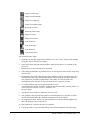
The Trend feature includes:
•
Historical cache mechanism – Offers improved performance with minimum load on the
server.
•
Asynchronous historical data download – As a result the Trend is always responsive to
the user.
•
Performance - On a local area network, performance is similar to Wizcon for Windows. It
is possible to use trends over dial-up connection.
•
Show multiple tags over time.
•
Historical and on-line data support.
•
X & Y axis labeling.
•
Offers different Line Colors and Line Types.
•
The trend component takes less than 400K to download.
Trend Scroll step
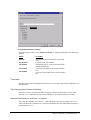
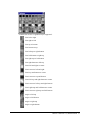
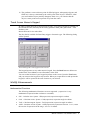
In the Trend Profile Dialog Display, you can select the scroll step (as in the chart).
Default – ½ window.
Wizcon 7 Version 7.5, Release Notes 2