1
Benchtop System Users Manual, Release 4.3
10.4.4 SpecChoice
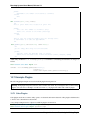
class SpecChoice(Spec):
"""
Creates a combo box depending allowing selection of a value from a list of choices
"""
def __init__(self, label, values=None, defaultValue=None):
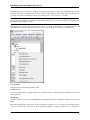
A Spec choice allows the user to choose an option from a combo box. It expects a list of strings as possible choices.
It’s value member will be one of the strings in the list. Example:
from spectronon.workbench.plugin import CubePlugin
from resonon.utils.spec import SpecChoice
class MyPlugin(CubePlugin):
"""
An example plugin
"""
label = "My Plugin"
userLevel = 1
def setup(self):
self.my_options = SpecChoice(label='option',
values = ['choice one',
'choice two',
'choice three'],
defaultValue = 'choice one')
self.my_options.help = 'my mouse hover help'
def action(self):
if self.my_options.value == 'choice one':
pass # action for choice one
elif self.my_options.value == 'choice two':
pass # action for choice two
elif self.my_options.value == 'choice three':
pass # action for choice three
10.4.5 SpecCube
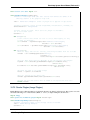
class SpecCube(Spec):
"""
Displays a ComboBox for selecting one of the loaded datacubes
"""
def __init__(self,
label,
datacube,
wb,
requireMatchedLineCount=False,
requireMatchedSampleCount=False,
requireMatchedBandCount=False,
requireBandCount=None,
defaultValue=None):
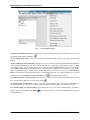
The SpecCube user interface is a combo box that will automatically be populated with the datacubes that are currently
available on the Spectronon workbench (e.g. any cube that appears in the Spectronon resource tree). The parameters
passed to SpecCube’s constructor allow you to provide criteria by which the list of applicable cubes will be filtered.
104
Chapter 10. Custom Data Analysis: Writing Plugins