1
Benchtop System Users Manual, Release 4.3
• if requireMatchedLineCount=True the list will only show cubes whose line count is equal to that of
the cube passed as datacube.
• if requireMatchedSampleCount=True the list will only show cubes whose sample count is equal to that
of the cube passed as datacube.
• if requireMatchedBandCount=True the list will only show cubes whose band count is equal to that of
the cube passed as datacube.
• if requireBandCount=[an integer] the list will only show cubes whose band count is equal the specified integer. This value overrides that provided in requireMatchedBandCount.
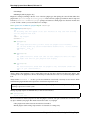
Most commonly, you will pass your plugin’s datacube member to SpecCube’s constructor as the datacube argument,
but any datacube object is a valid choice. You should always pass the plugin’s self.wb (workbench) member to
SpecCub as the wb argument.
The value of a SpecCube is an index to a cube within the workbench. To get the cube object itself, you must call the
wb.tree.getCube method.
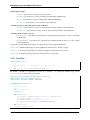
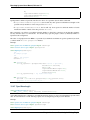
Example:
from spectronon.workbench.plugin import CubePlugin
from resonon.utils.spec import SpecCube
class MyPlugin(CubePlugin):
"""
An example plugin
"""
label = "My Plugin"
userLevel = 1
def setup(self):
self.my_cube = SpecCube(label='Select a Datacube',
datacube=self.datacube,
wb=self.wb,
requireMatchedLineCount=False,
requireMatchedSampleCount=False,
# list only those cubes with the same number of
# bands as the cube we operate on
requireMatchedBandCount=True,
requireBandCount=None,
defaultValue=None)
self.my_cube.help = 'my mouse hover help'
def action(self):
primary_cube = self.datacube
secondary_cube = self.wb.tree.getCube(self.my_cube.value)
# operate on the datacubes...
10.4.6 SpecSpectrum
class SpecSpectrum(Spec):
"""
Displays a ComboBox for selecting one of the loaded spectra
"""
def __init__(self,
label,
datacube,
10.4. Specs
105