1
REVISED DECEMBER 2007
NIGHTLY MAINTENANCE (END OF EACH SHIFT)
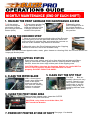
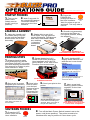
1. RELEASE THE PRINT CARRIAGE FOR MAINTENANCE ACCESS
1. Lift the printer
cover covering the
print head. Locate
the Carriage Release
Button (blue).
2. Press down on the Car-
3. Manually return
riage Release Button.
Hold and slide the Print
Carriage towards the
middle of the printer.
Print Carriage back to
it’s original position
when done. It will click
into position.
2. CLEAN THE ENCODER STRIP
1. Wrap an alcohol pad around both sides of the Encoder
strip and gently move the pad back and forth. Move the
print carriage to opposite side and repeat the process so
that the entire encoder strip has been cleaned.
2. Manually return the Print Carriage back to the Capping
Station to clean the rest of the Encoder Strip.
NOTE: You can use foam-tipped swabs, water, glass cleaner or cleaning fluid, but for best results use
Isopropyl Alcohol pads.
3. CLEAN THE CAPPING STATION
Ensure the outer rubber seal is free from dried ink and garment fibers.
Using a foam swab, water, glass cleaner, cleaning fluid or Isopropyl
Alcohol, clean the outer edge rubber part of the capping area.
CAUTION: When cleaning the Capping Station, be careful NOT to
move it out of position or the Print Head will not seat
properly. DO NOT PUSH TOO HARD.
4. CLEAN THE WIPER BLADE
5. CLEAN OUT THE SPIT TRAY
With a foam-tipped
swab, wipe down both
sides of the wiper
blade as well as the
top. Use HD cleaning
solution or window
cleaner if needed.
The Spit
Box assembly collects ink very
quickly. Check it regularly. Clean it throughout the day or as necessary using a rag or
anything that can soak
up ink.
6. CLEAN THE PRINT HEAD AREA
Using a foam tipped swab, clean the OUTER
EDGE of the print head area.
CAUTION: only clean around the sides, DO
NOT touch the Nozzles.
7. POWER OFF PRINTER AT END OF SHIFT See page 1 for details.