1
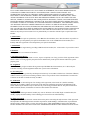
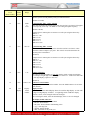
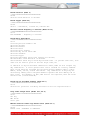
First Menu
Level
Mode Number
Second
Menu
Level
Value
Range
Mode Description and Instructions
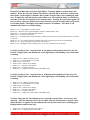
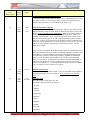
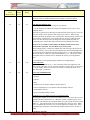
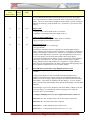
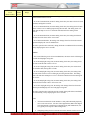
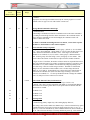
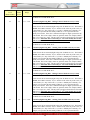
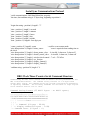
does not provide date informatiuon, only time.
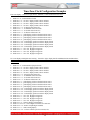
Examples:
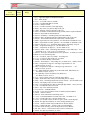
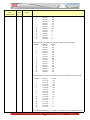
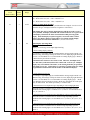
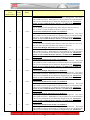
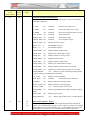
0=PL transmits or receives on SRST port.
0=Serial sync transmits or receives on SRST port.
0=Serial sync receives on GPS port, Ethernet sync transmits on SRST port.
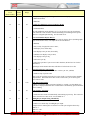
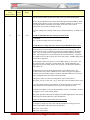
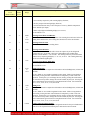
2=GPS receives on GPS port and PL transmits on SRST port.
2=GPS receives on GPS port and serial sync transmits/receives on SRST port.
3=CDMA receives on GPS port and serial sync transmits on SRST port.
3=CDMA receives on GPS port and PL transmits on SRST port.
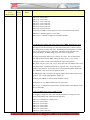
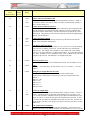
4=IRIG-B receives on GPS port and PL transmits on SRST port.
4=IRIG-B receives on GPS port and serial sync transmits on SRST port.
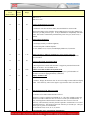
5=Thumbwheel switch on GPS port, serial sync receives/transmits on SRST port.
5=Keypad on GPS port, serial sync receives/transmits on SRST port.
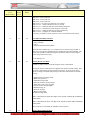
7=Serial sync transmit on GPS port, PL receives on SRST port.
7=Serial sync transmits on GPS port, Ethernet sync receives on SRST port.
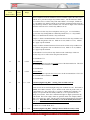
8=PL transmit only on the GPS port, Ethernet receives on the SRST port
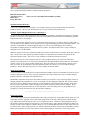
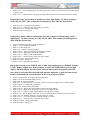
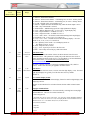
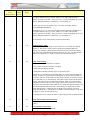
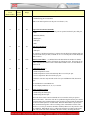
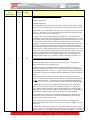
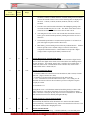
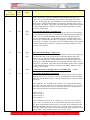
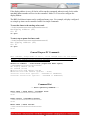
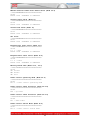
DATUM Tymserve 2100 Notes – Connect the clock to Serial Port A using an RS232
to RS422 converter. Set the Sysplex timer to AUTO ON so it will begin sending time
automatically on power-up. Because the year is not included in the data from the
Tymserve 2100, the day of the year is not used. Only the hours, minutes and seconds
are set. The date may be manually set use the clock’s control buttons. Once set, the
date will increment normally.
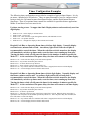
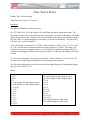
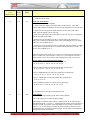
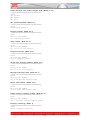
32
16
0-2
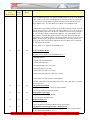
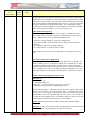
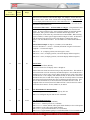
Alarm master/slave control
0=disable (default),
1=enable separate start/stop and warning alarms
2= combine start/stop and warning alarms into the main relay output
When using wired sync, slave clocks may follow the alarm sounding of a master
clock. This allows one clock to control the alarm sounding of several alert horns. For
example, one master clock could contain the alert horn schedule for the entire plant.
Several slave clocks with the AL or AH alert horn options could be controlled by the
alarm schedule of the master clock. Both Master and Slave clock must have Mode
32-16 enabled for this method to operate. Set to a value of 2 to activate the slave
relay when either start/stop or warning alarms are activated.
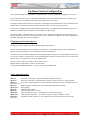
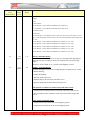
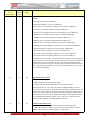
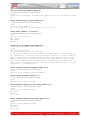
32
17
0,1
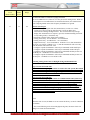
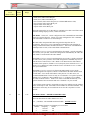
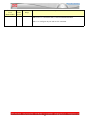
Timer Direction Auto-reverse
0 = do not reverse timer direction when the end time is reached, (default)
1 = When the end time is reached., reverse timer direction from down to up and
continue with elapsed time This only applies to a down timer.
55