1
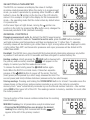
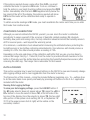
• Pressing the button twice displays the lowest reading since
entering that measurement mode.
will appear at the left of
the primary readout.
• Pressing the button a third time resumes real-time
measurement and display of the same parameter.
Wood m
Mini US
RECALLING STORED READINGS
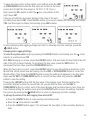
will appear
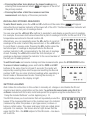
To enter Recall mode, press the <DN and UP> buttons at the same time.
above the Record number indicator at the lower left of the LCD. The Record number indicator will
correspond to the last pair of readings stored.
You can now use the <DN and UP> buttons to navigate to and display a specific pair of readings.
For example, the screen shot below shows that a pair of readings of 63.8% for RH and 28.8°C for
temperature were stored in Record location 08.
Alternatively, you can repeatedly press the UP> button to recall all
readings in the order in which they were stored, or the <DN button
to recall them in reverse order. Pressing the UP> button when the
last stored pair of readings is displayed returns the Record
number indicator to 01, corresponding to the first pair of readings
stored. Pressing the <DN button when the first stored pair of
readings is displayed returns the indicator to the record number of
the last pair of readings stored.
To exit Recall mode and resume making real-time measurements, press the STORE/ENTER button.
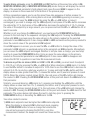
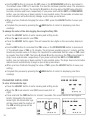
To erase all stored readings, press and hold the ZERO and UNIT
buttons at the same time for at least 2 seconds. The meter will
respond by sounding three short beeps and resetting the Record
number to 01. You can clear all stored readings while operating in
Recall mode or Measurement mode. Clearing the memory in
Recall mode produces the display at right.
SETTING ALARMS
Note: Follow the instructions in this section to manually set, change or arm/disable the RH and
moisture level alarms using buttons on the meter. To perform the same tasks using the X-In-1
software included with the meter, install and operate the program using the instructions in the
“Using the Included Software” section beginning on p. 15.
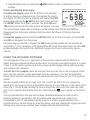
The RH700 allows you to set alarms that will repeatedly sound the
beeper if the measured RH level or the moisture level of a material
(measured by either the pinless or pin-type sensor) is above or
below a certain value. The upper and lower limits are called alarm
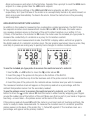
setpoints. For example, the screen shot at right shows that the
upper limit for RH—the HIGH setpoint of the RH alarm—has been
set to 63.8%.
9