1
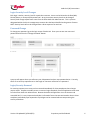
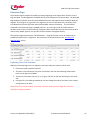
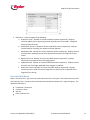
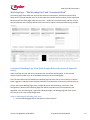
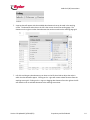
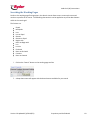
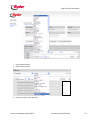
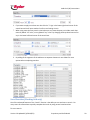
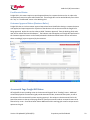
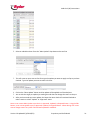
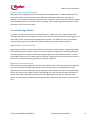
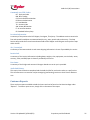
Audit Link (ALI) Instructions Audit Link Audit Link is a web based tool designed for Ryder customers to Update, Approve or Reject freight bills prior to going to invoice. Built on a dot-Net platform, Ryder has tapped into industry leading technology to ensure speed, flexibility and reliability. The tool has replaced the older WebFocus technology. Version 2.0 Updated 3/1/2012 (RFL) Proprietary and Confidential 1 Audit Link (ALI) Instructions Contents Introduction .................................................................................................................................................. 5 Browsers ....................................................................................................................................................... 5 Login and Password ...................................................................................................................................... 5 Client Audit Link Administrator................................................................................................................. 5 Login and Password .................................................................................................................................. 5 Login Security Level Changes .................................................................................................................... 6 Password Change ...................................................................................................................................... 6 Login/Security Removal ............................................................................................................................ 6 Inactivity Timeout ..................................................................................................................................... 7 Data Interchange between FBAP and Audit Link .......................................................................................... 7 Accessing the System .................................................................................................................................... 8 Update Summary .......................................................................................................................................... 9 Version 2.0 ................................................................................................................................................ 9 Version 2.0 Phase 2 ................................................................................................................................... 9 Overview Page ............................................................................................................................................ 10 Updating Overview Columns .................................................................................................................. 10 Overview Drill Down ............................................................................................................................... 11 Working Page – “The Working Grid” and “Accessorial Grid” ..................................................................... 13 Customized Working Page View (Both Freight Bill and Accessorial Approval views)............................. 13 Steps to Adjusting the Working Page view ......................................................................................... 13 Number of Records in the Results Grid / Moving to the next page.................................................... 16 Filtering the Working Page – “The Working and Accessorial Grid” ............................................................ 17 Changing to a Different level of the Hierarchy or to a different Plant/ABU ........................................... 17 Filtering on Pro Number ......................................................................................................................... 17 Filtering on SCAC ..................................................................................................................................... 17 Filtering on Ship Date.............................................................................................................................. 17 Searching the Working Pages ..................................................................................................................... 18 Saved Searches (Working Grid only) ....................................................................................................... 20 Running Saved Searches ..................................................................................................................... 21 Deleting Saved Searches ..................................................................................................................... 22 Export to Excel from Working or Accessorial Grid .................................................................................. 22 Version 2.0 Updated 3/1/2012 (RFL) Proprietary and Confidential 2 Audit Link (ALI) Instructions Working Page Freight Bill Status ................................................................................................................. 22 Preallocated Status ................................................................................................................................. 23 Customer Approval Status (Business Rules) ........................................................................................... 23 Accessorial Page Freight Bill Status............................................................................................................. 23 Working Page Actions ................................................................................................................................. 24 Floating Action Bar .................................................................................................................................. 24 Approve in Working Grid ........................................................................................................................ 25 Reject in Working Grid ............................................................................................................................ 26 Update and Reallocation (Reassignment)............................................................................................... 28 Editable Data Elements (Working Grid) .............................................................................................. 28 Editable Data Elements (Accessorial Grid) .......................................................................................... 28 Reallocating in the Accessorial Grid .................................................................................................... 28 Single Pro Update in Working or Accessorial Grid .............................................................................. 29 Mass Update (Working Grid only) ...................................................................................................... 30 Updated Fields and TIS (Reporting) .................................................................................................... 32 Accessorial Page Actions ............................................................................................................................. 32 Approve in Accessorial Grid .................................................................................................................... 32 Reject in Accessorial Grid........................................................................................................................ 32 Pro Detail Screen......................................................................................................................................... 33 Accessing the Pro Level Detail ................................................................................................................ 33 Description of Data in the Pro Level Detail ............................................................................................. 34 Summary ............................................................................................................................................. 34 References .......................................................................................................................................... 34 Commonly used EDI Codes ................................................................................................................ 35 Location Information .......................................................................................................................... 35 Air / Ocean Info ................................................................................................................................... 35 Invoice Info.......................................................................................................................................... 35 Line Items ............................................................................................................................................ 35 Audit Link History ................................................................................................................................ 35 Customer Reports ....................................................................................................................................... 35 Ryder Internal Use Functions ...................................................................................................................... 37 Links ............................................................................................................................................................ 37 Version 2.0 Updated 3/1/2012 (RFL) Proprietary and Confidential 3 Audit Link (ALI) Instructions Ryder Documents / Spy Vision ................................................................................................................ 37 TIS (Transportation Intelligence System) – Enterprise Data Warehouse ............................................... 38 Carrier Payment Inquiry .......................................................................................................................... 38 Frequently Asked Questions ....................................................................................................................... 38 Definitions ................................................................................................................................................... 42 Version 2.0 Updated 3/1/2012 (RFL) Proprietary and Confidential 4 Audit Link (ALI) Instructions Introduction Audit Link is a web based tool designed for Ryder customers to Update, Approve or Reject freight bills prior to going to invoice. The tool gives our customers a platform to efficiently correct reference, Chargeline (GL # or Account Codes), and freight bill description information for more timely processing of invoices. Audit Link is built on a Dot-Net platform. Ryder has tapped into industry leading technology to ensure speed, flexibility and reliability. Ryder is releasing the application in multiple phases with future releases including: export capabilities and customer enabled accessorial approval (tentative release date: June 2012). Browsers Audit Link is built to run on all the top internet browsers: Internet Explorer, Firefox, and Google Chrome. Best results, top speed and response time have been on Firefox 8.0 or higher and Google Chrome. Internet Explorer 7.0 or higher will also run the application, but will not produce the speed of Firefox and Chrome. Internet Explorer versions below 7.0 may experience some problems as they may not support the modern coding involved in the application. Questions about browsers should be directed to [email protected]. Login and Password Client Audit Link Administrator During implementation of Audit Link, each Ryder Customer will designate a manager level or higher employee to oversee and grant access levels to employees. Security levels of client employees (end users) will only be added, modified, or deleted from the Client Audit Link Administrator. Login and Password In order to receive a login and password for the Ryder Audit Link System, please complete the attached form and return it to your Ryder Operations contact and/or email [email protected]. ACCESS_REQUEST_ FORM Request submitted before 12:00pm (EST) will be returned same business day. All other requests will be completed and returned before 12:00pm(EST) the following business day. Logins will only be granted to individuals with a valid company email address. Version 2.0 Updated 3/1/2012 (RFL) Proprietary and Confidential 5 Audit Link (ALI) Instructions Login Security Level Changes Each login is tied to a security level for a particular customer. Access can be limited to the Plant/ABU, Division/Sector, or Enterprise/Corporate level. At any time these security levels can be changed. Security level change request must come from the Client Audit Link Administrator. This is a person designated within the client’s management structure who has been identified as the granter of access. NOTE: Security levels will not be changed from a direct request of an end user. Password Change To change your password, go to the login screen of Audit Link. Enter your current user name and password and click on the “Change Password” Button. A pop up will appear where you will enter your old password and your new password twice. Currently, there are no security requirements on the length or character restriction for a password. Login/Security Removal For security purposes, user access can be removed immediately for client employees that no longer require access. Request to modify access or remove a login completely from the application must come from the Client Audit Link Administrator. Because the Audit Link application is on the internet and accessible 24x7, it is very important that Ryder is informed of users that are terminated or leave a client workplace immediately upon separation so privileges can be removed without compromising the security of the data. Version 2.0 Updated 3/1/2012 (RFL) Proprietary and Confidential 6 Audit Link (ALI) Instructions Inactivity Timeout Audit Link users who are logged into the application and do not perform any activity for 30 minutes will be automatically logged off. Audit Link imposes this security feature to protect the customer data. The user may also be directed to a new login screen with their next action. Data Interchange between FBAP and Audit Link All invoices that are available in Audit Link will have already been: Assigned a Plant or Business Unit Prescreened by Ryder operations Assigned a Bill Type ● APR – Approved which means the bills has passed audit and it ready for invoice ● SUS – Suspense which means the bill needs required information before it can pass through audit. Once updated these bills will reappear as an APR bill in audit link after they have completed the rate audit. Assigned a customer status ● Preallocation – Chargeline/GL code assigned and ready to move to an invoice with Customer approval ● Suspense – Requires a Chargeline/GL code assignment by the customer ● Customer Approval – Requires Business Rule approval to approve the freight bill. Note that Approving or Rejecting the Business Rule will approve or reject the invoice – no secondary or final freight bill approval required. Version 2.0 Updated 3/1/2012 (RFL) Proprietary and Confidential 7 Audit Link (ALI) Instructions It is very important to note the difference between the Bill Type and the Status Code as it will define the timing of the bill making it to the client’s invoice Bills will be transferred to Audit Link from FBAP in a batch process Migration from FBAP to Audit Link happens nightly at 03:01AM EST Monday through Saturday Migration from Audit Link back to FBAP happens nightly Monday through Friday at 11:59 PM EST Daily interchange means real time data and quicker cycle times to payment for carriers and clients Accessing the System The Ryder Audit Link application is web based. Audit Link is accessible 24 hours a day, 7 days a week. The URL information is noted below: Production Environment http://auditlink.ryder.com or http://168.218.5.64 Version 2.0 Updated 3/1/2012 (RFL) Proprietary and Confidential 8 Audit Link (ALI) Instructions Please report any outage or downtime to your operational contact or [email protected]. Update Summary Version 2.0 Export to Excel –gives the user the ability to export the current result set to excel from the Audit Link . Export will include the current filters and all elements within the current view in the order they appear in the application Floating Action Bar - gives the user the ability to float the action bar. When the user scrolls the fixed action bar out of view the new action bar remains pegged to the top of the screen. This update significantly reduces the up and down scrolling to get to the action bar when working with a large result set. Version 2.0 Phase 2 Accessorial Approval –allows customer specific accessorials that require approval prior to invoicing to be reviewed and approved or rejected within Audit Link. Reporting Capabilities –standard reporting including user level reports, aging reports, and import/export volume reports can now be generated through the Audit Link application. Business Rule (Customer) Approval –allows customer specific business rules that require approval prior to invoicing to be reviewed and approved or rejected within Audit Link. Version 2.0 Updated 3/1/2012 (RFL) Proprietary and Confidential 9 Audit Link (ALI) Instructions Overview Page The overview page is designed to provide a summary beginning at the highest level of access a user’s login will allow. For Management, the default will be at the Enterprise or Corporate level. The Overview page displays the total bill count and associated dollar amount that requires approval broken down by segment. By clicking the (+) sign next to any segment, the user can drill down into a summary of the level below with the same bill count and associated dollar amount information. The information presented on the Overview Page is updated real-time. As a user logs in and out of the system or refreshes their screen, the information will change to reflect actions taken by that user as well as other users as they update, approve, or reject bills for that customer throughout the day. The overview page also houses the “Saved Searches”. Using this function a user can select and run predefined searches from a single click. See instructions on saved searches in the “Searching the Working Page” section. Updating Overview Columns Within the Overview Page, users can adjust the summary columns to create a custom view. 1. Click on the button marked “Columns” 2. The items in the left column of the box are already in the user Overview Page view and the items on the right can be added 3. To move an item either click the (+) or (–) sign or left click on the item and drag it to the other side 4. Using the left click and drag method you can also change the order of the items in the view by moving them up or down Note: the Total $, Total #, Visible $, and Visible # Columns of the Overview Page view cannot be removed or change in position Version 2.0 Updated 3/1/2012 (RFL) Proprietary and Confidential 10 Audit Link (ALI) Instructions 5. Definitions – Overview Page Column Headings a. Suspense $ and # - Number of invoices and dollar amount respectively. Requires customer update prior to approval /payment (typically user will provide a Chargeline (Account Code/ GL Code). b. Preallocation $ and # - Number of invoices and dollar amount respectively. Displays invoices ready for invoicing, but requires customer approval. c. Rejected $ and # - Number of invoices and dollar amount respectively. Displays invoices that have been rejected (have not been approved for payment) and requires a reject reason. d. Approved $ and # - Number of invoices and dollar amount respectively. Displays invoices that are approved for processing/payment. e. Updated $ and # - Number of invoices and dollar amount respectively. Displays invoices that have one of the eight updatable fields changed or modified. f. Accessorial $ and # - Number of invoices and dollar amount respectively. Displays invoices that are in need of Accessorial approval or rejection prior to approval of the freight bill for invoicing. Overview Drill Down When a user clicks the + sign from their initial overview screen it will open a view of the summary of the next hierarchy level. If another level exist below the secondary drill down level + signs will appear. The application hierarchy is: Corporation / Enterprise Customer / Sector Division Plant / Business Unit Version 2.0 Updated 3/1/2012 (RFL) Proprietary and Confidential 11 Audit Link (ALI) Instructions Note the expansion down to the plant level when the + sign was clicked on At any level within a user’s hierarchy, the user can click on a name of the level and Audit Link with take them to the working page for the level they have chosen. To access the Accessorial Approval Grid from the Overview Page, click on the Accessorial # value for the Business Unit or Plant you wish to review bills for. The Application will take you to the Working Page – “The Accessorial Grid” for review. Version 2.0 Updated 3/1/2012 (RFL) Proprietary and Confidential 12 Audit Link (ALI) Instructions Working Page – “The Working Grid” and “Accessorial Grid” The working page allows Audit Link users to take action on invoices/pros, while the Accessorial Grid allows users to review and take action on invoices/pros that require accessorial level of service approval. Most users will use these pages more than any other. Audit Link has multiple search and filter criteria that will allow the user to display and work the invoices they request in the most efficient way possible. Customized Working Page View (Both Freight Bill and Accessorial Approval views) Upon initial login the user will want to customize the view of their working page. A user can add, remove, and/or reorder any or all of the 98 data elements into the working page. Hint: The more data elements added to the working page the more side to side scrolling is required. Ryder suggests to add and reorder only the elements a user identifies as necessary to action the pros. Once a user has the Working Page screen configured to their desired settings, click on the “Save Configuration” button and this Working Page view will be saved within the User Preferences (not applicable in the accessorial grid). Upon each subsequent login, the Working Page will return to this view until the user saves a new configuration. Steps to Adjusting the Working Page view 1. From the Working page click on the button marked “Columns” Version 2.0 Updated 3/1/2012 (RFL) Proprietary and Confidential 13 Audit Link (ALI) Instructions 2. A pop up box will appear with the available data elements that can be used in the working screen. The elements and order on the left is the current view of the working page. The elements on the right are other data elements that can be moved into the working page grid. 3. Left click and drag any data element up or down on the left hand side to adjust the order in which the data elements appear. Clicking on the – signs will remove a data elements from the working screen grid. Clicking on the + signs or dragging data elements from the right to the left will allow the user to add data elements to the working screen view. Version 2.0 Updated 3/1/2012 (RFL) Proprietary and Confidential 14 Audit Link (ALI) Instructions 4. The shipper and consignee addresses can be configured to appear as a single element containing all segments of the address. Example “HOLLAND LITNO PRINTING TODD - 10972 CHICAGO DR MI, ZEELAND , MI, 49464, US” as a single element vs. “HOLLAND LITNO PRINTING TODD” as Shipper Vendor Name, “10972 CHICAGO DR MI” as Shipper Address1, Etc…. The shipper and consignee addresses can also be configured to appear as separate elements depending on user preference. To select either, use the COLUMNS toolbar and (+) select the correct elements. 5. Instances where an address is greater than 25 characters in length, the excess data will appear in the second address field (Address2). In the example below see how the “Y” in parkway appears in the second address field Version 2.0 Updated 3/1/2012 (RFL) Proprietary and Confidential 15 Audit Link (ALI) Instructions Number of Records in the Results Grid / Moving to the next page A user can select the number of records that are displayed in a results grid to allow a larger volume to be viewed. Currently the options are 50, 100, or 150 records at a time. To change the number to be viewed: 1. Scroll to the lower right hand corner of your results grid. 2. Select your volume choice from the drop down list. 3. A page counter is visible to display the count of pages in your current result set. There are also arrow icons that will advance you to the next page. 4. The middle of the results bottom and top toolbar displays the actual count of the records that are currently being displayed, ie “View 1-150 of 7,620”. This indicates a user is viewing the first 150 records out of a total 7,620 records. NOTE: Actual Count is displayed in the middle at both the top and bottom toolbars of the results grid Version 2.0 Updated 3/1/2012 (RFL) Proprietary and Confidential 16 Audit Link (ALI) Instructions Filtering the Working Page – “The Working and Accessorial Grid” The top of the working page is designed as a filter. Navigating to different levels of the customer hierarchy, (ie. Customer, Division, Plant/ABU), limiting results based on Status, Pro, SCAC, or Ship Date. The filters allow a user to manage the returned results and refine a search if necessary. Changing to a Different level of the Hierarchy or to a different Plant/ABU Using the drop down menus next to any of the levels of hierarchy will allow a user to change the result set that is displayed. Filtering on Pro Number Entering a pro/invoice number in the “Pro#” search box of the working screen and clicking on the “Search” button will bring back results only for that invoice/pro number. Hint: Because of pro length restrictions and keying rules, Ryder does not key in any special characters such as, (-), spaces, etc. when keying pros/invoices into our system. Ryder does not key alpha suffix characters preceding numerics. Ryder Suggestion: Use the Working Page search criteria with a “contains” statement for accurate pro/invoice search results. Filtering on SCAC Entering a Carrier SCAC (Standard Carrier Alpha Code) in the “SCAC:” search box of the working screen and clicking on the “Search” button will bring back results only for that SCAC. It is important that you only use Ryder SCACs, which are not always in sync with industry SCACs. Just as with the pro search function, if the result expected do not display, use the Working Page search criteria with a “contains” statement on the carrier name field for accurate results. Filtering on Ship Date Entering a Date Range in the “Ship From/Ship To:” search box of the working screen and clicking on the “Search” button will bring back results only for that Date Range. Version 2.0 Updated 3/1/2012 (RFL) Proprietary and Confidential 17 Audit Link (ALI) Instructions Searching the Working Pages Similar to the working page filtering options, the Search criteria allows a user to narrow the returned results to a specific set of criteria. The following characteristic can be applied to any of the data element visible in the results grid. The limiters are: Equals Not Equals Less Less or Equal Greater Greater or Equal Begins with Does not Begin with Is in Is not in Ends with Does not End with Contains Does not Contain 1. Click on the “Search” button on the working page tool line 2. A drop down menu will appear with the data elements available for your search Version 2.0 Updated 3/1/2012 (RFL) Proprietary and Confidential 18 Audit Link (ALI) Instructions 3. Select a data element 4. Select a search limiter 5. Enter the criteria in the open box Version 2.0 Updated 3/1/2012 (RFL) Proprietary and Confidential 19 Audit Link (ALI) Instructions 6. If you want to apply more than one rule click the “+” sign in the lower right hand corner of the search box and it will open another line for more limiting criteria. 7. When using more than one search criteria the user can create the query to include match that meet all (Match “all” rules”) or any (Match “any” rules” by changing the drop down box to all or any in the lower left hand corner of the search box. 8. By adding all the segments of the addresses as separate elements it now allows for more options when completing searches. Saved Searches (Working Grid only) One of the advanced features of the “search” function is the ability to save and name a search. For many users this allows them to quickly complete their work by using several saved searches. To save a search: Version 2.0 Updated 3/1/2012 (RFL) Proprietary and Confidential 20 Audit Link (ALI) Instructions 1. Once you have created and executed a search (as outlined above)you like click on the save button on the tool line 2. A pop up will appear that will allow the user to enter a name for the search that is currently executed. Be sure that the naming convention used has enough detail allow the user to identify it in the future 3. A user can save as many searches as they want and they will always be available the next time they log into the system with their valid username/password. 4. Save searches will always contain the plant, division and customer information as it appears in the top “Search Parameters”. Running Saved Searches Currently saved searches can only be run from the Overview Screen. 1. If a user is in the “working view”, “The Grid”, click on the “Return to Overview” button. 2. Click on the drop down arrow to the left of the “run” button. This will display your “saved” searches. Version 2.0 Updated 3/1/2012 (RFL) Proprietary and Confidential 21 Audit Link (ALI) Instructions 3. Click on the search that you want to run and then click on the “run” button. 4. The “working” page will pop up with your results. Deleting Saved Searches To delete a Saved Search: 1. Click on the drop down arrow to the left of the “run” button. This will display your “saved” searches. 2. Click on the search that you want to delete and then click on the “delete” button. Export to Excel from Working or Accessorial Grid The export function gives the user the ability to export the current result set to excel from the Audit Link. Export will include the current filters and all elements within the current view in the order they appear in the application 1. Once the user has filtered their results and added all the columns they want in their export click on the “export “ button on the tool line. 2. The results set will open up in a version of excel Working Page Freight Bill Status Customer freight bills are initially presented to a customer in one of two statuses – “Preallocated” or “Customer Approval” Version 2.0 Updated 3/1/2012 (RFL) Proprietary and Confidential 22 Audit Link (ALI) Instructions Preallocated Status Freight bills in this status require no special approval based on customer business rules in order to be reviewed and have action taken within Audit Link. These freight bills can be worked directly from either the “Any” or “PreAllocated” status in the Working Grid. Customer Approval Status (Business Rules) Freight bills that are in the customer approval status have been identified as having a customer business rule applied, and require approval or rejection of that business rule at the same time the freight bill is being approved. Audit Link now has a Status called “Customer Approval” from the Working Grid, and a new column called “Business Rule Reason”. The business rule that applies to all freight bills presented in the Customer Approval status can be found/reviewed in the Business Rule Reason column and action taken accordingly (reject or approve) by the customer. Accessorial Page Freight Bill Status All freight bills that are pending action in the Accessorial Page will be in “Pending” status. Additional columns displayed in the accessorial grid provide Accessorial Code, Accessorial Description, as well as the amount of the accessorial line item requiring approval. Also unique to the Accessorial Grid is the Search Parameters at the top of the page allow for specific accessorial codes or accessorial status to be filtered on by a user. Screenshot below shows additional fields in working grid as well as unique search options to this grid. Version 2.0 Updated 3/1/2012 (RFL) Proprietary and Confidential 23 Audit Link (ALI) Instructions Working Page Actions A customer can take up to three actions on a Pro/Invoice Number: Approve, Reject, or Update. Each of these actions can be completed one pro at a time or up to 150 pros at a time through the mass update option. Floating Action Bar The floating action bar gives the user the ability to freeze action bar at the top of the screen. When the user scrolls the fixed action bar out of view the new action bar remains pegged to the top of the screen. This update significantly reduces the up and down scrolling to get to the action bar when working with a large result set. 1. To freeze the action bar click on the menu button on the tool line Version 2.0 Updated 3/1/2012 (RFL) Proprietary and Confidential 24 Audit Link (ALI) Instructions 2. The action bar will peg to the top of the screen to allow significantly reduce up and down scrolling for the user Approve in Working Grid By approving a pro or group of pros the user is actioning the pro to move to final payment status with the information as displayed on the pro. 1. Check the box on one or multiple pros that the user wants to send to final invoice. In the case where a user wants to approve the entire page, they click on the box to the left of the word “action” and it will activate checks next to all pros. 2. Click on the word “Approve” on tool line. The system will process the invoices and change the status from “Preallocation” or “Suspense” to “Approved” Version 2.0 Updated 3/1/2012 (RFL) Proprietary and Confidential 25 Audit Link (ALI) Instructions Hint: Once a pro has been changed to “Approved” status , the user has until the upload that evening to make changes. If there were any pros Approved in error, you will be allowed to correct. To correct, change your Working Page Search Parameter under the Status drop down to read ”Approved” and all the approved invoices will be displayed. Note: It is extremely important that users are correcting any bad information, ie. Plant, Division, Sector, PO, Ref #, or Load Number prior to approving the bill. Any changes after the fact or during the invoicing process can significantly delay the payment to the carrier and cause incorrect reporting output within TIS. Reject in Working Grid By rejecting a pro or grouping of pros the user is actioning the pro to not pay the invoice and return a reason code back to the carrier. Version 2.0 Updated 3/1/2012 (RFL) Proprietary and Confidential 26 Audit Link (ALI) Instructions 1. The reject process can be completed on a single pro at a time or in mass. To delete one pro at a time, check the box on the pros you want to reject. 2. Click on the word “Edit” next to the check mark. This will open up the option to choose a reject reason from the drop down in the “Reject Reason” column. 3. Change the Status code to “Reject” and select a reject reason from the drop down list in the “Reject Reason” drop down list” 4. Click on “Save” once the selections are made. 5. This will mark the invoices as not to be paid and will send an alert to the carrier with the message you have chosen from the drop down list. Version 2.0 Updated 3/1/2012 (RFL) Proprietary and Confidential 27 Audit Link (ALI) Instructions Update and Reallocation (Reassignment) If the user wants to change information on a pro the user is actioning the pro to modify one of nine editable data elements, including the reallocation (reassigning) of pros to other plants or ABUs. Note: Using the Update function does not send a pro to final payment. Invoices that are updated will remain in Audit Link with the updated information until the pro is changed to “Rejected” or “Approved” status. Editable Data Elements (Working Grid) Changing information in an editable field in Audit Link will update the original record in the Ryder FBAP system. For those clients on a match process, updating information will force the bill back through the match process. The following data elements are editable using the Audit Link application: Chargeline Customer Division Plant / Business Unit Bill of Lading (BOL) Purchase Order Number (PO#) Load # Reference # (This is the first Reference number) Description Comment Note: The Comment field is not an FBAP field, and while updatable in Audit Link this information does not update any fields in FBAP. Editable Data Elements (Accessorial Grid) The Accessorial Grid is limited to the following editable fields: Bill of Lading (BOL) Purchase Order Number (PO#) Reallocating in the Accessorial Grid If a customer has a freight bill in the Accessorial Grid, and it is determined that the freight bill needs to bill to, and be reviewed/approved, by another user, the Accessorial Grid does contain a new action button called “Go To Working View”. This button allows users to Toggle between the Working and Accessorial Grids. To reallocate a shipment you are reviewing in the Accessorial Grid, simply click on the “Go To Working View” button to toggle to the working view. Search or locate the particular pro that needs action taken, and reallocate to the correct plant. Version 2.0 Updated 3/1/2012 (RFL) Proprietary and Confidential 28 Audit Link (ALI) Instructions Single Pro Update in Working or Accessorial Grid 1. Click on the word Edit next to the pro you want to update. 2. The editable fields will open up and can be updated accordingly. Those with restrictions will open up as a drop down menu. Version 2.0 Updated 3/1/2012 (RFL) Proprietary and Confidential 29 Audit Link (ALI) Instructions 3. It is very important when making an edit that you also change the status to “Updated” or “Approved”. Just changing and saving changes to an editable field does not change the status. 4. Once your update is made click on “Save” Mass Update (Working Grid only) The mass update function allows the user to make the same update to multiple pros with a single action. The mass update can be applied to any of the editable fields list in the previous section 1. Select the pros that you want to mass update by clicking the check box next to the pro or by selecting all pros in a page by clicking the box to the left of the word action, which will select all visible pros on that page. or Version 2.0 Updated 3/1/2012 (RFL) Proprietary and Confidential 30 Audit Link (ALI) Instructions 2. Select an editable column from the “Mass Update” drop down on the tool line 3. This will create an open area to free form type the update you want to apply to all pros you have checked. Type the update you want to make in the box 4. Click on the “Mass Update” button and the update will be applied to all checked pros. 5. Just as with the single pro update just making the edit does not change the status on the pro. 6. After you have made you mass update, the boxes that were check will remained checked to make it easier to select “Update” or “approved” status. Note: A user cannot Mass Update a pro that is in Approved, Updated, or Rejected Status. Using the Edit button, a user cannot update a pro in Approved, Updated, or Rejected Status. When editing a bill a user cannot change status if any other field has been updated or modified. Version 2.0 Updated 3/1/2012 (RFL) Proprietary and Confidential 31 Audit Link (ALI) Instructions Updated Fields and TIS (Reporting) Information that is updated in Audit Link will appear in the updated view in TIS (Ryder Reporting Tool). This actually makes it possible for the users to affect the way the data appears for reporting. For example, if a user wants to know why a pro/invoice was in Suspense, they could enter a code into a field (same field each time) that can be later used in reporting. Ask your Ryder Operations Contact for more information on how to use this option. Accessorial Page Actions A customer can take two actions on an individual line item: Approve or reject. Note that if you have multiple accessorials that need approval, each will show as its own line item within the working grid, and action will be taken on them separately (approved or rejected). This allows the user to accepts those accessorials they approve and reject those specific accessorials they do not wish to approve. Approve in Accessorial Grid Approving an accessorial in the Accessorial Grid is performed in the same manner as approving a freight bill in the working grid. However, in order to review and approve a freight bill in the Working Grid you must action (approve or reject) all accessorials requiring approval in the Accessorial Grid first. You will not be able to take action in the Working Grid to approve a freight bill to your next invoice until action is taken on all accessorials requiring approval on a particular freight bill. Reject in Accessorial Grid The function of rejecting a freight bill in the Accessorial Grid is done in the same manner as the Working Grid. As noted above for approving freight bills, all accessorials on any one freight bill that require approval must have action taken (approval or rejection) in the Accessorial Grid prior to customers being able to take action on the freight bill itself in the Working Grid. Also note that the reject messages are unique to the Accessorial Grid versus those used in the Working Grid, but are accessed in the same manner by clicking on the drop down window option directly beside the reject button in the Accessorial Grid. Version 2.0 Updated 3/1/2012 (RFL) Proprietary and Confidential 32 Audit Link (ALI) Instructions Pro Detail Screen The intent of the Audit Link application is to allow the user to complete as much work as possible from the working screen; however, there will be times when a user needs to view the detail level of a freight bill. Each pro listed in the working page has a pro level detail that the user can drill down to. Accessing the Pro Level Detail 1. Click the check box next to the pro the user wants to view the detail on or click on any data element on the row of the desired pro and the check will automatically be placed in the box. 2. Click on the “Detail” button 3. This will open up the detail of the pro Version 2.0 Updated 3/1/2012 (RFL) Proprietary and Confidential 33 Audit Link (ALI) Instructions 4. Each of the sections of the detail screen are collapsible by clicking the small arrow in the black circle on the right hand side of the screen 5. Once the information is obtained from the detail screen the “Return to List” button on the top of the detail takes the user back to the working screen to action the pro. 6. All information in the Detail screen can be copied by just highlighting the area and right clicking, selecting copy, and then pasting that information into what every email, application (excel, word, etc.) or another Audit Link field if necessary. Description of Data in the Pro Level Detail Below is a description of the data elements of each section of the detail screen Summary A summary of the high level information on a pro including: pro, SCAC, Mode, Customer, Division, Plant/Business Unit, Account #(mainly used for small package) , Invoice number, and Description References A summary of all the reference numbers provided by a carrier for a given pro is displayed. Please refer to the section below for a cross reference for the codes translation. Version 2.0 Updated 3/1/2012 (RFL) Proprietary and Confidential 34 Audit Link (ALI) Instructions Commonly used EDI Codes PO - Purchase Order BM- Bill of Lading CR- Carrier Reference Number RZ- Return Authorization LO- Load Number TH - Account Code AW- Airway Bill Number IT- Air account Number EX- Standard Delivery Days Location Information A summary of the parties to the bill: Shipper, Consignee, Third party. The address sections contain the first and second line address concatenated with the city, state, postal code, and country. The Stop Section will provide the first and second name fields of the Shipper and Consignee and any other stops within the bill. Air / Ocean Info A summary of the International air and ocean shipping information is shown if provided by the carrier. Invoice Info A summary of the invoice information including dates, weights, class, equipment, service levels, zones, currency, miles, and EDI/Paper is shown if provided by the carrier. Line Items A summary of the Freight and accessorial charges related to a carrier pro is provided. Audit Link History This section lists the Actions completed and the Audit Link IDs for each action taken on a pro/invoice. This will allow users to trace who may be reassigning (reallocating) invoices to their Plant or Business Unit. Customer Reports There are three reports available to Audit Link users and can be found on the Overview Page under “Reports”. To select a report to run, simply click on the name of the report. Version 2.0 Updated 3/1/2012 (RFL) Proprietary and Confidential 35 Audit Link (ALI) Instructions Once you have selected a report, modify the report parameters including date range and which Business Unit, Division, and Plant you wish to run the report for (either “Any” or a specific location). Click “Run Report” to display results of your report parameters. Click the save function button just above where the results populated and select either Excel, PDF, or Word to export your results to. Version 2.0 Updated 3/1/2012 (RFL) Proprietary and Confidential 36 Audit Link (ALI) Instructions To return to the Overview Page, click the “Return to Overview” button at the top of the report screen. Ryder Internal Use Functions The following buttons and functions, although visible to all users, are for Ryder internal use only: Review Pre-Allocation Suspend Links Ryder Documents / Spy Vision If the user wants to see the actual paper invoice for a shipment, and the invoice was received by Ryder on paper, the user can access our image warehouse from a link in Audit Link 1. User clicks on the link that reads “Ryder Documents” on the left hand side of the Audit Link application Version 2.0 Updated 3/1/2012 (RFL) Proprietary and Confidential 37 Audit Link (ALI) Instructions 2. This will bring you to a direct link to the login to Ryder Documents (Spy Vision) TIS (Transportation Intelligence System) – Enterprise Data Warehouse Carrier Payment Inquiry Frequently Asked Questions 1. What is Audit Link (ALI)? Audit Link is a Ryder specific application that will replace the existing General Ledger Account Coding (chargeline) process that is used today. Audit Link is web-based, available 24/7, and uses Excel features throughout to make it user friendly. 2. Can I use the same process I do today to chargeline/Account Code and approve my invoices? Version 2.0 Updated 3/1/2012 (RFL) Proprietary and Confidential 38 Audit Link (ALI) Instructions There are procedural changes that will affect how this application will work for you. There will be business rules based on client, to determine which invoices are placed in Pre-Allocation vs. Suspense. 3. Are invoices in Audit Link already audited by the Ryder FBAP team? The invoices that are populated in Audit Link are not currently audited prior to entering this application. This will be modified in subsequent releases. 4. Will I be able to see who transferred an invoice to my business unit (plant)? Yes, using the Detail screens, you can identify who and the email of the person who transferred the invoice. 5. Can you sort the invoices by Date or Mode etc.? Yes, you can sort the invoices by any of the column headers in the Working Page. 6. Can you sort using a “wildcard” or (*)? No, you cannot sort with a wildcard, but you are allowed to use the multiple sorting criteria including the “CONTAINS” search. 7. Can we see customer specific data fields within the application that we use today to approve or Account Code/Chargeline an invoice? Yes, customer specific data fields used today will be available within Audit Link. 8. Will I be able to use customer specific reason codes within the Audit Link? The most commonly used reason codes will be provided in a drop down window in the first release of Audit Link. Ryder will investigate the request to include customer specific reason codes in a subsequent release of Audit Link. 9. Is Audit Link backed up? If so, how often? Audit Link is backed up daily. 10. If I make a change to an invoice in Audit Link, will it be overwritten when it comes back to Ryder FBAP? All changes made to invoices within Audit Link will be retained within Ryder FBAP. 11. If I make column customizations when I log in the first time, will they stay when I log in again? Yes, all column customizations will be retained for future sessions for that user login. 12. If I am viewing an invoice in Working View General Ledger Account Coding view and scroll to the right and I want to check mark that particular invoice (row), how can I do it without scrolling back to the left? To select a row or invoice to work on in Working View General Ledger Account Coding, just click on the row itself and it will automatically check mark. Version 2.0 Updated 3/1/2012 (RFL) Proprietary and Confidential 39 Audit Link (ALI) Instructions 13. Can I approve an invoice that is not in my Login Access Level? No, a user can only approve an invoice that is in their security access level. 14. Can I move columns in the Working View any other way besides going into COLUMNS? Yes, you can drag and drop the column headers to the desired location. Please ensure that the ACTIONS column remains the first column for easier usage. 15. Can a manual or help guide be added to the main overview screen as a link? Yes, a manual or help guide will be added to the main overview screen as a link for all users to have access to. 16. When I am in Check Box Select and I accidently click off the check box of an invoice, it removes all the existing check marks I have made on that page. This is functionality from a grid application that Ryder cannot modify at this time. Please ensure all check marks are within the box selection outlined. 17. Can I modify a field value to blank or spaces? Yes, use hyphen (-) or dash to remove bad data from a field value instead of using the space bar. This will allow the updated information to be retained within Ryder FBAP. 18. Can an additional column be added to Audit Link for comments to be used within Audit Link only? Yes, the column COMMENTS will be added to Audit Link for the first release for users to enter information visible only in Audit Link and will not be transferred to Ryder FBAP. 19. How do I know when the invoice appeared in Audit Link? Use the column AUDIT LINK DATE in the Working Page to sort your invoices by date. 20. Can you include the SUM (Dollar Amount) of the corresponding invoices in the Overview Page? There will be a SUM (Dollar Amount) value next to the count of invoices in the Overview Page within the first release of Audit Link. 21. Can you add TIS as a link within Audit Link? Yes, TIS will be a link on the Overview Page of Audit Link. 22. Can we talk to other users of Audit Link in a User’s Forum? Ryder FBAP will be hosting calls with customers on a regular basis to discuss issues/concerns, or suggestions. 23. How will I know if someone changed something on the invoice I have in my queue? Audit Link History within the detail page of the invoice will display the Change Type, Modified By, and the Modified On date. 24. Can a matrix of my client’s NCS codes (plants) be placed in Audit Link? Version 2.0 Updated 3/1/2012 (RFL) Proprietary and Confidential 40 Audit Link (ALI) Instructions All links placed on Audit Link are visible to all users. Ryder will investigate the request to add customer NCS Codes (Plants) as a link by user login in a subsequent release of Audit Link. 25. Is there a HOLD/SHIFT/DRAG option within Audit Link to make a selection of multiple invoices? No, the ability to Hold/Shift/Drag is not a function within Audit Link today. Use the Search/Filtering capabilities to make a selection of multiple invoices within Audit Link. 26. Can I limit the views of invoices by status code within Audit Link? No, currently all status codes are displayed based on user security. Ryder will investigate the request to limit the views by status code for certain users in a subsequent release of Audit Link. 27. During training I didn’t see all the columns available in the search criteria. Can I search on all columns in the working page? Yes, all columns are available in the search function within Audit Link. 28. Can I download this information and any updates made to Excel? No, at this time data is not available for download directly from Audit Link. You can access all data from TIS (Ryder’s Enterprise Web Reporting Application) or you can cut/paste your selection to Excel. 29. Will there be any management reports? Yes, management reports will be available in Release 2.0 of Audit Link. Estimated completion is June of 2012. 30. Can I modify more than the 50, 100, or 150 records in a Mass Update? Currently, 150 is the maximum you are allowed to update at one time. 31. Is there a warning message displayed when someone is working on an invoice I want to work? No, there is not a warning message displayed when another user is working on an invoice you have access to. Audit Link updates the server multiple times throughout each individual session . Each Search and/or Sort request updates the server each time you run these functions. Remember, Audit Link is available 24/7 (not weekly) which greatly reduces the risk for error. The last update from Audit Link is the information that will be transferred to Ryder FBAP for invoicing. 32. Can I run an interactive search? E.g. Select ‘R’ and see those invoices beginning with ‘R’ and then add ‘Y’ to that same search? No, Audit Link does not have interactive search capability. 33. How do I know when the last import (to Ryder FBAP) took place? The Overview Page of Audit Link will show you the Last Import Date. Version 2.0 Updated 3/1/2012 (RFL) Proprietary and Confidential 41 Audit Link (ALI) Instructions 34. What is the cut-off timing for me to approve something in Audit Link and still make my weekly invoice? Please allow two days to complete the process to invoice due to the complexities of some clients. Definitions Account Code Used mostly with Small Parcel carriers, a number that is provided on a Pro/Invoice that associates that shipment with a particular location. Audit Link A web based tool designed for Ryder customers to Update, Approve or Reject freight bills prior to going to invoice. Built on a dot-Net platform. Business Unit Level of drill down into a customer. A business unit could denote a location and/or an area within a location. Chargeline G/L Account Code to be added to an invoice in order for correct processing to occur. Client Audit Link Administrator A manager level or higher employee to oversee and grant access levels to employees for that customer. Contract A legal document between Ryder and the customer. Contract Carrier A for-hire carrier that serves only shippers with which the carrier has a continuing contract, and not the general public. Contract Logistics The use of a third-party provider to plan, implement and control the efficient, cost effective flow and storage of raw materials, inprocess inventory, finished goods, and related information from the point of origin to the point of consumption. Customer A company or individual who does business with Ryder. Flatbed A trailer or truck body with no sides or top, which can be fitted with removable stake sides. Used for hauling lumber, machinery or other cargo not affected by weather. Version 2.0 Updated 3/1/2012 (RFL) Proprietary and Confidential 42 Audit Link (ALI) Instructions Integrated Logistics A system-wide management view of the entire supple chain, from raw materials supply through finished goods distribution. Intermodal Transportation Transporting freight by using two or more transportation modes. An example would be freight in containers, which might first be taken to a port by truck, transported by ship, then carried by rail, and finally be transferred back to a truck for delivery. Interstate Operation Movement of a vehicle from one point in one state to another point in another state (between states), regardless of route traveled. Intra-state Operations Movement of a vehicle from one point to another within the same state, regardless of route traveled. Location Code A four-digit number that identifies an area, CBU or branch/location. LTL Less-Than-Truckload Carriers – Trucking companies that consolidate and then transport small shipments of freight by utilizing a network of terminals and relay points. Milk Run A pick-up route with multiple stops. Peddle Route A delivery route with multiple stops. PO Purchase Order. Written order (usually numbered) to purchase goods or services issued to a vendor by the purchasing company. Pro Invoice submitted by a carrier referencing costs for freight and accessorials to be paid Reefer Trailer or body with insulated sides, floor, and ceiling, and equipped with a refrigeration unit for internal cooling. Used for cargo that must be kept at a specific temperature. The refrigeration unit itself may also be referred to as a “reefer”. Ryder ID Used internally within Ryder. Ryder SCAC Usually the Industry (Standard Carrier Alpha Code)code – assigned by the National Motor Freight Association. Ryder has instances where the Ryder SCAC does not match the Industry SCAC. Please check with your Ryder Operations Team for any discrepancies. Version 2.0 Updated 3/1/2012 (RFL) Proprietary and Confidential 43 Audit Link (ALI) Instructions Supply Chain A company’s complete process of getting its products produced and delivered to their customers. Process includes: production and delivery of raw materials and parts, management of parts and materials kept on hand, manufacturing and production of finished goods, management of inventory of finished goods, and outbound delivery of finished goods to customers. Third-Party Bill To The party responsible for the payment of the freight. Ryder is not a Third Party Bill To, but rather, a Remit To. TL Truckload Carriers – Trucking companies that move full truckloads of freight directly from the point of origin to its destination. TMC Transportation Management Center. Located in Fort Worth, Texas, this Ryder facility manages the transportation needs of multiple clients, with round-the-clock customer service to assist customers in getting their products delivered. Tractor Power unit including a cab and chassis with a fifth wheel on the rear frame; used to pull a trailer. Trailer Vehicle towed behind a power unit. Most trailers have one or two axles at the rear. A cargo vehicle that is pulled by a tractor; it can be a flat or stake bed, dry, reefer or electronics van. . Version 2.0 Updated 3/1/2012 (RFL) Proprietary and Confidential 44