1
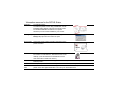
Information resources for the DCP240 Printer
Installation
To install the printer:
To install one printer to a PC using a USB cable, see the
Installation Map, shipped at the top of the printer carton.
For detailed installation information or for special
situations (such as network installation), Info Central.
Message Help If you see a message, click Help on the message box.
Really! Help topics are short and to the point.
Printer Guide
This Printer Guide contains operating information for the
printer and driver.
Info Central
For in-depth information about using the printer, install
Info Central on a Windows PC, then click the icon on the
desktop. (Insert the DCP Driver CD-ROM and choose
User Information to install Info Central.)
Service and Support FAQs at www.digital-identification.com provide answers to questions about the
DCP240 printer.
For help with questions not addressed by other DCP information, contact your dealer.
Contact the DIS Service Center at +49 (0)711 341 689 540 for service in Europe. For worldwide service,
please check www.digital-identification.com to find your nearest DIS office.
FAQs
Dealer
Customer
Care