1
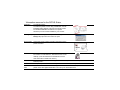
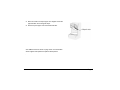
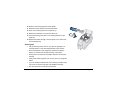
10 Slide the used cleaning sleeve off the spindle.
11 Discard the used cleaning card and used sleeve.
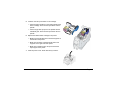
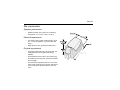
12 Place a new cleaning sleeve on the spindle (1).
13 Remove the protective cover from the sleeve (2).
14 Insert the cleaning roller (with a new cleaning sleeve) into the
printer (3).
15 Replace the ribbon cartridge, close the printer cover, load cards,
and resume printing.
Cleaning tips
•
Use the cleaning card as soon as you open the package. The
cleaning solution on the card evaporates after a few minutes.
•
Some card features, such as signature panels and magnetic
stripes, can require more frequent cleaning of the printer.
•
Printing with a monochrome print ribbon requires more frequent
cleaning.
•
Clean printer rollers regularly, such as every time you change the
ribbon.
•
If you use adhesive-backed cards, use a cleaning card after every
100 cards. The printer might also need additional cleaning.
•
See Info Central for more cleaning information.
Page 21