1
1. Access and Login
Open a web browser window and point your browser to your system’s
URL (web address). You can find the URL in TotalCode’s welcome email.
The URL consists of your system name (as entered when your system was
created) followed by “.totalcode-erp.com”.
Your web browser will display the system login page. Type your
username and password to gain access. If this is the first time you log in,
you will find your username and password in TotalCode’s welcome email
You can reset your password at any time by clicking the “Forgot your
password?” link in the login page.
2. Users and Permissions:
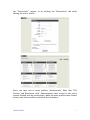
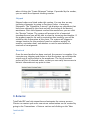
Users can be added, deleted, and modified by going to the “System
Users” section under the “Settings” menu (Settings > System Users). A list
of active users will be presented.
You can add new users by clicking the “New User” button or you can
modify any user’s profile and contact information by clicking the user’s
name. You can also delete one or more users by selecting the checkboxes
in the first column and then clicking the “Delete” button. Permissions for
each user can also be viewed and changed by clicking the “Set” link under
TotalCode ERP 2