1
USING A MEMORY CARD
Formatting a Memory Card
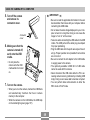
1. Load the memory card into the camera.
Formatting a memory card deletes any data already stored
on it.
2. Turn on the camera. Next, enter the REC mode
or PLAY mode and press MENU.
IMPORTANT!
3. Select the “Set Up” tab, select “Format”, and
• Be sure to use the camera to format a memory card.
Formatting a memory card on a computer and then
using it in the camera can slow down data processing
by the camera. In the case of an SD card, formatting
on a computer can result in non-conformity with the
SD format, causing problems with compatibility, operation, etc.
• Note that data deleted by a memory card format operation cannot be recovered. Check to make sure you
do not need any of the data on the memory card before you format it.
• Formatting a memory card that contains files deletes
all the files, even those that are protected (page 65).
then rock the controller to the right.
4. Rock the controller up or down to select
“Format”, and then click.
• To exit the format operation without formatting, select
“Cancel”.
76