1
APPENDIX
APPENDIX
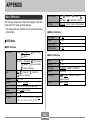
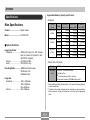
Menu Reference
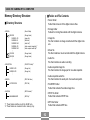
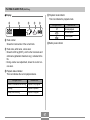
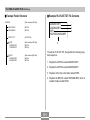
The following shows lists of menus that appear in the REC
mode and PLAY mode, and their settings.
• The settings that are underlined in the following table are
initial defaults.
● REC tab menu
EX-S1:
(Snapshot) /
(Snapshot) /
L/R Key
(Light Bulb) /
(Fluorescent) / Manual
REC Mode / EV shift / Flash / White Balance
(Sunlight) /
(Shade) /
REC Mode
On / Off
Flash
Digital Zoom
On / Off
On / Off
White Balance
On / Off
(Night Scene) /
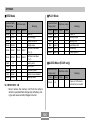
● Set Up tab menu
(Movie)
EX-M1:
Auto /
● Memory tab menu
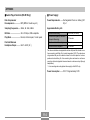
■ REC Mode
REC Mode
White Balance
(Night Scene) /
(Movie) /
(Snapshot Audio) /
(Voice Recording)
Flash
Auto /
(Flash Off) /
(Red-eye reduction)
(Flash On) /
Self-timer
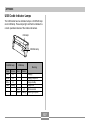
Indicators
Off / 10 sec
LCD-OFF / LCD-ON
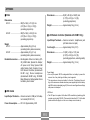
Size
Quality
1600 x 1200 / 1280 x 960 / 640 x 480
Fine / Normal / Economy
Digital Zoom
EV Shift
Off / On
–2.0 / –1.7 / –1.3 / –1.0 / –0.7 / –0.3 / 0.0 /
+0.3 / +0.7 / +1.0 / +1.3 / +1.7 / +2.0
104
Beep
On / Off
Startup
Date Style
On / Off
YY/MM/DD / DD/MM/YY / MM/DD/YY
Adjust
Language
Time setting
/ English / Français / Deutsch /
Format
Español / Italiano
Format / Cancel