1
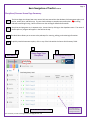
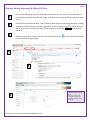
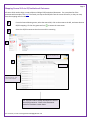
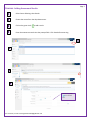
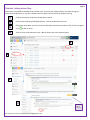
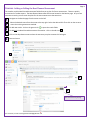
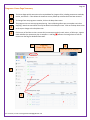
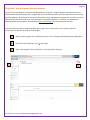
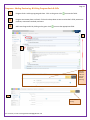
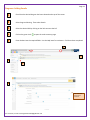
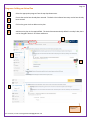
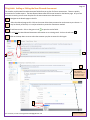
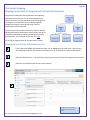
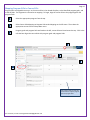
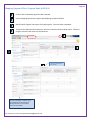
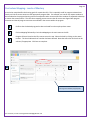
Page 1 TracDat Faculty User Manual Version 5.0.44 2015-2016 Table of Contents Page Introduction 3 Logging In 3 Outcomes Database Basics Basic navigation of the program 4 Disciplines/Courses: Home page summary 4 Course SLOs Add, Review, Edit a Course SLO Map Course SLOs to Related GE/Institutional SLOs Add Assessment Results Add an Action Plan Add or Edit the Next Planned Assessment 5 6 7 8 9 Program SLOs Program Home Summary Page Add a Program Mission Statement Add, Review, Edit a Program Goals and SLOs Add a Results Summary Add an Action Plan Add or Edit the Next Planned Assessment Curriculum Mapping: Course to GE/ILO Outcomes Mapping Program SLOs to Course SLOs Mapping Program SLOs to Program Goals & GE/ILOs Curriculum Mapping: Level of Mastery For assistance, contact [email protected] 10 11 12 13 14 15 16 17 18 19 Page 2 Reports Ad Hoc Reports 20 Appendices Appendix A: What is an Assessment Cycle? Appendix B: Types of Assessment Appendix C: GE/Institutional SLOs with Examples For assistance, contact [email protected] 21 23 25 Introduction Page 3 The PC outcomes database, TracDat, is designed to assist the College with the implementation of Student Learning Outcomes. TracDat stores and organizes outcomes, assessment plans, assessment results, action plans, and other data related to SLOs. In addition, a reporting component provides various summaries of the data that have been entered, including curriculum mapping, an essential component of an SLO assessment plan. This TracDat User Manual has been written for the faculty at Palomar College to provide an introduction to and assistance with this specially-designed software. The various features of the database have been customized for our specific use. Logging into TracDat You can find convenient links to the Palomar Outcomes Database in these places: • The Faculty & Staff web page (scroll down to Faculty Resources) • The TracDat web page The actual URL for the program is https://outcomes.palomar.edu:8443/tracdat/. Use your college email login (first initial + last name) and password to access your data. DO NOT USE the e-services password. The best browsers to use are: Firefox, Internet Explorer 10 or later, or Chrome, latest version. For assistance, contact [email protected] Page 4 Basic Navigation of TracDat v.5.0.43 Disciplines/Courses: Home Page Summary 1 The Home Page view shows how many course SLOs are entered into the database, SLO assessment plans, and results, action plans, and follow-up. A green check indicates a complete assessment plan. A red flag indicates something missing. Roll the mouse over the red flag for detailed information. 2 Disciplines and programs are in separate units. Access them by clicking on the dropdown menu. The name of the discipline or program will appear in the field at the top. 3 The Main Menu allows you to access to the pathways for entering, editing, and reviewing information. 4 To quickly view SLO assessment plans, click on any of the links within the Course SLO Summary Table. 1 3 Home Page View Discipline Main Menu 4 Course SLO Summary Table For assistance, contact [email protected] 2 Select Specific Discipline Here The red flag indicates, In this case, one of the SLOs is missing an assessment. Page 5 Courses: Adding, Reviewing, & Editing SLO Plans Click on Course Planning to access Course SLOs, assessment plans, and results. Course SLO plans are listed by course, selected at the top of the page. Change to other courses by clicking on the drop-down menu. Course SLOs are listed by SLO name. Click on the drop-down arrow to view assessment plans, including assessment methods, timelines, and any assignments. Click on the green circle add any elements to the assessment plan. Select the edit icon to the right elements. Add the information for a new course SLO. Use the information icons Click Save before leaving the page. to add an SLO or to to edit existing for more details on the fields. Click Save before leaving the page. TIP: You can click on the drop-down arrow to save and add another SLO before returning. For assistance, contact [email protected] Page 6 Mapping Course SLOs to GE/Institutional Outcomes All course SLOs need to align or map to Palomar College’s GE/Institutional Outcomes. For a complete list of the outcomes with examples, click here. The faculty can map to the GE/ILOs from the course SLO menu, or they can map from the mapping menu on the left. From the Course Planning menu, select the course SLO, click on the arrow to the left, and move down to GE/ILO mapping. Click on the green tool icon to access the next screen. Select the GE/ILO outcomes that the course SLO is assessing. Change to a different course by clicking on the drop-down arrow. Course SLOs Select the GE/ILOs that the course SLO is actually assessing. Scroll down to see the complete list. TIP: There are rubrics already developed for some of the GE/ILO outcomes. Check in the Documents section of TracDat to review those. . For assistance, contact [email protected] Page 7 Courses: Adding Assessment Results Select Course Planning, then Results. Choose the course from the drop-down menu. Click on the green circle to add a result. Enter the assessment results into the prompt fields. Click Save before returning. Check the Help prompts to assist with these fields. For assistance, contact [email protected] Courses: Adding Action Plans Page 8 Action plans are needed to complete an assessment cycle. An action plan might involve a curriculum change, an instructional modification, or any other related actions to support the success of the student learning. Confirm assessment results have already been entered. Click on Course Planning followed by Results. Click on the desired course link. Click on the drop-down menus for the course SLO and the assessment method. Then click on the green circle to add an action. View the current SLO plan with result. Add the action plan in the required space. Click Save before returning. For assistance, contact [email protected] Page 9 Courses: Adding or Editing the Next Planned Assessment The timeline and the Next Planned Assessment fields allow you to plan for future assessments. These are quickly summarized in TracDat reports. The Next Planned Assessment field is now located on the Results page. As you enter assessment results, you can enter the plans for the next assessment at the same time. Navigate to the Results page from the menu on the left. Select the desired course from the arrow at the top right. Select the desired SLO. Then click on the arrow to access the existing assessment method. To add new results: click on the green circle to open the results fields. To add only the Next Planned Assessment information: click on the edit icon . Click on the drop-down arrow to select the semester you plan to assess this SLO again. Save and return. Use this to add results, which include the Next Planned Assessment. Use this to only update the Next Planned Assessment. Click Save before leaving the page. For assistance, contact [email protected] Page 10 Programs: Home Page Summary The Home Page quickly summarizes the required data for Program SLOs, including assessment methods, results, and actions. It also allows the viewer to see any follow-up activities that have been entered. To change from one program to another, click on the drop-down menu. The program view can access program planning. Course Planning allows you to complete curriculum mapping. Note that course SLOs can only be edited in the Discipline view. Click on the drop-down menu at the top to change to the discipline view. Click on any of the links to view a current SLO, assessment method, result, action, or follow up. A green check indicates the assessment plan is complete. A red flag mouse over the flag for detailed information. Program Home Page View For assistance, contact [email protected] indicates a missing element. Roll the Select the Specific Program Programs: Add a Program Mission Statement Page 11 Any set of courses leading to a certificate or degree defines a “program.” Program Student Learning Outcomes are identified separately from course SLOs. Program SLOs can be assessed via course SLOs that capture the essence of the particular program. By assessing the course SLO, the program SLO is also assessed. Program SLOs can also be assessed separately from the course SLOs, such as a licensing test or portfolio assessment. The faculty in a department or discipline decide on this together. See Appendix B, Types of Assessment for information and resources. A mission statement explains what the program goal or goals are in a sentence or two. A mission statement encapsulates the direction or purpose of the program. Make sure the program unit is selected at the top. Click on Program followed by General Information. Click on the edit information icon to the right. Type in the program’s mission statement. Click Save before returning. For assistance, contact [email protected] Page 12 Programs: Adding, Reviewing, & Editing Program Goals & SLOs Program Goals: Add any program goals here. Click on the green circle to access the fields. Program assessment plans are listed. Click on the drop-down arrows to review the P SLOS, assessment timelines, assessment methods, and more. Add a new Program SLO by clicking on the green circle to access the appropriate fields. Program goals are useful for Program Review planning. Click Save before returning. For assistance, contact [email protected] Page 13 Programs: Adding Results Check that the desired Program has been selected at the top of the screen. Select Program Planning. Then select Results. Select the desired SLO by clicking on the little arrow to the left. Click on the green circle to open the result summary page. Enter the data into the required fields. Use the Help items for assistance. Click Save when completed. Click on the blue help icons for assistance. For assistance, contact [email protected] Page 14 Programs: Adding an Action Plan Select the appropriate program from the top drop-down menu. Ensure that results have already been entered. The dark circle indicates how many results have already been entered. Click on the green circle to add an action plan. Add the action plan in the required field. The Action Date automatically default’s to today’s date, but it can be changed if desired. Click Save and Return. Click Save when completed. For assistance, contact [email protected] Page 15 Programs: Adding or Editing the Next Planned Assessment The timeline and the Next Planned Assessment fields allow you to plan for future assessments. These are quickly summarized in TracDat reports. The Next Planned Assessment field is now located on the Results page. As you enter assessment results, you can enter the plans for the next assessment at the same time. Navigate to the Results page on the left. 2 Select the desired program SLO. Click on the arrow. Select how you want the result summary to relate to. It may be directly to the SLO, or it may be related to a particular assessment method. 3 To add new results: click on the green circle 4 to open the results fields. To add only the Next Planned Assessment information to an existing result: click on the edit icon . Click on the drop-down arrow to select the semester you plan to assess this SLO again. 3 3 TO ONLY UPDATE THE NEXT PLANNED ASSESSMENT: Click on the edit icon to open the result summary. For assistance, contact [email protected] Save when completed. Curriculum Mapping: Aligning Course SLOs to Program and Institutional Outcomes Page 16 Program and institutional learning outcomes are frequently assessed at the course level. An outcome alignment map shows how a set of courses contribute to the overall goals of the program. It is expected that as a student progresses through the program, he/she should reach a level of mastering the various outcomes. Program and course outcomes must also map to our General Educational/Institutional Outcomes, which are the overall set of abilities and qualities a student graduating from Palomar should possess. For a description of those, click here. All curriculum mapping must be recorded within TracDat. Mapping Course SLOs to GE/Institutional SLOs If this needs to be added to an assessment plan, click on Mapping on the main menu. Select Course SLOs Mapping to GE/ILOs. The GE/ILOs are listed on the left. Scroll down to view all of the GE/ILOs. Select the desired course. Course SLOs are listed across the top. Scroll across if appropriate to view all. Select any of the GE/ILOs that the course SLO assesses. Change to a different course by clicking on the drop-down arrow. TIP: Select the GE/ILOs that the course SLO actually assesses. Check the Documents area in TracDat for examples of the ILOs and current rubrics. For assistance, contact [email protected] Page 17 Mapping Program SLOs to Course SLOs Program SLOs are aligned three ways: to the course SLOs in the related discipline, to the identified program goals, and to the GE/ILOs. This alignment is referred to as mapping. To begin, align the course SLOs to the program goals and program SLOs. Select the appropriate program from the top. Select Course SLOs Mapping to Program SLOs under Mapping on the left menu. Then select the appropriate course from the drop-down menu. Program goals and program SLOs are listed on the left; course SLOs are listed across the top. Click in the cell that best aligns the course SLOs with program goals and program SLOs. Click inside the table to select the course SLOs that support program goals and program SLOs. For assistance, contact [email protected] Page 18 Mapping Program SLOs to Program Goals & GE/ILOs Confirm that the desired program has been selected. Click on Mapping followed by Program SLOs Mapping to Goals & GE/ILOs. Identify which program SLOs map to the program goals. Click Save when completed. To map to the GE/Institutional Outcomes, switch the view from the drop-down menu. Select the program outcomes that assess the GE/Outcomes. Click here to switch the view to the GE/ILOs. For more information: view the rubrics for the GE/ILOs that the College has already assessed in the Documents section of the database. For assistance, contact [email protected] Page 19 Curriculum Mapping: Levels of Mastery A curriculum map identifies the learning goals for a particular SLO. This is especially useful in program review where faculty can link the course content to the appropriate program SLOs. For example, one course may expect students to be introduced to the program learning outcome compared to other courses where the students are expected to develop or master the same outcome. The curriculum mapping process ensures that all courses are aligned with program outcomes and that all program outcomes are assessed in the courses within the program. Confirm that the desired program has been selected from the top drop-down menu. Click on Mapping followed by Curriculum Mapping on the main menu to the left. Program SLOs are listed on the left; courses are on the top. Select the level by clicking on the actual number. The check indicates that a number has been selected. Note that more than one level can be selected, if appropriate. Click Save to complete. Note that more than one level of learning can be selected, if appropriate. For assistance, contact [email protected] Page 20 Run Ad Hoc Reports The reporting feature in TracDat allows you to quickly see what data have been entered. There are standard reports and Ad Hoc reports, ones that we have customized for our use at Palomar College. If you do not see the information in a report that you would like, please contact one of the SLO Coordinators to create that report for you. NOTE: the report list will change as we continue to update and customize new reports. To run an existing Ad Hoc report, follow these steps. From the Home Page (Discipline or Program), click on Reports. Select the Ad Hoc reports. Click on the name of the report to open. You can save the document or copy it to another discipline or program that has been assigned to you. Click on the copy icon to the right of the reports. Click on the link to open the report. For assistance, contact [email protected] Page 21 Appendix A Student Learning Outcomes Assessment Cycle The SLO assessment process essentially has 4 basic steps. First, the faculty in the discipline discuss, identify, and write learning outcomes for all courses and programs. Concurrently, an assessment plan is organized, composed of an assessment method and a timeline. The timeline specifies when to conduct the assessment as well as when to examine results. The assessment plan also includes the mapping of curricula, meaning that the SLO is aligned both with identified program SLOs and with GE/Institutional SLOs. All SLO data are housed within TracDat. Complete plans will allow the faculty to achieve their programs’ goals as well as allow for accurate reporting, not only for department and College use but also for accreditation reporting and requirements. These plans are part of a department’s Program Review. STEP 1 Identify SLOs & Write an Assessment Plan THIS IS A COMPLETE ASSESSMENT PLAN: Assessment Method(s) Map to Program SLOs AND GE/Institutional SLOs Timeline for Assessing AND for Analysis ASSESSMENT PLAN STEP 2 Write SLO plans Organize & conduct assessments The faculty conduct the planned assessment and submit their results to a key person in the department or discipline. For assistance, contact [email protected] Page 22 STEP 3 Write SLO plans Organize & conduct assessments Analyze the data The results are examined, followed by discussion of what the results indicate with regards to student learning. A plan of action is organized and resources are identified to support student learning and improvement STEP 4 CREATE ACTION PLANS & IMPLEMENT Write SLO plans Organize Create Action Plans; Implement Analyze & conduct assessments the data The Action Plan is implemented with follow-up and needed. Name Expectations REVIEW: This* is a review of the cycle for the assessment of student learning, placing the students and student learning at the center of focus. for Learning Communicate Expectations Strategize New Student Success Plans to Students STUDENTS Determine Extent of Learning Collect Student Work Adapted from David W. Marshall, Phd, CSU San Bernardino Refer to the Learning Outcomes website for more information on writing SLOs, assessment plans, and accreditation. For assistance, contact [email protected] Appendix B Types of Assessment Data and Assessments Page 23 These definitions are paired for emphasis and contrast. Evidence of program and institutional outcomes performance. Quantitative or qualitative, direct or indirect data that provides information concerning the extent to which an institution meets the goals and outcomes it has established and publicized to its stakeholders. Direct data. Direct data measures the exact value. For instance, a math test directly measures a student's learning in math by defining a criteria and standard, then having the student analyze a problem. Indirect data. Data that measures a variable related to the intended value. For instance a person’s math skills may be indirectly measured through an employer’s questionnaire asking about the computational skills of graduating students. Qualitative data. Data collected as descriptive information, such as a narrative or portfolio. These types of data, often collected in open-ended questions, feedback surveys, or summary reports, are more difficult to compare, reproduce, and generalize. It is bulky to store and to report; however, it is often the most valuable and insightful data generated, often providing potential solutions or modifications in the form of feedback. Quantitative data. Data collected as numerical or statistical values. These data use actual numbers (scores, rates, etc) to express quantities of a variable. Qualitative data, such as opinions, can be displayed as numerical data by using Likert scaled responses which assigns a numerical value to each response (e.g. 5 = strongly agree to 1 = strongly disagree). This data is easy to store and manage; it can be generalized and reproduced, but has limited value due to the rigidity of the responses and must be carefully constructed to be valid. Formative assessment. Formative evaluation involves assessment and analysis that generates useful feedback for development and improvement. The purpose is to provide an opportunity to perform and receive guidance (such as in class assignments, quizzes, discussion, lab activities, etc.) that will improve or shape performance on a final or summative evaluation. Summative assessment. Summative evaluation is a final determination of particular knowledge, skills, and abilities. This could be exemplified by exit or licensing exams, senior recitals, or any final assessment that is not created to provide feedback for improvement, but is used for final judgments. Criterion-based assessments. Assessment evaluated or scored using a set of criteria to appraise or evaluate work. Criterion-referenced evaluation is based on proficiency not subjective measures such as improvement. 25Norm-referenced assessment. Assessment of an individual is compared to that of another individual or to the same individual’s improvement over time. Individuals are commonly ranked to determine a median or average. This technique addresses overall mastery, but provides little detail about specific skills. For assistance, contact [email protected] Page 24 Embedded assessment. Embedded assessment occurs within the regular class or curricular activity. Class assignments linked to student learning outcomes through primary trait analysis, serve as grading and assessment instruments. Individual questions on exams can be embedded in numerous classes to provide departmental, program, or institutional assessment information. An additional benefit to embedded assessment is immediate feedback on the pedagogy and student needs. Standardized assessment. Assessments created, tested, and usually sold by an educational testing company e.g. GRE’s, SAT, ACT for broad public usage and data comparison, usually scored normatively. Homegrown or Local assessment. This type of assessment is developed and validated for a specific purpose, course, or function and is usually criterion-referenced to promote validity. Return to the Table of Contents For assistance, contact [email protected] Page 25 Appendix C Palomar College General Education/Institutional Student Learning Outcomes With Example Outcomes The College’s GE/Institutional Student Learning Outcomes are modeled after the LEAP Essential Learning Outcomes Framework developed by the Association of American Colleges and Universities (AACU). The Learning Outcomes Council compiled these examples of outcomes for each area of the GE/Institutional Student Learning Outcomes framework. The examples provide clarity and context for the each of the College’s essential student learning outcomes. For further elaboration of outcomes and guidance on assessment, visit the AACU VALUE (Valid Assessment of Learning in Undergraduate Education) website. The General Education Program at Palomar College promotes competence in various fields of knowledge, provides an academic foundation for lifelong learning, and enriches students’ lives. As a result of the general education experience, students will demonstrate: Knowledge of Human Cultures and the Physical and Natural World through Study in the sciences and mathematics, social sciences, humanities, histories, languages, and the arts, for example: • • • • • • • • Connect and apply the knowledge, skills, and abilities developed through general education studies to activities in personal life, career, and citizenship Demonstrate ability to thrive in a complex global world and an understanding of its historical, social, economic, moral, and cultural challenges Recognize and respect likenesses and differences among human cultures and their contributions to society Exhibit the ability to effectively engage with individuals with diverse backgrounds and perspectives Understand scientific and technological developments and their impact on global economics Identify and commit to lifelong learning and personal development opportunities Promote and participate in the arts and their contributions to human development, expression, creativity, and curiosity Demonstrate knowledge of various forms of government, their principles, and relevance to global existence Focused by engagement with big questions, both contemporary and enduring For assistance, contact [email protected] Intellectual and Practical Skills, including Page 26 Inquiry and analysis, for example: • • • • • • • Assess new information skeptically Construct structured and rigorous experiments, gathering data, and conducting research Consider possible options with an open mind and an awareness of one's own biases Understand that uncertainty is part of the process Demonstrate awareness of potential sources of error Frame questions clearly, and in a way which makes inquiry possible Present evidence in support of an argument or hypothesis Critical and creative thinking, for example: • • • • • Explore issues, ideas, artifacts and events before accepting or formulating an opinion or conclusion Reason through logic without discounting intuition and imagination Develop intellectual curiosity Recognize and scrutinize assumptions, including one's own See the value of learning established procedures yet be open to innovation Written and oral communication, for example: • • • • • • • Communicate effectively both in writing and in speech and in a variety of contexts Communicate in an understandable and organized manner to explain ideas, express feelings, or support conclusions Communicate with clarity of expression Communicate with a correct use of grammar, syntax, punctuation Communicate accurately when reporting or evaluating information Read effectively and analytically Use credible, relevant sources to support ideas Artistic Perception, for example: • • • • • Analyze and interpret artistic compositions in the visual and performance media Demonstrate understanding of the role of art as a reflection and critique of society Exhibit comprehension of how formal elements contribute to the meaning and communication of artistic works in visual and performance media Show an understanding of the artistic processes Analyze and interpret commercial media in the context of artistic history and process For assistance, contact [email protected] Intellectual and Practical Skills, cont. Page 27 Quantitative literacy, for example: • Develop competence in arithmetic operations: addition, subtraction, multiplication, division • Develop competence in algebraic operations: modeling a situation (translate a problem into an algebraic equation using variables for unknown quantities), solve algebraic equations • Read and understand graphs, use mathematical and analytical skills to other disciplines and real-world situations • Develop competence in applied analytical skills: structure arguments, use inductive and deductive reasoning skills, draw inferences. • Structure arguments, demonstrate inductive and deductive reasoning skills, weigh evidence, draw inferences, perform basic statistical operations, read and understand simple graphs, perform simple data analysis, handle basic financial operations (like balancing a checkbook, calculating interest), and transfer mathematical and analytical skills to other disciplines and real-world situations Information literacy, for example: • Determine the nature and extent of information needed • Access the needed information • Evaluate information and its sources critically • Incorporate information into knowledge base and value system • Use information to accomplish a specific purpose • Access and use information ethically and legally Digital literacy, for example: • Use digital and emerging technologies to: o Choose the appropriate technology to accomplish a task o Model routine, intentional, and effective use of technology o Employ current standard technologies as well as emerging technologies for communication and collaboration in workplace, education, personal life, and the larger community o Use technology for improved productivity o Maintain awareness of and proficiency in emerging technologies to access, evaluate, create and synthesize information Teamwork and problem solving, for example: • Work collaboratively and constructively with others; share tasks; complete tasks on time • Work effectively within culturally diverse settings; treat others with respect and consideration • Teach others; learn from others; negotiate decisions and problem solving • Demonstrate leadership • Function as an active participant in a group or team setting • Listen to others’ ideas; consider the desires and rights of others equally with one's own desires and rights; show commitment to the team • Communicate effectively with team members to address conflicts and solve problems Practiced extensively, across the curriculum, in the context of progressively more challenging problems, projects, and standards for performance For assistance, contact [email protected] Personal and Social Responsibility, including Page 28 Civic knowledge and engagement—local and global, for example: • Analyze and solve problems in the community • Apply knowledge and skills from the classroom to community settings and public questions • Cultivate personal and academic integrity • Contribute to a larger community, recognizing and acting on one's responsibility to the educational community and the wider society, locally, nationally, and globally • Recognize, appreciate, and consider the perspectives of others to inform one's own judgment • Develop competence in ethical and moral reasoning • Work through controversy with civility • Participate in public life, public problem solving, and community service Intercultural knowledge and competence, for example: • Demonstrate critical self-reflection of one's own assumptions and stereotypes • Comprehend one's own social and cultural group identities and the relative privilege or marginalization of each • Demonstrate intercultural communication skills • Demonstrate knowledge of the demographics, socio-cultural dynamics and assets of a specific local community • Examine and analyze a community issue in the context of systemic inequities • Enter, participate in and exit a community in ways that do not reinforce systemic injustice • Demonstrate reciprocity and responsiveness in service work with community Ethical reasoning and action, for example: • Demonstrate critical self-reflection of one's own ethical values • Exhibit knowledge of cultural assumptions and norms • Show the capacity to perceive events from others’ perspectives • Use self-awareness and self-assessment to solve problems • Demonstrate courage in acting ethically • Utilize independence of judgment combined with awareness of the opinions of others • Cultivate personal and academic integrity Foundations and skills for lifelong learning, for example: • Understand that learning is a lifelong process • Learn from the suggestions of others • Explore new ideas and processes; apply prior learning to new situations • Exhibit intellectual curiosity • Independently present meaningful insights and take the initiative to develop them into new, unique, or novel ideas • Understand how college skills will affect their lives in later years Anchored through active involvement with diverse communities and real-world challenges For assistance, contact [email protected] Integrative Learning, including Page 29 Synthesis and advanced accomplishment across general and specialized studies, for example: • • • • • • • Connect outside experience to academic study; see connections across disciplines; adapt and apply skills, abilities, theories, or methodologies gained in one situation to new situations; demonstrate a developing sense of self as a learner Demonstrate the ability to apply communication, computational, technology and life skills across the curriculum Demonstrate integrative learning through completion of capstone courses in the major Participate in learning communities and other cross-disciplinary activities Participate in work-based learning activities, internships and other experiential learning opportunities Participate in service learning Attend campus cultural events such as films, theatre, dance, music and art that engage attendees in interdisciplinary dialogues Demonstrated through the application of knowledge, skills, and responsibilities to new settings and complex problems Resources Consulted Association of American Colleges and Universities • LEAP Framework - http://www.aacu.org/leap/vision.cfm • Value Rubrics - http://www.aacu.org/value/ (Rubrics are also available in the Learning Outcomes Blackboard shell) Lifelong Learning • Examples above were taken from Long Beach State GE Outcomes http://www.csulb.edu/divisions/aa/ge/students/fsll/ • AACU “Foundations and Skills for Lifelong Learning Value Rubric http://assessment.aas.duke.edu/documents/LifelongLearning.pdf • Manchester Metro U http://www.celt.mmu.ac.uk/ltia/issue5/willmot.shtml Information Literacy • Association of College & Research Libraries Information Literacy Competency Standards for Higher Education http://www.ala.org/ala/mgrps/divs/acrl/standards/informationliteracycompetency.cfm Digital Literacy • California ICT Digital Literacy Assessments and Curriculum Framework, November 2008. http://www.ictliteracy.info/rf.pdf/California%20ICT%20Assessments%20and%20Curriculum%20Framewor k.pdf • Related assessment initiatives include: ACT WorkKeys Assessments, Certiport IC3, ETS iskills/ICT Certification Exam, ICDLU Digital Literacy Assessment, ACRL and the National ICT Literacy Policy Council Standards, ISTE NETS. Intercultural knowledge and competence • Examples above were taken from CSU, Monterey Bay. This university has a service-learning component in their graduation requirements. Service-learning can facilitate meeting most of these outcomes. http://service.csumb.edu/programs/cpulr.html#outcomes Civic Knowledge and engagement • http://www.aacu.org/resources/civicengagement/index.cfm • http://www.nl.edu/cec/upload/Working-Definition-of-Civic-Engagement.pdf Return to the Table of Contents For assistance, contact [email protected]