1
Shenzhen ASunDar Electronics Co., Ltd.
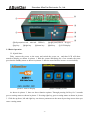
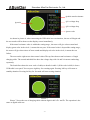
①cable actual resistance
p
②1A voltage drop
⑤result
③2A voltage drop
④error code
picture 6 Digital cable testing
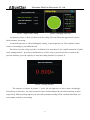
As shown in picture 6, when connecting the USB cable in a test situation , the test will begin and
the test results will be shown on the display screen immediately.
If the actual resistance value is within the setting range , the tester will give a buzz sound and
display green color in the circle , it means the test pass. If the actual value is beyond the setting range ,
the tester will give three times of buzz sounds and display red color in the circle, it means the test
failure .
The texts on the right screen show actual values.The top line shows actual resistance of single
charging cable. The second and third line show the voltage drop with 1A and 2A current conducting
separately.
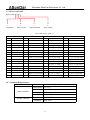
The fourth line shows the error code of cable(see details in table 1).If the code is 0000, it shows
USB cable is accepted. You can press right key for retesting again. Pressing left key will return to
standby situation. Pressing left key for 2seconds will enter setting situation.
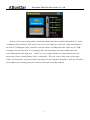
Picture 7
Picture 7 shows the test of charging cable without digital cable’s D+ and D-. The operation is the
same as digital cable test.
-6-