1
24
4. Operating Paragon
User Customization
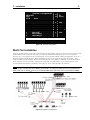
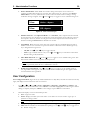
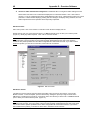
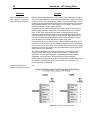
The User Profile Menu (Figure 27) (function key <F4> while in the OSUI) is for displaying Paragon configuration
and for setting/changing preferred operating parameters.
User
Connected:
User: Susan
Profile
UMT8 HWII
User Port: 1
Admin: No
Group: 45
Scan Mode:
Global
Global Scan Rate:
03 Seconds
ID Display:
On
03 Seconds
Green Mode:
Off
05 Minutes
Hotkey:
Scroll Lock
Display Position:
Menu
ID
Previous Channel Key:
NumLck
Help:
Single Line
LocalPC: Off
….. Scrolling Messages Banner…..
ScrlLock
|
Scan
|
Skip
|
NCSL
Figure 27. User Profile Menu
1.
Activate OSUI by pressing the Hot Key <ScrollLock> key twice rapidly.
2.
Press <F4> to access User Profile screen.
· Connected field displays name and Channel ID number of selected device or computer, if user is
currently connected to a channel.
· User field displays user name entered at login.
· User Port field displays UMT8 user port to which user is connected.
· Admin field displays user’s administrator privileges – if any.
· Group field displays user’s group ID(s).
3.
Select field to be edited by pressing <Tab> (forward) <Shift-Tab> (backward), <á>, <â>, <ß>, or
<à> keys to move to desired field. Press <Enter> to begin editing. Highlighted area will turn green.
Follow Instructions below For Interpreting and Editing Each Specific User Profile Menu Option.
When editing is completed either press <Enter> (highlighted selection will turn yellow) to retain changes,
and then press <S> to save changes; or press <Esc> to cancel changes.
Note: If <S> had not been pressed to save changes, choosing <Esc>, or pressing any function key that causes
user to exit User Profile Menu, prompts user with an opportunity to save any changes (Y/N) before exiting.
Instructions For Interpreting and Editing Each Specific User Profile Menu Option:
· Scan Mode: Use <á> and <â>, or <ß> and <à> keys to toggle between Global and
Individual. Global Scan Mode scans each channel for the same amount of time,
indicated by the Global Scan Rate. Individual Scan Mode scans each channel for the
specified time as shown in Selection Menu. Default setting is Global. (Setting the
channel’s individual scan rate is an administrator function).