1
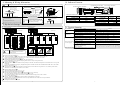
4. Mounting & Wiring Information
WARNING
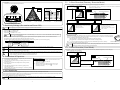
10. Indicator Function
Drilling may cause electric shock. Be careful of hidden wires inside the ceiling.
1. Cut out the Mounting Template provided into 2. Connect wires
the appropriate size for the sensor.
126
Connector of the Unit
130 mm
300
Wiring Cable
Yellow
Yellow
Gray
Gray
500 mm
Output
Door
Y
Turn clockwise
CAUTION
7. Sensitivity Settings (Pre-caution on Power-ON)
Initialization Indicator LED
6. Attach the Front Panel to the body.
Turn clockwise
5. Dip Switch Settings
6. Adjusting the detection area
If there is the wiring inside the
ceiling, install the body more
than 1m away the wiring.
During
After
Adjusting Mode
Initialization Indicator
ON
OFF
Blink
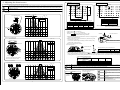
5. Dip Switch Settings
Please read followings and understand the functions well to do the proper settings.
Dip Switch X
ON 1
2
Presence Timer
3
4
6
7
8
ON 1
Default Setting
Quantity of
Detection Rows
Frequency
2
3
Sensitivity
4
Mounting Height
Self-Monitoring
6R
A
H
2
3m
ON
Doorway
OFF
10s
5R
B
M
2.5
4m
OFF
Normal
ON
3
1
4R
C
L
3R
D
Snow
2R
E
2
3
4
5
7
5
6
2
6R
6
4
Door operates
intermittently.
Door operates when
no-one is present.
1
F
Door does not
operate.
Default Setting
6
2s
60s
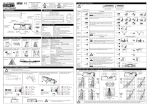
Cause
Problem
5
2R
Adjustment
1st Row Setting - Doorway
8
Operation Indicator / Power Indicator LED
Operation
Power
Indicator
Indicator
Pre-Power ON
OFF
OFF
Power ON
OFF
ON
Detecting
ON
ON
2nd Row Overlapped
Both Blink
Self-Monitoring
Alternate Blink
11. Trouble Shooting
Dip Switch Y
5
1st Row Setting - Normal
Solution
Sensor Connector.
Tighten connector or reconnect.
Power Supply Voltage.
Apply proper voltage to the sensor.
Sensor is very dusty or covered with raindrops etc.
Clean the sensor. (Do not use thinner or alcohol to clean sensor.)
Sensitivity is too low.
Increase sensitivity by adjusting <Dip Switch Y 1 2>.
Detection area incorrect.
Adjust Dip Switch and Area Mask.
Moving objects in the detection area.
Adjust detection area or move away the moving object.
Detection area too far from the Door, detecting
people passing by.
Adjust Dip Switch and Area Mask.
Sensitivity is too high.
Decrease sensitivity by adjusting <Dip Switch Y 1 2>.
Another sensor is installed near by.
Ensure different frequency setting for each other.
The condition of Detection Area is varying.
*Dust / Dirty
*Spread out / Remove a mat
*Snow (footprints)
Detection State may continue during the time setting for presence
detection (the Door remains open) and becomes normal afterward.
Set the presence detection time shorter, re-set the power supply.
After rechecking, there is still a problem, please contact us or your dealer.
CAUTION
1
2
3
4
5
6
7
8
In case that you carry out settings not in
a way mentioned here, mal-function
will be occurred.
Door
Side
6 5 4 3 2 1
R R R R R R
Door
Side
2
R
Door
Side
1
R
Presence Timer (Dip Switch X 1 2)
The sensor will detect a stationary object only for the time set by the Presence Timer. (2s, 10s, 60 seconds, )
If set to , the period is infinity in case of the 1st, 2nd, 3rd Row, 2 seconds in case of the 4th, 5th, 6th Row.
Quantity of Detection Rows (Dip Switch X 3 4 5)
Pattern Depth is adjustable by selecting 2R / 3R / 4R / 5R / 6R (all rows).
If set to <adjustment>, mode is special for adjusting and the inner row only is valid. (please see 6.2)
Frequency (Dip Switch X 6 7 8)
When more than two sensors are installed in close proximity to each other, select different frequencies for each sensor from A to F to prevent
interference.
If you used our H/MH/ML/L 4 frequency changed model, please be noted H coincides with A and MH with B and ML with C and L with D.
Sensitivity (Dip Switch Y 1 2)
Normal position is <M>. If the Door operates even though no person is in the detection area, please set to <L> (Sensitivity will be lower).
When there is an influence by snow or insects, set to <Snow>.
Mounting Height (Dip Switch Y 3)
Adjust the mounting height 2
3 m or 2.5
4 m.
Doorway Detection when closed (Dip Switch Y 4)
Doorway Detecting mode when 1st Row Setting (Dip Switch Y 5) is set to <Doorway>.
ON : Detects Doorway when the Door is closed. Normal position is <ON>
OFF : Not detect Doorway when the door is closed. Combined with other security systems, <OFF> is useful.
1st Row Setting (Dip Switch Y 5)
Doorway : Detects Doorway realizing the Door movement. Normal position is <Doorway>.
Normal : Detects as an usual Activation Row. In this case, adjust the detection area of the 1st Row away from the door.
Self-Monitoring (Dip Switch Y 6)
Self diagnostic function can be selected.
-2-
Power Indicator LED (Red)
Initialization Indicator LED (Red)
Power
Gray codes used for Power, yellow codes used for
Output. Both do not have polarity of electrode.
5. Please see 8. Verification of Operation to confirm
operations.
4. Dip Switch Settings and adjustments.
Operation Indicator LED (Red)
3. Mount the body into the ceiling by Fixing
Screw.
-7-