1
<Top View>
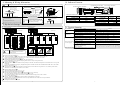
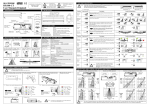
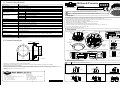
6. Adjusting the detection area
Without Prism
Adjust the detection area according to the following diagrams.
With Prism
Door Side
Door Side
W3
W1
The illustrated detection areas represent the actual position of the infrared beams. The actual detection area observed will vary depending
CAUTION
on the sensor installation environment, objects been detected and sensor settings. Please confirm the detection area and sensitivity after
installation without fail.
CAUTION Do not touch the surface of the lens while adjusting. If the lens becomes dirty, wipe the lens clean by using neutral detergent.
1. Detection Area Pattern
<Side View>
Door Center
Area Adjusting Screw
1.0
0.3
0.5
0.5
0.5
(Unit : m)
1.0
1.5
2.0
2.5
W2
W1
Side View
H
2200
2500
3000
4000
2.0
Door Side
10
3.0
(Unit : mm)
D
1100
1250
1500
2000
Depth “D“ is unchanged
When using prisms : Mounting height is MAX 2.8m
Detection by Area Mask is prohibited
Set Dip Switch X 3 4 5 to <Adjustment>
In this setting, only 2nd Row is valid.
Initialization indicating LED blinks.
3 4 5
<Front View> Without Prism
(Unit : m)
2.5
10
5
W3
1000
1100
1300
1730
2nd Row
Adjustment
4.0
5
W2
1550
1750
2100
2800
Set Dip Switch Y 5 to <Doorway>
10
3.5
10
W1
2100
2400
2850
3800
(Unit : mm)
W1
2560
2920
3270
Prism does not work
2. Adjusting Detection Area
Adjust the 2nd Row when Doorway detection function is ON.
2.5
10 for both sides
(RIGHT / LEFT)
H
2200
2500
2800
More than 2800
2.0
1.5
1.0
0.5
0.5
1.0
1.5
2.0
2.5
Front View
Scale Marks inside
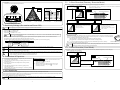
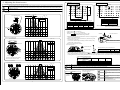
Referring to the Area Adjusting Estimation List below, fix the approximate
angle by Area Adjusting Screw.
Adjust 2nd Row not to overlap with the Doorway with the door opened.
(See the figure on the right)
Detection Area should be adjusted looking at Indicator LED by using
a beam finder or reflection sheet.
Just under the sensor
2nd Row should be not to detect Door.
Turn Area Adjusting Screw as below.
Area Adjusting Screw
Towards Door Side
3
Towards Outside
2.0
A 360 roll of the Screw adjusts Depth Angle 3 .
2.5
4000mm
Moving distance on the floor
200mm
100mm
150mm
After finishing setting of 2nd Row, adjust Dip Switch X 3 4 5 as necessary. Re-set Power-ON after confirming no one is in the detection area.
When Open/Close the door, if hunting occurs or caution Indicator LED regarding the 2nd Row overlapping with the door blink (Both Power
Indicating LED and Operation Indicating LED blink at the same time), adjust the detection area away from the door by Area Adjusting Screw.
3.0
Door Side
Lens Box (Upper Hatch) for adjusting
Detection Area. (RIGHT / LEFT)
Moving distance by 360 roll of the Screw
Mounting height
2000mm 3000mm
10
10
3.5
Area Adjusting Estimation List
Distance between Door
Center and Sensor
4.0
Mounting Height
2000mm
3000mm
4000mm
<Front View> With Prism
Attach the prisms covering the lenses.
(Unit : m)
2.5
2.0
1.5
1.0
0.5
0.5
1.0
1.5
2.0
2.5
Front View
CAUTION
300mm
6
3
2
400mm
500mm
9
5
3
10
7
5
After adjusting Detection Area, be sure to Re-set Power-ON, and carry out Initializing and Automatic Sensitivity Adjustment again.
st
st
CAUTION When selection <Normal> of 1 Row Setting, the 1 Row detects in an usual activation mode.
Please adjust the 1st Row not to detect the Door.
With Prism
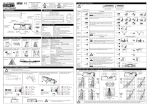
How to attach prisms (as an option)
CAUTION
2.0
10
2.5
Door Side
10
Both sides of the prism lens are
set into the lens box.
CAUTION Mounting height is less than 2.8m in case of using
prisms.
CAUTION Setting Area Mask <Wide> in case of using
Each of the
2 prisms are
attached.
prisms.
CAUTION Check whether the prisms are set firmly after
fixing them.
If the prisms become dirty, wipe them clean by
2.8
CAUTION using neutral detergent.
Do not use thinner or alcohol.
-4-
-5-