1
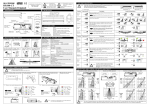
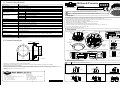
5.1 1st Row Detection (Doorway Detection Mode)
3. Area Mask
Detection Area can be adjusted using Area Mask.
When the 1st Row is used for the detection of doorway, please set Dip Switch as follows.
Dip Switch Y 5 1st Row Detection
Even after setting 1st Row to <Doorway>, if the door still closes, set the detection area as
follows not to detect the door.
Doorway
Just under
the sensor
Front
View
Top
View
Side View
Top View
Door Side
Doorway Detection Row
Door
door
Fixed glass sheet
In the position of NARROW, Area Mask
is seen in white over the lenses.
L
N
N
6
R
R
5
R
4
R
3
R
2
R
1R
2R
6R
1
R
Dip Switch Y 4 Doorway Detection when closed
To be deleted
by <L> Area Mask
N : NARROW W : WIDE
To be deleted
by <R> Area Mask
To be deleted
by <L> Area Mask
To be deleted
by <R> Area Mask
ON
Doorway detection function can be selected as follows.
OFF
Area Mask Tuning Knob
Please turn Area Mask to stop in
click
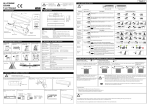
7. Sensitivity Settings (Pre-caution on Power-ON)
CAUTION
1
2
Before applying power, please check the wiring again and follow instructions below.
After installation of the sensor, please check sensitivity Dip Switch set to <M>
(Dip Switch Y 1 2. Default is <M>.)
Please adjust the Mounting Height.
(Dip Switch Y 3. Default is <2.5
4m>.)
CAUTION When the actual Mounting Height is 2.5
<2.5
3
door
3m, either setting <2
6
R
3m> or <2.5
4m> can be selected. In this case, Default
4m> is recommended.
Sensitivity is adjusted automatically. Before applying power, please check no objects (stepladder, tools etc.) are left in the detection area.
After applying power, do not enter into the detection area within 10 seconds.
(If there is a person inside the detection area within the detection seconds, setting sensitivity cannot be made properly.)
Do not enter into the detection area within 10 seconds
Power
ON
10 seconds
5
R
4
R
3
R
2
R
Detecting doorway when the door closed.
(the sensor is OFF.)
Normal position is this.
door
1
R
6
R
5
R
4
R
3
R
2
R
Not detecting doorway when the door
closed. (the sensor is OFF.)
Combined with other security systems
<OFF> is useful.
1
R
Initialization
Initialization of a sensor (door learning process) is necessary for doorway detection. This process is made every time of
Power-ON, it is completed after the sensor has learned the movement of persons 2 or 3 times. The state of Initialization
process is confirmed with Initialization Indicating LED.
Under Initialization : Initialization Indicating LED flashes. Not detecting doorway.
After Initialization : Initialization Indicating LED does not flash. Detecting doorway.
The 2nd
6th Row except Doorway Row are not necessary for the Initialization process above, and they
operate in the same manner of usual reflection sensors.
Presence
Detection
Initialization Indicating LED
CAUTION If only the detection of Doorway Row occurs, and has judged malfunction of the door, re-start the initialization process.
Initialization Indicating LED starts flashing when initialization.
CAUTION If there is a moving object in the detection area after Power-ON, the sensor will not be in Presence Detection mode.
After removing of the person or object, the sensor will be in Presence Detection mode in 7 seconds.
CAUTION When set to
, please be noted there would be a case the door remains open if the surface of the detection floor changed suddenly.
In that case, please turn off the power and try again.
While carrying out followings, please turn off the power. If you carry out followings when the power is ON, the door will remain open
5.2 1st Row Detection (Usual Mode)
When the 1st Row is used as the usual detection, and activation area (detection depth area) is to be enlarged,
please set detection area as follows.
Dip Switch Y 5 1st Row Detection
CAUTION for the period of Presence detection time you set. And also the Initialization will start again.
Normal
In case of alteration of Detection Area, or re-adjustment of Sensitivity.
In case of laying or removing a cloth/resin mat in the Detection Area.
Top View
Side View
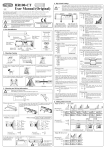
8. Verification of Operation
1. If mounting and various settings are completed, the power and confirm
the performance of detection area.
2. If the door does not operate normally, turn off the power and re-set
the detection area.
3. If the door does not function normally after the above procedure,
adjust Dip Switch.
4. When adjusting the detection area or sensitivity by Dip Switch,
turn off the power first.
When re-setting, turn on the power according to <7. Sensitivity Settings
(Precaution on Power-ON)>.
(1) When the sensor does not detect a person in the detection area,
adjust <Dip Switch Y 1 2> (H) side.
(Sensitivity increases)
(2) When the sensor detects a person even if no one exists in
the detection area, adjust <Dip Switch Y 1 2> (L) side.
(Sensitivity decreases)
Door
door
How to set sensitivity :
Fixed glass sheet
The 1st Row detection area should
not be overlapped with the door.
6
R
5
R
4
R
3
R
2
R
1R
2R
6R
1
R
Initialization process is not necessary in this case. Initialization Indicating LED does not flash even after Power-ON.
9. Self-Monitoring
Self-Monitoring means the sensor is equipped with microprocessor control function and continuously monitors itself.
When Self-Monitoring determines that the sensor has malfunctioned, Operation Indicator LED and Power Indicator LED will blink alternately with the
door remained open. In this case, please replace the sensor immediately.
ON / OFF of Self-Monitoring can be set with Dip Switch.
CAUTION If the floor of Detection Area is specular surface, Self-Monitoring may function. In that case, set Self-Monitoring <OFF>
with Dip Switch.
-6-
Usual Detection Row
-3-