1
Table of Contents
1
General Information .......................................................................................................................... 5
1.1
2
Overview ........................................................................................................................................... 6
2.1
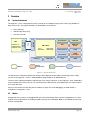
System Architecture .................................................................................................................. 6
2.2
Models ....................................................................................................................................... 6
2.2.1
Argos2D – A100 (150-1001-1) ........................................................................................... 7
2.2.2
Argos2D – A101 (150-1002-1) ........................................................................................... 7
2.2.3
Argos2D – A102 (150-1003-1) ........................................................................................... 7
2.2.4
Argos2D – A103 (150-1004-1) ........................................................................................... 7
2.2.5
Argos2D – A104 (150-1005-1) ........................................................................................... 7
2.3
3
4
Symbols Used ........................................................................................................................... 5
Interfaces & Connectors ........................................................................................................... 8
Software Installation ......................................................................................................................... 9
3.1
Software-Development-Kit SDK ............................................................................................... 9
3.2
Drivers ....................................................................................................................................... 9
3.3
Console ..................................................................................................................................... 9
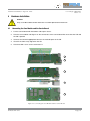
Hardware Installation ..................................................................................................................... 10
4.1
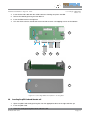
Connecting the Core Module and the Carrier Board .............................................................. 10
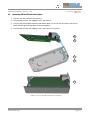
4.2
Connecting CM and CB with housing base ........................................................................... 11
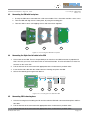
4.3
Connecting the ISM with front plane ...................................................................................... 12
4.4
Connecting the 30pin flex-foil cable to the ISM ..................................................................... 12
4.5
Connecting ISM to housing base ........................................................................................... 12
4.6
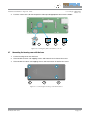
Inserting the µSD-Card and the coin cell ................................................................................ 13
4.7
Connecting the housing cover with the base ......................................................................... 14
5
Getting Started ............................................................................................................................... 15
6
Programming Environment ............................................................................................................ 16
Use Eclipse IDE for C/C++ developers or an editor of your choice. ................................................. 16
6.1
7
Setting up the tool chain ......................................................................................................... 16
Appendix ........................................................................................................................................ 17
7.1
Electrical Specifications .......................................................................................................... 17
7.1.1
Operating Conditions ....................................................................................................... 17
7.1.2
Maximum Ratings ............................................................................................................ 17
7.1.3
ESD Sensitivity ................................................................................................................. 17
7.2
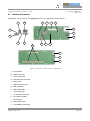
Connector and Interface Description ...................................................................................... 18
7.2.1
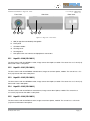
Reset button a(S4) ........................................................................................................... 18
7.2.2
HDMI connector b(X10) ................................................................................................... 18
7.2.3
Power connector c(X10) .................................................................................................. 18
© Bluetechnix 2013