1
Nursery Numbers
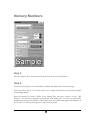
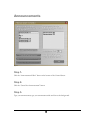
Figure 8
Step 1.
Click the “Nursery Alert” button located along the bottom of your Control Screen.
Step 2.
Check the Font Style, Size, Color, Bold, Italic, underline, and display time for correct settings.
The X Axis offset, and the Y Axis offset, allows you to change the placement of the Nursery Number
on the Display Screen.
Enter the number you need to display in the Message Box, and press <Enter> or click “Add
Number”. You will see the number you just entered in the Display List. You may now add another
number in the message box and hit the Add Number again, that number will appear in the Display List
Box as well. You may repeat this process as many times as needed.
20