1
Listening to your messages _____________________________
From the Voice Mail Account menu, press 1 to listen to your new and old
messages, or 2 to listen to your saved messages. As you listen to each message,
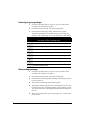
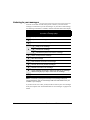
the following commands are available, which are described later in this chapter.
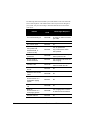
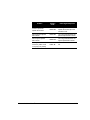
Voice Message Commands
Use after a message plays
1
Replay the message
2
Skip to the next message
3
Delete or undelete the message
4
1
Reply to the message
2
Forward the message
3
Call back the person who left the message
5
Return to the previous message
6
Save the message
7
Fast forward 5 seconds in the message
8
Recover all recently deleted messages
9
Rewind 5 seconds in the message
#
During message introduction: Skip to the start of the message
While message plays: Skip to the end of the message
*
Return to the Voice Mail Account menu
Note: Commands 7 (message fast forward) and 9 (message rewind) are
enhanced features—ask your TeleVantage CTM Suite administrator if they are
available in your company.
If you have access to a e-mail, you may be able to listen to your voice messages
from your computer. See “E-mail notification of voice messages” on page 6-4 for
details.
6-6
TELEVANTAGE CTM SUITE USER’S GUIDE