1
4
Preparing the system for ISDN
development
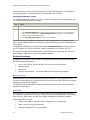
Installing NMS ISDN software
Install NMS ISDN software from a package downloaded from the NMS
Communications web site (www.nmscommunications.com). To install the software
this way, follow the instructions on the web site to download and decompress the
package.
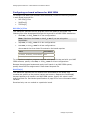
Running the system with NMS OAM
To be configured and started correctly, each board you install must have a separate
set of configuration parameters and values entered into the NMS OAM configuration
database. See NMS OAM on page 16 for details. Parameters and their assigned
values are expressed as a keyword name and value pair (for example, Encoding =
MU_LAW).
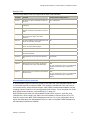
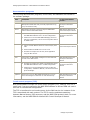
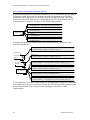
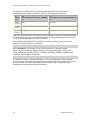
These configuration settings are specified in two types of files:
File type
Description
Board keyword
NMS OAM board keyword files contain parameters to configure the board. These
settings are expressed as keyword name and value pairs. See Creating board keyword
files on page 22.
System
configuration
NMS OAM system configuration files contain a list of boards in the system and the
name of one or more board keyword files for each board. See Creating a system
configuration file for oamsys on page 39.
After you create and edit these files, load them into the NMS OAM configuration
database by running the oamsys utility. Running oamsys describes this step.
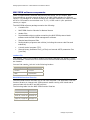
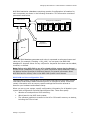
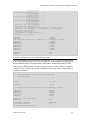
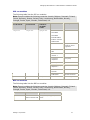
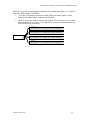
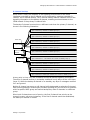
The following illustration shows the process by which configuration files are sent to
oamsys to create the NMS OAM configuration database:
System configuration file
Keyword file
filea.cfg
TCPFILE[0]=isd0
Country=USA
.
.
.
Keyword file
f i l e b. c f g
TCPFILE[0]=isd0
Country=USA
.
.
.
Dialogic Corporation
oamsys.cfg
[Board A]
Product=CG6000_QUAD
Number=1
Bus=0
Slot=20
File=filea.cfg
[Board B]
Product=CG6000_QUAD
Number=2
Bus=0
Slot=21
File=fileb.cfg
oamsys
NMS OAM
configuration
database
[Supervisor]
AutoStartEnabled=Yes
AutoStopEnabled=Yes
21