1
SoftLINK 12
Network Settings
Allows you to set up the network transport for a Client. It must be the
same as that set at the Control.
TCP/IP
Port
The TCP/IP protocol requires that a port number be allocated for
applications to communicate through. The default-registered port for
SoftLINK is 5405.
Send Keep Alive Packets
Some TCP stacks send Keep Alive Packets. In some circumstances, it may
be desirable to disable this. For example on an ISDN line where a TCP/IP
client is loaded a symptom may occur where the ISDN line is brought up
unintentionally.
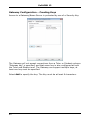
Use Name & Connectivity Server (Gateway)
Enable this option if you want the Students current IP address to register
with a designated 'Name Server/Gateway' on start up. Click Configure
and enter the IP address of the Name Server along with the matching
security key.
Multicast address
This is the IP multicast address that the Student is listening on.
247