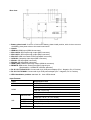
1
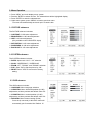
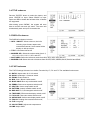
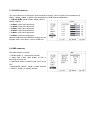
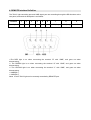
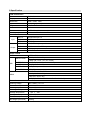
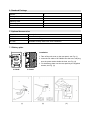
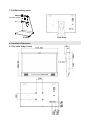
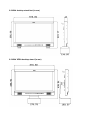
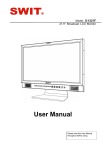
Model: S-1242F 23.8" Broadcast Studio LCD Monitor User Manual Ver: V1.0.0V00 Please read this User Manual throughout before using. Preface Congratulations on your purchase of this product. Please read this user manual carefully. 1 . All internal technologies of this product are protected, including device, software and trademark. Reproduction in whole or in part without written permission is prohibited. 2 . All brands and trademarks of SWIT Electronics Co., Ltd. are protected and other relative trademarks in this user manual are the property of their respective owners. 3 . Due to constant effort of product development, SWIT reserves the right to make changes and improvements to the product described in this manual without prior notice. 4 . The warranty period of this product is 2 years, and does not cover the following: (1) Physical damage to the surface of the products, including scratches, cracks or other damage to the LCD screen or other externally exposed parts; (2) The LCD dot defects are not over three; (3) Any damage caused by using third-party power adaptors; (4) Any damage or breakdown caused by use, maintenance or storage not according to the user manual. (5) The product is disassembled by anyone other than an authorized service center. (6) Any damage or breakdown not caused by the product design, workmanship, or manufacturing quality, etc. 5 . For any suggestions and requirements on this product, please contact us through phone, fax, Email, etc. SWIT Electronics Co., Ltd. Address: 10 Hengtong Road, Nanjing Economic and Technological Development Zone, Nanjing 210038, P.R.China Phone: +86-25-85805753 Fax: +86-25-85805296 Email: [email protected] Website: http://www.swit.cc Maintenance The Monitor 1. Please keep the signal terminals and the cooling vent away from knife-edge, metal or liquid in order to avoid short-circuit and damage. 2. Please don't try to disassemble any parts of the monitor by yourself, which would probably damage the monitor and do harm to human body, and it will cause the invalidation of product warranty. 3. Please don't touch the screen with your fingers, which would probably deface the screen. 4. Please don't press the screen; the LCD is extremely exquisite and flimsy. The power Please use the power adapter provided or recommended by the manufacturer in order to avoid damage. For a third party power adapter, please make sure the voltage range, supplied power, and polarity of power lead are fit. Please disconnect the power cable under the following situations: 1. If you do not operate this monitor for a period of time; 2. If the power cable or power adaptor is damaged; 3. If the monitor housing is broken. Working Environment 1. Please don't lay this product on the unstable place. 2. Please don't lay this product in hot, cold or wet location. Cleaning 1. Please clean the screen with dry and downy cloth or special LCD cleanser. 2. Please do not press hard when cleaning the screen. 3. Please do not use water or other chemical cleanser to clean the screen. The chemical may damage the LCD. 1. Features Full-HD 23.8” IPS LCD Panel 1920×1080 resolution, H 178°/V 178° viewing angle, 1000:1 contrast Multiple inputs HD/SD-SDI, HDMI and Composite input Loop through outputs Each of the 2 input HD/SD-SDI and HDMI has loop through output. HDMI converted to SDI output Supported HDMI formats: 480i / 576i / 720p (50, 59.94, 60) / 1080i (50, 59.94, 60) / 1080P (23.98 24, 25, 29.97, 30), and the output SDI will embed the audio (48KHz) from HDMI. Waveform (Y, Cb, Cr, R, G, B) and full scale There are totally 6 kinds of waveform display, available under both SDI and HDMI, to check the Luminance (Y), Blue-difference (Cb), Red-difference (Cr), Red (R), Green (G), Blue (B), and the Y, Cb, Cr can be simultaneously displayed, R, G, B can be simultaneously displayed, and each of the waveforms can be set to full scale display. Vector scope The displayed vector scope pattern is available under both SDI and HDMI, represents saturation as distance from the center of the circle, and hue as the angle, in standard position, around it. Histogram (R, G, B) The histogram is a bar graph that shows the distribution of luminance values in the picture. There’re R, G, B histograms that individually displayed simultaneously, available under both SDI and HDMI. 16-ch audio meter Under HDSDI, it displays 16 channels audio bars, with mark, and under SDSDI or HDMI, it displays 8 channels audio bars with mark. The audio bar is green, and will turn yellow when audio exceeds -20dB, and turn red when exceeds -9dB. SDI timecode Under SDI input, it can display the SMPTE timecode (VITC1, VITC2 or LTC), which is used extensively for synchronization, and for logging and identifying material in recorded media. ◆ ◆ ◆ ◆ ◆ ◆ Peaking focus assist (red/blue switch) The Peaking focus assist function is to mark the sharpest edges of the image with red or blue color, for users to check if the subjects are focused. Multi Scale Marker The monitor has 16:9 native LCD panel, and supports 4:3, 13:9, 14:9, 15:9, 1.85:1 and 2.35:1 scales marker for different video producing. Zebra stripes Zebra Stripes are used to check if the image is over exposed or not by showing black and white lines on the monitor. It is considered over exposed when luminance value exceeds 90%. False color The false color is used to aid in the setting of camera exposure. Under false color mode, there’s a color chart on the bottom of screen for reference. The over exposed subjects (above 101 IRE) on the monitor will display as RED, and the underexposed subjects will display as BLUE. For correct exposed subjects, it will display as green and pink. Blue Only Under Blue Only Mode, only blue pixels are used to generate the image, because hue and saturation can be adjusted quicker and more accurately. UMD Support TSL UMD protocol so that TALLY UMD can be remotely controlled. User definable function keys There are 4 function keys on the monitor front panel, which permit users to define shortcuts for the various functions. User editable video title User can edit a video title for the current camera, and the title will display on the top of screen. 3-color TALLY light There’s a 3-color TALLY light in the front panel of monitor, and TALLY signal is input via DB-9 connector on the rear panel. Main/Backup Power Supply The monitor provides 2 DC power inputs, for main and backup power. ◆ ◆ ◆ ◆ 、 2. Panel Instruction ·Front view ⑴ Desktop Stand Feet (dismountable) ⑵ Speaker: For SDI/HDMI embedded audio and analog audio monitoring. (Will not work if earphone is plugged in) ⑶ SDI1: Press “SDI1” to switch to SDI input 1 ⑷ SDI2: Press “SDI2” to switch to SDI input 2 ⑸ HDMI: Press “HDMI” to switch to HDMI input ⑹ CVBS: Press “CVBS” to switch to CVBS input ⑺~⑼ F1, F2, F3, User definable function keys ⑽ WFM: Display waveform Press “WFM” once, it will display the waveform on the screen. Within 5 seconds, press “WFM” again, it will display the waveform menu. Revolve “ENTER” to select a waveform display mode and turn it on. After the waveform being turned on for 5 seconds, press “WFM”, the waveform display will be turned off. DISPLAY: Press “Display” to display safe area, scale marker, title/UMD, function status and the current input signal information. MENU: Press to enter Menu ENTER: Select and Apply Under menu system, revolve “ENTER” to adjust settings and press to apply; and out of menu system, directly revolve “ENTER” to adjust volume, and directly press to mute. BRIGHT: Revolve “BRIGHT” to adjust brightness value from 0 100. Default value is 50. CONTRAST: Revolve “CONTRAST” to adjust contrast value from 0 100. Default value is 50. SATURATION: Revolve “SATURATION” to adjust saturation value from 0 100. Default value is 50. POWER: Power on/off Connect with power cable, press the “POWER” to switch on the monitor. Press again to switch off. Note: Disconnect with power cable if the monitor will not be used for a period of time. PHONE 3.5mm earphone socket, for SDI/HDMI embedded audio and analog audio monitoring. TALLY Light: Red, Green and Yellow 3-color TALLY indicator ⑾ ⑿ ⒀ ⒁ ⒂ ⒃ ⒄ ⒅ ⒆ ~ : ~ ~ ·Rear view ⑴ Battery plate Install: V-mount or Gold mount battery plates install position, with a hole to connect the battery plate power wires to the main board inside. ⑵ Handle ⑶ HDMI-IN: HDMI input (HDMI-A connector) ⑷ SDI-LOOP2: SDI loop through output (BNC connector) ⑸ SDI-LOOP1: SDI loop through output (BNC connector) ⑹ SDI-OUT: HDMI converted to SDI output(BNC connector) ⑺ CVBS-IN: Composite video input (BNC connector) ⑻ SDI-IN1: SDI input (BNC connector) ⑼ SDI-IN2: SDI input (BNC connector) ⑽ HDMI-LOOP: HDMI loop through output (HDMI-A connector) ⑾ REMOTE: DB9 socket, external controlling signal input. (See details in “4.REMOTE interface definition”) ⑿ DC IN 11V-17V BACK UP: Connect with 4-pin XLR power adaptor (Pin 1: Negative, Pin 4: Positive) ⒀ DC IN 11V-17V MAIN: Connect with 4-pin XLR power adaptor (Pin 1: Negative, Pin 4: Positive) ⒁ VESA installation position: standard 10×10cm VESA thread ·Input Formats Input Supported formats CVBS PAL / NTSC 480I / 576I / 480P / 576P 1080i (60 / 59.94 / 50) HDMI 720p (60 / 59.94 / 50) 1080p (60 / 59.94 / 50 / 30 / 29.97 / 25 / 24 / 23.98) SMPTE-274M SDI 1080i (60 / 59.94 / 50) 1080p (30 / 29.97 / 25 / 24 / 23.98) SMPTE-RP211 1080psf (30 / 29.97 / 25 / 24 / 23.98) SMPTE-296M 720p (60 / 59.94 / 50) SMPTE-125M 480i (59.94) ITU-R BT.656 576i (50) 3. Menu Operation ⑴ Press “MENU” and it will display menu system ⑵ Revolve “ENTER” to select an item. The selected item will be highlighted display. ⑶ Press “ENTER” to enter the selected item. ⑷ Under menu system, press “MENU” to back to previous menu. *The menu will automatically save and quit if it remains idle. 3.1 PICTURE submenu The PICTURE submenu includes: CONTRAST: 0-100 value adjustment BRIGHTNESS: 0-100 value adjustment HUE: 0-100 value adjustment (Only available under CVBS NTSC input) SATURATION: 0-100 value adjustment SHARPNESS: 0-100 value adjustment BACKLIGHT: 0-100 value adjustment ⑴ ⑵ ⑶ ⑷ ⑸ ⑹ 3.2 SYSTEM submenu The SYSTEM submenu includes: RATIO: Aspect ratio “16:9” / “4:3” selection SCAN: “UNDERSCAN” / “OVERSCAN” ZOOM: “OFF”, “ZOOM1” and “ZOOM2” selection FLIP: Select “ON” to flip the picture by 180°. RESET: Select “YES” to recover all to factory setting. ⑴ ⑵ ⑶ ⑷ ⑸ 3.3 OSD submenu The OSD submenu includes: LANGUAGE: Menu language selection H-POSITION: Menu horizontal position (0-100) adjustment, real-time preview and default value: 50. V-POSITION: Menu vertical position (0-100) adjustment, real-time preview and default value: 50. DURATION: Menu timeout setting (5-60s) Set a time (in seconds) in which the menu will automatically quit if remains idle. Default: 15. ⑴ ⑵ ⑶ ⑷ 3.4 TITLE submenu Revolve "ENTER" button to select the letters, and press "ENTER" to input. Select SPACE to input space and DEL to delete the left letter. Max 10 letters are supported. After setting, press "MENU", the system will save data to current user and quit menu. The menu will automatically save and quit if it remains idle. 3.5 DISPLAY submenu The DISPLAY submenu includes: INFO: “ON/OFF” When select on, the infos including Input format, aspect ratio, underscan/overscan, zoom status will be display on left top screen. TITLE: User edited title on/off MARKER SEL: Select the scale marker from 4:3, 13:9, 14:9, 15:9, 1.85:1, 2.35:1 and OFF SAFE AREA: Select the safe area scale from 80%, 85%, 90%, 95% and OFF. MARKER CLR: Select the color of markers from WHITE, RED, GREEN, BLUE, BLACK and GRAY. ⑴ ⑵ ⑶ ⑷ ⑸ 3.6 F KEY submenu The F KEY Settings Submenu is to define Function Key F1, F2 and F3. The available functions are: 01- RATIO: Aspect ratio 16:9 / 4:3 switch 02- SCAN: Underscan / Overscan switch 03- ZOOM: Picture Zoom-in 04- B/W: Color / Black & white switch 05- BLUE ONLY: Blue only mode switch on/off 06- ZEBRA: Zebra over exposure switch on/off 07- VECTOR: Vector scope switch on/off 08- PATTERN: Internal colorbar switch on/off 09- RGB HIST: R, G, B Histogram switch on/off 10- TIMECODE: SDI timecode display switch on/off 11- F.COLOR: False color mode switch on/off 12- AUDIO BAR: Audio meter display switch on/off 13- FOCUS: Peaking focus assist switch on/off, 14- FLIP: Image flip 15- COLOR TEMP: Adjust color temperature 16-UMD: Adjust UMD 3.7 COLOR submenu The color submenu is to change the color temperature settings. User can select color temperature as 6500K 5600K 9300K, or define color temperature by RGB GAIN and RGB BIAS. COLOR TEMP: 6500K, 5600K, 9300K, USER1, USER2, USER3 R GAIN: 0-255 value adjustment G GAIN: 0-255 value adjustment B GAIN: 0-255 value adjustment R BIAS: 0-255 value adjustment G BIAS: 0-255 value adjustment B BIAS: 0-255 value adjustment Remark: RGB GAIN and RGB BIAS settings are only available when “Color temp” is set as USER1/2/3 ⑴ ⑵ ⑶ ⑷ ⑸ ⑹ ⑺ 、 、 3.8 UMD submenu The UMD submenu includes: RS485 ADDR: 1 126 address selection UMD POS: Select UMD display at TOP or BOTTOM on the screen UMD DISP: Switch to UMD or fixed TITLE, or turn OFF BAUD RATE: ”38400”, “19200” or “9600” selection PARITY: “EVEN” or “NONE” selection ⑴ ⑵ ⑶ ⑷ ⑸ ~ 4. REMOTE Interface Definition The TALLY light controlling port and UMD signal port are controlling through the DB-9 socket at the rear panel, and terminal description is as follows: Terminal Description 1 2 3 4 Y G R 5 6 7 8 9 485B(Rx-) 485A(Rx+) GND ⑴The RED light is on when connecting the terminal “R” with “GND”, and goes out when disconnecting. ⑵ The GREEN light is on when connecting the terminal “G” with “GND”, and goes out when disconnecting. ⑶ The YELLOW light is on when connecting the terminal “Y” with “GND”, and goes out when disconnecting. ⑷ 485B(Rx-) ⑸ 485A(Rx+) Note:3-color TALLY light can be remotely controlled by REMOTE port. 5.Specification LCD Performance Size 23.8 inches Display area 527 296mm Resolution × 1920×RGB×1080 Aspect ratio 16:9 (4:3 adjustable) Brightness 250cd m2 Contrast 1000:1 Color 16.77 million colors Viewing angle Horizontal: 178 Vertical: 178 / ° ° Interface Input Output BNC ×2 HD/SD-SDI input ×2 BNC ×1 CVBS input HDMI ×1 HDMI input BNC ×2 HD/SD-SDI loop output ×2 BNC ×1 HDMI converted to SDI output HDMI ×1 HDMI loop output 3.5mm ×1 SDI/HDMI embedded audio output Video Format CVBS SMPTE-274M SDI ∕ NTSC PAL 1080i (60 / 59.94 / 50) 1080p (30 / 29.97 / 25 / 24 / 23.98) SMPTE-RP211 1080psf (30 / 29.97 / 25 / 24 / 23.98) SMPTE-296M 720p (60 / 59.94 / 50) SMPTE-125M 480i (59.94) ITU-R BT.656 576i (50) 480I / 576I / 480P / 576P HDMI 1080i (60 / 59.94 / 50) 720p (60 / 59.94 / 50) 1080p (60 / 59.94 / 50 / 30 / 29.97 / 25 / 24 / 23.98) General Working voltage DC / battery 11V-17V Power consumption ≤42W Working temperature 0 Working humidity Storage temperature Storage humidity Dimensions (w/o stand) Net weight (w/o stand) ℃~+40℃ 10%~90% ﹣15℃~﹢60℃ 10%~90% 576×387×81mm 6.98kg 6. Standard Package Monitor ×1 Desktop Stand Feet User Manual Warranty Card Power Adaptor Power Cable ×2 ×1 ×1 ×1 ×1 7. Optional Accessories Model Description S-7004S V-mount battery plate S-7004A Gold mount battery plate A-VS22 Rotatable desktop stand with VESA installation 7.1 Battery plate Installation 1. Take off the rub cover on the rear panel, see Fig. (1) 2. Insert the DC cable of S-7004S/A into the hole, and plug onto the power socket inside the hole, see Fig. (2) 3. Fix the battery plate onto the rear panel by the supplied screws, see Fig. (3) S-7004S S-7004A (1) (2) (3) 7.2 VESA Desk top stand 10x10cm VESA A-VS22 8. Installation Dimension 8.1 The main body (in mm) Rear View 8.2 With desktop stand feet (in mm) 8.3 With VESA desktop stand (in mm)