1
6-3
<6. Setup>
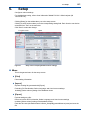
By default, the user account option is disabled (Level 4). See below for more details about levels.
When this option is enabled, the Level 4 user account information screen is displayed for the
purpose of confirmation. Entering the user ID and password changes the level to Level 1 and the
Current measurement readings appears.
One user is registered by default.
A001
User ID:
Level:
4
Operator:User
Password:123456
To enable password management, use the above user ID and password. For security, it is
recommended that you change the password, or that you add a new Level 4 (administrator) user
ID and delete the existing A001.
When registering a new user ID, access [Setup] – [User account] again and select [New...].
If password management is enabled, only Level 4 users can access the user account screen.
The user ID of the current logged-in user cannot be edited or deleted. The password can be
edited.
When the user account option is disabled, [New...], [Delete], [Edit...], and [Change password] for
the user ID are not available.
CAUTION
Any user can change their own password. Level 4 (administrator) users must not forget their own
password. They alone can access the user account screen.
If no one can access the user account screen, contact Yokogawa.
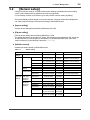
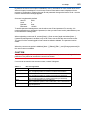
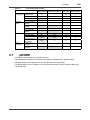
Table 6.1
New user registration
Registration Item
User ID (account)
Operator
Description
Level
Password
Description
Enter a user account ID for log-in.
Up to 10 single-byte letters or numbers. The field is case sensitive.
Enter the operator name.
Up to 20 single-byte letters or numbers (10 double-byte characters).
Optional information field. Can be used as memo.
Up to 50 single-byte letters or numbers (25 double-byte characters).
Select a user permission level (see Table 6.2).
Level 2: Calibration operator, Level 3: Data editor, Level 4: Administrator
6 to 20 single-byte letters or numbers. The field is case sensitive. Never
forget the password.
IM 12A01S02-01E
1st Edition : May 10, 2013-00

![Model PH450G [Style: S2] pH and ORP Converter](http://vs1.manualzilla.com/store/data/006013412_1-cd77700eed276036ffccc744cbf6fbb4-150x150.png)