1
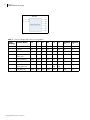
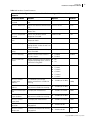
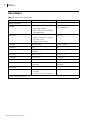
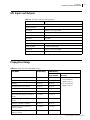
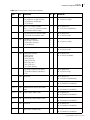
APM6802+ Installation and Operation Manual 41 Custom GPI Example The following example indicates how to use the combination of GPI In 2 and GPI In 3 to change audio output sources, and trigger GPI Outputs based on the source of SDI_A Out 1 Surround In. Table 5-2 Custom GPI Example Inputs Action Result GPI Inputs Parameters 12 (GPI1) I3 (GPI2) S1 Out 1 Surround In (PARAM [346]) S1 Out 1 Stereo In (PARAM [347]) 0 0 Virtual In 1 Surround 5.1 Virtual In 1 Stereo 0 1 Virtual In 4 Surround 5.1 Virtual In 4 Stereo 1 0 AAP Surround 5.1 AAP Aux 1 1 Virtual In 2 Surround 5.1 Virtual In 2 Stereo Table 5-3 Custom GPI Example Outputs Action Result Parameters GPI Outputs SDI_A Out 1 Surround In (PARAM [346]) O1 (GPO0) O2 (GPO1) O3 (GPO2) O4 (GPO3) Virtual In 1 Surround 5.1 1 0 0 0 Virtual In 4 Surround 5.1 0 1 0 0 AAP Surround 5.1 0 0 1 0 Virtual In 2 Surround 5.1 0 0 0 1 Pre-Requisites Make the following configuration settings: Go to SDI_A > Audio Configuration > Input Configuration Set Virtual In 1 > SDI_A In 1 Virtual Type to Surround-5.1+2.0 Set Virtual In 2 > SDI_A In 2 Virtual Type to Surround-5.1+2.0 Set Virtual In 4 > SDI_A In 4 Virtual Type to Surround-5.1+2.0 Go to SDI_A > Audio Configuration > Advanced Audio Processing Set SDI_A Processing Mode to M3: MultiMerge [Credit4] Go to SDI_A > Audio Configuration > Output Configuration Set Virtual Out 1 > SDI_A Out 1 Virtual Type = Surround-5.1+2.0 Set Virtual Out 1 > Source Select > SDI_A Out 1 Virtual Source Routing Type = Group Go to General > GPI Input Set GPI Input to Edit to Input 2 Set Input Trigger to RisingEdge Set Input Event to Custom GPI Repeat the previous steps to configure Input 3 Copyright © 2012, Harris Corporation