1
Coagulation Analyzer User’s Manual
5.4 DFIB setting
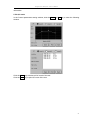
When setting PT program, please select “DFIB” with “√”. Click the DFIB key to enter the
DFIB parameters window. (Refer to Appendix II)
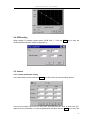
5.5 Control
5.5.1 Control parameters setting
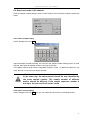
In the test setting window, click the Control key, then enter the control setting window.
There level controls can be set for every test, and each has the value of lower limit (LL),
upper limit (UL) and batch no. Input the parameters and then click the Save key to save the
20