Download Operation Manual

Transcript
Coagulation Analyzer User’s Manual
6. Sample Testing............................................................................. 22
6.1 Select the tests combination ......................................................................... 22
6.2 Select test mode of the channel.................................................................... 23
6.2.1 Select sample testing.................................................................................................. 23
6.2.2 Select control testing .................................................................................................. 23
6.2.3 Select standard testing ............................................................................................... 24
6.2.4 Start testing ................................................................................................................. 24
6.3 Adding the reagent........................................................................................ 25
6.4 Blood coagulation testing .............................................................................. 26
6.5 Saving the testing result ............................................................................... 26
7. Synthetized Report....................................................................... 27
7.1 Printing according to patient ......................................................................... 27
7.1.1 Patient table ................................................................................................................ 27
7.1.2 Basic Operation .......................................................................................................... 27
7.1.3 Change the patient information .................................................................................. 28
7.1.4 Review the report ........................................................................................................ 28
7.1.5 Cancel the patient record............................................................................................ 28
7.1.6 Report printing ............................................................................................................ 28
7.2 Print according to the items .......................................................................... 29
7.3 Send data to serial port ................................................................................. 29
8. System Setup ............................................................................... 30
9. Message Management ................................................................. 32
10. System Log ................................................................................ 34
11. Shutting Down the System ......................................................... 35
12. Instrument Maintenance ............................................................. 36
12.1 General ....................................................................................................... 36
12.2 Clean the instrument ................................................................................... 36
12.3 Changing the parts of the instrument .......................................................... 36
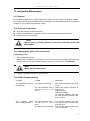
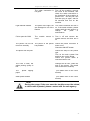
12.4 Simple Troubleshutting ............................................................................... 36
Appendix I: Guideline for Adding the Sample ................................... 38
Appendix II: Special Instruction of Program Parameter Setting ........ 40
7