1
ISO 9001 CERTIFIED
Chapter 8
8-1
8-1-1
www.liteputer.com.tw
Other function setting
LCD display / default setting
Power switch of LCD background lighting
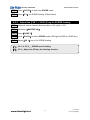
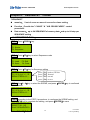
STEP-1 Press【SET】
F1 : Setup F3 : Patch
F2 : Xio F4 : Lock
STEP-2 and press【F1】
F1 : Lcd
F2 : Reset system
STEP-3 and press【F1】
F1 : Backlight
F2 : Concen
STEP-4 and press【F1】for brightness of LCD background lighting, press【F1】again
to save.
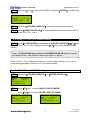
F1 : Backlight
F2 : Concen
8-1-2 LCD contrast adjustment
STEP-4 refer to STEP-4,press【F2】key to adjust the contrast of LCD, and press
【F2】again to confirmed.
F1 : Backlight
F2 : Concen
www.bluelight.at
17
Lite-Puter
CX-12 [EUM-E]