1
P L A N 4 0 0
I N S T A L L E R
G U I D E
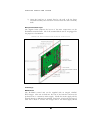
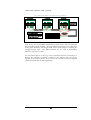
As standard, the panel is shipped with the relevant jumpers set for direct
cabled systems, this presumes that PLAN400’s are linked together using
dedicated twisted paired cables and connected to the Host PC via an Intelligent
Loop Supervisor (ILS). The ILS device is available in two or eight port
configurations and would usually be located adjacent to the main PLAN640
PC. For hybrid applications a virtual ILS will be used which provides the
functionality of the physical ILS (using the serial ports available within the PC
as well as the option to use the Ethernet LAN network interface card.
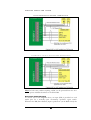
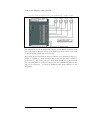
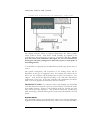
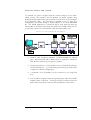
TYP ICAL PLAN400 NETW ORK SCH EMATIC
•
Network cable should be minimum 7/0.2mm shielded two twisted
pairs. Recommended cable is Belden 8723 or equivalent. Maximum
cable distance between any two panels is 5,000m.
•
Normal precautions to avoid possible causes of harmful interference
should be employed… e.g. avoid running with heavy duty mains cables
or adjacent to fluorescent lighting etc.
•
A maximum of 16 PLAN400’s can be connected to any single ILS
port.
•
Care should be employed when using twisted pair cables that include
multiple ‘black’ conductors. ‘Crossing’ the black conductors between
panels will cause spurious faults that may be difficult to track down.
16