1
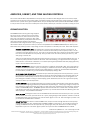
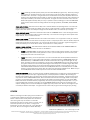
CABINET IMPULSE PROCESSOR Without a guitar speaker cabinet, guitar
distortion would sound thin and harsh.
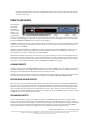
Studio Devil Amp Modeler Pro features a
powerful module, the CABINET IMPULSE
processor, which allows you to select a
guitar speaker cabinet model, giving you the
effect of hooking up your amp to a real
guitar cabinet. Each guitar cabinet (and
associated mic-ing technique) is stored in a
special file called an impulse file. When you
select a cabinet from the CABINET IMPULSE
processor, you actually select one of Studio Devil’s built-in impulse files for use with your sound.
Studio Devil Amp Modeler Pro comes with a set of cabinet impulse files for you to get started with right away. But the real
power of Studio Devil AMP is that it will work with ANY impulse file in standard WAV or AIFF format…even impulses that
don’t match the sample rate of your project. We’ll get more into that later, but for now let’s look at the controls of the
CABINET IMPULSE processor and how they work:
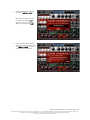
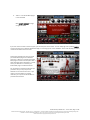
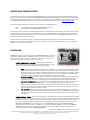
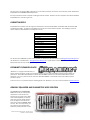
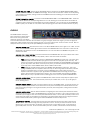
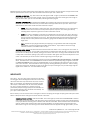
CABINET SELECT TEXT BOX: To select the cabinet that’s right for you, just click on the red text area where
you see the cabinet name, or on the small down arrow that appears next to it. This pulls up the cabinet select
menu, where you will see the names of all the impulse files stored in Studio Devil’s impulse library. Studio Devil
AMP comes with several impulse files built-in, so just click on the name of the cabinet you want to try, and away
you go. Some impulse files are arranged into sub-menus to keep them organized. To access them, simply click
on the sub-menu name to open up the list of impulse files contained within it, and then click on the impulse file of
your choice.
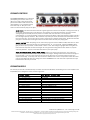
You’ll find that a lot of the tonal characteristics of your sound come from both the CABINET SELECTION and TONE
CONTROLS. So, even if one cabinet doesn’t sound quite right at first, a little tweaking of the TONE CONTROLS
might take you to the sound you’re after. Once again, experimentation and exploration are the keys here to great
sound…play around with different cabinets and the tone controls together, and see what gets your fingers itching
to play…that’s where it’s at!
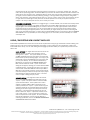
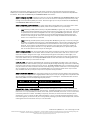
CABINET IMPULSE ON BUTTON: This small button turns the cabinet modeling engine on and off…click it
once to turn it on, click it again to turn it off. The button lights up in red when the cabinet modeling engine is
running to remind you that it is ON. There are a lot of really great speaker modeling plug-ins out there, and we
want you to be able to use them to get your sound with Studio Devil! If you decide to use a third-party cabinet or
impulse modeler, or if you want to use Studio Devil AMP live with a real guitar cabinet, you will need to turn this
button OFF to disable the Studio Devil cabinet processor. That way, you won’t get the clashing effects of two
speaker cabinets running together! But, unless you’re using another cabinet emulator, or playing live though a
real guitar cabinet, you’ll usually want to leave this button ON.
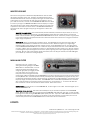
NORM / FAST SWITCH: This switch allows you to remove the latency or delay that might be found in some of
the impulse files you use. The cabinet impulse files that come with Studio Devil Amp Modeler Pro are already
trimmed to provide zero latency, so most times you will want to leave this switch in the NORM position. However,
when you start to download impulse files from the Internet, or begin to record your own impulse files, you might
find that some will introduce an internal latency, or delay, to your guitar sound. This delay can come from the
position of the microphone that was used to record the impulse, or can be because the original impulse file
wasn’t properly trimmed before saved as a WAV file. In either case, flip the NORM / FAST switch to the FAST
position and Studio Devil AMP will convert your impulse file to a minimum phase version that strips the latency
off. This process might change the sound of your impulse model slightly...so flip this switch back to NORM to hear
the impulse in its original form for comparison. Then, choose which mode sounds and feels best for you.
FILTER LENGTH SELECTOR SWITCH: This switch allows you to shorten the size of your cabinet impulse,
enabling you to reduce processing, and to change the cabinet tone and response. Longer impulses typically have
more low end, capture more of the room ambience and reverb, and have a lot of frequency detail in them. They
also take a lot more processing power to compute. On the other hand, shorter impulses have a tighter sound,
Studio Devil Amp Modeler Pro – User’s Guide, Page 15 of 35
©2009-2010 Gallo Engineering, PLLC. All rights reserved. “Amp Modeler Pro”, “Studio Devil AMP”, Studio Devil and the Studio Devil logo are trademarks of Gallo Engineering, PLLC.
Marshall is a trademark of Marshall Amplification. VST and the VST logo are trademarks of Steinberg Media Technologies, GmbH.
All other trademarks are property of their respective owners.