1
Detailed descriptions of CLI commands
How to use the CLI
CLI consists of several commands. To execute the command, press
enter after typing command. Entering help displays all valid commands.
Entering help and a command displays further options of command.
Ctrl -C is the interrupt key sequency and returns user to the prompt.
Note! All letter must be typed as lowercase.
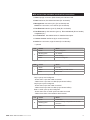
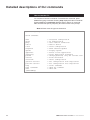
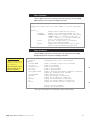
[admin@MPX]$ help
Valid commands:
date
ipcfg
ping
reboot
route
tftpswud
uptime
appselect
changelog
passwd
version
eraseconf
getconf <server>
putconf <server>
help
help <command>
exit
[admin@MPX]$
60
->
->
->
->
->
->
->
->
->
->
->
->
->
->
->
->
->
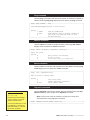
Date/time configuration
IP Configuration
Test network connection
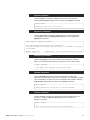
Reboot device
Route configuration
TFTP Software Update
Display uptime
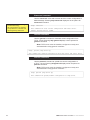
Select active application
Print application changelog
Change password, only for current user
Print SW-version
Erase configuration
Get configuration from tftp-server
Put configuration into tftp-server
Print commands
Help for command
Exit CLI
MPX series video encoders CLI user manual