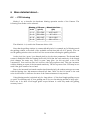
1
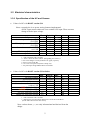
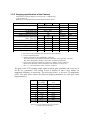
valid firmware on the device, UPDATE mode will start anyway with the text ‘NO FIRMWARE’. This mode is used to update the Firmware or download/refresh stored parameter data. The PC application may make the running Firmware to enter this mode (even during autoguiding), be careful! More on this at Error: Reference source not found or in the PC app.’s manual. 1.6 Hardware types There are two types of hardware of this device (HandController and Camera). The newer will show a little X right to the ‘UPDATE MODE’ text to indicate the new hardware type. Besides the HC will show a BOOT version of $14 and the Camera BOOT version of $14 as well. (See PC app.’s manual how to check this.) Lower BOOT versions indicate ‘old’ hardware. Note that the new hardware can not run Firmware version older than 2.00 due to the hardware change. Uploading such an old firmware will succeed but the HandController will display ‘WRONG FIRMWARE’ in update mode. The difference between the two hardvare types are the following: • the new can be turned on by remote (USB) while the old can not; • the new can be used with a (supplied) 6-wire cable while the old works only with a 8-wire one; • the new can’t run a Firmware below 2.00; • the new contains a small beeper built-in (though not activated yet). Types of the supplied camera-cables: • 8-wire black “telephone” (flat) cable with black connector (Cbb) • 6-wire yellow silicone-covered cable with black connector (Cyb) • 8-wire yellow silicone-covered cable with white connector (Cyw) • same as Cbb but producted after the year 2014 (Cbb2) The table below is important only if You want to use different HC and Camera (not from the same device pack). The HC and Camera is advised to be used always from the same pack, the following configurations would work only: old HC, old Cam. new HC, new Cam. old HC, new Cam. new HC, old Cam. Cbb ■──■ () () X Cyb ■──■ ─ () ─ Cyw □──□ () X ─ = not working ()= must be working but not guaranteed X = not working. The devices may be damaged! 8 Cbb2 ■──■ () X