1
Installation Guide
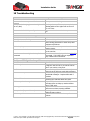
10 Troubleshooting
Problem: Unit does not turn on when the power switch is pressed
Possible Cause:
Power switch was not pressed for 2 seconds
or more
Battery needs charging (sometimes lights will
be very dim)
Power switch disabled by configuration
Resolution:
Press power switch longer.
Recharge battery. If battery is completely
discharged then the Lights will not turn on
for 1.5 hours
Remove and re-insert the battery to turn unit
on.
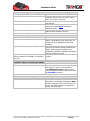
Problem: Unit does not respond to SMS
Possible Cause:
GSM light is on or flashing
GSM Network is slow
Unit is sleeping
User is not authorized
User does not have a high authority for the
command
Problem: GSM light is always ON
Possible Cause:
No GSM signal
No SIM card
SIM card has expired
SIM has PIN code set
SIM is warped or damaged
Roaming not enabled
Battery is low (for portable use)
Unknown problem
Resolution:
Refer to GSM problem resolution
Wait for SMS. Some GSM networks slow
down during peak times or when they have
equipment problems.
Wait for unit to wake up or activate the
motion sensor.
Check that the user’s phone number is added
to the user list.
Check the user’s authority with the LISTUSER
command. T23 FLEET will not respond to
any unauthorized commands.
Resolution:
Check with a mobile phone to see if there is
a signal in the area or try to call the unit to
see if you receive a ring tone.
Insert working SIM card. Check through a
phone that the SIM can send SMS messages.
Check through a phone that the SIM can
send SMS messages. Replace SIM card if
needed.
Remove PIN code through a phone by
inserting the SIM and delete the code.
Inspect SIM, clean the contacts. If reinserting does not help try another SIM to
see if it will work.
If you are in a different country your SIM
account must have roaming enabled.
Recharge the unit for 5-15 minutes and the
GSM will start working.
Remove and re-insert the battery after 1
minute.
© 2007 - 2013 Tramigo™ Ltd. All rights reserved. Under the copyright laws, this manual cannot be reproduced in any form
without the prior written permission of Tramigo™.
Page 21