1
1 DATECS DPP-350
ECCL
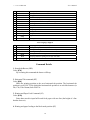
nl, nh
Datai
User’s Manual
Error correction control level:
1: L (7%)
2: M (15%)
3: Q (25%)
4: H (30%)
Specify lower byte and upper byte of data size (1 to 448).
Data bytes
71. Filling or inverting a rectangle in page mode (GS R).
Code: [1Dh] + [52h] + xL + xH + yL + yH + dxL + dxH + dyL + dyH + n
xL and xH
Low and high byte of the horizontal position of the top left corner of
the rectangle in the active page.
yL and yH
Low and high byte of the vertical position of the top left corner of
the rectangle in the active page.
dxL and dxH
Low and high byte of the width of the rectangle.
dyL and dyH
Low and high byte of the height of the rectangle.
n
Filling mode:
0 or ‘0’
Rectangle area is cleared (white).
1 or ‘1’
Rectangle area is filled (black).
2 or ‘2’
Rectangle area is inverted.
The coordinates are relative to the left corner of the page, defined using ESC W (The
print direction doesn’t matter).
If some part of the rectangle is outside the page, only the part inside the page is filled.
The command is invalid in standard mode.
72. Selecting QR Code cell size (GS S)
Code: [1Dh] + [53h] + n
This command sets the cell size for two dimensional barcode QR Code.
Possible values:
n=0 or ‘0’:
Cell size 3.
n=1 or ‘1’:
Cell size 4.
73. Selecting the print direction in page mode (GS T).
Code: [1Dh] + [54h] + n
The command selects the current print direction and set starting point to (0, 0)
according to this direction.
Accepted values of n:
0 or ‘0’
Printing from left to right, feed to bottom. Starting point in left top corner
of the page.
1 or ‘1’
Printing from bottom to top, feed to right. Starting point in left bottom
corner of the page.
32