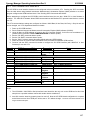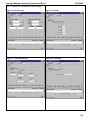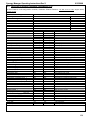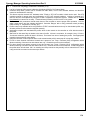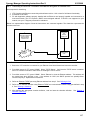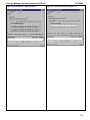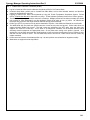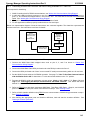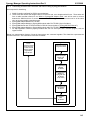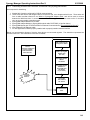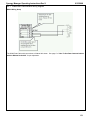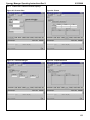
1
23(5$7,1*,16758&7,216 For Software Version: 2.12.20 Revision: S, Date: 9/15/2008 Tidal Engineering Corporation 2 Emery Ave. Randolph, NJ 07869 Phone: (973) 328-1173 | Fax: (973) 328-2302 Synergy Manager Operating Instructions Part Number TE1567 ©2002, 2005 Tidal Engineering Corporation. • All rights reserved. Notice to Users TIDAL ENGINEERING PRODUCTS ARE NOT AUTHORIZED FOR USE AS CRITICAL COMPONENTS IN LIFESUPPORT DEVICES OR SYSTEMS UNLESS A SPECIFIC WRITTEN AGREEMENT REGARDING SUCH USE IS ENTERED OBTAINED FROM TIDAL ENGINEERING PRIOR TO USE. Life-support devices or systems are devices or systems intended for surgical implantation into the body or to sustain life, and whose failure to perform, when properly used in accordance with instructions for use provided in the labeling and user’s manual, can be reasonably expected to result in significant injury. No complex software or hardware system is perfect. Bugs are always present in a system of any size. In order to prevent danger to life or property, it is the responsibility of the system designer to incorporate redundant protective mechanisms appropriate to the risk involved. All Tidal Engineering products are 100 percent functionally tested. Additional testing may include visual inspections. Specifications are based on characterization of tested sample units rather than testing over temperature and voltage of each unit. Additional testing or burn-in of a system is available by special order. Tidal Engineering reserves the right to make changes and improvements to its products without providing notice. Trademarks TIDAL ENGINEERING IS A REGISTERED TRADEMARK OF TIDAL ENGINEERING CORPORATION. Tidal Engineering Corporation 2 Emery Ave Randolph, NJ 07869 Tel: 973-328-1181 Fax: 973-328-2302 Email: [email protected] ii Revision List 1. 2. Rev A Rev B Initial Release Added VT 3 Communications Board Setup Section and associated instructions. 3. Rev C 07/25/2002 4. Rev. D 5 Rev. E 6 Rev. F 7 Rev. G. Added Watlow 942 Setup and associated material. Added missing controller sections as placeholder for future revisions. Revised Program Installation section to include Win95 and Win98. These OS must have DCOM95 or DCOM98 executed respectively. Revised Program installation section to include instructions to uninstall all previous versions of program before installing any newer versions. Added VT 4 Communications setup section via RS232 modbus. Added revision level information to supported controllers. Added various placeholder sections all marked ‘Preliminary’ for later additions. Revised Program Requirements section to unabbreviated Service Packs designations for clarity. Renamed document to Synergy Manager User Manual. Added all preliminary sections and removed markers. Added Alert System section. 8 Rev. H 01/29/2003 9 Rev. I 10 Rev. J 11 Rev. K 12 Rev. L Updated document to reflect changes made in Synergy Manager. Added a section that describes using National Instruments Max to send SCPI Commands. Updated to reflect Synergy Manager revision change. Added features include a Synergy Manager monitor only version, additional communication support for Watlow 942, F4 via GPIB, and profile control for Versatenn 5 , see ‘New Features’ section for details. Added ‘New Features’, ‘Bug Fixes’, ‘Known Issues’, and ‘Revision History’ sections this revision (Rev. I). Updated to reflect Synergy Manager revision change to (Rev. J). Addition of a new controller type, Thermotron 4800. Enhanced Event tab display which allows supplemental controller information to be displayed. Addition of an error codes list. Updated to reflect Synergy Manager revision change to (Rev. K). Addition of a new profile editor that imports Versatenn 5 profiles into Synergy Manager from a 3.5 inch floppy disk. Added support for software protection via external hardware dongle. Use of third party installation software which simplifies the install process for supported PC operating systems. Updated to reflect Synergy Manager revision change to 2.5 (Rev. 2.05). Major release upgrade. 13 Rev. L 9/28/2004 14 Rev. M 15 Rev. N 16 Rev. O 17 Rev. P 18 Rev. Q 19 Rev. R 20 Rev. S Updated to reflect Synergy Manager revision change to 2.5.22. Increased PC serial port support to 16. Minor release upgrade. Updated to reflect Synergy Manager revision change to 2.6.21. Added support for Partlow 1460 set point controller and profile control for WF4 controler. Updated to reflect Synergy Manager revision change to 2.7.X. Minor documentation corrections,. added RS485 communication support for the Partlow 1460/1462 profile controller. Added more descriptive error messages when certain functions executed during initial chamber window connection sequence. Added more descriptive headings to sections of the manual concerning controller communication methods setup. Updated to reflect Synergy Manager revision change to 2.08.X. Includes minor changes from 2.07.05. Please see ‘Revision History’ section for details. Updated to reflect Synergy Manager revision change to 2.09.X. Added new Yokogawa 550 /750, Pro550/750 support.. Please see ‘Revision History’ and ‘Known Issues’ sections for details. Updated to reflect Synergy Manager revision change to 2.10.x. Added New Chamber AutoLoad feature, support for VT5 HALT/HASS configuration, and revised controller information section. Removed ‘Revision History’, ‘Bug Fixes’, and ‘Known Issue’ section to a new document (Synergy Manager Revision History Rev. Q.doc) to decrease size of main document. Updated to reflect Synergy Manager revision change to 2.11.x. Added the ability to communicate with Tidal Engineering’s TCweb Temperature Aquisition System via TCP/IP Telnet. Please see Release Notes Section for details. Updated to reflect new Synergy Manager revision change to 2.12.x. Added profile support for the Thermotron 4800. Please see Release Notes Section for details. iii 07/11/2002 09/03/2002 09/25/2002 11/03/2002 01/20/2003 05/20/2003 08/22/2003 1/19/2004 8/01/2004 11/15/2004 12/8/2004 05/30/2005 11/21/2005 7/07/2006 8/31/2007 9/15/2008 Table of Contents 1. Introduction .....................................................................................................................................1 1.1 Hardware Requirements.......................................................................................................1 1.2 Software Installation.............................................................................................................2 1.3 External Hardware Dongle Key............................................................................................3 1.4 Synergy Manager Help Menu...............................................................................................4 1.4.1 Synergy Manager in Monitor Only Mode...............................................................................................................................................4 1.4.2 Synergy Manager in Full Feature Mode ................................................................................................................................................5 1.5 1.6 Reference Document List.....................................................................................................6 Synergy Manager Release Notes for Version 2.12.20........................................................8 1.6.1 What’s New ..........................................................................................................................................................................................8 1.6.2 Bug Fixes .............................................................................................................................................................................................8 1.6.3 Known Issues.......................................................................................................................................................................................8 1.7 Synergy Manager Startup ....................................................................................................9 1.7.1 Starting Synergy Manager from the Desktop ........................................................................................................................................9 1.7.2 Starting Synergy Manager from the Start Menu ..................................................................................................................................10 2. Application User Interface Display...............................................................................................11 2.1 Menu Bar .............................................................................................................................12 2.1.1 File Menu ...........................................................................................................................................................................................12 2.1.1.1 Preferences Sub Menu ............................................................................................................................................................12 2.1.1.2 Exit Menu Item.........................................................................................................................................................................14 2.1.2 Chambers Menu.................................................................................................................................................................................15 2.1.2.1 Chamber Setup Sub Menu.......................................................................................................................................................15 2.1.2.1.1 Defining A Chamber ...........................................................................................................................................................15 2.1.2.1.2 Editing A Chamber .............................................................................................................................................................23 2.1.2.1.3 Deleting A Chamber ...........................................................................................................................................................25 2.1.3 Ports Menu.........................................................................................................................................................................................27 2.1.3.1 Port Setup Sub Menu...............................................................................................................................................................27 2.1.3.1.1 Defining A Port ...................................................................................................................................................................27 2.1.3.1.2 Editing A Port .....................................................................................................................................................................33 2.1.3.1.3 Deleting A Port ...................................................................................................................................................................35 2.1.4 Profile Editor Menu.............................................................................................................................................................................37 2.1.5 Alert System Menu .............................................................................................................................................................................38 2.1.6 Support Menu.....................................................................................................................................................................................40 2.1.6.1 View User Manual Sub Menu...................................................................................................................................................40 2.1.6.2 Support PDF Documents Sub Menu ........................................................................................................................................42 2.1.7 Windows Menu...................................................................................................................................................................................44 2.1.8 Help Menu..........................................................................................................................................................................................45 2.2 Starting A Chamber Definition...........................................................................................46 2.2.1 Changing a Process Set Point Value ..................................................................................................................................................49 2.3 3. Keyboard Shortcut Combinations.....................................................................................50 Application Chamber Window Display ........................................................................................51 3.1 Process Data Tab................................................................................................................52 3.2 Graph Tab............................................................................................................................53 3.2.1 Expanding and Collapsing the Graph Tab ..........................................................................................................................................54 3.2.2 The Print and Reset buttons ...............................................................................................................................................................56 3.2.3 Exporting Process Graph Data ...........................................................................................................................................................57 3.3 Alarms Tab ..........................................................................................................................61 3.3.1 3.3.2 3.3.3 3.3.4 3.3.5 3.3.6 3.3.7 3.4 The Control Tab .................................................................................................................................................................................62 The Limits Tab ...................................................................................................................................................................................63 The Deviations Tab ............................................................................................................................................................................64 The Alarm Status Summary Tab.........................................................................................................................................................65 Setting an Limit or Deviation Alarm.....................................................................................................................................................66 Sample Chamber Alarm States ..........................................................................................................................................................70 Sample Chamber Graph printout with Alarm Status............................................................................................................................71 Logging Tab ........................................................................................................................72 3.4.1 Enabling Process Logging ..................................................................................................................................................................73 3.4.2 Exporting Logged Data.......................................................................................................................................................................76 3.4.3 Events Tab .........................................................................................................................................................................................79 3.5 Profiles Tab .........................................................................................................................80 3.5.1 3.5.2 3.5.3 3.5.4 Starting Profile Editor..........................................................................................................................................................................81 Downloading a Profile.........................................................................................................................................................................82 Show Compiled Profile .......................................................................................................................................................................85 Profile Control ....................................................................................................................................................................................86 iv 3.6 TCweb Tab...........................................................................................................................89 3.6.1 3.6.2 3.6.3 3.6.4 3.6.5 3.7 3.8 The TCweb Info Tab...........................................................................................................................................................................90 The Export Enables Tab.....................................................................................................................................................................91 The Master and Slave (S1 thru S9) Tabs............................................................................................................................................92 Linking a TCweb Master with a chamber definition window ................................................................................................................94 Removing a TCweb Link from a chamber definition window ...............................................................................................................98 Messages (Msgs) Tab.......................................................................................................100 Info Tab..............................................................................................................................101 4. Supported Controllers and Feature Support ............................................................................102 4.1 Controller Interfacing .......................................................................................................103 4.2 VersaTenn 3 /VeraTenn 2 /VersaTenn Controllers (VT3) ...............................................104 4.2.1 VersaTenn 3 Controller Footnotes (VT3) ..........................................................................................................................................105 4.2.2 Connecting a VersaTenn 3 Controller via RS232 using Standard PC COM Port...............................................................................106 4.2.3 Connecting a VersaTenn 3 Controller via GPIB using ICS 4804A/09A GPIB Interface .....................................................................108 4.2.4 Connecting a VersaTenn 3 Controller via RS232 using Synergy488 Module ....................................................................................110 4.2.5 Connecting a VersaTenn 3 Controller via GPIB using Synergy488 Module ......................................................................................112 4.2.6 Connecting a VersaTenn 3 Controller via Ethernet using Synergy488 Module..................................................................................114 4.2.7 VersaTenn 3 Option Switch Location................................................................................................................................................116 4.2.8 VersaTenn 3 Data Cable Configuration ............................................................................................................................................117 4.2.9 VersaTenn 3 Communications Board Setup (PN: TNNY-COMM-R422) ...........................................................................................117 4.2.10 SCPI Command List for VersaTenn 3...............................................................................................................................................118 4.2.11 VersaTenn 3 Chamber Window Displays .........................................................................................................................................119 4.3 VersaTenn 4 Controller (VT4) ..........................................................................................121 4.3.1 4.3.2 4.3.3 4.3.4 4.3.5 4.3.6 4.4 VersaTenn 4 Controller Footnotes (VT4) ..........................................................................................................................................122 Connecting a VersaTenn 4 Controller via RS232 using Standard PC COM Port...............................................................................123 Connecting a VersaTenn 4 Controller via GPIB using ICS 4804A/09A GPIB Interface .....................................................................124 VersaTenn 4 Logic Control Diagram for RS232 / GPIB.....................................................................................................................126 SCPI Command List for VersaTenn 4...............................................................................................................................................127 VersaTenn 4 Chamber Window Displays .........................................................................................................................................128 VersaTenn 5 /Synergy Controllers /Compatibles (VT5) .................................................129 4.4.1 VersaTenn 5/Synergy Controllers Footnotes (VT5) ..........................................................................................................................130 4.4.2 VersaTenn 5 UUT Data Logging (using VT5 UUT Modules) .............................................................................................................131 4.4.2.1 VT5 Open UUT Sensor Display .............................................................................................................................................134 4.4.2.2 VT5 Bad UUT Sensor Display................................................................................................................................................134 4.4.3 Connecting a VersaTenn 5 Controller via RS232 using Standard PC COM Port...............................................................................135 4.4.4 Connecting a VersaTenn 5 Controller via GPIB using built-in GPIB Interface ...................................................................................136 4.4.5 Connecting a VersaTenn 5 Controller via Ethernet using built-in Ethernet Port.................................................................................137 4.4.6 VersaTenn 5 Chamber Window Displays .........................................................................................................................................138 4.5 Watlow 942 Controller (W942) .........................................................................................140 4.5.1 4.5.2 4.5.3 4.5.4 4.5.5 4.5.6 4.5.7 4.5.8 4.5.9 4.6 Watlow 942 Controller Footnotes (W942) .........................................................................................................................................141 Connecting a Watlow 942 Controller via RS232 using Standard PC COM Port ................................................................................142 Connecting a Watlow 942 Controller via GPIB using ICS 4804A/09A GPIB Interface .......................................................................143 Connecting a Watlow 942 Controller via RS232 using Synergy488 Module......................................................................................145 Connecting a Watlow 942 Controller via GPIB using Synergy488 Module ........................................................................................147 Connecting a Watlow 942 Controller via Ethernet using Synergy488 Module ...................................................................................149 Watlow 942 Communication Wiring Diagram....................................................................................................................................151 SCPI Command List for Watlow 942.................................................................................................................................................152 Watlow 942 Chamber Window Displays ...........................................................................................................................................153 Watlow F4 Controller (WF4) .............................................................................................154 4.6.1 Watlow F4 Controller Footnotes (WF4).............................................................................................................................................155 4.6.2 Connecting a Watlow F4 Controller via RS232 using Standard PC COM port ..................................................................................156 4.6.3 Connecting a Watlow F4 Controller via GPIB using ICS 4804A/09A GPIB Interface .........................................................................157 4.6.4 Connecting a Watlow F4 Controller via RS232 using Synergy488 Module........................................................................................159 4.6.5 Connecting a Watlow F4 Controller via GPIB using Synergy488 Module ..........................................................................................161 4.6.6 Connecting a Watlow F4 Controller via Ethernet using Synergy488 Module .....................................................................................163 4.6.7 Connecting a Watlow F4 Controller via Ethernet using Synergy Gateway-Ethernet Module..............................................................165 4.6.8 Watlow F4 Communication Wiring Diagram for RS232.....................................................................................................................167 4.6.9 SCPI Command List for Watlow F4 ..................................................................................................................................................168 4.6.10 Watlow F4 Chamber Window Displays .............................................................................................................................................169 4.7 Thermotron 4800 Controller (T4800) ...............................................................................171 4.7.1 4.7.2 4.7.3 4.7.4 4.7.5 4.7.6 4.7.7 4.7.8 4.7.9 4.8 Thermotron 4800 Controller Footnotes (T4800)................................................................................................................................172 Connecting a Thermotron 4800 Controller via RS232 using Standard PC COM Port........................................................................173 Connecting a Thermotron 4800 Controller via RS232 using Synergy488 Module .............................................................................174 Connecting a Thermontron 4800 Controller via GPIB using Synergy488 Module..............................................................................176 Connecting a Thermotron 4800 Controller via Ethernet using Synergy488 Module...........................................................................178 Thermotron 4800 RS232 Communications Board SW1 switch position chart ...................................................................................180 Thermotron 4800 RS232 option board..............................................................................................................................................180 Thermotron 4800 Auxiliary (Events) Setup for Profile Set Point (Ramp) Step ...................................................................................181 Thermotron 4800 Chamber Window Displays...................................................................................................................................182 Partlow 1460/62 Controller (P1460) .................................................................................185 v 4.8.1 Partlow 1460/62 Controller Footnotes (P1460) .................................................................................................................................186 4.8.2 Connecting a Partlow 1460 Controller via RS232 using Standard PC COM Port ..............................................................................187 4.8.3 Connecting a Partlow 1460 Controller via RS485 using Standard PC COM Port ..............................................................................188 4.8.4 Connecting a Partlow 1460 Controller via RS232 using Synergy488 Module....................................................................................189 4.8.5 Connecting a Partlow 1460 Controller via GPIB using Synergy488 Module ......................................................................................191 4.8.6 Connecting a Partlow 1460 Controller via Ethernet using Synergy488 Module .................................................................................193 4.8.7 Partlow 1460 Communication Wiring Diagram for RS232 .................................................................................................................195 4.8.8 Partlow 1460 Communication Wiring Diagram for RS232 (Alternative Method) ................................................................................195 4.8.9 Partlow 1460 Communication Wiring Diagram for RS485 .................................................................................................................196 4.8.10 Partlow 1460 Chamber Window Displays .........................................................................................................................................197 4.9 Yokogawa 550/750 Controller (Y750) ..............................................................................198 4.9.1 Yokogawa 550/750 Footnotes (Y750)...............................................................................................................................................199 4.9.2 Connecting a Yokogawa 550/750 Controller via RS232 using Standard PC COM Port.....................................................................200 4.9.3 Connecting a Yokogawa 550/750 Controller via RS485 using Standard PC COM Port.....................................................................201 4.9.4 Connecting a Yokogawa 550/750 Controller via RS232 using Synergy488 Module ..........................................................................202 4.9.5 Connecting a Yokogawa 550/750 Controller via GPIB using Synergy488 Module ............................................................................204 4.9.6 Connecting a Yokogawa 550/750 Controller via Ethernet using Synergy488 Module........................................................................206 4.9.7 Yokogawa 550 / 750 Communication Wiring Diagram for RS232 .....................................................................................................208 4.9.8 Yokogawa 550 / 750 Communication Wiring Diagram for RS232 (Alternative Method).....................................................................208 4.9.9 Yokogawa 550 / 750 Communication Wiring Diagram for RS485 .....................................................................................................209 4.9.10 Yokogawa 550 / 750 Input Range Code Table .................................................................................................................................210 4.9.11 Yokogawa 750 Chamber Window Displays ......................................................................................................................................211 5. RS485 Network Communications using the Synergy488 Module...........................................213 5.1 Multi-Drop Communication via Synergy488 RS232 port ...............................................214 5.2 Multi-Drop Communication via Synergy488 Ethernet port ...........................................216 5.3 Multi-Drop Communication via Synergy488 GPIB port .................................................218 6. Supplementary Support Information.........................................................................................220 6.1 Standard PC Serial Extension Cable...............................................................................220 6.2 DB9 Female to DB25 Male Adapter Reference ...............................................................221 6.3 ICS 4804A / 09A GPIB to Serial Interface Boards...........................................................222 6.3.1 6.3.2 6.3.3 6.3.4 6.3.5 6.3.6 6.3.7 6.3.8 6.4 ICS 4804A / 09A GPIB Interface Board (New Version) .....................................................................................................................222 ICS 4804A / 09A GPIB Jumper Locations.........................................................................................................................................222 ICS 4804A / 09A GPIB Jumper Settings...........................................................................................................................................223 ICS 4804A / 09A GPIB Prom Part Numbers .....................................................................................................................................223 ICS 4804A / 09A GPIB External Address Switch Assignments .........................................................................................................224 ICS 4804A / 09A GPIB External Address Switch Reference Chart ...................................................................................................224 ICS 4804A / 09A GPIB Interface Board (4809 Old Version)..............................................................................................................225 ICS 4804A / 09A GPIB Interface Board (4809 Old Version) Layout ..................................................................................................225 Synergy488 Module with Environmental Chamber Control Firmware .........................226 6.4.1 Synergy488 Adapter Module Layout.................................................................................................................................................226 6.4.2 Synergy488 GPIB Address Dip Switch Settings................................................................................................................................227 6.5 USB to RS232 Adapters ...................................................................................................228 6.5.1 EasySync Ltd, www.easysync.co.uk, PN: US232B...........................................................................................................................228 6.5.2 Keyspan, www.keyspan.com, Model: USA-19HS .............................................................................................................................229 6.6 6.7 Setting up HyperTerminal for Cable Testing ..................................................................230 Sending SCPI Commands with NI Max ...........................................................................236 6.7.1 Using the NI 488.2 Communicator to Send SCPI Commands...........................................................................................................240 7. Application Error Codes .............................................................................................................245 7.1 Start up / Initialization Error Codes .................................................................................245 7.2 Modbus Protocol Error Codes.........................................................................................246 7.3 GPIB Error Codes .............................................................................................................246 7.4 RS232 Error Codes ...........................................................................................................247 7.5 TCP/IP Error Codes...........................................................................................................248 7.6 General Error Codes.........................................................................................................248 8. Profile Editor Features ...................................................................................................................249 8.1 ProEd Editor Screen .........................................................................................................249 8.1.1 Toolbar Buttons................................................................................................................................................................................250 8.1.1.1 File Control ............................................................................................................................................................................250 8.1.1.2 Step Creation buttons ............................................................................................................................................................250 8.1.1.3 Other buttons.........................................................................................................................................................................250 8.2 Building a Profile ..............................................................................................................251 vi 8.2.1 Ramp Step .......................................................................................................................................................................................251 8.2.1.1 Set points Tab........................................................................................................................................................................251 8.2.1.2 Ramp Time Tab .....................................................................................................................................................................252 8.2.1.3 Event Tab ..............................................................................................................................................................................252 8.2.2 Hold Step .........................................................................................................................................................................................252 8.2.2.1 Process Variables Tab...........................................................................................................................................................252 8.2.2.2 Hold Time Tab .......................................................................................................................................................................252 8.2.2.3 Wait for Input Tab ..................................................................................................................................................................253 8.2.3 Loop Step.........................................................................................................................................................................................253 8.2.4 Start Step .........................................................................................................................................................................................253 8.2.5 Stop Step .........................................................................................................................................................................................254 8.3 Editing Profiles .................................................................................................................255 8.3.1 Changing Step Types .......................................................................................................................................................................255 8.3.2 Copying and Pasting ........................................................................................................................................................................255 8.3.3 Add/Insert Mode ...............................................................................................................................................................................255 8.4 8.5 Graphing a Profile.............................................................................................................256 Setup Options ...................................................................................................................257 8.5.1 Display Settings................................................................................................................................................................................257 8.5.2 Step Limits .......................................................................................................................................................................................258 8.5.3 Profile Editor Limitations...................................................................................................................................................................258 9. Email Fax Alert System ..............................................................................................................259 9.1 Alert System Activation....................................................................................................259 9.2 Individual Chamber Activation ........................................................................................260 9.3 Comm Setup......................................................................................................................261 9.3.1 Email Set Up ....................................................................................................................................................................................261 9.3.2 Fax Set Up .......................................................................................................................................................................................261 9.3.3 Testing & Debugging Email & Fax Communications.........................................................................................................................261 9.4 Alarm Setup Catagories ...................................................................................................263 9.4.1 Recommended Category Priority Settings ........................................................................................................................................264 9.5 Alarm Priority ....................................................................................................................265 9.5.1 Recommended Priority Frequency Settings......................................................................................................................................265 9.6 Recipients..........................................................................................................................266 9.6.1 Email Notification..............................................................................................................................................................................266 9.6.2 Fax Notification.................................................................................................................................................................................266 9.7 Email & Fax History ..........................................................................................................267 9.7.1 Sent History Fields ...........................................................................................................................................................................267 9.7.2 Send Queue Fields...........................................................................................................................................................................267 9.8 Sample Alert System Message ........................................................................................268 vii Synergy Manager Operating Instructions Rev S 9/15/2008 1. Introduction Synergy Manager is a Microsoft Visual Basic Software application designed for the Microsoft Windows™ family of PC Operating Systems (see ‘Hardware Requirements’ for details). Synergy Manager utilizes a Multi-Document Interface (MDI) familiar to Windows™ software applications so more than one Environmental Chamber Window can be monitored at a time. Synergy Manager provides centralized remote monitoring and control of multiple process controllers simultaneously. Synergy Manager supports several process controllers (see ‘Supported Controllers and Feature Support’ for details). The major features provided by Synergy Manager are: • • • • • • • Interactive remote control and monitoring. Alarm reporting and notification via Email or Fax. User-friendly profile program editor. Controller specific profile download. Importing / exporting of VersaTenn 5 profiles via floppy disk. Logging, printing and graphing of process data, and External UUT process Data. Exporting of logging history data via an ASCII comma separated values (CSV) file for easy import into Microsoft Excel or any analysis package that accepts comma separated values (CSV) file format. • Ability to display user manual via the Synergy Manager Support menu utilizing Acrobat software. • Supports up to sixteen (16) standard PC serial ports (ports must be recognized by supported OS and contiguous (1 thru 16)). • Software protection via external hardware Rev. 1.20 and higher (See ‘External Hardware Dongle Key’). Contact Tidal Engineering at www.tidaleng.com or 973 328-1173 for more information. Detailed feature lists are provided under Supported Controllers and Feature Support section. This manual describes how Synergy Manager and its various features operate. 1.1 Hardware Requirements The minimum hardware requirements for Synergy Manager are as follows: • • • • • • • • • • • A Pentium 233 MHz or better 128 MB ram plus 32 MB for each simultaneous chamber session 80 MB hard disk space One serial port (Optional) One USB port (Optional) must be recognized by PC Operating system. One National Instruments GPIB IEEE interface (Optional) One 10/100 Ethernet card using TCP/IP (Optional) One USB external hardware dongle (Parallel port type needed for NT 4.0) (see ‘External Hardware Dongle’). Printer (Optional) Fax Modem (Optional) One of these Microsoft Windows™ PC Operating systems: ♦ Microsoft Windows™ 95 ♦ Microsoft Windows™ 98 ♦ Microsoft Windows™ 98 Special Edition ♦ Microsoft Windows™ NT 4.0 Service Pack 6a ♦ Microsoft Windows™ 2000 Service Pack 2 or latest available service pack ♦ Microsoft Windows™ XP Service Pack 1 (use latest available Service Pack, see ‘Known Issues’ section) For Windows™ 95, operating system must support USB ports (OSR2 version is needed) if a USB dongle is to be used. 1 Synergy Manager Operating Instructions Rev S 1.2 9/15/2008 Software Installation Synergy Manager software installation utilizes Installshield installation software. This simplifies the installation process and uses standard Microsoft Windows™ installation conventions. Please read this section in its entirety before attempting installation. 1. First close all running programs (see Note 1). 2. Uninstall any previous versions of Synergy Manager including ‘Monitor Only Mode’ versions before installing this new version. Previous versions of this software are not compatible. 3. Insert the installation CD into the proper drive and navigate to drive root folder. If necessary unzip program files into a temporary folder before proceeding to next step. 4. Do not insert the Dongle key until application has been properly installed (Note 8). 5. Run the Synergy Manager setup program (SynergyMan_Setup.exe) file from the run option of the start menu. 6. Follow the installation instructions on the screen. Notes: 1. No other programs should be running during the installation process. 2. DCOM95.exe, DCOM98.exe and Acrobat Reader 5.1 can be found on the install CD in the \Support folder. 3. The latest revision of the ‘Synergy Manager User Manual’ can be found in the \Support folder of the installation CD and can also be downloaded from the Tidal Engineering website (www.TidalEng.com). Copy the ‘Synergy Manager User Manual’ PDF file to the Synergy Manager installation folder for proper integration. 4. For Microsoft Windows™ 2000 users: If the Synergy Manager setup program warns that it is about to replace a newer file with an older one, select the response that will cancel the installation of the older version of the file, keeping the newer one. 5. For Microsoft Windows™ XP, Microsoft Windows™ 2000 and Microsoft Windows™ NT 4.0, user must have administrator’s privileges to install this software (Rev. 2.05 and up). 6. Adobe Acrobat reader software must be installed for Synergy Manager to properly display the user manual. If Adobe Acrobat is not installed, copy AcroReader51_ENU.exe located in the \Support folder of CD to a ‘Temp’ folder; then with the run option of the start menu, execute the program (AcroReader51_ENU.exe). Then follow the on screen setup instructions that appear. The latest version of Adobe Acrobat reader can be downloaded from www.adobe.com. 7. During the install process it may be necessary for the Synergy Manager setup program to reboot the PC to allow updated files to be used during installation. This is normal and it is handled automatically by Synergy Manager setup program, just follow on screen instructions. 8. Do not insert USB dongle key before Synergy Manager has been properly installed. If the USB Dongle key is inserted before application has been properly installed, Microsoft Windows™ operating systems may incorrectly assign the wrong software driver to the USB Dongle key. This will cause Synergy Manager not to recognize the USB dongle even though it is inserted, and thus cause Synergy Manager to run in ‘Monitor Only Mode’. 9. Releases prior to 2.09.50 do not install the proper dongle key drivers for Windows XP with Service Pack 2 installed. To use this software with Windows XP with SP2, use version 2.09.50 or higher. Please see ‘Known issues’ for more information on this issue. 10. Please read the ‘Known issues’ section before installation. This section has a current list of concerns with their perspective solution or work around. 2 Synergy Manager Operating Instructions Rev S 1.3 9/15/2008 External Hardware Dongle Key Synergy Manager software now utilizes an external hardware dongle key to provide software registration and protection. The dongle comes in two versions: a USB model and parallel port model. The USB model is preferred. The Dongle Key chart below indicates which model to use with what PC operating system. External Dongle Key Chart Supported PC Operating System Microsoft Windows™ 95 * Dongle Key Type USB* or Parallel Microsoft Windows™ 98 USB or Parallel Microsoft Windows™ 98 Special Edition USB or Parallel Microsoft Windows™ NT 4.0 Service Pack 6a Microsoft Windows™ 2000 Service Pack 2 or latest available Microsoft Windows™ XP Service Pack 1 or latest available Parallel Only, NO USB SUPPORT PROVIDED USB or Parallel USB or Parallel (See ‘Known Issues’ section.) * For Windows™ 95, Operating system must support USB ports, OSR2 version is needed. USB Port Key Parallel Port Key Connect directly to an unused PC USB port before starting Synergy Manager. If possible use a USB port located in the rear of the PC to prevent accidental damage to USB key. Connect directly to a PC Parallel port before starting Synergy Manager preferably before PC power up. The Parallel Port Key has a printer pass thru connector for connecting a printer if necessary. Do not insert USB dongle key before Synergy Manager has been properly installed, this could cause the USB dongle key not to be properly recognized. Please see ‘Known Issues’ for more information on this issue. The dongle key must be inserted before Synergy Manager is started (executed after proper installation) or Synergy Manager will run in ‘Monitor Only Mode’ and the About box will not display the serial number. Please see sections ‘Synergy Manager Monitor Only Mode’ and ‘Synergy Manager Full Feature Mode’. Once Synergy Manager has been started with dongle key, the dongle key should not be removed. 3 Synergy Manager Operating Instructions Rev S 1.4 9/15/2008 Synergy Manager Help Menu The Help menu consists of the ‘About Synergy Manager’ menu item as shown in the graphic below. The ‘About Synergy Manager’ menu item activates the ‘About Synergy Manager’ dialog shown in the next section. This dialog displays current application version, build level and whether the dongle was recognized or not. To activate the about box dialog select HELP> About Synergy Manager, as shown in the above graphic. The ‘About Box’ dialog will look similar to that shown below. 1.4.1 Synergy Manager in Monitor Only Mode If Synergy Manager is started without dongle key, the title bar will indicate that Synergy Manager is in ‘Monitor Only Mode’ as shown in the graphic below. Also the About box will not display a valid serial number. Synergy Manager Title bar without Dongle Key Inserted. The About Synergy Manager Box without Dongle Key inserted. ‘Monitor Only Mode’ is also indicated here for reference. The dongle key must be inserted before starting Synergy Manager, inserting dongle key after application has started will not change the mode. Please see Supported Controllers and Feature Support for information on which Synergy Manager features are not supported in ‘Monitor Only Mode’. 4 Synergy Manager Operating Instructions Rev S 1.4.2 9/15/2008 Synergy Manager in Full Feature Mode If Synergy Manager is started with the dongle key inserted, the title bar will be similar to that shown in the graphic below. This is Full Feature Mode. The ‘About Synergy Manager’ dialog will indicate the status of key search and display the dongle key serial number similar to that shown in the graphic below. Synergy Manager Title bar with Dongle Key Inserted. The About Box with Dongle Key inserted. For documentation purposes the serial number has been removed. The dongle key must not be removed once application has been started. 5 Synergy Manager Operating Instructions Rev S 1.5 9/15/2008 Reference Document List This section lists reference documents for controllers and other hardware items used. These documents will be needed when interfacing Synergy Manager to a controller via a supported communication method or for general reference as need arises. Item Name User Manual Reference List 1 VersaTenn 3 Controller Tenney Environmental Data Communication Operations Manual VersaTenn 3 Controller 2 VersaTenn 4 Controller 1. VersaTenn IV Touch Interface Control System Operating Instructions for Tenney Temperature / Humidity Test Chamber manual dated 08/07/00 2. Tenney Environmental Data Communications Operations Manual VersaTenn 4 Controller 3 VersaTenn 5 Controller VersaTenn 5 Controller Technical Manual 4 Synergy Controller Synergy Controller Technical Manual Rev - A6 5 Watlow 942 Controller 1. Watlow Manual - How To Use Data Communications with the Watlow Series 942 2. Watlow Manual - Series 942 User’s Manual 6 Watlow F4 Controller 1. Watlow Manual – Series F4P Communications Guide 2. Watlow Manual - Series F4 User’s Manual 7 Thermotron 4800 Controller 1. 2800_4800_CONFIGURATION_INSTRUCTIONS_ 2. 4800_PROGRAMMER_CONTROLLER_COMPUTER_INTERFACE_05202003 3. 4800_CONFIGURATION_SHEETS_05202003 8 Synergy Manager Software 9 Synergy488 Module “Synergy488_Application_Manual_Rev_E.pdf”, installation and operating instructions for Synergy488 Module hereafter refered to as the “Synergy488 User Manual” for brevity. 10 SynG-Ethernet Module (Synergy Gateway) Synergy Gateway AppNote 1 - Setup for your Watlow F4 11 ICS 4804A / 09A GPIB To Serial Interface 1. MODEL 4894A and 4804A GPIB Serial Interface Instruction Manual 2. MODEL 4809 / 4819 / 4899 GPIB Modbus Interfaces Instruction Manual 12 Partlow 1460/1462 Controller 1. MIC1460 - 1462 MODBUS Protocol Manual. 2. MIC 1460 1/4 DIN SET POINT PROGRAMMER OPERATOR’S MANUAL herein referred Synergy Manager User Manual (Latest available, check www.tidaleng.com) to as “Partlow 1460 User’s Manual”. 3. MIC 1462 1/4 DIN SET POINT PROGRAMMER OPERATOR’S MANUAL herein referred to as “Partlow 1462 User’s Manual” 13 Yokogawa 550/750 (UP550/UP750) Controller 1. Model 550 User Manual IM05E01C02-41E. 2. Model 750 User Manual IM05E01B02-52E.. Both these manuals will be herein referred to as ‘Y750 User’s Manual.’ controller used select appropriate manual. Depending on 14 RS485 Networking Basics of the RS485 Standard Technical Article #1 B & B Electronic Mfg www.bb-elec.com 15 Synergy Revision Document Synergy Manager Revision History Rev. Q D07072006 Complete Revision History including Bug fixes and Known Issues (available in \Support folder of installation CD or download from www.tidaleng.com website ) Manager History 6 Synergy Manager Operating Instructions Rev S 9/15/2008 Reference Document List (Cont.) Item Name 16 TCweb User Manual User Manual Reference List TCWEB Technical Manual, Document number TE1440, Revision A. Herein referred to as the ‘TCweb User Manual’.. 17 Aladdin Hasp Key Driver Install Issue Application Note Aladdin Hasp Key Driver Install Issue_D10122006_.pdf Describes the driver installation procedure to use when Hasp key insertion causes the’Add New Hardware wizard’ to pop up. Only for Windows XP with SP2 installed. 7 Synergy Manager Operating Instructions Rev S 1.6 1.6.1 9/15/2008 Synergy Manager Release Notes for Version 2.12.20 What’s New Added a Temperature / Pressure (CH 3) configuration for VT5 controllers that have a three channel configuration where pressure is on channel 3. In this configuration channel 2 is not displayed or controlled. This is a workaround until multichannel configuration support is added. Added TCP/IP, GPIB, and RS232 support for Thermotron 4800 via Synergy488 Module. Added profile support for Thermotron 4800. Improved Synergy488 module communication support for VT3 and W942. Added ’Set Time’ feature to VT3 for easier setting of controller time. Added ability to save ’Process Graph Data’ to a CSV file for later viewing or archiving. Added Temperature Only configuration to VersaTenn 5, Synergy Controllers and compatibles. 1.6.2 Bug Fixes None this release. 1.6.3 Known Issues Aladdin Hasp Key Driver Issue. After application installation completes and the Hasp key is inserted, the ’Add New Hardware wizard’ may appear; this happens only on Windows XP with SP2 installed, the procedure outlined in Aladdin Hasp Key Driver Install Issue_D10122006 app note should be followed to complete Hasp key driver installation. There is an issue with the Aladdin driver installation program and this procedure must be completed so dongle key can be recognized. This procdure supercedes any previous instructions for Hasp driver installation where the ’Add New Hardware’ wizard appears. This issue will resolved upon receiving a solution from Aladdin. This pertains to Synergy Manager v2.09.50 and later. Please review latest Synergy Manager Revision History Document for previous release issues, see ‘Reference Document List’. 8 Synergy Manager Operating Instructions Rev S 1.7 9/15/2008 Synergy Manager Startup After proper installation, Synergy Manager can be started by using one of two (2) ways, (1) from the Desktop Shortcut provided during the installation process, and (2) the Start>Programs menu. To use Synergy Manager after startup, a chamber definition window must be defined, this is a two-step process described in ‘Defining A Port’ and ‘Defining A Chamber’. 1.7.1 Starting Synergy Manager from the Desktop Find the Synergy Manager icon located on the desktop of the PC. The shortcut should look similar to that shown here. Double clicking this shortcut with the mouse (left button) will start the Synergy Manager application. If this is the first time Synergy Manager has been started then the splash screen shown below will appear. After a few moments the Synergy Manager workspace will appear as shown in Application User Interface Display. 9 Synergy Manager Operating Instructions Rev S 1.7.2 9/15/2008 Starting Synergy Manager from the Start Menu From the Start menu select Programs> Synergy Manager Environmental Lab Manager> Synergy Manager Environmental Lab Manager, to start the application as shown in the graphic below. If this is the first time Synergy Manager has been started, the splash screen will appear as shown below. After a few moments the Synergy Manager workspace will appear as shown in Application User Interface Display. 10 Synergy Manager Operating Instructions Rev S 9/15/2008 2. Application User Interface Display When the application is started, the user is presented with the display shown below. All user interactions with the application occur through this interface. This interface is standard in nature to all Microsoft Windows™ applications. The major parts of the interface are described below. 1. Menu Bar. Which contains the File, Chambers, Ports, Profile Editor, Alert System, Support, Windows, and Help menus. 2. Chamber Window display area. This is where all chamber definition displays appear which allows ease of user interaction and control of multiple chamber definitions (physical chambers). 3. System Message area. Displays system informational and status messages. 4. Status Information bar. Displays the total number of chambers definitions loaded in the workspace and the status of the currently selected chamber definition. Figure 1 Application User Interface 1 2 3 4 11 Synergy Manager Operating Instructions Rev S 2.1 9/15/2008 Menu Bar The Menu bar consists of eight menus: File, Chambers, Ports, Profile Editor, Alert System, Support, Windows and Help as shown below. They are described in the following sections. 2.1.1 File Menu The ‘File’ menu has the ‘Preferences’ sub menu and ‘Exit’ menu item. The ‘File’ menu is shown below in its extended state. 2.1.1.1 Preferences Sub Menu The ‘Preferences’ sub menu consists of the ‘SplashScreen On Start Up’ and the ‘Autoload Setup’ menus items. The ‘SplashScreen On Start Up’ item allows the activation or deactivation of the splash screen at startup. If checked, the splash screen will appear every time application is started (default setup). If unchecked the splash screen will not appear at start up. The ‘Autoload Setup’ item allows the selection of which chamber definition(s) are loaded into the application workspace upon startup. Using the mouse highlight the ‘Autoload Setup’ as shown above, then click left mouse button and a dialog appears similar to that shown in next frame. 12 Synergy Manager Operating Instructions Rev S 9/15/2008 The dialog will display currently defined chamber definitions similar to that shown in the graphic below. From this list select the chamber definition(s) to be loaded upon application startup A maximum of five(5) can be selected. The graphic indicates that chamber definition number 8, ‘VERSATENN 3 TEST CHAMBER’ has been selected for Autoload. This box must be checked to enable this feature on next application startup. After all selections are made, check the ‘Enable AutoLoad on Startup’ check box as shown above to enable this feature. Then click the ‘Close / Cancel’ button to close the dialog box. The autoload feature is now set to load chamber definition number 8 on next application startup. 13 Synergy Manager Operating Instructions Rev S 2.1.1.2 9/15/2008 Exit Menu Item The ‘Exit’ menu item provides for proper shutdown of the application. All chamber windows must be disconnected and closed before shutdown can occur. This ensures a smooth shutdown process and trouble free startups. To perform a shutdown, disconnect and close all chamber windows, then select FILE > Exit as shown below in the graphic below. The graphic below depicts what happens when there is an attempt to shutdown the application while chamber definitions are loaded. Improper shutdown error message All chamber windows must be disconnected and closed before exiting application. 14 Synergy Manager Operating Instructions Rev S 2.1.2 9/15/2008 Chambers Menu The Chambers menu consists of the ‘Chamber Setup Sub Menu’, ‘Select a Chamber below to Load’ and the “No Chambers defined” menu items as shown below. The ‘Select a Chamber below to Load…’ menu item is an instructional title directing a user to select a chamber definition from the list below it. Clicking this menu item performs no action. The ‘No Chambers defined…’ menu item is a placeholder for a defined chambers list. This menu item will be replaced by a list of chamber definition(s) for easy reference and selection. Clicking the ‘No Chambers defined…’ menu item without any chamber definitions performs no action. 2.1.2.1 Chamber Setup Sub Menu The ‘Chamber Setup’ menu consists of ‘Define A Chamber’, Edit A Chamber’, and ‘Delete A Chamber’ menu items as shown in the graphic below. The ‘Chambers Setup’ menu provides the means to create, edit and delete chamber definitions. 2.1.2.1.1 Defining A Chamber To define a chamber definition, at least one communication port must be defined first. See ‘Defining A Port’ section for more details. To define a chamber definition, select CHAMBERS> CHAMBER SETUP> Define A Chamber as shown in the graphic below. Using the mouse highlight the ‘Define A Chamber’ as shown above, then click left mouse button and a dialog appears similar to that shown in next frame. 15 Synergy Manager Operating Instructions Rev S 9/15/2008 The ‘Define A Chamber’ dialog appears as shown below. The buttons are described below. 1. Close/Cancel button. Use this button to close the dialog when finished or to cancel an operation (dialog will close also). The dialog can be closed at any time during an operation without saving any changes or additions. 2. Back button. Use this button to navigate backwards or to review a previous selection. If used in conjunction with the ‘Next’ button allows user to navigate forwards or backwards through dialog. 3. Next button. Use this button to navigate to next dialog page after making a selection or entry. If used in conjunction with the ‘Back’ button allows user to navigate forwards or backwards through dialog. 4. Finish button. Use this button to confirm all choices and save entries. This button is activated for saving choices or confirmation of user entries only. 5. Status Message area. All status messages and instructions appear here. 6. Chamber Window Display Area. This area displays a list of currently defined chamber definitions. If the color is gray (dark as shown below) then no user interaction with defined chambers is allowed. If the color is white (Edit or Delete modes), user may select individual chambers to perform the chosen action (see ‘Editing a Chamber’ or ‘Deleting a Chamber’). Dialog Title should say ‘Define A Chamber” 6 No Chambers are defined. 1 2 3 4 5 Click the ‘Next’ button to continue, the dialog will look similar to that shown in next frame. 16 Synergy Manager Operating Instructions Rev S 9/15/2008 The dialog displays the chamber name and chamber description fields. These fields allow users to enter a userfriendly name and description for the chamber definition. Notice that the chamber name entry is highlighted indicating cursor position and field selection. Highlighted area indicates cursor position Click the ‘Next button to continue and the dialog will similar to that shown below. Error Messages appear here in RED. Clicking the ‘Next’ button before a entry or selection has been made will result in an error being generated as illustrated above. Always make necessary entries or appropriate selections before clicking the ‘Next’ button. Continued in next frame. 17 Synergy Manager Operating Instructions Rev S 9/15/2008 Enter a chamber name, for this test enter ‘VERSATENN 3 TEST CHAMBER’ press the <ENTER> key when finished. Enter a description for this chamber definition, for these tests enter ‘VT3’ indicating the chamber’s controller choice. The dialog should look similar to that shown below. Highlighted area indicates cursor position Click the ‘Next’ button to continue and the dialog will display all currently supported process controllers for ease of selection. Using the mouse, choose the appropriate controller. For this test select ‘VersaTenn 3’ as shown in the graphic below. Supported Controller List Click the ‘Next’ button to continue and the dialog will look similar to that in next frame. 18 Synergy Manager Operating Instructions Rev S 9/15/2008 The dialog displays currently supported controller configurations (modes) for controller selected. For this test select the ‘Temp – Humidity’ configuration and the dialog will look similar to that shown below. Supported Controller Modes List Click the ‘Next’ button to continue and the dialog displays the communication methods available for this controller. For this test select the ‘RS232’ method and the dialog will look similar to that shown below. Available Commnuication methods for this controller Click the ‘Next’ button to continue and the dialog will look simliar to that in next frame. 19 Synergy Manager Operating Instructions Rev S 9/15/2008 The dialog displays a list of previously defined ports for the communication method chosen and the default chamber address value. With the mouse, select the port for this chamber definition (COM1 etc.). The dialog will then display the port settings easy reference. The ‘Change’ button is used to select/modify the chamber address when GPIB (IEEE-488) communications or modbus protocol are used. The chamber address represents the physical chamber’s controller address when using modbus protocol and the GPIB interface device address using GPIB communications. If using RS485 communications, the chamber address is set to 1 and cannot be changed. RS485 communications are single ended, only one controller (physical chamber) allowed. The address for this test is 1. List of defined ports, will show only RS232 and GPIB ports. Selected port parameters are shown here. Controller address change button Click the ‘Change’ button to change the chamber address; the dialog will look similar to that shown in next frame. 20 Synergy Manager Operating Instructions Rev S 9/15/2008 The dialog displays a keypad for chamber address entry/modification. The dialog also displays the allowable address range for the chosen communication method (RS232). No value outside of this range can be chosen. Key pad for chamber address entry or modification Status Message Area Since the address is set to one (1), click the ‘Cancel’ button to return to previous screen. The dialog should look similar to that shown below. Defined ports list. The dialog displays the previously selected port, and the chamber address selector (highlighted). Verify selections and chamber address for correctness. Click the ‘Next’ button to continue and the dialog will look simliar to that shown in next frame. 21 Synergy Manager Operating Instructions Rev S 9/15/2008 The dialog displays all selections made for this chamber definition in an easy to read format for user confirmation. To confirm chosen selections click the ‘Finish’ button. To correct any errors use the ‘Back’ and ‘Next’ buttons to review any previous selections and make necessary corrections. This chamber definition can also be set to load on startup (if Autoload feature is enabled, see ‘Autoload Setup’) by checking the ‘Autoload on application startup’ check box shown in graphic below. The dialog can be closed without saving any changes by clicking the ‘Close/Cancel’ button. Chamber can be set to load on startup here Chamber definition information Click the ‘Finish’ button to accept chosen entries and the dialog will look similar to that shown in the graphic below. This is a properly defined chamber definition. The status indicates chamber definition creation was successful. Click the ‘Close/Cancel’ button to exit or click the ‘Next’ button to continue defining more chamber definitions. A properly defined chamber definition Click the ‘Close/Cancel’ button to close the dialog. 22 Synergy Manager Operating Instructions Rev S 2.1.2.1.2 9/15/2008 Editing A Chamber To edit an existing chamber definition, select CHAMBERS> CHAMBER SETUP> Edit A Chamber as shown below. A dialog similar to the one shown below will appear listing available chamber definition(s) to edit with no chamber definition highlighted. With the mouse, select a chamber definition whose status is ‘Not Loaded’. A chamber definition cannot be edited while its’ status says ‘Loaded’. The dialog will look similar to that shown below. Chamber status must be ‘Not Loaded’ in order to edit. Click the ‘Next’ button to continue and the dialog will look similar to that shown in next frame. 23 Synergy Manager Operating Instructions Rev S 9/15/2008 The dialog displays the selected chamber definition with parameters loaded for editing. The dialog now works the same as Defining A Chamber definition. See ‘Defining A Chamber’ for more details. To correct any errors or change chamber definition selections use the ‘Back’ and ‘Next’ buttons to review selections and make necessary corrections. Use the ‘Finish’ button when activated to confirm all changes and save the chamber definition changes. Click the ‘Close/Cancel’ button to close the dialog. 24 Synergy Manager Operating Instructions Rev S 2.1.2.1.3 9/15/2008 Deleting A Chamber To delete an existing chamber definition, select CHAMBERS > CHAMBER SETUP > Delete A Chamber as shown below. A dialog similar to the one shown below will appear listing available chamber definitions(s) to delete. With the mouse, select a chamber definition whose status is ‘Not Loaded’. A chamber definition cannot be deleted while its’ status says ‘Loaded’. The dialog will look similar to that shown below. Chamber status must be ‘Not Loaded’ in order to delete. Click the ‘Next’ button to continue and the dialog will look similar to that shown in next frame. 25 Synergy Manager Operating Instructions Rev S 9/15/2008 The dialog displays selected chamber definition parameters for user confirmation to delete. To confirm chamber definition deletion, click the ‘Finish’ button. To cancel operation, click the ‘Close/Cancel’ button. To change chamber selection use the ‘Back’ and ‘Next’ buttons to review selections and make necessary corrections. A deleted chamber definition cannot be recovered. Chamber definition information for use in determining chosen chamber is correct before confirmation of delete action. Click the ‘Finish’ button and the dialog will look similar to that shown in the graphic below. No Chambers are available The selected chamber definition has been deleted and the dialog displays the current list of available chamber definition(s) ready to accept more deletions or ‘None’ appears indicating no more definitions to delete. Click the ‘Next’ button to repeat previous steps to delete other chamber definitions. If no more deletions are necessary click the ‘Close/Cancel’ button to exit. 26 Synergy Manager Operating Instructions Rev S 2.1.3 9/15/2008 Ports Menu The Ports Menu consists of the ‘Port Setup’ sub menu, ‘Defined Port List’ menu Item, and ‘No Comm Ports defined…’ menu item as shown in the graphic below. The ‘Port Setup’ sub menu allows for the creation, editing and deletion of system communication ports. A communication port must be defined before a chamber definition can be defined. The ‘Defined Port List’ menu item is an instructional title indicating that the defined port list is located below it. Clicking the ‘Defined Port List’ with the mouse performs no action. The ‘No Comm Ports defined…’ menu item is a placeholder for a defined ports list. This menu item will be replaced by a list of comm port definitions for easy reference. Clicking the ‘No Comm Ports defined…’ menu item performs no action even with a defined ports list present. 2.1.3.1 Port Setup Sub Menu The Ports Setup Sub Menu is used when defining, editing or deleting system communication ports. 2.1.3.1.1 Defining A Port A chamber definition cannot be defined unless one system communication port has been defined. To define a port, select PORTS> PORTS SETUP> Define A Port as shown in the graphic below. Using the mouse highlight the ‘Define A Port’ as shown above, then click left mouse button and a dialog appears similar to that shown in next frame. 27 Synergy Manager Operating Instructions Rev S 9/15/2008 The dialog display indicates that there are no ports defined (‘None’). The buttons are described below. 1. Close/Cancel button. Use this button to close the dialog when finished or to cancel an operation (dialog will close also). The dialog can be closed at any time during an operation without saving any changes or additions. 2. Back button. Use this button to navigate backwards or to review a previous selection. If used in conjunction with the ‘Next’ button allows user to navigate forwards or backwards through dialog. 3. Next button. Use this button to navigate to next dialog page after making a selection or entry. If used in conjunction with the ‘Back’ button allows user to navigate forwards or backwards through dialog. 4. Finish button. Use this button to confirm all choices and save entries. confirmation of user entries only. This button is activated for 5. Status Message area. All status messages and instructions appear here. 6. Port Display Area. This area displays currently defined ports (if any). If the color is gray (dark as shown below) then no user interaction with defined ports is allowed. If the color is white (Edit and delete modes), user may select individual ports to perform chosen action (see ‘Editing A Port’ or ‘Deleting A Port’). Dialog Title should say ‘Define A Port” 6 No ports are defined. 1 2 3 4 5 Click the ‘Next’ button to continue, the dialog will look similar to that shown in next frame. 28 Synergy Manager Operating Instructions Rev S 9/15/2008 The dialog displays a list of supported communications methods. Communication Methods List Click the ‘Next’ button to continue and the dialog will look similar to that shown below. Error Messages appear here in RED. Clicking the ‘Next’ button before a selection is made will result in an error being generated as illustrated above. Always make appropriate selections before clicking the ‘Next’ button. Continued in next frame. 29 Synergy Manager Operating Instructions Rev S 9/15/2008 To define an RS232 port, select ‘RS232’ from the list of communication methods and the dialog will look similar to that shown below. User Selected Items appear highlighted after clicking with mouse. Use the GPIB PC CARD DEFINE method to define the GPIB PC interface located inside PC. The GPIB PC interface must be defined before any GPIB device can be used/defined. The application supports a maximum of two GPIB PC interfaces. All GPIB device are defined when defining a chamber definition that uses GPIB communications. Click the ‘Next’ button to continue and the dialog will look similar to that shown in next frame. 30 Synergy Manager Operating Instructions Rev S 9/15/2008 The dialog displays available PC communication ports (Com Port List) and other port parameters shown in their default states. Four (4) com ports are shown available for the PC in this example. For this demonstration, with the mouse select ‘Com1’ from the ‘Com Port List’. Then select 9600 baud, 7 data bits, ‘O’ for Odd Parity, One (1) Stop bit, and Xon/Xoff protocol. The dialog should resemble that shown below; notice how the Port Name field is automatically created from com port parameter selections. RS232 Port Parameters Port name created from selected port parameters For user convenience there is a controller preset dropdown list available for supported controllers. These presets default com port parameters to recommended values for supported controllers and specialized communication methods. Dropdown list of parameter presets When all parameters are selected, click the ‘Next’ button to continue and the dialog will look similar to that in next frame. 31 Synergy Manager Operating Instructions Rev S 9/15/2008 The dialog displays chosen port parameters for user confirmation. To confirm choices click the ‘Finish’ button. To correct any errors use the ‘Back’ and ‘Next’ buttons to review any previous selections and make necessary corrections. The dialog can be closed without saving any changes by clicking the ‘Close/Cancel’ button. Port parameters shown here for easy viewing Click the ‘Finish’ button to accept chosen entries and the dialog will look similar to that shown below. Port Name entry A properly defined Port definition This is a properly defined port. When a new port is added it is shown highlighted as illustrated above. The status indicates port addition was successful (in green color). Click the ‘Close/Cancel’ button to exit or click the ‘Next’ button to continue defining more ports. 32 Synergy Manager Operating Instructions Rev S 2.1.3.1.2 9/15/2008 Editing A Port To edit an existing port, select PORTS> PORTS SETUP> Edit A Port as shown below. A dialog like the one shown below will appear listing the port(s) available to edit. A port cannot be edited if the chamber using it is loaded or connected. With the mouse, select a port to edit. The dialog will change to that shown below. Available port listing Click the ‘Next’ button to continue and the dialog will look similar to that shown in next frame. 33 Synergy Manager Operating Instructions Rev S 9/15/2008 The dialog displays the selected port with parameters loaded for editing. This dialog now works as if Defining A Port definition with one difference; in edit mode the communication method cannot be changed. The dialog depicts this by graying out all communications methods and highlighting chosen method for this definition as shown below. To correct any errors or change other port parameters use the ‘Back’ and ‘Next’ buttons to review selections and make necessary corrections. Use the ‘Finish’ button when activated to confirm edit changes and save port definition. Editing a port does not allow modification of the communication method as indicatied by the grayed out selections. The chosen method is shown highlighted. Click the ‘Close / Cancel’ button to end this editing demostration. 34 Synergy Manager Operating Instructions Rev S 2.1.3.1.3 9/15/2008 Deleting A Port To delete an existing port, select PORTS> PORTS SETUP> Delete A Port as shown below. A dialog like the one shown below will appear listing available port(s) to delete. Ports can only be deleted if not used by a chamber definition. The specific chamber definition must be edited to use another port or deleted before the port can be deleted. With the mouse, select a port to be deleted. The dialog will look similar to that shown in the graphic below. Available port listing Click the ‘Next’ button to continue and the dialog will look similar to that in next frame. 35 Synergy Manager Operating Instructions Rev S 9/15/2008 The dialog displays selected port definition parameters for user confirmation to delete. To confirm port definition deletion, click the ‘Finish’ button. To cancel operation, click the ‘Close/Cancel’ button. To change port selections use the ‘Back’ and ‘Next’ buttons to review selections and make necessary corrections. A deleted port definition cannot be recovered. Port definition information is used to verify chosen port is correct before confirmation of delete action. Click the ‘Finish’ to confirm port definition deletion and dialog will look similar to that shown in the graphic below. No available ports The selected port definition has been deleted and the dialog displays the current list of available port(s) ready to accept more deletions or ‘None’ appears indicating no more ports to delete. Click the ‘Next’ button to repeat previous steps to delete another port. If no more deletions are necessary, click the ‘Close/Cancel’ button to exit. 36 Synergy Manager Operating Instructions Rev S 2.1.4 9/15/2008 Profile Editor Menu The Profile Editor Menu contains the ‘Start Editor’ menu item for activating the Profile Editor in a stand-alone fashion for working with profiles offline (not attached to a chamber definition). To start the Profile Editor, select PROFILE EDITOR > Start Editor as shown below. The ‘Start Editor’ menu item will have a check mark next to it when the editor is running in a stand-alone mode as shown below. The Profile Editor is not attached to a chamber definition (window) when started from the main menu so profile download is not supported (the Profile Editor caption bar will show which chamber definition it is attached to). To close the Profile Editor, uncheck the ‘Start Editor’ menu item as shown in first graphic above, or use the ‘Close’ button on the profile editor menu bar, or the ‘X’ in the top right corner of the profile editor. Please see ‘ProED Editor Screen’ for information on editor operation. Figure 2 Profile Editor Generic Version (no download capability) Use ‘X’ to close Profile Editor Profile Editor Menu Bar Close Button Profile Editor caption indicates ‘Generic’ when not attached to a chamber definintion. 37 Synergy Manager Operating Instructions Rev S 2.1.5 9/15/2008 Alert System Menu The Alert System Menu contains the ‘Start Alert System’ menu sub Item for activating the Email / Fax Alert System. To start the Alert System, select ALERT SYSTEM > Start System as shown below. The ‘Start Alert System’ menu item will change to “Stop Alert System” and have a check mark next to it when the Alert System is started successfully as shown in the graphic below. The application will display the Alert System Status Display when the Alert System has completed its’ startup procedure. The status details of the Alert System are shown here. For a complete explanation please see the ‘Alert System Section’. Figure 3 Alert System Activation Alert System Status Display To stop the Alert System, uncheck the ‘Stop Alert System’ menu item as shown in next frame. 38 Synergy Manager Operating Instructions Rev S 9/15/2008 The ‘Stop Alert System’ menu item was unchecked and has reverted back to ‘Start Alert System’ and the Alert System Status Display has been removed from the workspace as shown in the graphics below. Figure 4 Alert System Deactivation Alert System Status Display has been removed 39 Synergy Manager Operating Instructions Rev S 2.1.6 9/15/2008 Support Menu The Support Menu consists of the ‘View User Manual’ and ‘Support PDF Documents’ sub menus as shown in the graphic below. 2.1.6.1 View User Manual Sub Menu The View User Manual sub menu consists of the current application user manual for this revision as a sub menu item shown in the graphic above.. Clicking this menu item will display the current User Manual as installed with this version. The User Manual is in the Adobe Portable Document Format so a compatible PDF file reader is needed to display this type of document. The install CD includes a free copy of Adobe Acrobat Reader in the ‘\Support’ folder. The latest version of the Adobe Acrobat reader can be obtained from the Adobe website at www.adobe.com. The application will use whatever PDF reader is associated with files bearing the PDF extension. Should an update for the user manual become available, replace the old version with the new version. The updated manual should be copied to the application installation folder. Make sure only one version of User Manual (PDF file) resides in installatioin folder. To display the User Manual, from main menu, select SUPPORT> VIEW USER MANUAL (USES Default PDF READER) >Application User Manual (Actual filename will appear here), as Illustrated above with a test file and the default PDF file reader will load the user manual and present the user with a display similar to that shown below Figure 5 Displaying Application User Manual Test document used to illustrate feature, actual application user manual will appear here. 40 Synergy Manager Operating Instructions Rev S 9/15/2008 If the user manual is not available, then a dialog similar to the one shown below will appear indicating where the latest user manual can be found and providing instructions on its’ installation. Moving the mouse pointer over the Tidal Engineering Website link will change mouse pointer to a finger, which when clicked will open the default web browser and navigate to the Tidal Engineering website. Contains instructions on where the latest manual can be found and where to copy the PDF file. This area is scrollable. Click ‘OK’ button to close this window. Tidal Engineering’s website for downloading User manuals and other useful informationi. Click the ‘OK’ button to close this window when finished. 41 Synergy Manager Operating Instructions Rev S 2.1.6.2 9/15/2008 Support PDF Documents Sub Menu The ‘Support PDF Documents’ sub menu consists of menu items of preinstalled reference documents in PDF file format provided for reference and ease of viewing as shown in the graphic above. This menu is user customizable, the user can select any ten (max 10) pdf files to be displayed here for refereence. Located in the installation folder is a ‘\pdf‘ folder which holds the PDF files to be displayed on this menu. The user can remove or add files per needs, but only ten (10) files will be made available (sorted alphabeticallly). The additional PDF files will appear on this menu on next application startup. As an example, special test instructions can be placed in an appropriately named PDF file and copied to the ‘\pdf’ folder to be displayed anytime that test needs to be performed by testing personnel. To display a particular support document, from main menu, select SUPPORT> Support PDF Documents, then highlight the document as shown below, then click the left mouse button to load the document into the default PDF file reader. If the selected PDF document has not been removed and is still in the ‘\PDF’ folder then it will be opened by the default PDF reader for viewing accordingly. 42 Synergy Manager Operating Instructions Rev S 9/15/2008 If the selected PDF document has been removed or is no longer residing in the ‘\PDF’ folder a dialog similar to the one shown below will appear indicating that the selected PDF document is missing. Will indicate an error loading the selected PDF document. Tidal Engineering’s website for downloading User manuals and other useful informationi. Click ‘OK’ button to close this window. If no PDF documents are placed in the ‘\PDF’ folder and the menu item is clicked a dialog similar to the one shown below will appear. Will indicate that no PDF file(s) are located in the ‘\PDF’ folder. Click ‘OK’ button to close this window. Tidal Engineering’s website for downloading User manuals and other useful informationi. 43 Synergy Manager Operating Instructions Rev S 2.1.7 9/15/2008 Windows Menu The Window Menu consists of menu items to arrange chamber windows only. Using the ‘Cascade menu Item’ will align all chamber windows neatly under the main menu bar. If the chamber windows are minimized (icons), the ‘Arrange icons menu Item’ will align them neatly above the system message area for ease of viewing and location. An example of cascaded chamber windows. Cascaded chamber windows 44 Synergy Manager Operating Instructions Rev S 9/15/2008 An example of the application workspace when the chamber windows are minimized and ‘Arrange Icons’ was selected Unarranged’ chamber icons before ‘Arrange Icons’ was used. Arranged’ chamber icon windows after using ‘Arrange Icons’. 2.1.8 Help Menu Please refer to the Help Menu section for a description of the ‘Help’ menu. 45 Synergy Manager Operating Instructions Rev S 2.2 9/15/2008 Starting A Chamber Definition A chamber definition can only be loaded once into application workspace. If a chamber definition has been previously loaded then the definition will not be enabled (grayed out) on the menu list. To load a chamber definition, from the menu bar, select CHAMBERS> CHAMBER SETUP> ‘1 VERSATENN 3 TEST CHAMBER’ as shown in the graphic above. This action will load the selected chamber definition into the application workspace as shown in the graphic below. Chamber definition loaded into workspace 2 1 3 4 5 6 7 7 Chamber definition window state before pressing the ‘CONnect’ button. 1. 2. 3. 4. 5. 6. 7. ‘CON’ and ‘DIS’ buttons are enabled. The ‘DIS’ button is now depressed with the’CON’ button undepressed. ‘ON’ and “OFF” button are disabled (grayed out), and do not reflect the current state of the controller ( where applicable). Channel 1 Set point change button is disabled (grayed out). Channel 2 Set point change button is disabled (grayed out, where applicable). Temperature mode change button is disabled (grayed out), and does not reflect current state of controller (where applicable). No messages appear here. Channel 1 and Channel 2 (where applicable) set point and actual values are blank. The ‘VERSATENN 3 TEST CHAMBER’ has been loaded into the workspace. To start communicating with the physical chamber (controller) click the ‘CONnect’ button. The chamber definition window will start communicating and the window will look similar the one in the next frame. 46 Synergy Manager Operating Instructions Rev S 9/15/2008 Below is an example of communication with a VersaTenn 3 controller over RS232. When the chamber window makes the connection, the ‘DISconnect’ button will not be depressed and no error messages are displayed in status area. Communication over RS232 with VersaTenn 3 1 3 2 4 5 6 7 8 8 Chamber window state after pressing the ‘CON’ button and the ‘Chamber Connected and Communicating’.message appears. 1. 2. 3. 4. 5. 6. 7. 8. ‘CON’ and ‘DIS’ buttons are enabled. The ‘CON’ button is now depressed with the’DIS’ button undepressed. Chamber window status will indicate ‘Connecting’ until properly connected ( See number 7.) then will indicate current status of controller. ‘ON’ and “OFF” button are enabled (not grayed out), and reflects the current state of the controller (where applicable). Channel 1 Set point change button is enabled (not grayed out) and current chamber set point appears. Channel 2 Set point change button is enabled (not grayed out) and current chamber set point appears. Temperature mode change button is enabled (not grayed out), and reflect current state of controller where applicable. No error messages should appear here and a message similar to the shown will appear indicating that proper comunications have been established. The green square should blink on and off when properly communicating with a chamber. When the‘Chamber ‘Connected and Communicating’.(as shown above) message appears chamber functions will start to be enabled as verified by the enabled buttons (not grayed out). Channel 1 and Channel 2 (where applicable) set point and actual values appear here. The green square (bottom right corner of chamber window) will blink indicating proper communication with chamber (physical controller). A slow blink and error messages in the status area are indication of a communication problem. 47 Synergy Manager Operating Instructions Rev S 9/15/2008 The process variables are displayed when the chamber is connected properly. Figure 6 Properly ‘Connected and Communicating’ with physical chamber OFF-1 Button depressed iindicating chamber is now in Off state. Click the ‘On-1’ button. The chamber window changes to that shown in the graphic below. Clicking the ‘Off-1’ button will turn the chamber “off“. Click the change button for channel 1 set point. To use any of the control buttons, the chamber must be in a connected state, communicating with the physical chamber as demonstrated in previous frame. The screen should look similar to that shown in the next frame. Figure 7 A connected and turned ‘ON’ chamber definition OFF-1 Button is now undepressed indicating chamber is now in ON state. Channel 1 Set point change button. 48 Synergy Manager Operating Instructions Rev S 2.2.1 9/15/2008 Changing a Process Set Point Value After clicking channel 1’s change button the chamber definition window will display a keypad for set point entry/modification as shown in the graphic below. Key Pad for editing set point displayed. With the mouse or keyboard enter in 75 degrees. The screen should be similar to that shown in the graphic below. To clear improper entries click the ‘Clear Entry’ button. To backspace click the ‘Back Space’ button. To Cancel this action, click the ‘Cancel’ button. 75 degress entered for new set point. Click the ‘OK’ button to accept this entry. The screen should look similar to that shown in next frame. 49 Synergy Manager Operating Instructions Rev S 9/15/2008 Channel 1 set point has changed to 75 degrees Celsius. Channel 1 set point now 75 degress For a complete explanation of the chamber window features and functions, see ‘Application Chamber Window Display’ section. 2.3 Keyboard Shortcut Combinations The user interface has been enhanced to include menu short cut keys for commonly used functions. Below are the key combinations along with designated Menu functions. Table 1 Keyboard Shortcut Combinations Control Key Combination (CTRL + KEY) Description F1 Activates 'Define a Chamber’ dialog F2 Activates 'Edit a Chamber' dialog F3 Activates 'Delete a Chamber' dialog F4 Not Implemented F5 Not Implemented F6 Cycles through loaded chamber windows F7 Activates 'Define a Port' dialog F8 Activates 'Edit a Port' dialog F9 Activates 'Delete a Port' dialog F10 Not Implemented F11 Start / Stop Alert System F12 Not Implemented D Cascade all Chamber Windows E Exits Application (close all chamber windows first) H Displays About Dialog I Arranges all Iconic Chamber Windows M Displays User Manual using Acrobat Software 50 Synergy Manager Operating Instructions Rev S 9/15/2008 3. Application Chamber Window Display The application chamber definition window is a logical representation of the physical chamber. All interaction between the application and the connected physical chamber takes place through this window. The functionality of the chamber window definition is the same across all supported controllers except for the ‘Events’ tab. A chamber window definition consists of these major parts as described below. 1. Chamber Title bar. The chamber name will appear here to identify the different chamber definitions. Using the mouse the chamber window can be moved using this Title bar. 2. Chamber Close button. Use this button to close the chamber definition window. The chamber definition must be disconnected before it will close. 3. Chamber Control bar. This bar contains chamber ‘CONnect' and ‘DISconnect' buttons, and the channel ‘On/Off’ buttons. 4. Chamber Status bar. Physical controller status information and application alarms appear here. 5. Chamber Information Dialog. A tabbed dialog consisting of nine (9) tabs presents all the information pertaining to the chamber (physical controller). 6. Chamber Status message bar. Status and error messages appear here. 7. Chamber Info bar. This bar displays channel process readings and chamber mode information. 8. Communication and special event bar. This bar displays port connection status and special events such as profile downloading, alarm enabling, data logging, Fax/Email Alert status, and data exporting. 9. Fax/Email Alert Status. This mailbox graphic indicates when the Alerts system is enabled for a specific chamber. See ‘Alert System section’ for more information. 2 1 3 4 5 6 7 8 9 51 Synergy Manager Operating Instructions Rev S 3.1 9/15/2008 Process Data Tab The ‘Process Data’ tab is where controller process variables are displayed and modified. This data is displayed only when the chamber definition is communicating with the physical chamber (controller). This tab also contains the temperature units toggle button (where applicable) for changing temperature mode. The major parts of this tab are described below. 1. 2. 3. 4. 5. 6. 7. 8. 9. 10. 11. Set Point Channel 1. Displays Channel 1 set point process information Channel 1 Change Button. Channel 1 set point change button Temperature Mode toggle. Chamber Temperature mode toggle Celsius to Fahrenheit and vice versa Actual Channel 1. Displays Channel 1 actual process reading Channel 2 Change Button. Channel 2 set point change button Set Point Channel 2. Displays Channel 2 set point process information Actual Channel 2. Displays Channel 2 actual process reading Heat PID Channel 1. Displays Channel 1 heating output reading Cool PID Channel 1. Displays Channel 1 cooling output reading Humidify PID Channel 2. Displays Channel 2 humidify output reading Dehumidify PID Channel 2. Displays Channel 2 dehumidify output reading 2 5 1 3 6 4 7 8 9 10 11 52 Synergy Manager Operating Instructions Rev S 3.2 9/15/2008 Graph Tab The ‘Graph’ tab displays the process data in a graphical format. The items displayed depend on the chamber definition mode configured, which should reflect the physical controller. As shown below the controller is set in Temp / Humidity mode, hence the display of Temp and Humidity set points and actual readings (and chamber definition mode description). The graph can be expanded, printed, or reset using the Expand, Print and Reset command buttons in the upper right hand corner of the graph as shown in the graphic below. 1. Command Buttons. Use these buttons to Expand, Print w/BLK Background, Print w/WHT Background or Reset graph as necessary. 2. Graphing area. Displays process variables. 3. One Hour Sample selection. The 1-second buffer will hold 3600 points or one hour worth. The graph time axis will be real time (Hours: Min: Sec), default selection. 4. Seventy-Two (72) Hour Sample selection. The 1-minute buffer will hold 4320 points or 72 hours worth. The graph time axis will be real time (Day: Hours: Min). 1 2 3 4 53 Synergy Manager Operating Instructions Rev S 3.2.1 9/15/2008 Expanding and Collapsing the Graph Tab Make sure chamber definition window is communicating and connected to a physical chamber (controller) before attempting to expand the graph. To expand the graph tab use the ‘Expand’ command button shown in the graphic below. With the mouse click the ‘Expand’ button the graph tab will expand as shown in next frame. Expand Command button 54 Synergy Manager Operating Instructions Rev S 9/15/2008 In expansion mode the graph has a toolbar to assist in data analysis. The toolbar functions are described in Table 2. Use the mouse to select a specific function; the selected function will be highlighted YELLOW. Table 2 Graph Toolbar Function Descriptions Plot Scroll-X Scroll-Y Scroll-XY Cursor Zoom-X Zoom-Y Zoom-XY Zoom-Box Plot only, Auto Scale and AutoScroll Active. Auto Scale and AutoScroll Inactive, user can scroll plot in X-Axis. Auto Scale and AutoScroll Inactive, user can scroll plot in Y-Axis. Auto Scale and AutoScroll Inactive, user can scroll plot in XY-Axis. Auto Scale and AutoScroll Inactive, user can move cursor, change cursor channel. This mode also lets user select process graph data to be saved to a CSV file for archive purposes. Auto Scale and AutoScroll Inactive, user can zoom X-Axis. Auto Scale and AutoScroll Inactive, user can zoom Y-Axis. Auto Scale and AutoScroll Inactive, user can zoom XY-Axis. Auto Scale and AutoScroll Inactive; user can drag a box to zoom XY-Axis. Graph Tab in Expansion View Mode Expand button now changes to ‘Collapse’ The graph exposes toolbar to assist in data analysis. See text for function explanations. The Expand button now becomes the ‘Collapse’ button; use the ‘Collapse’ button to return Graph Tab to original size. 55 Synergy Manager Operating Instructions Rev S 9/15/2008 When the ‘Collapse’ button is clicked, the graph tab will return to normal size, and resume plotting of data. Normal view is shown in the graphic below. Collapse now becomes the Expand button The Collapse button now becomes the ‘Expand’ button as before. 3.2.2 The Print and Reset buttons The Print buttons will activate a print dialog to allow printing of the graph plot. An example of the print output can be found at Sample Chamber Graph printout with Alarm Status. There are two print buttons which provide the option of printing the graph with black background or with a white background. The Reset button will clear the graph, and the graph plot will begin anew. 56 Synergy Manager Operating Instructions Rev S 3.2.3 9/15/2008 Exporting Process Graph Data The displayed graph data can now be exported to a CSV file for archival or external graphing needs. This file can not be reloaded or imported back into the graph, instead use excel or another graphing package view the exported data. There are three steps to access this feature and they are as follows: 1. 2. 3. The process graph must be in Expanded mode Then select the ‘Cursor’ graph mode from displayed toolbar Then select the beginning and end points of graph data to export using the cursor or mouse. After these steps are accomplished, the chamber window should be similar to that shown below. This feature is accessible only in ‘Cursor’ mode. Putting graph in any other mode will remove cursor position box. A new ‘Cursor Position’ box appears in the upper right hand corner of the graph showing current cursor position (Date/Time format). This box has three elements: a ‘From’ / ‘To’ area and a disabled export button. Cursor mode activated when highlighted yellow and displays X and Y values of currently selected process variable. Cursor posion box appears and indicates the current cursor position. Cursor postions itself in the middle of graph, shown here as a veritcal line. The cursor mode is shown highlighted in YELLOW showing the current X and Y values for the highlighted variable on the right. To move the cursor along the X axis, use the Left / Right arrow keyboard keys or simply click the graph with the mouse to locate the cursor at that position. See next frame for example. 57 Synergy Manager Operating Instructions Rev S 9/15/2008 Using the mouse the cursor position was changed to that shown in the graphic below. To select the beginning and end points of export data by clicking in the ‘From’ or ‘To’ areas respectively. Mouse click this area to select the starting point of the export. The date will appear here and a ‘From’ label will appear on the graph at the same point. Cursor was moved to this position using Left / Right arrow keys or a mouse click This label appears after clicking in the From area to select this point as the starting point of the export. To select the starting point of the export, use the mouse and click inside the ‘From’ area. The current cursor position will be shown in that area (Date/Time format). Also the label ‘From>’ appears next to the cursor vertical line position on the graph. To select another starting point, use the mouse and click on the graph to select new point, then use mouse to click inside the ‘From’ area in the cursor position box. The new starting point will overwrite old one and the ‘From>’ label will move to new cursor position. Please see graphic above. 58 Synergy Manager Operating Instructions Rev S 9/15/2008 To select export ending position use mouse and click on graph to select a location, then click inside ‘To’ area in ‘Cursor Position box’ as shown in the graphic below. This action will select this point as the export ending point placing the current cursor position inside the ‘To’ area. Also a ‘<To’ label will appear next to current cursor position on the graph. Mouse click this area to select the ending point of the export. The date will appear here and a ‘To’ label will appear on the graph at the same point. Also the export button now becomes active. Cursor was moved to this position using Left / Right arrow keys or a mouse click This label appears after clicking in the To area to select this point as the ending point of the export. After selecting the export ending point (‘To’) the ‘Export’ button will become active. For the ‘Export’ button to become active, there must be an starting and ending point selected, the starting and ending point must not be the same point, and the starting point must be earlier than the ending point. To change any point use mouse to select a new location on the graph then click in the appropriate area (‘From’ or ‘To’ box). To start over just change the mode to ‘Plot’ then back to ‘Cursor’, this will reset the ‘From’ and ‘To’ areas. 59 Synergy Manager Operating Instructions Rev S 9/15/2008 To start the export process, click the ‘Export’ button. The button will automatically disable to avoid double clicks. A message appears underneath the button informing the user that the exporting of graph data has begun. Please see graphic below. Clicking the export button starts the export process as indicated by the status message. The export button disables after starting the process. The button reenables after reselecting the From / To points. When the export process has completed a status message will appear similar to that shown in the graphic below denoting completion. The message contains the complete file path to the exported data file for reference. When export process completes a status message appears. 60 Synergy Manager Operating Instructions Rev S 3.3 9/15/2008 Alarms Tab The Alarm system monitors process variables and provides user customizable alerts through application status messages and/or Fax/Email Alerts. The application alarm system is separate and independent from the physical chamber (controller) or any other external alarm system. In general, the alarms (limits) can be set (value dependent on specific controller ranges) to monitor high limit, low limit or both conditions on both channels with a delay from 1 to 9999 seconds each. The deviation checks (-999.9 to 999.9) can be set to monitor high, low or both conditions on both channels with a delay from 1 to 9999 seconds each. These settings are saved so they can be recalled when the chamber window definition is later restarted. The application displays a message in the chamber window status message area when an alarm activates or clears. An option is available to display these alarm alerts in the graph display area. The ‘Alarm Status Summary’ page displays what alarms are enabled (if any) and the date/time the alarms last became active and the date/time the alarms cleared. Please review these sections carefully to become familiar with this feature. Alarm /Deviation feature Alarm system feature Alarm Status messages appear here. 61 Synergy Manager Operating Instructions Rev S 3.3.1 9/15/2008 The Control Tab Clicking the ‘Alarms’ tab on connected chamber definition window (see ‘Starting A Chamber (Definition)’) displays the alarm screen with the ‘Control’ tab selected as shown in the graphic shown below. The ‘Control’ tab contains the limit, deviation, and Fax/Email alerts enables and disables. The Fax/Email alerts can only be enabled if the Alert System has been previously started/enabled. The ‘Control’ tab uses colors to denote the enabling and setting of a particular check. Hovering the mouse over the name of an alarm displays the current setting (if any) for that alarm. The colors used and their meanings are as follows: White with black letters. The check/delay is not enabled. The check/delay value could be set but the check has not been enabled. Green will black letters. The check or delay is enabled and set. Blinking Red with white letters. The check is currently an active alarm. If the corresponding delay is set, it will be Red with white letters meaning the delay has already passed. The ‘Alarms’ tab parts description is as follows: 1. Enable Limit Alarm. This check box enables limit checking for all limit checks set and enabled. 2. Enable Deviation Alarm. The check box enables deviation checking for all deviation checks set and enabled. 3. Enable Fax/Email Alert. The is check box will enable Fax\Email alerts for this chamber definition only if the Alert System has been enabled. 4. Show Alarms on graph. This check box will enable limit and deviation alarms to appear in the graph area. They will appear as a vertical line at the time of activation or clearing. 5. Channel 1 Alarm / Deviation Display area. This area displays channel 1 actual and set point values along with indicators for the alarms and deviation that are set and enabled. When enabled the color of the indicator will be green. If a delay is set for the particular alarm then that delay indicator will be green also. 6. Channel 2 Alarm / Deviation Display area. This area displays channel 2 actual and set point values along with indicators for the alarms and deviation that are set and enabled. When enabled the color of the indicator will be green. If a delay is set for the particular alarm then that delay indicator will be green also. Channel 2 is not available in ‘Temp Only’ configurations. 7. Alarm Information Display area. This area will display alarm or deviation information when the mouse is hovered over an alarm name. The display will then show pertinent information about the alarm; if check is enabled, the value of the check, if check is enable, if a delay is set and also enabled. 8. Tab Buttons. ‘Control’, ‘Limits’, ‘Deviations’, and ‘Alarm Status Summary’ tabs. 8 1 2 3 7 4 5 6 62 Synergy Manager Operating Instructions Rev S 3.3.2 9/15/2008 The Limits Tab The ‘Limits’ and ‘Deviations’ tabs are similar in design, setup, and operation. Both tabs have areas devoted to channel 1 and channel 2 individual limits/delay settings as shown in the graphic below. There are ‘Set’ buttons for each limit/deviation and delay combination for entering values. These buttons are located to the right of the limit/deviation or delay affected. There are individual check box enables for limits/deviations and delays to allow individual enabling or disabling of limit/deviation or delays as necessary. The major parts of the ‘Limits’ tab are described as follows: 1. Channel 1 Alarm Setup area. This area displays channel 1 high and low limit values along with individual delay values. These values are entered or modified by using the adjacent set button (see graphic below). 2. Channel 2 Alarm Setup area. This area displays channel 2 high and low limit values along with individual delay values. These values are entered or modified by using the adjacent set button (see graphic below). This section not available in a ‘Temp Only’ configuration. 3. Clear Alarm Setting button. This button clears all entries at once. To clear individual values use the adjacent set button to activate the keypad, and then click the ‘Clr Value’ button. Individual set buttons for entering or modifying data values. 1 2 3 Check box enables are used to enable or disable individual checks 63 Synergy Manager Operating Instructions Rev S 3.3.3 9/15/2008 The Deviations Tab The ‘Limits’ and ‘Deviations’ tabs are similar in design, setup, and operation. Both tabs have areas denoted for channel 1 and channel 2 individual limits/delay settings in the graphic below. There are ‘Set’ buttons for each limit/deviation and delay combination for entering values. These buttons are located to the right of the limit/deviation or delay affected. There are individual check box enables for limits/deviations and delays to allow individual enabling or disabling of limit/deviation or delays as necessary. The major parts of the ‘Deviation’ tab are described as follows: 1. Channel 1 Deviation Setup area. This area displays channel 1 high and low limit values along with individual delay values. These values are entered or modified by using the adjacent set button (see graphic below). 2. Channel 2 Deviation Setup area. This area displays channel 2 high and low limit values along with individual delay values. These values are entered or modified by using the adjacent set button (see graphic below). This section not available in a ‘Temp Only’ configuration. 3. Clear Deviation Setting button. This button clears all entries at once. To clear individual values use the adjacent set button to activate the keypad, and then click the ‘Clr Value’ button. Individual set buttons for entering or modifying f data values. 1 2 3 Check box enables are used to enable or disable individual checks 64 Synergy Manager Operating Instructions Rev S 3.3.4 9/15/2008 The Alarm Status Summary Tab The ‘Alarm Status Summary’ tab displays current alarm status. This tab displays which alarms are enabled (if any), the date/time an alarm became active (if any), and the date/time an alarm cleared (if any). A button is available for clearing (resetting) this information. This status information is included whenever a chamber graph is printed. The major parts of ‘Alarm Status Summary’ tab are: 1. Alarm Status Display Area. This area displays the alarms current status whether an alarm is enable and the last time (if any) active and cleared. This information appears on the graph print also. See Sample Chamber Graph printout with Alarm Status for an illustration. Channel 2’s alarm information not available in ‘Temp Only’ configurations. The table column name descriptions are as follows: • • • • • ALM. The alarm number appears in this column to be used as a reference. ENA. Denotes whether alarm has been enabled (Yes or No). DESCRIPTION. Denotes the alarm name. TIME ALM STARTED. Indicates the Date/Time the alarm started or became active. TIME ALM CLEARED. Indicates the Date/Time the alarm cleared or became inactive. 2. Clear Status Summary button. This button resets the alarm status display area to that shown in graphic below. All alarms times are set to none. 1 2 65 Synergy Manager Operating Instructions Rev S 3.3.5 9/15/2008 Setting an Limit or Deviation Alarm To set an application alarm whether limit or deviation, ensure the chamber definition window is connected and communicating with a physical chamber (controller), see ‘Starting A Chamber (Definition. This example will only demonstrate setting a limit alarm for this procedure also applies to deviation alarm and delay settings. The ‘Alarms’ tab displays four sub tabs labeled ‘Control’, ‘Limits’, ‘Deviations’, and ‘Alarm Status Summary’ as shown below. See ’Control Tab’ section for explanations. The alarm section of the chamber window. Click the ‘Limits’ tab and the alarm section will be similar to that shown in graphic below. Channel 1 High alarm set button Click the Channel 1 High Alarm set button and the alarm section will be similar to that shown in the graphic below. The alarm section displays a keypad for high limit entry/modification similar to that shown below. Key pad ready for entry 66 Synergy Manager Operating Instructions Rev S 9/15/2008 With the mouse or keyboard enter in 5 degrees. The alarm section will similar to that shown in the graphic below. Key pad now has 5 degrees entered To clear an improper entry, click the ‘CE’ button. To Backspace click the ‘BS’ button. To clear a particular value (blank entry), click the ‘Clr Value’ button. To Cancel this action, click the ‘Cancel’ button. Click the ‘OK’ button to accept this entry. The alarm section should be similar to that shown in the graphic below. Channel 1 high limit now set to 5 degrees. Channel 1 high limit delay set button The alarm section displays Channel 1 ‘s high limit now set for 5 degrees. Channel 1’s high limit enable has been set automatically. Click the Channel 1 High limit delay set button and with the mouse or keyboard enter in 15 seconds, and the alarm section will be similar to that shown below. Key pad now has 15 seconds entered Click the ‘OK’ button to accept this entry. The alarm section should look similar to that shown in next frame. 67 Synergy Manager Operating Instructions Rev S 9/15/2008 The Alarm section now displays Channel 1 ‘s high limit delay now set for 15 seconds. Channel 1’s high limit delay enable has been set automatically as shown in graphic below. Channel 1 high limit delay now set to 15 seconds. Clicking the ‘Control’ tab the alarm section displays channel 1 high limit alarm/delay highlighted in green. This indicates that the high limit alarm has been set and enabled. To see the alarm values, hover the mouse over the ‘CH 1 HIGH ALARM’ area and the set values will appear in the ‘Alarm Information Display area’ as shown in the graphic below. Channel 1 high limit delay now highlighted green to indicate a vlue is set and enabled Hovering the mouse over the Channel 1 high alarm name displays this information To enable limit checking, click the ‘Enable Limit Alarm’ check box. To enable deviation checking, click the ‘Enable Deviation Alarm’ check box. To enable ‘Fax/Email Alert’, first ensure the ‘Alert System’ is enabled, then click the ‘Enable Fax/Email Alert’ check box. To show alarms on graph, click the ‘Show Alarms on Graph’ check box before enabling limit or deviation checking. Hover the mouse over the ‘CH1 HIGH ALARM’ area and a message similar to the one shown in the graphic above will appear. With the mouse click the ‘Show Alarms on Graph’ check box then click ‘Enable Limit Alarm’ check box. With the limit set so low (5 degrees) the alarm delay activates immediately as shown in the graphic in next frame. 68 Synergy Manager Operating Instructions Rev S 9/15/2008 The channel 1 high alarm delay is now active as indicated by the steady Red/White color. If the alarm condition reverses itself before the delay completes (15 seconds) the delay will reset and no alarm will occur. Delay is active the alarm will not occur until delay time has elapsed. After the delay has expired the ‘CH1 High Alarm’ will begin to blink between Red and Green. The application displays a message in the chamber window status indicating the alarm activation. This message can be seen in the ‘Msgs’ tab and ‘Alarm Status Summary’. 69 Synergy Manager Operating Instructions Rev S 3.3.6 9/15/2008 Sample Chamber Alarm States 1. Alarm activating 2. Alarm beginning to blink. 3. Alarm clearing 4. Alarm status shows Date/Time of active and clearing. 70 Synergy Manager Operating Instructions Rev S 3.3.7 9/15/2008 Sample Chamber Graph printout with Alarm Status 1 2 3 1. This vertical line indicates alarm 1 became active here. The number corresponds to the alarm, the ‘A’ indicates the alarm’s state (active). 2. This vertical line indicates alarm 1 was cleared here. The number corresponds to the alarm, the ‘C’ indicates the alarm’s state (clear). 3. Current Alarm Status is printed with a graph print. The same information can be found under the ‘Alarm Status Summary’ tab. See the Alarm Status Summary section for a description of the column names (ALM, ENA, etc.). 71 Synergy Manager Operating Instructions Rev S 3.4 9/15/2008 Logging Tab The ‘Logging’ tab provides a means to log process variable values to a database for later export and analysis. Depending on the chamber definition configuration channel 1 and channel 2 process variables can be selected for export into a comma separated values (CSV) file. The CSV file will easily import into a Microsoft Excel worksheet or any other software analysis package excepting the CSV file format. The logging interval is adjustable from 0.1 to 100 minutes. The maximum log file size is 65535 records equivalent to one Microsoft Excel worksheet. The major parts of the ‘Logging’ tab are described and shown below. 1. 2. 3. 4. 5. 6. 7. 8. 9. 10. Channel 1 process values selection. Use check boxes to select which variables to log for channel 1. Channel 2-process values selection. Use check boxes to select which variables to log for channel 2 Chamber Log file size in records. Displays current log file size as count of records logged. Logging interval in minutes. Displays current log interval time in minutes. Set Log interval button. Use to set logging interval. Logging Status. Displays whether logging is enabled or disabled. Enable Logging button. Enables or disables logging for chamber definition. Clear log file button. Clears log file, ‘Log Size’ count will equal zero (0). Export Log file button. Allows exporting of logged data to a Comma Separated Values (CSV) file. Clear Log selection. Clears all process variables selections. At least one variable must be selected for logging to be enabled. 1 2 3 6 7 8 4 9 5 10 72 Synergy Manager Operating Instructions Rev S 3.4.1 9/15/2008 Enabling Process Logging To enable logging ensure the chamber definition window is connected and communicating with a physical chamber (see ‘Starting A Chamber (Definition). Click the ‘Logging’ tab and the chamber window will change to that shown in the graphic below. Channel 1 and Channel 2 variables unselected. Log file file size is zero. Logging is disabled. Logging interval set to 1 minute Log file size and logging interval will default to zero (0) records and one (1) minute respectively. Logging is disabled and channel 1 and 2 variable selections are all unselected by default. Changes to these values are retained for later use. First, set the logging interval to 0.1 of a minute (6 seconds) by clicking the ‘Set Log Interval’ button. The chamber definition window will be similar to that shown in graphic below. Key pad ready for entry The chamber window will display a keypad for logging Interval entry/modification. With the mouse or keyboard enter in 0.1 minutes. The chamber definition window should be similar to that in the next frame. 73 Synergy Manager Operating Instructions Rev S 9/15/2008 To clear an entry, click the ‘Clear Entry’ button. To Backspace click the ‘Back Space’ button. To Cancel this action, click the ‘Cancel’ button. Key pad now has .1 minutes entered Click the ‘OK’ button to accept this entry. The screen should look like that shown in the graphic below. Logging interval now .1 of a minute. The logging interval has been changed to 0.1 minutes (6 seconds) as shown above. Select which variables to log by the checking channel 1 or channel 2 variables as shown in the graphic above. Click the ‘Enable Logging’ button and the chamber window will change as shown in the next frame. 74 Synergy Manager Operating Instructions Rev S 9/15/2008 After a few seconds the chamber window will show that log file size is changing at the interval specified. Notice that while logging is enabled all other functions are disabled. Channel 1 an 2 variable selections are disabled during logging process All other functions disabled while logging is enabled except ‘Disable Logging’ Logging is enabled Logging enabled prompt appears here Allow some records to be logged then click the ‘Disable Logging’ button and the chamber definition window will look similar to the graphic below. Channel 1 an 2 variable selections are enabled. All other functions are enabled The ‘Disable Logging button changed back to Enable Logging Logging is disabled Logging enabled prompt is cleared. After clicking the ‘Disable Logging’ button, notice that all buttons are now enabled (‘Export Log” button not grayed out). 75 Synergy Manager Operating Instructions Rev S 3.4.2 9/15/2008 Exporting Logged Data To export logged data to a log file ensure the chamber definition window is connected and communicating with a physical chamber (see ‘Starting A Chamber (Definition). Click the ‘Logging’ tab and the chamber window will change to that shown in the graphic below. To export a log file, the log file size must be greater than zero and at least one variable selected. Click the ‘Export Log’ button and the chamber window will change to that shown in the graphic below. Note that the Export Log function only works if the log file size is greater than zero and at least one log variable is checked. Displays log file destination here Change Folder Button Cancel Export button OK button enabled due to default log file name, log file name can be changed. The logging tab displays the Export log file dialog and generates a default log file name based on chamber definition name with current date. Clicking in the ‘Export Filename’ text area with the mouse and then retyping can change the log file name. Click the ‘Change Folder’ button and the screen will change to that in the next frame. 76 Synergy Manager Operating Instructions Rev S 9/15/2008 The screen displays a folder selection dialog for the user to choose where the export log file should be saved. The application does not save to removable media (Floppy or zip drives). Save the exported log file to a hard drive folder and then copy the exported file to any removable media. Select the drive and folder location with the mouse and then click the ‘OK’ button. To cancel the folder selection, click the ‘Cancel folder selection’ button. Drive location Drop Down Folder Selection List box Folder Location or path Clicking OK button accepts selection Cancel Folder Selection Button Click the ‘Cancel Folder Selection’ button and the screen returns to that shown in the graphic below. Export Filename. To cancel the Export log process click the ‘Cancel Export’ button. Click the “OK’ button to accept export filename and start the export process. Depending upon the size of the log file, the export process could take a few seconds to a few minutes. When the export process is complete the screen will be similar to that shown in the next frame. 77 Synergy Manager Operating Instructions Rev S 9/15/2008 Upon a successfully generated log file, the status message ‘***Export file Created***’ will be displayed as shown in the graphic below. If the log file could not be generated an error will be displayed instead. The export process time will vary with the size of the log file. The maximum log file size is 65535 records equivalent to one Microsoft excel worksheet. Successful generation of export log indicatied here as shown 78 Synergy Manager Operating Instructions Rev S 3.4.3 9/15/2008 Events Tab The ‘Events’ tab displays supplemental controller information and allows for better visual display of this data. Below is an example of a VT3 ‘Events’ tab display. The VT3 Events tab exposes the ‘Events’, ‘Controller Ranges’, ‘Dip Switch Settings’, ‘Logical Inputs’, and ‘Misc Inputs’ sub tabs. Below are the major parts the VT3 ‘Events’ tab. 1. Tab dialog buttons. Clicking an individual tab button will display the information selected. The ‘Events’ tab as shown below is in the depressed (selected) state. 2. Tab Dialog Scroll buttons. Scrolls tab buttons to right or left to allow ease of access to all tabs (where shown). 3. Event Toggle buttons. Toggles controller events from one state to another. 4. Logical Event Toggle buttons. Toggles Logical Events from one state to another. The ‘Events’ tabs for all controllers can be found in the ‘Supported Controllers and Feature Support section under the individual controller sections. 2 1 3 4 79 Synergy Manager Operating Instructions Rev S 3.5 9/15/2008 Profiles Tab The application can create generic test profiles and download them to any supported controller (see ‘Supported Controllers and Feature Support’ section). These generic profiles can be saved on the PC’s hard drive, network drive share or any other removable media for easy transport or archival. See the ‘Profile Editor Features’ section for more details. The profile functions are shown in the graphic below. All profiles are downloaded to one location based on supported controller (see ‘Supported Controllers and Feature Support’ for specific location), overwriting any previously downloaded profile. A profile can be loaded into the profile editor for modification and then downloaded or downloaded without loading the editor. Single channel controllers are only sent profile information for one channel even if the profile was created with two channels. VT5 and compatible controllers require firmware revision 1.4.8 or higher. 1. 2. 3. 4. 5. 6. 7. 8. Current Profile Information. Displays statistics about current downloaded profile. Start Profile Editor button. Starts the Profile Editor. Download Profile button. Downloads an existing profile to controller. Cancel Download button. Cancels the current download session. Show Compiled Profile button. Displays a dialog for viewing currently compiled / downloaded profile Profile control button. Displays profile remote control dialog for downloaded profile only. Command String Window. Displays compiled controller commands as current profile is being downloaded. Compiler Status Message Window. Displays compiler profile status information. 1 2 3 7 4 5 6 8 80 Synergy Manager Operating Instructions Rev S 3.5.1 9/15/2008 Starting Profile Editor A user-friendly profile editor is provided for creating profiles for commonly run tasks. Clicking the ‘Start Profile Editor’ button will start the editor that is shown below. For complete details on the operation of the profile editor see ‘Profile Editor Features’ section. See ‘Profile Editor’ section for more information 81 Synergy Manager Operating Instructions Rev S 3.5.2 9/15/2008 Downloading a Profile To download a profile to a controller file ensure the chamber definition window is connected and communicating with a physical chamber (see ‘Starting A Chamber (Definition). Click the ‘Profiles’ tab and the chamber definition window will change to that shown in the graphic below. The Download Profile button Click the ‘Download Profile’ button and a dialog similar to the one shown in the next frame will be shown. 82 Synergy Manager Operating Instructions Rev S 9/15/2008 The ‘Open’ profile dialog allows the user to choose a profile for download. From the drives drop down list select the drive and from the folder list select the appropriate folder. All application profiles files have an extension of ‘ltp’ so if profiles exist in the folder selected they will appear in the profile list section automatically. As shown below the profile ‘VT3_Test_Profile.ltp’ exists in folder D:\Projects\Test_Runs_eSynergy_v205\Log_CSV. Profiles List Drive List selector Open profiles button Folder List selector With the mouse select the appropriate file and the dialog should look similar to the graphic shown below. Click the ‘Open’ profiles button and the dialog will display something similar to that in the next frame. 83 Synergy Manager Operating Instructions Rev S 9/15/2008 The selected profile is first compiled, if no errors are found, the download process begins as shown in the graphic below. Notice the selected profile filename appears in the information section of the tab. The download process can be canceled by clicking the ‘Cancel Download’ button. Last command string sent to controller Status indicates Profile downloading Status indicates Profile download mode If no errors occur in communications the download process continues until completed. The profiles tab should look like the one shown in the graphic below. Status indicates Profile downloading Completed The status message “Profile Download Completed.” confirms that profile was successfully downloaded. 84 Synergy Manager Operating Instructions Rev S 3.5.3 9/15/2008 Show Compiled Profile After profile download completes the downloaded profile maybe viewed by clicking the ‘Show Compiled Profile’ button, which exposes the ‘Profile Compile View’ as shown below. This display allows the user to review profile in its compiled form (Raw) specific to the controller used. The profile step information represents what was sent to the controller to create this step. This view is also good for troubleshooting purposes. Profile Steps List Profile Step Info Each profile step can be selected in the list and the step details displayed. Only info pertinent to the selected step will be displayed. An example is shown in the graphic below. Show Profile View example A Setpoint step is selected from list (step 3) Step Info List displays setpoint paramters for step 3. Return to Download button Click the ‘Return to Download’ button to return to download dialog. 85 Synergy Manager Operating Instructions Rev S 3.5.4 9/15/2008 Profile Control After profile download completes the user may click the ‘Profile Control’ button, which exposes the ‘Profile Run Control View’ as shown below. This view allows the user to remotely run the downloaded profile from the application. The major parts of this view are described and shown below. 1. Profile Step List. This list displays the downloaded profile and step currently executing on the controller. Similar to the compiled profile view the steps are user selectable to view step parameters but reset to reflect current controller step when profile is running. The profile step list is always reset to step 1 when the ‘Profile Run Control View’ is first opened. 2. Step Info List. Allows the user to view step parameters of the current selected step only. The list will automatically update while a profile is running to the current step where applicable. The step parameters are displayed in a user readable form based on controller value meanings. 3. Controller Monitor View. Displays the controller monitor step information where applicable. This information is used to update ‘Profile Step List’. 4. Return to Download. Allows user to return to download dialog of ‘Profiles’ tab. This button is not available after a profile starts, and only becomes available after the ‘Hold’ button is clicked or when the profile stops. 5. Load Button. Loads the downloaded profile from step 1. Currently for VT5 controllers only. If active, click this button first to load profile into physical controller’s program buffer. 6. Start Button. Starts the downloaded profile from step 1. 7. Hold Button. Pauses the running profile at the current controller step; ‘Resume’ button becomes available. 8. Resume Button. Resumes a paused profile at the current controller step. 1 2 3 4 5 6 7 8 86 Synergy Manager Operating Instructions Rev S 9/15/2008 Clicking the ‘Start’ button sends commands to the controller to start current profile from step 1 and places the profile dialog in the state shown in the graphic below. The start button always starts the profile from step 1. 9 10 11 12 13 9. 10. 11. 12. 13. 14. 15. 16. 14 15 16 Profile step list changes to display current step being executed by controller. Step Info list updates to display current step parameters. Monitor information updates showing current step values. Return to Download button disabled while in run mode. Load button disabled after loading profile into physical controller’s program buffer (VT5 only). Start button disabled after initial first click. Hold button enabled so user can pause profile if need be. Resume button disabled until ‘Hold’ button is clicked. To pause the running profile, click the ‘Hold’ button. This will enable the ‘Resume’ and ‘Return to Download’ buttons. Clicking the ‘Return to Download’ returns to the profile download dialog and resets profile step list to step 1. Clicking the ‘Hold’ button sends a command to the controller to pause the profile at the current step and puts the profile control dialog in state below. 17 18 19 20 17. 18. 19. 20. 21. 22. 23. 24. 21 22 23 24 Profile step list displays step controller is paused at. Step Info updates to current step parameters. Monitor information updates to show pause condition. 'Return to Download' button enabled while profile is paused (Hold mode). Load button disabled after loading profile into physical controller’s run buffer. Start button disabled after initial first click. Hold button disabled after clicking. Resume button enabled to resume profile if need be. 87 Synergy Manager Operating Instructions Rev S 9/15/2008 Clicking the ‘Resume’ button sends a command to the controller to restart the profile at the step paused where the current step and puts the profile control dialog in state below. 25 26 27 28 25. 26. 27. 28. 29. 30. 31. 32. 29 30 31 32 Profile step list displays step controller currently executing. Step Info list updates to display current step parameters. Monitor information updates to show current step condition. 'Return to Download' button disabled while profile is running. Load button disabled after loading profile into physical controller’s program buffer. Start button disabled after initial first click. Hold button enabled after clicking ‘Resume’ button. Resume button disabled after clicking. After the controller completes the profile the dialog resets to that shown in the graphic below. 33 34 35 36 33. 34. 35. 36. 37. 38. 39. 40. 37 38 39 40 Profile step list displays last step executed by controller. Step Info list updates to display last step parameters. Monitor information updates to show last step information. Return to download button enabled, allows return to profile download dialog page. Load button disabled this button only activates for VT5 and compatibles. Start button enabled, ready to restart profile if need be. Hold button disabled. Resume button disabled. 88 Synergy Manager Operating Instructions Rev S 3.6 9/15/2008 TCweb Tab The ‘TCweb Tab’ is where a logical attachment to a TCweb System (TCweb Temperature Acquisition System) is created. This feature allows the logical attachment of one (1) TCweb master and up to nine (9) Tcweb slave units for a total of 160 external sensors for UUT testing and data logging for controllers that do not have that capability builtin. The TCweb sensor values are joined with the chamber definition process values creating a centralized export file. For this feature to operate properly the TCweb master and slaves units must be previously configured and TCweb software (firmware) revision level is 4.0.8 or greater. Please review the TCweb User Manual in the Reference Document List for TCweb setup and operating instructions. For more information about the TCweb Temperature Aquisition System, visit Tidal Engineering Website at http://www.tidaleng.com/tcweb.htm to download press releases or to obtain the latest TCweb User Manual. Figure 8 TCweb UUT Module The TCweb tab exposes the ‘TCweb Info’, ‘Export Enables’, ‘Master’, and ‘S1’ thru ‘S9’ sub tabs as shown in the graphic below. TCweb Info Tab Selected 89 Synergy Manager Operating Instructions Rev S 3.6.1 9/15/2008 The TCweb Info Tab The ‘TCweb Info’ sub tab displays TCweb master unit information that was configured previously at time of initial TCweb setup. For this feature to work properly, there must be a TCweb master unit configured and avaliable for use. The major parts of the ‘TCweb Info’ sub tab are shown and described below. 1 11 2 10 3 4 5 6 7 8 9 1. Tabbed dialog contains 12 tabs for displaying other aspects of the TCweb Link such as the master and slave sensor readings. The example above indicates the ‘TCweb Info’ tab has been activated. 2. TCweb Master unit information, user customizable information such as the TCweb Name, TCweb ID, and TCweb Units fields. Please see TCweb User Manual for more details. 3. TCP/IP communication status leds, which give a visual indication of the TCP/IP link. The COMM LED when green indicates a connection. The SND and RCV leds alternately blink red or green depending on action. The TIMEOUT led when lit green means last command read timed out. Check status area (item 4) for error description. 4. TCweb status message area, TCweb error and status messages appear here. 5. Reading Unit field displays the number of the TCweb unit (M00 for master, SXX for a slave) being read or accessed at this time. 6. Total Slaves Connected field displays the number of slave units connected to this TCweb master unit. There is a maximum of nine (9) slaves supported for this feature. 7. Chamber Units field displays current physical controller temperature units. If highlighted green, TCweb sensor readings (units) are being converted to match the chamber temp units. 8. Disconnect button, used to close the TCP/IP connection between chamber definition window and TCweb master unit. The Disconnect button is disabled until a TCP/IP connection is established using the Connect button and disabled when connection is closed. 9. Connect button, used to initiate TCP/IP connection between chamber definition window and a TCweb master unit. The Connect button is disabled until a properly formatted IP Address has been entered and accepted. The Connect button disappears when TCP/IP connection has been established and reappears when connection is closed (disconnected). The IP address is saved with the chamber definition for future use. 10. Accept button, used to accept a TCweb IP address entry. The Accept button is enabled automatically when TCweb IP address format is correct. The Accept button disappears when a connection is established and reappears if the IP address field is change. 11. TCweb IP Address entry field, used to enter a valid TCweb master unit IP address. TCweb IP address must be of proper format and belong to a TCweb master unit. Please see TCweb User Manual for details. 90 Synergy Manager Operating Instructions Rev S 3.6.2 9/15/2008 The Export Enables Tab The ‘Export Enables’ sub tab provides an user customizable means to enable or disable log data export for the master or a slave unit. These selections are saved with the chamber definition for later recall. The criteria for enabling TCweb log data export is as follows: • The master or a slave unit must be available and communicating. When a TCweb unit is available and communicating the associated export button is enabled (not grayed out, bolded) as shown below with item number 2. Notice the label underneath indicates ‘Export OFF’ (item 2) and the button will activate if clicked. When a TCweb unit is not available the button is shown disabled (grayed out, not bolded) as in item number 3. Notice the label underneath indicates ‘DISabled’ (item 3) and button will not activate if clicked. • The associated button for that unit must be depressed (enabled) as in item number 5 below. Notice the label underneath indicates ‘Export On’ and is in green highlight. The major parts of the ‘Export Enables’ sub tab are shown and described below. 2 1 3 2 5 4 1. Tabbed dialog contains 12 tabs for displaying other aspects of the TCweb link such as the master and slave sensor readings. The example indicates the ‘Export Enables’ tab has been activated. 2. Export Enable button with status labels. Each button corresponds to one master and up to nine (9) slave units. Utilize these export buttons to enable log exporting for the master and all enabled (communicating slave(s), nine (9) maximum). The master button is for the master and S1 thru S9 are for the slaves 1 thru 9. 3. An example of a disabled slave unit. 4. TCweb status message area, 5. An example of exporting enabled for a slave unit. 91 Synergy Manager Operating Instructions Rev S 3.6.3 9/15/2008 The Master and Slave (S1 thru S9) Tabs The ‘Master’ and ‘Slave’ (S1 thru S9) sub tabs are used to display the sensor data for the selected unit. The displayed data is also what is logged into the database for later exporting. The master and slave (S1 thru S9) sub tabs display operation is same. The major parts of these sub tabs are shown and described below. 1 4 2 3 4 3 5 1. Tabbed dialog contains 12 tabs for displaying other aspects of the TCweb link such as the master and slave temperatures. The example indicates the ‘Master’ tab has been activated. 2. Displays Unit name and ambient sensor reading. 3. An example of a displayed sensor value. 4. Sensor identifier indicates type of sensor and number. See TCweb User Manual for more information on sensor types. 5. TCweb status message area. 7 6 8 6. Indicates this T type sensor (number 1) is OPEN. The master or slave unit has detected a faulty sensor. Please review the TCweb User Manual in the Reference Document List for more information. 7. Indicates that this is an E type sensor for number 2 and is reading 72.2 degrees Fahrenheit. 8. Indicates this sensor has been turned OFF in master or slave setup. Please review the TCweb User Manual in the Reference Document List for TCweb setup and operating instructions. 92 Synergy Manager Operating Instructions Rev S 9/15/2008 9. Indicates this unit has communication errors reading the sensors. The master or slave unit cannot read sensor values. Please review the TCweb User Manual in the Reference Document List for more information. 9 10. An example of a enabled slave (S1) unit display. Master and slave unit displays operate the same. 10 11. An example of a disabled slave (S9) unit, no sensor display 11 93 Synergy Manager Operating Instructions Rev S 3.6.4 9/15/2008 Linking a TCweb Master with a chamber definition window To create a TCP/IP link to a TCweb Master ensure the chamber definition window is connected and communicating with a physical chamber (see ‘Starting A Chamber (Definition). Please refer to the TCweb User Manual for setup instructions; the TCweb Master Unit should be up and running. Click the ‘TCweb’ tab and the chamber definition window will change to that shown in the graphic below. Hovering the mouse over TCweb IP ADDRESS field activates this tooltip With the mouse hover over the TCweb IP ADDRESS field. After few seconds a tooltip appears with instructions to ‘Enter TCweb IP address here, then press the <ENTER> key’ as shown in the graphic above. Place the mouse over the TCweb IP ADDRESS field and left click. The dialog will be similar to that shown in the graphic below. The field is highlighted ready for IP ADDRess entry. TCweb IP ADDRESS field is highlighted after the mouse click. Begin to enter an IP ADDRESS with the keyboard and the dialog will be similar to that in the next frame. 94 Synergy Manager Operating Instructions Rev S 9/15/2008 As the IP ADDRess is typed, the field will clear its’ default message and start accepting the address as shown in the graphic below. Partially typed IP address in TCweb IP ADDRESS field. Continue IP ADDRess entry unitil the correct address is obtained and the ‘Accept’ button becomes enabled (not grayed out) as shown in the graphic below. If the format of the IP address is correct then the ‘Accept’ button will be enabled automatically. The ‘Accept’ button enables upon recognizing properly formatted TCP/IP address. At this point press the <ENTER> key or click the ‘Accept’ button and the dialog will be similar to that in the next frame. 95 Synergy Manager Operating Instructions Rev S 9/15/2008 The TCP/IP address was accepted and stored with the chamber definition for later recall. The ‘Connect’ button has been enabled as shown in the graphic below. This IP address will be used until cleared or the chamber definition is deleted. Only one IP address per chamber definition and no IP address can be duplicated across chamber definitons. Connect button is enabled upon IP ADDRess value acceptance Click the ‘Connect’ button to initiate a TCP/IP connection between the TCweb Master and chamber definition window. If no errors are generated the dialog will be similar to that shown in the graphic below. 6 1 2 5 3 4 1. TCweb Master unit information is filled in, TCweb Name, TCweb Temp (units), TCweb ID, and after reading through all slaves the total number of Slaves connected will fill in. 2. Communication is established, SND and RCV lights blink asynchronously indicating a good connection. 3. TCweb status indicates a successful connection. 4. Chamber definition status message indicates that the ‘TCweb Master Connected and communicating’. 5. Disconnect button enables and the ‘Connect and ‘Accept buttons disappear. 6. TCweb IP ADDRESS caption highlights green indicating a connected TCweb master unit. The TCweb IP ADDRESS field will not accept any entries while connected. 96 Synergy Manager Operating Instructions Rev S 9/15/2008 If the chamber definitioin is disconnected from the physical chamber and then reconnected again the TCweb llnk will automatically be reestablished using the saved TCP/IP address. Any error(s) generated during this connection process will appear in the chamber definition status message area, the TCweb status message area and the ‘Msgs’ tab. If no errors are encountered the dialog will sook similar to that shown in the graphic below with both the chamber definition and the TCweb issuing messages that they are connected and communicating. These messages appear if the chamber definition was reconnected. They indicate that the TCweb link was established without error. 97 Synergy Manager Operating Instructions Rev S 3.6.5 9/15/2008 Removing a TCweb Link from a chamber definition window To delete the link between a TCweb and a chamber definition click the disconnect button to close the TCP/IP connection. The dialog will look similar to that shown below with the Connect button reappearing and a status message indicating connection closed successfully.. . Connect button reappears after connection closed, TCweb IP ADDRESS field will now accept entries. With the mouse left click inside the TCweb IP ADDRESS field, and press the <DELETE> or <BACKSPACE> key on the keyboard to remove the IP address as shown in the graphic below. The ‘Accept’ button reappears and all buttons are disabled. All buttons are visible but are disabled Continue deleting the IP address from the TCweb IP ADDRESS field, when finished press the <ENTER> on the keyboard and the dialog will look similar to that in the next frame. 98 Synergy Manager Operating Instructions Rev S 9/15/2008 The TCweb IP ADDRESS field has been cleared of the previous IP address as shown in the graphic below. Status messages indicate that the TCweb is no longer attached to this chamber definition. The TCweb IP ADDRESS field has been cleared, field will accept new IP address entry. 99 Synergy Manager Operating Instructions Rev S 3.7 9/15/2008 Messages (Msgs) Tab The ‘Msgs’ tab logs all error messages from both the controller and the application. These messages are only logged once but remain in the Status Messages area until the problem or condition is resolved. If the Alert system is enabled these messages will be sent to the Alert System for reporting. See Alert System for more information. Below are the major parts of the ‘Msgs Tab’ described and shown below. 1. Message Log area. Displays MSG code number, source of error, time or error, error category and error description. The list is scrollable and fields are adjustable for ease of viewing. 2. Clear Msgs button. Clears all messages from list. 1 2 An Example of a Logged Error Message Error message generated during the “Alarms’ Tab demo. See text for explanatioin. 100 Synergy Manager Operating Instructions Rev S 3.8 9/15/2008 Info Tab The Info tab displays chamber definition configuration information. This information can be used as a reference for definition configuration and communication parameters. For example this tab shows that this chamber definition has a physical controller address of 1. The controller name is VersaTenn 3 and is configured in Temp - Humidity mode. The definition also uses RS-232 as its’ communication method, and is connected to Com Port 2. 1. Chamber Information display area. Displays chamber configuration for reference 1 101 Synergy Manager Operating Instructions Rev S 9/15/2008 4. Supported Controllers and Feature Support This Application currently supports these controllers shown below. 1. 2. 3. 4. 5. 6. 7. 8. VersaTenn 3 /VersaTenn 2 /VersaTenn (VT3) VersaTenn 4 (VT4) VersaTenn 5/Synergy Controller/Compatibles (VT5) Watlow 942 (W942) Watlow F4 (WF4) Thermotron 4800 (T4800) Partlow 1460/62 (P1460) Yokogawa 550/750 (Y750) Please review the respective controller section for software/firmware hardware revision levels. Each controller section lists the communication methods supported for the controller and available features. GPIB communications support is provided by Tidal Engineering’s Synergy488 Module and ICS Electronics’ 4804A / 09A GPIB to Serial Interface except for VT5/Synergy Controllers and compatibles, for which GPIB communications is a built-in feature. Tidal Engineering’s Synergy488 Module (ASCII) and Synergy Gateway Module (Modbus TCP for WF4 only) provide Ethernet support for VT3, P1460, W942, WF4 and Y750. The application has two modes of operation: Monitor Only and Full Feature. Please see sections ‘Monitor Only Mode’ and ‘Full Feature Mode’ for further details. The application does not support the highlighted (and in BOLD type) features in ‘Monitor Only Mode’. CONTROLLER SECTION SYMBOL CONVENTIONS Read Only Read/Write Yes NA HighLighted and In BOLD type 1 Footnotes Parameter is Read Only Parameter can be both Read and Modified Feature is available for this controller Feature is not available for this controller, or controller does not support it. Feature is not available in ‘Monitor Only Mode’, or feature has no control, or is Read only, or disabled. Footnote numbers appear next to some features, and the text can be found at the end of the controller section on the following page. Review for pertinent information about feature and operation details. Chamber Window Section This section displays the various process and events tabs for supported process controllers. The functionality of each chamber window (see ‘Defining A Chamber’) is essentially the same across all supported controllers except for the events tab. The events tab has been subdivided to display specific supplemental controller information. This arrangement allows for additional information to be added in future revisions. 102 Synergy Manager Operating Instructions Rev S 4.1 9/15/2008 Controller Interfacing This section briefly describes how to interface the application to a particular controller using a supported communication method and protocols, more detailed information to follow. Interfacing to a particular controller is straightforward but largely depends on specific chamber configuration. These instructions relate to interfacing a specific controller (chamber definition window) on the test bench but can be used as a reference toward real world applications. Some steps may not be necessary due to the inclusion of an item within the physical chamber at time of manufacture. These steps will be pointed out where possible but due to the highly specialized nature of chamber installations, some steps could be unintentionally left out. Ultimately what steps are used or left out depends on physical chamber installation and user needs. The following sections provide instructions for interfacing a single controller (chamber definition window) in a point-topoint connection as illustrated below. Single Cham ber Application PC w ith LinkTenn32 Application properly installed installed Cham ber w ith a VersaTenn 3 Controller For multiple chambers, just repeat appropriate steps for next controller (chamber window) as needed. See illustration below. Multi-Cham ber Application Cham ber w ith a VersaTenn 4 Controller RS232 Cham ber w ith a VersaTenn 3 Controller RS232 PC w ith Application properly installed Cham ber w ith a VersaTenn 5 Controller Ethernet Local Com pany Lan 103 Synergy Manager Operating Instructions Rev S 4.2 9/15/2008 VersaTenn 3 /VeraTenn 2 /VersaTenn Controllers (VT3) A Dual Channel controller, Hardware Revision, VTIIH. Communication Support Method External Hardware Needed Protocol RS232 GPIB/IEEE-488 Synergy488-GPIB Synergy488-RS232 Synergy488-TCP/IP PC Comm. Port ICS 4804A / 09A, Prom Rev. 4804A R11 or Later Synergy488 Module with TE1579 Rev. 4.1 or Later firmware Synergy488 Module with TE1579 Rev. 4.1 or Later firmware Synergy488 Module with TE1579 Rev. 4.1 or Later firmware Xon/Xoff flow control GPIB GPIB RS232 TCP/IP Application Modes Full Feature Monitor Only Description Process Data SP1 SP2 C1 C2 Temperature Mode Heating / Cooling Humidity / Dehumidify Events Controller Alarms Read/Write Read/Write Read Only Read Only Read/Write Read Only Read Only Read/Write Read Only Read Only Read Only Read Only Read Only Read Only Read Only Read Only Read Only Read Only Channel 1 Set Point Channel 2 Set Point Channel 1 Process Variable Channel 2 Process Variable Celsius and Fahrenheit selectable PID Display PID Display Event Output Display Controller Alarm Alert Yes Yes Yes Yes Yes Yes Application Limit Check Setup Application Deviatioin Check Setup Alarms Check Setup Saving Yes Yes Yes Yes Yes Yes Yes Yes Graph process and set point data Log process and set point data Exports log data as CSV Data File Logging of external UUT data via TCWEB Yes Yes Yes Yes NA Yes Yes Yes Yes NA Temperature only mode Temperature / Temperature mode Temperature / Humidity mode Temperature / Pressure mode Temperature / Vibration mode Yes Yes Yes Yes NA NA Create controller profile Download to controller Start and Stop profiles 2 Yes Yes Yes Yes Yes NA Yes Yes Yes Yes Yes Controller Profile DownLoad location VT3 Autostart Step VT3 Set Point Step VT3 Wait For Step VT3 Jump Step VT3 Stop Step Application Setting Limit Check Setup Deviation Check Setup Limit Check Setup Saving Data Logging Graph/Zoom Process Variable 1 Export Data UUT Data Logging 4 Controller Modes Temperature Only Temperature / Temperature 3 Temperature / Humidity 3 Temperature / Pressure Temperature / Vibration (HALT / HASS) Profiles 2,5,6,7,8,9,10 Profile Creation Profile Download 8 Profile Control Profile Editor Support Profile Download File 7 AutoStart Step Ramp Step 9 Hold Step 9 Jump Step Stop Step 6 2,5,6,7,8,9,10 104 Synergy Manager Operating Instructions Rev S 4.2.1 9/15/2008 VersaTenn 3 Controller Footnotes (VT3) 1. Log file is limited to 6553 records in Monitor Only Mode, 65535 in Full Feature Mode. 2. In Monitor Only Mode, profiles can be created from Main Menu, but not from chamber window, and therefore cannot be downloaded to controller and there is no profile control. 3. In some chamber configurations the VT3 controller can switch between these two modes on the fly, the application will adjust to this change automatically. For ‘Temperature / Pressure’ units where pressure is on channel two use ‘Temp – Pressure (CH. 2)’ mode selection. 4. Logging of external UUT data is accomplished by using the TCweb Temperature Acquisition System. Please refer to TCWeb User Manual for instructions on setup. TCweb software (firmware) revision level 4.0.8 or greater. 5. Profile editor’s limit parameters should match those of the controller to ensure proper editor operation. Use the editor’s setup button and the chamber definition’s ‘Controller Ranges’ tab to verify parameter match (including channel setup, i.e. temperature, humidity, etc.). 6. Profiles are downloaded to profile number 2 for this controller due to the use of profile number 1 to reset the controller upon power loss (depending upon the configuration of controller). Profile 1 cannot be changed if controller is in this mode. So profile number 2 is always used for downloading profiles to this controller to avoid confusion. 7. Auto start variables (Day, Hour, and Minute) are set in reference to the real time clock of the controller and represent a 24-hour clock. The day variable is relative to when the profile is set to run (0 equal current, 1 day from current, etc. up to 13 total). The real time clock on the controller should be set to proper time to ensure proper operation. The controller time can be set from the chamber window via the ‘Events’ tab. See VT3 user manual for more details. 8. Profile control is limited to downloaded profile only. All other profiles must be started or stopped manually at the controller front panel. See VT3 user manual for more details. 9. The Hold and Jump steps do not affect events when used, changes to events settings can be done with a Ramp step and stay in effect until changed by another Ramp Step. 10. The profile editor does not support the LEV1 and LEV2 variables. The LEV1 and LEV2 variables can be controlled from the ‘Events’ tab when a profile is not running. 105 Synergy Manager Operating Instructions Rev S 4.2.2 9/15/2008 Connecting a VersaTenn 3 Controller via RS232 using Standard PC COM Port Items required for interfacing: 1. VT3 Controller with Communications board installed (TNNY-COMM-R422) setup for RS232 communications, see ‘VersaTenn 3 Communications Board Setup’ 2. DB-15 pin to DB-25 pin cable, see ‘VersaTenn 3 Data Cable Configuration’, herein referred to as the ‘VT3 Data Cable’ 3. DB-9 pin Female to DB-25 pin Male adapter 4. DB-9 pin male to DB-9 pin female Standard PC Serial Extension Cable 5. PC with Application software properly installed with one free serial port and a terminal program, such as HyperTerminal Below is a representative diagram of how the items above are connected together. The dotted box represents the chamber enclosure. See instructions next frame for details. 5. PC with Application installed and one free serial port with a terminal emulation program (Hyperteminal) Please See Text. 1. VT3 Controller with TNNY-COMM-R422 2. VT3 Data Cable 4. Standard PC Serial Extension Cable 3. DB-9 pin to DB-25 pin Adapter Note: Items 1 and 2 may have been installed in the chamber at the factory. 106 Synergy Manager Operating Instructions Rev S 9/15/2008 VersaTenn 3 Controller setup for RS232 using standard PC com port 1. If the communications board was installed in the chamber at the factory, skip to step 3. 2. Connect the VT3 data cable DB-15 pin male end to the DB-15 pin female D connector on the VT3 Communications board. 3. Connect the VT3 data cable DB-25 pin female end to the DB-25 pin male end of Item 3. Check installation of communications board for RS232 communications setup (see VersaTenn 3 Communications Board Setup). 4. Connect the DB-9 pin female end of Item 3 to the DB-9 pin male end of Item 4. 5. Connect the DB-9 pin female end of Item 4 to an unused DB-9 pin male PC serial port remembering the PC serial port number for later use. 6. Program the VT3’s serial port parameters to these values: Baud to 9600, Data to 7O (7 bits data, Odd parity), COM to XON (Protocol = Xon/Xoff), and Log to NO. Data logging will disrupt communications with VT3 controller. 7. To verify cable connections, use HyperTerminal to manually send VT3 commands. See ‘Setting up HyperTerminal for Cable Testing’. For this test, using HyperTerminal, set the PC serial port to the same parameters: Baud to 9600, 7 bits Data, Odd Parity, 1 Stop bit, and Xon/Xoff Flow Control (Protocol). Be sure to use the same PC serial port that is connected to VT3’s data cable (step 5). If the cable test passes go to step 8, else check steps 1 through 7 above. 8. Define an RS232 port with these parameters: Baud to 9600, 7 bits Data, Odd Parity, 1 Stop bit, and Xon/Xoff Flow Control (Protocol) using PC serial port number from step 5. See ‘Defining A Port’. 9. Define a VT3 chamber definition using RS232 as the communication method using port defined in step 8. See ‘Defining A Chamber’. 10. After defining the appropriate ports and chamber definitions, load and start the chamber definition. See ‘Starting A Chamber (Definition)’. 107 Synergy Manager Operating Instructions Rev S 4.2.3 9/15/2008 Connecting a VersaTenn 3 Controller via GPIB using ICS 4804A/09A GPIB Interface Items required for interfacing: 1. VT3 Controller with Communications board installed (TNNY-COMM-R422) setup for RS232 communications, see ‘VersaTenn 3 Communications Board Setup’ 2. DB-15 pin to DB-25 pin cable, see ‘VersaTenn 3 Data Cable Configuration’, herein referred to as the ‘VT3 Data Cable’ 3. One serial flat ribbon extension cable from ICS GPIB interface to DB-25 pin male connector, included with ICS GPIB interface 4. One ICS 4804A/09A GPIB to Serial Interface with ‘4804A R11’ or later firmware installed, properly configured for RS232 communications 5. One GPIB Horizontal connector/address switch assembly, with GPIB flat extension cable, included with ICS GPIB interface 6. One GPIB IEEE PC interface cable 7. PC with Application software properly installed with a National Instruments PCI-GPIB card properly installed as GPIB0 or GPIB1 8. A method of sending SCPI commands to the ICS GPIB to Serial interface such as National Instruments Measurement & Automation Explorer (MAX) software (NI-MAX) Below is a representative diagram of how the items above are connected together. The dotted box represents the chamber enclosure. See instructions next frame for details. 1. VT3 Controller with TNNY-COMM-R422 2. VT3 Data Cable 3. Serial Flat Ribbon Cable 7. PC with Application installed and properly installed PCGPIB Interface Please See Text. 4. ICS 4804A/09A GPIB Interface 4804A R11 or later Prom 6. GPIB IEEE PC interface cable 5. GPIB Address connector switch assembly Note: Items 1 through 5 are usually installed in the chamber at the factory when GPIB communications are ordered. 108 Synergy Manager Operating Instructions Rev S 9/15/2008 VersaTenn 3 Controller setup for GPIB using ICS 4804A/09A GPIB Interface 1. If the communications board was installed in the chamber at the factory, skip to step 5. 2. Connect the VT3 data cable DB-15 pin male end to the DB-15 pin female ‘D’ connector on the VT3 Communications board. Check installation of communications board for RS232 communications setup (see VT3 Communications Board Setup). Program the VT3’s serial port parameters to these values: Baud to 9600, Data to 7O (7 bits data, Odd parity), COM to XON (Protocol = Xon/Xoff), and Log to NO. Data logging will disrupt communications with VT3 controller. 3. Connect the VT3 data cable DB-25 pin female end to the DB-25 pin male end of the DB-25 pin male connector of the serial flat ribbon extension cable of the ICS GPIB interface. 4. Connect the GPIB horizontal connector/address assembly to the ICS 4804A/09A GPIB interface address connector. Set the ICS 4804A/09A GPIB device address to 1. This GPIB device address must not conflict with other device addresses on GPIB bus. This GPIB device address will be used for the chamber address when defining the chamber definition, please remember for later use. 5. Connect the GPIB horizontal connector/address assembly to the PC using a GPIB IEEE PC interface cable. 6. Using the NI-MAX software from National Instruments, configure the ICS 4804A / 09A GPIB interface board. See ‘SCPI Command List for VersaTenn 3’. 7. Define a VT3 chamber definition using GPIB/IEEE 488 as the communication method. See ‘Defining A Chamber’. When defining the chamber definition use the GPIB device address assigned previously in step 4 for the chamber address. 8. After defining the appropriate chamber definition, load and start the chamber definition. See ‘Starting A Chamber (Definition)’. 109 Synergy Manager Operating Instructions Rev S 4.2.4 9/15/2008 Connecting a VersaTenn 3 Controller via RS232 using Synergy488 Module Items required for interfacing: 1. VT3 Controller with Communications board installed (TNNY-COMM-R422) setup for RS232 communications, see ‘VersaTenn 3 Communications Board Setup’ 2. Synergy488 Adapter Module PN: TE1602. 3. Synergy488 Adapter Module to Synergy488 module cable PN: TE1595 (10 pin flat ribbon ) 4. Synergy488 Module with TE1579 firmware for RS232 Communications (“Synergy488 User Manual”). 5. Synergy488 module to PC serial port cable PN: TE1595 (10 pin flat ribbon ) 6. PC with Application software properly installed with one free serial port and a terminal program, such as HyperTerminal Below is a representative diagram of how the items above are connected together. The dotted box represents the chamber enclosure. See instructions next frame for details. 6. PC with Application installed and one free serial port with a terminal emulation program (Hyperteminal) Please See Text. 1. VT3 Controller with TNNY-COMM-R422 2. Synergy488 Adapter MODULE PN: TE1602 3. Synergy488 Adapter MODULE To Synergy488 cable PN: TE1595 (10 pin ribbon) 4. Synergy488 with firmware PN: TE1579 5. Serial Ribbon Cable PN: TE1595 Note: Item 1 may have been installed in the chamber at the factory. 110 Synergy Manager Operating Instructions Rev S 9/15/2008 VersaTenn 3 Controller setup for RS232 using Synergy488 Module 1. Check installation of communications board for RS232 communications setup, see VT3 Communications Board Setup. Program the VT3’s serial port parameters to these values: Baud to 9600, Data to 7O (7 bits data, Odd parity), COM to XON (Protocol = Xon/Xoff), and Log to NO. Data logging will disrupt communications with VT3 controller. 2. Connect the Synergy488 module adapter DB-15 male connector to the VT3 communications board DB-15 female connector. Refer to the ‘Synergy488 User Manual’ for instructions on how to connect Synergy488 to a VT3 controller using items 2 thru 5. 3. Define a SYNERGY488-RS232 port with these parameters, 19200 Baud, 8 bits Data, No Parity, and 1 Stop bit using an available PC serial port. See ‘Defining A Port’. Using this PC serial port refer to the ‘Synergy488 User Manual’ for instructions on how to connect the Synergy488 for RS232 Communications with a VT3 controller. 4. Define a VT3 chamber definiton using SYNERGY488-RS232 as the communication method and the port defined in step 3. See ‘Defining A Chamber’. 5. After defining the appropriate ports and chamber definition, load and start the chamber definition. ‘Starting A Chamber (Definition). See 111 Synergy Manager Operating Instructions Rev S 4.2.5 9/15/2008 Connecting a VersaTenn 3 Controller via GPIB using Synergy488 Module Items required for interfacing: 1. VT3 Controller with Communications board installed (TNNY-COMM-R422) setup for RS232 communications, see ‘VersaTenn 3 Communications Board Setup’ 2. Synergy488 Adapter Module PN: TE1602. 3. Synergy488 Adapter Module to Synergy488 module cable PN: TE1595 (10 pin flat ribbon ) 4. Synergy488 Module with TE1579 firmware for GPIB Communications (“Synergy488 User Manual”). 5. Synergy488 GPIB cable assembly PN: TE1596. 6. One GPIB IEEE PC interface cable 7. PC with Application software properly installed with a National Instruments PCI-GPIB card properly installed as GPIB0 or GPIB1 8. A method of sending SCPI type commands to the Synergy488 for setup purposes such as National Instruments Measurement & Automation Explorer (MAX) software (NI-MAX) Below is a representative diagram of how the items above are connected together. The dotted box represents the chamber enclosure. See instructions next frame for details. 1. VT3 Controller with TNNY-COMM-R422 2. Synergy488 Adapter MODULE PN: TE1602 3. Synergy488 Adapter MODULE To Synergy488 cable PN: TE1595 (10 pin ribbon) 7. PC with Application installed and properly installed PCGPIB Interface Please See Text. 4. Synergy488 with firmware PN: TE1579 6. GPIB IEEE PC interface cable 5. Synergy488 GPIB cable assembly PN: TE1596 112 Synergy Manager Operating Instructions Rev S 9/15/2008 VersaTenn 3 Controller setup for GPIB using Synergy488 Module 1. Check installation of communications board for RS232 communications setup, see VT3 Communications Board Setup. Program the VT3’s serial port parameters to these values: Baud to 9600, Data to 7O (7 bits data, Odd parity), COM to XON (Protocol = Xon/Xoff), and Log to NO. Data logging will disrupt communications with VT3 controller. 2. Connect the Synergy488 module adapter DB-15 male connector to the VT3 communications board DB-15 female connector. Refer to the ‘Synergy488 User Manual’ for instructions on how to connect Synergy488 to a VT3 controller using items 2 thru 5. 3. Connect the Synergy488 GPIB cable assembly to a PC using a GPIB IEEE PC interface cable. 4. Refer to ‘Synergy488 User Manual’ on how to configure the Synergy488 GPIB device address. The Synergy488 GPIB device address will be used as the chamber address during chamber definition, please remember for future use. This address must not conflict with other device addresses on the GPIB network bus. For this example, set the address to 1. 5. Using the NI-MAX software from National Instruments, configure the Synergy488 module for VT3 communications over GPIB. See ‘Synergy488 User Manual’ instructions on how to setup Synergy488 and the Synergy488 command set. 6. Define a VT3 chamber definition using SYNERGY488-GPIB as the communication method. See ‘Defining A Chamber’. When defining the chamber defintion use the Synergy488 GPIB device address assigned previously for the Synergy488 module in step 4 for the chamber address. 7. After defining the appropriate chamber definition, load and start the chamber definition. See ‘Starting A Chamber (Definition)’. 113 Synergy Manager Operating Instructions Rev S 4.2.6 9/15/2008 Connecting a VersaTenn 3 Controller via Ethernet using Synergy488 Module Items required for interfacing: 1. VT3 Controller with Communications board installed (TNNY-COMM-R422) setup for RS232 communications, see ‘VersaTenn 3 Communications Board Setup’. 2. Synergy488 Adapter Module PN: TE1602. 3. Synergy488 Adapter Module to Synergy488 module cable PN: TE1595 (10 pin flat ribbon ). 4. Synergy488 Module with TE1579 firmware for Ethernet Communications (“Synergy488 User Manual”). 5. One standard RJ-45 Ethernet cable. 6. PC with Application software properly installed with a properly installed ethernet interface. Below is a representative diagram of how the items above are connected together. The dotted box represents the chamber enclosure. See instructions next frame for details. 6. PC with Application installed and properly installed Ethernet Interface Please See Text. 1. VT3 Controller with TNNY-COMM-R422 2. Synergy488 Adapter MODULE PN: TE1602 3. Synergy488 Adapter MODULE To Synergy488 cable PN: TE1595 (10 pin ribbon) Company Local Area Network 4. Synergy488 with firmware PN: TE1579 5. Standard RJ -45 Ethernet Cable 114 Synergy Manager Operating Instructions Rev S 9/15/2008 VersaTenn 3 Controller setup for Ethernet using Synergy488 Module 1. Check installation of communications board for RS232 communications setup, see VT3 Communications Board Setup. Program the VT3’s serial port parameters to these values: Baud to 9600, Data to 7O (7 bits data, Odd parity), COM to XON (Protocol = Xon/Xoff), and Log to NO. Data logging will disrupt communications with VT3 controller. 2. Refer to the ‘Synergy488 User Manual’ for instructions on how to connect Synergy488 module to a VT3 controller using items 2 thru 5 and on how to set the Synergy488 IP address. The Synergy488 IP address will be used during port definition, please remember for future use. Please see company Lan administrator for assistance in obtaining an IP address. 3. Connect one end of the standard ethernet RJ-45 cable to the Synergy488 Ethernet port, then connect the other end to company local area network. Please see company Lan administrator for assistance. 4. Define an SYNERGY488-TCP/IP port with Synergy488 IP address from step 2. See ‘Defining A Port’. 5. Define a VT3 chamber definiton using SYNERGY488-TCP/IP as the communication method using port defined in step 4. See ‘Defining A Chamber’. 6. After defining the appropriate chamber definition, load and start the chamber definition. See ‘Starting A Chamber (Definition). 115 Synergy Manager Operating Instructions Rev S 4.2.7 9/15/2008 VersaTenn 3 Option Switch Location Versatenn 3 option switch location, arrow points to switch position 1. Switch position 1 is in the up position (OFF). See VT3 User manual for more information about VT3 option switch and its’ functionality. 116 Synergy Manager Operating Instructions Rev S 4.2.8 9/15/2008 VersaTenn 3 Data Cable Configuration This figure was taken from VersaTenn 3 Controller Manual, page 19. 4.2.9 VersaTenn 3 Communications Board Setup (PN: TNNY-COMM-R422) RS232 Setup For RS232 Communications, place jumper in bottom half of socket as shown below Use this jumper setting for RS232 communications. RS422 Setup For RS422 Communications, place jumper in the top half of socket as shown below (Default location). Use this jumper setting for RS422 communications. 117 Synergy Manager Operating Instructions Rev S 9/15/2008 4.2.10 SCPI Command List for VersaTenn 3 The ICS GPIB to serial interface board must be configured before use with the VT3. Sending the SCPI commands from the table below using National Instruments Measurement & Automation Explorer (MAX) software or a similar program configures the GPIB interface board. See ‘Sending SCPI Commands with NI Max’. Before attempting to configure the ICS GPIB to serial interface board; be sure that ‘4804A R11’ or later firmware is installed. The ‘4804A R11’ firmware allows GPIB communications with ASCII protocol based devices such as the VT3. The VT3 communications settings must be configured before use as follows: 9600 Baud, Data to 7O (7 bits, Odd Parity), 1 Stop bit, and Prot to ON (Xon/Xoff Protocol (Flow Control)), see VT3’s Operations Manual for details. Send the following commands to configure the ICS GPIB interface (with ‘4804A R11’ or later firmware) for use with VT3 controllers. Item # 1 2 3 SCPI Command String Parameter SYST:EMUL ICS SYST:MODE G SYST:COMM:GPIB:ADDR 1 Emulation Mode GPIB Address Serial Port SYST:COMM:SER:BAUD 9600 Baud SYST:COMM:SER:PAR ODD Parity SYST:COMM:SER:PAR:CHECK OFF Parity Checking SYST:COMM:SER:BITS 7 Bits SYST:COMM:SER:SBITS 1 Sbits SYST:COMM:SER:PACE XON PACE SYST:COMM:SER:EOM 13 EOMChr SYST:COMM:SER:ADD:CHAR 10 ADD CHARACTER SYST:COMM:SER:ADD:ENAB 1 ADD ENABLE SYST:COMM:SER:EOI 1 EOI STAT:OPER:ENAB 0 Status Reporting STAT:QUES:ENAB 0 Questionable Reporting *SAV 0 *SAV 0 RESET the ICS 4804A / 09A GPIB to Power Off and ON Serial Interface Board 4 5 6 7 8 9 10 11 12 13 14 15 16 17 Value ICS G 1 (See Notes) 9600 ODD 0 7 1 XON 13 10 1 1 0 0 Saves Configuration Data Mode (Default operation on power up) Notes: 1. The GPIB address must be the same as the chamber address defined for chamber definition. If ICS GPIB interface is using an external address switch, then it must be set to the same address also. In some cases after changing the GPIB address the ICS GPIB interface must be reset. 2. Do not change actual process controller address. For this Demo, use 1. 3. The ICS 4804A / 09A GPIB to Serial Interface board should be the only unit on the GPIB bus for this initial Setup. 4. For optimum performance with VT3, set both ICS GPIB to serial interface and VT3 to these parameters 4800 Baud, Data to 7O (7 bits, Odd Parity), 1 Stop Bit, Xon/Xoff Protocol (Flow Control) and Logging to OFF. 5. For item #17 reset the ICS 4804A / 09A GPIB to Serial Interface by powering unit on and off. This will put GPIB interface into ‘Data’ mode (default) and all data received from GPIB port will be sent to VT3 without change. The SCPI command software is no longer needed at this point. 118 Synergy Manager Operating Instructions Rev S 9/15/2008 4.2.11 VersaTenn 3 Chamber Window Displays Figure 9 VT3 Process View Figure 10 VT3 Events Figure 11 VT3 Controller Ranges Figure 12 VT3 Dip Switch Settings 119 Synergy Manager Operating Instructions Rev S Figure 13 VT3 Logical Inputs 9/15/2008 Figure 14 VT3 Miscellaneous Inputs 120 Synergy Manager Operating Instructions Rev S 4.3 9/15/2008 VersaTenn 4 Controller (VT4) A Dual Channel controller, Hardware Revision, V3.5, SBC V1.10. Communication Support Method RS232 GPIB/IEEE-488 External Hardware Needed PC Comm. Port ICS 4804A / 09A, Prom Rev. 4809 R13 or Later Application Modes Full Feature Monitor Only Protocol Modbus GPIB Description Process Data SP1 SP2 C1 C2 Temperature Mode Heating / Cooling Humidity / Dehumidify Events Controller Alarms Read/Write Read/Write Read Only Read Only Read/Write Read Only Read Only Read/Write Read Only Read Only Read Only Read Only Read Only Read Only Read Only Read Only Read Only Read Only Channel 1 Set Point Channel 2 Set Point Channel 1 Process Variable Channel 2 Process Variable Celsius and Fahrenheit selectable PID Display PID Display Event Output Display Controller Alarm Alert Yes Yes Yes Yes Yes Yes Application Limit Check Setup Application Deviatioin Check Setup Alarms Check Setup Saving Yes Yes Yes Yes Yes Yes Yes Yes Graph process and set point data Log process and set point data Exports log data as CSV Data File Logging of external UUT data NA NA Yes NA NA NA NA Yes NA NA Temperature only mode Temperature / Temperature mode Temperature / Humidity mode Temperature / Pressure mode Temperature / Vibration mode Yes Yes NA Yes NA NA Create controller profile Download to controller Start and Stop profiles 1 Yes Yes Yes Yes Yes NA Yes Yes Yes Yes Yes Controller Profile DownLoad location VT4 Autostart Address setup VT4 Set Point Address setup for Ramp Step VT4 Set Point Address Setup for Hold Step VT4 Set Point Address Setup for Jump Step VT4 Set Point Address Setup for Stop Step Application Setting Limit Check Setup Deviation Check Setup Limit Check Setup Saving Data Logging Graph/Zoom Process Variable 1 Export Data UUT Data Logging 3 Controller Modes Temperature Only Temperature / Temperature Temperature / Humidity Temperature / Pressure Temperature / Vibration (HALT / HASS) Profiles 2,4,5,6,7 Profile Creation Profile Download 6 Profile Control Profile Editor Support Profile Download File 5 AutoStart Step 7 Ramp Step Hold Step Jump Step Stop Step 2,4,5,6 121 Synergy Manager Operating Instructions Rev S 4.3.1 9/15/2008 VersaTenn 4 Controller Footnotes (VT4) 1. Log file is limited to 6553 records in Monitor Only Mode, 65535 in Full Feature Mode. 2. In Monitor Only Mode, profiles can be created from Main Menu, but not from chamber window, and therefore cannot be downloaded to controller. 3. Logging of external UUT data is accomplished by using the TCweb Temperature Acquisition System. Please refer to TCWeb User Manual for instructions on setup. TCweb software (firmware) revision level 4.0.8 or greater. 4. Profile editor limit parameters should match those of the controller to ensure proper editor operation. Use the editor’s setup button and the chamber definition’s ‘Controller Ranges’ tab to verify parameter match (including channel setup, i.e. temperature, humidity, etc.). 5. The Auto start step must be the first step in a profile, if used. Auto start variables (Day, Hour, and Minute) are set in reference to the real time clock on the controller and represents a 24-hour clock. The day variable represents the day of the month from 1 to 31. The real time clock on the controller should be set for proper time to ensure proper operation. All parameters need a value for profile to start properly. See VT4 controller user manual for more details. 6. No profile control for downloaded profile; all profiles must be started or stopped manually. 7. All profiles must contain at least one set point (ramp) step or an error will be generated and compiling will be halted. 122 Synergy Manager Operating Instructions Rev S 4.3.2 9/15/2008 Connecting a VersaTenn 4 Controller via RS232 using Standard PC COM Port Items required for interfacing: 1. VT4 Controller with access to CLS204 module 2. DB-9 pin female to DB-9 pin male standard PC Serial Extension Cable 3. PC with Application software properly installed with one free serial port. Below is a representative diagram of how the items above are connected together. The dotted box represents the chamber enclosure. See instructions next frame for details. 3. PC with Application installed and one free serial port Please See Text. 1. VT4 Controller with access to CLS204 2. Standard PC Serial Extension Cable VersaTenn 4 Controller setup for RS232 using standard PC com port (Modbus) 1. Disconnect the data cable from the CLS204 and the SBC processor board. Leave the cable connected to the CLS204 board and connect the male DB-9 pin end of Item 2 to DB-9 pin female end of the data cable. See ‘VersaTenn 4 Logic Control Diagram for RS232 / GPIB’. 2. Connect the DB-9 pin female end of Item 2 to an unused DB-9 pin male PC serial port, remembering which port used for later. 3. The VT4’s serial port parameters are set at 19200 Baud, 8 bits Data, 1 Stop bit, No Parity and Modbus protocol. Define an RS232 port. with these parameters: 19200 Baud, 8 bits Data, 1 Stop bit , No Parity and Modbus protocol. Be sure to use same PC serial port used in step 2. See ‘‘Defining A Port’. 4. From the ‘Main’ menu of VersaTenn 4, press ‘Setup’, then ‘Controller Address’. For this test, set the controller address to 1. The controller address (modbus address) will be needed when defining the chamber definition, please remember controller address for future use. 5. From the ‘Main’ menu of VersaTenn 4, press ‘Setup’, then ‘Special Functions’. Set ‘Data Logging’ to ‘Off’. Data logging will disrupt communications with VT4 controller. 6. Define a VT4 chamber definition using RS232 as the communication method using port defined in step 3. When defining the chamber definition use the controller address from step 4 as the chamber address. See ‘Defining A Chamber’. 7. After defining the appropriate chamber definition, load and start the chamber definition. See ‘Starting A Chamber (Definition)’. 123 Synergy Manager Operating Instructions Rev S 4.3.3 9/15/2008 Connecting a VersaTenn 4 Controller via GPIB using ICS 4804A/09A GPIB Interface Items required for interfacing: 1. 2. 3. 4. 5. 6. 7. 8. 9. VT4 Controller with access to CLS204 module DB-9 pin female to DB-9 pin male standard PC Serial Cable DB-25 pin male to DB-9 pin female adapter One Serial flat ribbon extension cable from ICS GPIB interface to DB-25 pin Male connector, included with ICS GPIB interface One ICS 4804A/09A GPIB to Serial interface with ‘4809 R13’ or later firmware installed, properly configured for RS232 communications One GPIB Horizontal connector/address switch assembly, with GPIB flat extension cable, included with ICS GPIB interface One GPIB IEEE PC interface cable. PC with Application software properly installed with a National Instruments PCI-GPIB card properly installed as GPIB0 or GPIB1. A method of sending SCPI commands to the ICS GPIB interface such as National Instruments Measurement & Automation Explorer (MAX) software (NI-MAX). Below is a representative diagram of how the items above are connected together. The dotted box represents the chamber enclosure. See instructions next frame for details. 1. VT4 Controller with access to CLS204 2. Standard PC Serial Extension Cable 3. DB-9 pin to DB-25 pin Adapter 8. PC with Application installed and properly installed PCGPIB Interface Please See Text. 4. Serial Flat Ribbon Cable 5. ICS 4804A/09A GPIB Interface 4809 R13 or later Prom 7. GPIB IEEE PC interface cable 6. GPIB Address connector switch assembly 124 Synergy Manager Operating Instructions Rev S 9/15/2008 VersaTenn 4 Controller setup for GPIB ICS 4804A/09A GPIB Interface 1. Disconnect the data cable from the CLS204 and the SBC processor board. Leave the cable connected to the CLS204 board and connect the DB-9 pin male end of Item 2 to DB-9 pin female end of the data cable. See ‘VersaTenn 4 Logic Control diagram for RS232 / GPIB’. 2. Connect the DB-9 pin female end of Item 2 to the DB-9 pin male end of Item 3. 3. Connect the DB-25 pin female end of Item 3 to the DB-25 pin male end of the serial flat ribbon extension cable of the ICS GPIB interface. 4. Connect the GPIB horizontal connector/address assembly to the ICS 4804A/09A GPIB interface address connector. Configure the GPIB device address switch to match the controller address (modbus address). For this example, set the address to 1. The GPIB device address will be needed when defining the chamber definition, please remember GPIB device address for future use. Make sure GPIB device address does not conflict with other devices on GPIB bus. 5. Connect the GPIB horizontal connector/address assembly to the PC using the GPIB IEEE PC interface cable. 6. From the Main menu of VersaTenn 4, press ‘Setup’, then ‘Controller Address’. For this test, set the controller address to 1. 7. From the Main menu of VersaTenn 4, press Setup, then ‘Special Functions’. Set ‘Data Logging’ to ‘Off’. Data logging will disrupt communications with VT4 controller. 8. Using the NI-MAX software from National Instruments, configure the ICS GPIB interface board. See ‘SCPI Command List for VersaTenn 4’. 9. Define a VT4 chamber definition using GPIB/IEEE 488 as the communication method. See ‘Defining A Chamber’. When defining the chamber definition use the GPIB device address assigned previously in step 4 for the chamber address. 10. After defining the appropriate chamber definition, load and start the chamber definition. See ‘Starting A Chamber (Definition)’. 125 Synergy Manager Operating Instructions Rev S 4.3.4 9/15/2008 VersaTenn 4 Logic Control Diagram for RS232 / GPIB VersaTenn IV Logic Diagram 1PS, +5 VDC +5 VDC Processor Board (SBC) Power Supply 1PS 32” Floppy Drive Data Log Input / Output RS232 Data Communications Communications / Data Log Switch 1PS, +24 VDC +24 VDC Touch Interface Panel CLS204 Board RTD/ Humidity Inputs 50 pin Round SCSI Cable Connect Application RS232 or GPIB Communication Input No. 1 port here. +24 VDC 0 - 5 VDC Output Interconnect Card Channel 1 & 2 Process Alarm Output Relays 34 pin Ribbon Cable 2SM Output Board See ‘Connecting a 1 -8 Digital Inputs VersaTenn 4 Controller via RS232’ or Common ‘Connecting a + 5VDC Common VersaTenn 4 Controller via GPIB’ for Digital Outputs explanations. 26-29,32 3SM Event Output Board 1SM Output Board Tenney Test Chamber Heating / Refrigeration / Humidity Systems This page was taken from the appendix of the VT4 Manual, VERSATENN IV TOUCH INTERFACE CONTROL SYSTEM OPERATING INSTRUCTIONS FOR TENNEY TEMPERATURE / HUMIDITY TEST CHAMBERS, Dated: 08/07/00. 126 Synergy Manager Operating Instructions Rev S 4.3.5 9/15/2008 SCPI Command List for VersaTenn 4 The ICS GPIB to serial interface board must be configured before use with the VT4. Sending the SCPI commands from the table below using National Instruments Measurement & Automation Explorer (MAX) software or a similar program configures the GPIB interface board. See ‘Sending SCPI Commands with NI Max’. Before attempting to configure the ICS GPIB to serial interface board; be sure that ‘4809 R13’ or later firmware is installed. The ‘4809 R13’ firmware allows GPIB communications with Modbus RTU protocol based devices such as the VT4. The VT4 communications settings are configured as follows: 19200 Baud, 8 bits Data, No Parity, 1 Stop bit and can not be changed, see VT4’s Operations Manual for details. 1. Power up ICS GPIB interface. 2. Run the National Instruments Measurement & Automation Explorer (MAX) software (NI MAX). 3. Using NI Max, set GPIB address of board to the VT4 Controller address, for this test use an address of 1 (send this SCPI command: ‘SYST:COMM:GPIB:ADDR 1’ without quotes.). 4. Send a ’CAL:DEF’ command without quotes. 5. Send a ’CAL:DATE’ command without quotes. 6. Send a ‘*SAV 0” without quotes; this saves default values and GPIB address. 7. Power off, Power on, send a ‘FIND LISTENERS’ SCPI command to reinitialize GPIB interface. 8. Continue with the SCPI command list below to configure the ICS GPIB interface (with ‘4809 R13’ or later firmware) for use with VT4. Item # 1 2 SCPI Command String SYST:COMM:GPIB:ADDR 1 SYST:COMM:GPIB:ADDR:EXT ON Parameter GPIB Address Addressing mode Serial Port SYST:COMM:SERIAL:BAUD 19200 Baud Rate SYST:COMM:SERIAL:PAR NONE Parity SYST:COMM:SERIAL:BITS 8 Data Bits SYST:COMM:SERIAL:SBITS 1 Stop Bit SYST:COMM:SERIAL:RS485 OFF RS485 Enable FORM:DATA:TALK ASCII Data Format STAT:QUES:ENAB 0 Status Register STAT:OPER:ENAB 0 Status Register D 1500 Modbus Timeout *SAV 0 *SAV 0 RESET the ICS 4804A / 09A GPIB to Power Off and Serial Interface On 3 4 5 6 7 8 9 10 11 12 13 Value For this demo use 1 For this demo use ON for Ext Mode 19200 None. 8 1 OFF, no RS485 Operation ASCII, all data in ASCII Default value of 0 Default values of 0 1500, modbus timeout Saves Configuration Notes: 1. The ICS 4804A / 09A GPIB to Serial Interface board should be the only unit on the GPIB bus for this initial setup due to a possible address conflict with another device at address 4. 2. Item #13 reset the board by powering board on and off. Now the ICS GPIB board configuration is complete and all data received from GPIB port will be sent to VT4 without change. The SCPI command software is no longer needed at this point. 127 Synergy Manager Operating Instructions Rev S 4.3.6 9/15/2008 VersaTenn 4 Chamber Window Displays Figure 15 -Process View Figure 16 - Events Figure 17 - Controller Ranges Figure 18 - Time Base 128 Synergy Manager Operating Instructions Rev S 4.4 9/15/2008 VersaTenn 5 /Synergy Controllers /Compatibles (VT5) A Dual Channel, multi-configuration controller, Hardware Software Revision, VT5 SW v1.4.8 or Later, Olympic board, V0.0.35 or later. Communication Support Method External Hardware Needed Protocol RS232 5 GPIB/IEEE-488 Ethernet-TCP/IP PC Comm. Port None, Built-in GPIB Interface None, Built-in Ethernet Interface None GPIB TCP/IP 5 Application Modes Full Feature Monitor Only Description Process Data SP1 SP2 C1 C2 Temperature Mode Heating / Cooling Humidity / Dehumidify Events Controller Alarms Read/Write Read/Write Read Only Read Only Read/Write Read Only Read Only Read/Write Read Only Read Only Read Only Read Only Read Only Read Only Read Only Read Only Read Only Read Only Channel 1 Set Point Channel 2 Set Point Channel 1 Process Variable Channel 2 Process Variable Celsius and Fahrenheit selectable PID Display PID Display Event Output Display Controller Alarm Alert Yes Yes Yes Yes Yes Yes Application Limit Check Setup Application Deviatioin Check Setup Alarms Check Setup Saving Yes Yes Yes Yes Yes Yes Yes Yes Graph process and set point data Log process and set point data Exports log data as CSV Data File Logging of external UUT data Yes Yes Yes Yes Yes Yes Yes Yes Yes Yes Yes Yes Temperature only mode Temperature / Temperature mode Temperature / Humidity mode Temperature / Pressure mode (CH2) Temperature / Vibration mode Temperature / Pressure mode (CH3) Yes Yes Yes Yes NA NA Create controller profile Download to controller Start and Stop profiles File Yes Yes Yes Yes Yes NA Yes Yes Yes Yes Yes Controller Profile DownLoad location VT5 Autostart Step VT5 Set Point Step VT5 Waitfor Step VT5 Jump Step VT5 Stop Step Application Setting Limit Check Setup Deviation Check Setup Limit Check Setup Saving Data Logging Graph/Zoom Process Variable 1 Export Data UUT Data Logging 3 Controller Modes Temperature Only Temperature / Temperature Temperature / Humidity 9 Temperature / Pressure (CH2) Temperature / Vibration (HALT / HASS) 10 Temperature / Pressure (CH3) Profiles 2,4,5,6,7,8,10 Profile Creation Profile Download 5 Profile Control Profile Editor Support Profile Download File 7,8 AutoStart Step Ramp Step Hold Step Jump Step Stop Step 6 2,4,5,6,7,8,10 129 Synergy Manager Operating Instructions Rev S 4.4.1 9/15/2008 VersaTenn 5/Synergy Controllers Footnotes (VT5) 1. Log file is limited to 6553 records in Monitor Only Mode, 65535 in Full Feature Mode. 2. In Monitor Only Mode, profiles can be created from Main Menu, but not from chamber window, and therefore cannot be downloaded to controller. 3. This feature requires external UUT hardware either TCweb or VT5 UUT modules or both can be used. See VT5 controller manual for proper setup and configuration of VT5 UUT external hardware. Logging of external UUT data can also be accomplished by using the TCweb Temperature Acquisition System. Please refer to TCWeb User Manual for instructions on setup. TCweb software (firmware) revision level 4.0.8 or greater. 4. Profile editor’s limit parameters should match those of the controller to ensure proper editor operation. Use the editor’s setup button and the chamber definition’s ‘Controller Ranges’ tab to verify parameter match (including channel setup, i.e. temperature, humidity, etc.). 5. Profile control only available when using Ethernet TCP/IP communications and only for downloaded profile only. All other profiles must be started or stopped manually. 6. Application compiles and downloads the profile, which is then saved on the controller as a file with the name of the profile. 7. Start time for Auto start Step is relative to the start of profile. All time is cumulative, for example 1 day, 15 hours, 10 minutes means the profile will start in 39 hours, 10 minutes from time of starting the profile. See appropriate controller user manual for more details. 8. Using the controller’s internal profile editor to edit a downloaded profile’s start step will corrupt day variable. 9. For two or three channel units where channel two is pressure, use ‘Temp / Pressure (Ch2)’ configuration which allows monitoring of channel one and channel two only. Channel three will not be monitored. 10. For three channel units where pressure is the third channel use ‘Temp / Pressure (Ch3)’ configuration which allows monitoring of channel one and channel three only. Channel two will not be monitored. In this configuration the profile editor will still show ‘CH 2’ on heading and setup menus but they actually refer to channel three. This is a bug and will be corrected on the next major release. 130 Synergy Manager Operating Instructions Rev S 4.4.2 9/15/2008 VersaTenn 5 UUT Data Logging (using VT5 UUT Modules) VersaTenn 5 controllers have the capability of monitoring Unit Under Test temperatures. This accomplished via external UUT modules (Not TCweb modules, but they can be used also, see ‘TCweb Tab’ for details). The UUT data is combined with the other process variable data (user selectable, see ‘Logging’) for ease of use and analysis. This section describes how to activate VT5 UUT data logging feature. The examples that follow are for both the VersaTenn 5 and compatibles. Refer to respective controller User Manual for specialized controller feature instructions where indicated. VT5 UUT Module To log VT5 UUT data perform these steps: For VT5 Controller: 1. The VT5 controller must have at least one External UUT module. 2. The VT5 controller must have UUT sensors enabled and at least one VT5 UUT module is being scanned. Please see respective VT5 or compatible controller’s User manual for instructions on how to activate these items. Application Setup After establishing communication with the VT5 controller, the chamber definition window should look similar to that shown below. Click the ‘Events’ tab and the chamber definition window should look similar to that in next frame. 131 Synergy Manager Operating Instructions Rev S 9/15/2008 The chamber definition window ‘Events’ tab displays controller specfic information such as ‘Event Status’, ‘Controller Ranges’, ‘Machine Values’ and ‘UUTs’. The information displayed is specific to each controller supported (see ‘Chamber Windows for Supported Controllers’). Click the “UUTs’ sub tab and the chamber definition window changes to that shown in graphic below. The ‘Export Enables’ page has eight UUT buttons. These UUT buttons enable or disable the inclusion of UUT data into the exported log file. There is one UUT button for each UUT module (VT5 can have a maximum of eight modules) numbered from UUT 1 to UUT 8. Below each UUT button is a status area that will indicate when a particular UUT module is installed and whether exporting is enabled. None of these features are active until the physical VT5 controller has UUT Scanning Enabled as shown below. Please see VT5 User manual for instructions on how to activate this feature. UUT 4’s button is shown undepressed and its’ status indicates that log export is not enabled for this module. This indicates that VT5 controller has UUT scanning enabled. UUT 7’s button is shown depressed and its’ status indicates that log export is enabled for this module. UUT 8’s button is grayed out and its’ status indicates that the module is ‘Not Installed’. Click ‘UUT 1’ sub tab and the chamber definition window should look similar to that in next frame. 132 Synergy Manager Operating Instructions Rev S 9/15/2008 The chamber definition window displays the sensor readings for UUT 1. Each sensor is numbered and has a corresponding reading and status below it. The graphic below indicates that all sensors are in normal temp range. All the UUT sensor displays work the same way. Sensor input reading are shown in the white areas. UUT 1 sensor inputs Sensor status appears here. See text for status values. Each sensor can have a status of Normal (NOR) , Open (OPN) and Bad (BAD). See ‘VT5 Open UUT Sensor Display’ and ‘VT5 Bad UUT Sensor Display’. Click the UUT 8 sub tab and the chamber definition window should look similar to that shown in graphic below. Sensor display is not visible when UUT module is ‘Not Installed’. When a UUT module is ‘Not Installed’ its’ corresponding sensor display will not be visible as shown in graphic above. 133 Synergy Manager Operating Instructions Rev S 4.4.2.1 VT5 Open UUT Sensor Display 4.4.2.2 VT5 Bad UUT Sensor Display 9/15/2008 134 Synergy Manager Operating Instructions Rev S 4.4.3 9/15/2008 Connecting a VersaTenn 5 Controller via RS232 using Standard PC COM Port Items required for interfacing: 1. VT5 Controller with RS232 option installed and firmware revision 1.4.8 or later for full feature functionality and compatibility. 2. DB-9 pin female to DB-9 pin male standard PC Serial Extension Cable 3. PC with Application software properly installed with one free serial port. Below is a representative diagram of how the items above are connected together. The dotted box represents the chamber enclosure. See instructions next frame for details. 3. PC with Application installed and one free serial port Please See Text. 1. VT5 Controller with RS232 option 2. Standard PC Serial Extension Cable VersaTenn 5 Controller setup for RS232 using standard PC com port 1. Connect the DB-9 pin female end of Item 2 to an unused DB-9 pin male PC serial port remembering PC serial port number for later use. Cable length must be less than or equal to 50 feet. 2. Connect DB-9 pin male end of Item 2 to the VT5 RS232 port for chamber in use. 3. From Main screen of VT5, press ‘COMM’. Select ‘RS232’. Verify VT5 RS232 port parameters as 19200 Baud, 8 bits Data, No Parity, and No flow control. 4. Define an RS232 port with these parameters: 19200 Baud, 8 bits Data, No Parity, and No flow control using PC serial port number from step 1. See ‘Defining A Port’. 5. Define a VT5 chamber definition using RS232 as the communication method using port defined in step 4. See ‘Defining A Chamber’. 6. After defining the appropriate chamber definition, load and start the chamber definition. See ‘Starting A Chamber (Definition)’. 135 Synergy Manager Operating Instructions Rev S 4.4.4 9/15/2008 Connecting a VersaTenn 5 Controller via GPIB using built-in GPIB Interface Items required for interfacing: 1. VT5 Controller with GPIB option installed and firmware revision 1.4.8 or later for full feature functionality. 2. One GPIB IEEE PC interface cable. 3. PC with Application software properly installed with a PC GPIB interface installed as GPIB0 or GPIB1. Below is a representative diagram of how the items above are connected together. The dotted box represents the chamber enclosure. See instructions next frame for details. 1. VT5 Controller with GPIB option installed 3. PC with Application installed and properly installed PCGPIB Interface Please See Text. 2. GPIB IEEE PC interface cable VersaTenn 5 Controller setup for GPIB using built-in GPIB Interface 1. Connect one end of the GPIB IEEE PC interface cable to the GPIB IEEE connector on the GPIB chamber option. 2. Connect the other end of GPIB IEEE PC interface cable to the GPIB IEEE connector on the GPIB interface installed in PC. 3. From Main screen of VT5, press ‘COMM’. Select ‘IEEE 488’. Verify that a controller address has been programmed into VT5 for GPIB communications. If not program an appropriate address, for this test set the address to 1. The controller address (GPIB device address) will be needed when defining the chamber definition, please remember controller address for future use. 4. Define a VT5 chamber definition using GPIB/IEEE 488 as the communication method. See ‘Defining A Chamber’. When defining the chamber definition use the controller address assigned in step 3 for the chamber address (GPIB device address). 5. After defining the appropriate chamber definition, load and start the chamber definition. See ‘Starting A Chamber (Definition)’. 136 Synergy Manager Operating Instructions Rev S 4.4.5 9/15/2008 Connecting a VersaTenn 5 Controller via Ethernet using built-in Ethernet Port Items required for interfacing: 1. VT5 Controller with Ethernet connectivity with software revision 1.4.8 or later for full feature functionality 2. A Ethernet RJ-45 cable 3. PC with Application software properly installed with an Ethernet card properly installed and connected to a local area network. The VT5 requires a DHCP server assigned address. If DHCP is not supported on your network, see your IT Support personnel for assistance. Below is a representative diagram of how the items above are connected together. The dotted box represents the chamber enclosure. 3. PC with Application installed and properly installed Ethernet Interface Please See Text. Company Local Area Network 1. VT5 Controller with access to Company Lan 2. Standard Ethernet Cable VersaTenn 5 Controller setup for Ethernet using bult-in Ethernet port (TCP/IP) 1. Ensure the VT5 controller is connected to your Ethernet Local Area Network and reset the controller. 2. From Main screen of VT5, press ‘COMM’. Select ‘TCP/IP Server’. Verify that the TCP/IP server is enabled. See VT5 Controller manual for instructions on enabling the TCP/IP server. 3. From Main screen of VT5, press ‘COMM’. Select ‘Ethernet’ to view the Ethernet address. This address will be needed later when defining a port. If the address is 0.0.0.0, the DHCP process has possibly failed. Contact company IT department for assistance. 4. Define an Ethernet TCP/IP port using Ethernet address from step 3. See ‘Defining A Port’. 5. Define a VT5 chamber definition using Ethernet TCP/IP as communication method using port defined in step 4. See ‘Defining A Chamber’. 6. After defining the appropriate chamber definition, load and start the chamber definition. See ‘Starting A Chamber (Definition). 137 Synergy Manager Operating Instructions Rev S 4.4.6 9/15/2008 VersaTenn 5 Chamber Window Displays Figure 19 - Process View Figure 20 - Events Figure 21 - Controller Ranges Figure 22 - Machine Values 138 Synergy Manager Operating Instructions Rev S Figure 23 - UUT Module Logging Enables 9/15/2008 Figure 24 - UUT Module Data Displays 1 - 8 139 Synergy Manager Operating Instructions Rev S 4.5 9/15/2008 Watlow 942 Controller (W942) A Single Channel Controller, Hardware Revision, 942AU. Communication Support Method External Hardware Needed Protocol RS232 GPIB/IEEE-488 Synergy488-GPIB Synergy488-RS232 Synergy488-TCP/IP PC Comm. Port ICS 4804A / 09A, Prom Rev. 4804A R11 or Later Synergy488 Module with TE1579 Rev. 4.1 or Later firmware Synergy488 Module withTE1579 Rev. 4.1 or Later firmware Synergy488 Module withTE1579 Rev. 4.1 or Later firmware Xon/Xoff GPIB GPIB RS232 TCP/IP Application Modes Full Feature Monitor Only Description Process Data SP1 SP2 C1 C2 Temperature Mode Heating / Cooling Humidity / Dehumidify Events Controller Alarms Read/Write NA Read Only NA Read/Write NA NA Read/Write Read Only Read Only NA Read Only NA Read Only NA NA Read Only Read Only Channel 1 Set Point Channel 2 Set Point Channel 1 Process Variable Channel 2 Process Variable Celsius and Fahrenheit selectable PID Display PID Display Event Output Display Controller Alarm Alert Yes Yes Yes Yes Yes Yes Application Limit Check Setup Application Deviatioin Check Setup Alarms Check Setup Saving Yes Yes Yes Yes Yes Yes Yes Yes Graph process and set point data Log process and set point data Exports log data as CSV data File Logging of external UUT data Yes NA NA NA NA Yes NA NA NA NA Temperature only mode Temperature / Temperature mode Temperature / Humidity mode Temperature / Pressure mode Temperature / Vibration mode Yes Yes Yes Yes NA NA Create controller profile Download to controller Start and Stop profiles 1 NA Yes Yes Yes Yes Yes NA Yes Yes Yes Yes Controller Profile DownLoad location W942 Autostart Step W942 Set Point Step W942 Soak Step W942 JumpLoop Step W942 End Step Application Setting Limit Check Setup Deviation Check Setup Limit Check Setup Saving Data Logging Graph/Zoom Process Variable 1 Export Data UUT Data Logging 3 Controller Modes Temperature Only Temperature / Temperature Temperature / Humidity Temperature / Pressure Temperature / Vibration (HALT / HASS) Profiles 2,4,5,6,7,8 Profile Creation Profile Download 7 Profile Control Profile Editor Support Profile Download File 8 AutoStart Step 5 Ramp Step 6 Hold Step Jump Step Stop Step 4 2,4,5,6,7,8 140 Synergy Manager Operating Instructions Rev S 4.5.1 9/15/2008 Watlow 942 Controller Footnotes (W942) 1. Log file is limited to 6553 records in Monitor Only Mode, 65535 in Full Feature Mode. 2. In Monitor Only Mode, profiles can be created from Main Menu, but not from chamber window, and therefore cannot be downloaded to controller. 3. Logging of external UUT data is accomplished by using the TCweb Temperature Acquisition System. Please refer to TCWeb User Manual for instructions on setup. TCweb software (firmware) revision level 4.0.8 or greater. 4. The W942 has only one profile with a maximum of 24 steps. Multiple profiles can be written manually (see W942 user manual for more information), but this application treats all 24 steps as one (1) profile. All channel two references are ignored for this single channel controller during profile download. 5. Profile Type (PTYP) is preset to time (ti) before download of a profile. See W942 User Manual for more details. 6. The W942 Hold step only waits the specified amount of time the set points are ignored. Profile editor does not support activating W942 hold events. The hold events are defaulted to the OFF state, since the editor only supports one event for a Hold step. This is done so no dangerous conditions can be created with the events activating external equipment at inappropriate times. So any hold event setting in the profile is ignored. As a workaround, use another ramp step after initial ramping to ramp at previous temperature for time needed to wait, and then use the events as usual. This will allow the events to be used in a safe manner and not create any unsafe conditions. 7. Profile control is limited to downloaded profile only. All other profiles must be started or stopped manually. 8. W942 does not support an auto step feature. 141 Synergy Manager Operating Instructions Rev S 4.5.2 9/15/2008 Connecting a Watlow 942 Controller via RS232 using Standard PC COM Port Items required for interfacing: 1. W942 Controller wired for RS232 communications, see ‘Watlow 942 Communication Wiring Diagram’ 2. A cable with a DB-9 pin female connector on one end, with wires connected to pins 2, 3, and 5. The wires on pins 2, 3, and 5 should be stripped about 1 inch from the end. This cable will be referred to as W942 Data Cable. See ‘Watlow 942 Communication Wiring Diagram’. 3. DB-9 pin female to DB-9 pin male standard PC Serial Extension Cable 4. PC with Application software properlly installed with one free serial port. Below is a representative diagram of how the items above are connected together. The dotted box represents the chamber enclosure. See instructions next frame for details. 4. PC with Application installed and one free serial port Please See Text. 1. Watlow 942 Controller configured for RS232 2. W942 Data Cable 3. Standard PC Serial Extension Cable Watlow 942 Controller Setup for RS232 using standard PC com port 1. Connect the W942 Data Cable stripped wires ends on pins 2, 3, and 5 as shown in ‘Watlow 942 Communication Wiring Diagram’. 2. Connect the W942 Data Cable DB-9 pin female end to the DB-9 pin male end of Item 3. 3. Connect the DB-9 pin female end of Item 3 to an unused PC serial port remembering which one for use later. 4. Set the W942 Protocol switches for RS423A operation. See page 7 of ‘How To Use Data Communications with the Watlow Series 942’ for instructions. For this test set the switches to the “C1” position. 5. Program the W942’s serial port parameters to these values: bAud to 9600, dAtA to 7 O, Prot to ON, and LOg to NO. Data logging will disrupt communications with W942 controller.. See ‘Series 942 User's Manual’ for instructions. 6. Define an RS232 port with these parameters 9600 Baud, 7 bits Data, ODD Parity, 1 Stop bit, and Xon/Xoff protocol using the PC serial port number remembered from step 3. See ‘Defining A Port’. 7. Define a W942 chamber definition using RS232 as the communications method using port defined in step 6. See ‘Defining A Chamber’. 8. After defining the appropriate ports and chamber definitions, load and start the chamber definition. See ‘Starting A Chamber (Definition)’. 142 Synergy Manager Operating Instructions Rev S 4.5.3 9/15/2008 Connecting a Watlow 942 Controller via GPIB using ICS 4804A/09A GPIB Interface Items required for interfacing: 1. Watlow 942 Controller wired for RS232 communications, see ‘Watlow 942 Communication Wiring Diagram’. 2. A cable with a DB-9 pin female connector on one end, with wires connected to pins 2, 3, and 5. The wires on pins 2, 3, and 5 should be stripped about 1 inch from the end. This cable will be referred to as W942 Data Cable. See ‘Watlow 942 Communication Wiring Diagram’. 3. DB-9 pin male to DB-25 pin female Adapter. 4. One Serial flat ribbon extension cable from ICS GPIB interface to DB-25P Male connector, included with ICS GPIB interface. 5. One ICS 4804A/09A GPIB to Serial interface with ‘4804A R11’ or later firmware installed, properly configured for RS232 communications. 6. One GPIB Horizontal connector/address switch assembly, with GPIB flat extension cable, included with ICS GPIB interface 7. One GPIB IEEE PC interface cable. 8. PC with Application software properly installed with a National Instruments PCI-GPIB card properly installed as GPIB0 or GPIB1. 9. A method of sending SCPI commands to the ICS GPIB interface such as National Instruments Measurement & Automation Explorer (MAX) software (NI-MAX). Below is a representative diagram of how the items above are connected together. The dotted box represents the chamber enclosure. See instructions next frame for details. 1. Watlow 942 Controller configured for RS232 2. W942 Data Cable 3. DB-9 pin to DB-25 pin Adapter 4. Serial Flat Ribbon Cable 8. PC with Application installed and properly installed PCGPIB Interface Please See Text. 5. ICS 4804A/09A GPIB Interface 4804A R11 or later Prom 7. GPIB IEEE PC interface cable 6. GPIB Address connector switch assembly Note: Items 4 through 6 are usually installed in the chamber at the factory when GPIB communications are ordered. 143 Synergy Manager Operating Instructions Rev S 9/15/2008 Watlow 942 Controller setup for GPIB using ICS 4804A/09A GPIB Interface 1. Connect the W942 Data Cable stripped wires on pins 2, 3, and 5 as shown in ‘Watlow 942 Communication Wiring Diagram’. 2. Set the W942 Protocol switches for RS423A operation. See page 7 of ‘How To Use Data Communications with the Watlow Series 942’ for instructions. For this test set the switches to the “C1” position. Program the W942’s serial port parameters to these values: bAud to 9600, dAtA to 7 O, Prot to ON, and LOg to NO. Data logging will disrupt communications with W942 controller. See ‘Series 942 User's Manual’ for instructions. 3. Connect the W942 Data Cable DB-9 pin female end to the DB-9 pin male end of Item 3. 4. Connect the DB-25 pin female end of Item 3 to the DB-25 pin male connector of the serial flat ribbon extension cable of the ICS GPIB interface. 5. Connect the GPIB horizontal connector/address assembly to the ICS 4804A/09A GPIB interface address connector. Set the ICS 4804A/09A GPIB device address to 1 (connector/address assembly). The GPIB address must not conflict with other device addresses on GPIB bus. This GPIB address will be used for the chamber address when defining the chamber definition, please remember GPIB address for later use. 6. Connect the GPIB horizontal connector/address assembly to the PC using a GPIB IEEE PC interface cable. 7. Using the NI-MAX software from National Instruments, configure the ICS 4804A / 09A GPIB interface board. See ‘SCPI Command List for Watlow 942’. 8. Define a W942 chamber definition using GPIB/IEEE 488 as the communication method. See ‘Defining A Chamber’. When defining the chamber definition use the GPIB device address assigned previously in step 5 for the chamber address. 9. After defining the appropriate chamber definition, load and start the chamber definition. See ‘Starting A Chamber (Definition)’. 144 Synergy Manager Operating Instructions Rev S 4.5.4 9/15/2008 Connecting a Watlow 942 Controller via RS232 using Synergy488 Module Items required for interfacing: 1. W942 Controller configured for RS232 communications. 2. Three wires with all wire ends stripped about 0.5 inch from end, cut to length needed for use. These wires will form a cable hereafter referred to as ‘W942 to Synergy488 Adapter cable’, and will be used to connect between the W942 and Item 3’s screw down terminals. It is suggested that these wires not be of the same color to prevent possible connection errors. 3. Synergy488 Adapter Module PN: TE1602. 4. Synergy488 Adapter Module to Synergy488 module cable PN: TE1595 (10 pin flat ribbon ) 5. Synergy488 Module with TE1579 firmware for RS232 Communications (“Synergy488 User Manual”). 6. Synergy488 Adapter Module to Synergy488 module cable PN: TE1595 (10 pin flat ribbon ) 7. PC with Application software properly installed with one free serial port and a terminal program, such as HyperTerminal Below is a representative diagram of how the items above are connected together. The dotted box represents the chamber enclosure. See instructions next frame for details. 7. PC with Application installed and one free serial port with a terminal emulation program (Hyperteminal) Please See Text. 1. Watlow 942 Controller configured for RS232 2. W942 to Synergy488 Adapter cable (See Text) 3. Synergy488 Adapter MODULE PN: TE1602 4. Synergy488 Adapter MODULE To Synergy488 cable PN: TE1595 (10 pin ribbon) 5. Synergy488 module with firmware PN: TE1579 6. Serial Ribbon Cable PN: TE1595 145 Synergy Manager Operating Instructions Rev S 9/15/2008 Watlow 942 Controller Setup for RS232 using Synergy488 Module 1. Set the W942 Protocol switches for RS423A operation. See page 7 of ‘How To Use Data Communications with the Watlow Series 942’ for instructions. For this test set the switches to the “C1” position. 2. Program the W942’s serial port parameters to these values: bAud to 9600, dAtA to 7 O, Prot to ON, and LOg to NO. Data logging will disrupt communications with W942 controller. See ‘Series 942 User's Manual’ for instructions. 3. Using “W942 to Synergy488 Adapter cable”, refer to the ‘Synergy488 User Manual’ for instructions on how to connect Synergy488 to a W942 controller using items 2 thru 6. 4. Define a SYNERGY488-RS232 port with these parameters: 19200 Baud, 8 bits Data, No Parity, and 1 Stop bit using an available PC serial port. See ‘Defining A Port’. Using this PC serial port refer to the ‘Synergy488 User Manual’ for instructions on how to connect the Synergy488 for RS232 Communications and for Synergy488 setup instructions. 5. Define a W942 chamber definiton using SYNERGY488-RS232 as the communication method using port defined in step 4. See ‘Defining A Chamber’. 6. After defining the appropriate ports and chamber definition, load and start the chamber definition. ‘Starting A Chamber (Definition)’. See 146 Synergy Manager Operating Instructions Rev S 4.5.5 9/15/2008 Connecting a Watlow 942 Controller via GPIB using Synergy488 Module Items required for interfacing: 1. Watlow 942 Controller configured for RS232 communications 2. Three wires with all wire ends stripped about 0.5 inch from end, cut to length needed for use. These wires will form a cable hereafter referred to as ‘W942 to Synergy488 Adapter cable’, and will be used to connect between the W942 and Item 3’s screw down terminals. It is suggested that these wires not be of the same color to prevent possible connection errors. 3. Synergy488 Adapter Module PN: TE1602. 4. Synergy488 Adapter Module to Synergy488 module cable PN: TE1595 (10 pin flat ribbon ) 5. Synergy488 Module with TE1579 firmware for GPIB Communications (“Synergy488 User Manual”). 6. Synergy488 GPIB cable assembly PN: TE1596. 7. One GPIB IEEE PC interface cable. 8. PC with Application software properly installed with a National Instruments PCI-GPIB card properly installed as GPIB0 or GPIB1. 9. A method of sending SCPI type commands to the Syergny488 module such as National Instruments Measurement & Automation Explorer (MAX) software (NI-MAX) Below is a representative diagram of how the items above are connected together. The dotted box represents the chamber enclosure. See instructions next frame for details. 1. Watlow 942 Controller configured for RS232 2. W942 to Synergy488 Adapter cable (See Text) 3. Synergy488 Adapter Module PN:TE1602 4. Synergy488 Adapter MODULE To Synergy488 cable PN: TE1595 (10 pin ribbon) 8. PC with Application installed and properly installed PCGPIB Interface Please See Text. 5. Synergy488 with firmware PN: TE1579 7. GPIB IEEE PC interface cable 6. Synergy488 GPIB cable assembly PN: TE1596 147 Synergy Manager Operating Instructions Rev S 9/15/2008 Watlow 942 Controller setup for GPIB using Synergy488 Module 1. Set the W942 Protocol switches for RS423A operation. See page 7 of ‘How To Use Data Communications with the Watlow Series 942’ for instructions. For this test set the switches to the “C1” position. 2. Program the W942’s serial port parameters to these values: bAud to 9600, dAtA to 8 N, Prot to ON, and LOg to NO. Data logging will disrupt communications with W942 controller. See ‘Series 942 User's Manual’ for instructions. 3. Using “W942 to Synergy488 Adapter cable”, refer to the ‘Synergy488 User Manual’ for instructions on how to connect Synergy488 to a W942 controller using items 2 thru 6. 4. Connect the Synergy488 GPIB cable assembly to a PC using a GPIB IEEE PC interface cable. 5. Refer to ‘Synergy488 User Manual’ on how to set the Synergy488 GPIB device address. The Synergy488 GPIB device address will be used as the chamber address during chamber definition, please remember GPIB address for future use. This address must not conflict with other devices on the GPIB bus. For this example, set the address to 1. 6. Using the NI-MAX software from National Instruments, configure the Synergy488 module for W942 communications over GPIB. See ‘Synergy488 User Manual instructions on how to setup Synergy488 and the Synergy488 command set. 7. Define a W942 chamber definition using SYNERGY488-GPIB as the communication method. See ‘Defining A Chamber’. When defining the chamber defintion use the Synergy488 GPIB device address assigned previously for the Synergy488 module in step 5 for the chamber address. 8. After defining the appropriate chamber definition, load and start the chamber definition. See ‘Starting A Chamber (Definition)’. 148 Synergy Manager Operating Instructions Rev S 4.5.6 9/15/2008 Connecting a Watlow 942 Controller via Ethernet using Synergy488 Module Items required for interfacing: 1. Watlow 942 Controller configured for RS232 communications 2. Three wires with all wire ends stripped about 0.5 inch from end, cut to length needed for use. These wires will form a cable hereafter referred to as ‘W942 to Synergy488 Adapter cable’, and will be used to connect between the W942 and Item 3’s screw down terminals. It is suggested that these wires not be of the same color to prevent possible connection errors. 3. Synergy488 Adapter Module PN:TE1602 4. Synergy488 Adapter Module to Synergy488 module cable PN:TE1595 (10 pin flat ribbon ) 5. Synergy488 Module with TE1579 firmware for Ethernet Communications (“Synergy488 User Manual”) 6. One standard RJ-45 Ethernet cable 7. PC with Application software properly installed with a properly installed ethernet interface Below is a representative diagram of how the items above are connected together. The dotted box represents the chamber enclosure. See instructions next frame for details. 1. Watlow 942 Controller configured for RS232 7. PC with Application installed and properly installed Ethernet Interface Please See Text. 2. W942 to Synergy488 Adapter cable (See Text) 3. Synergy488 Adapter Module PN:TE1602 4. Synergy488 Adapter MODULE To Synergy488 cable PN: TE1595 (10 pin ribbon) Company Local Area Network 5. Synergy488 with firmware PN: TE1579 6. Standard Ethernet Cable 149 Synergy Manager Operating Instructions Rev S 9/15/2008 Watlow 942 Controller setup for Ethernet using Synergy488 Module 1. Set the W942 Protocol switches for RS423A operation. See page 7 of ‘How To Use Data Communications with the Watlow Series 942’ for instructions. For this test set the switches to the “C1” position. 2. Program the W942’s serial port parameters to these values: bAud to 9600, dAtA to 7 O, Prot to ON, and LOg to NO. Data logging will disrupt communications with W942 controller. See ‘Series 942 User's Manual’ for instructions. 3. Refer to the ‘Synergy488 User Manual’ for instructions on how to connect Synergy488 to a W942 controller using items 2 thru 5 and on how to set the Synergy488 IP address. The Synergy488 IP address will be used during port definition, please remember IP Address for future use. Please see company IT administrator for assistance in obtaining an IP address. 4. Connect one end of the standard ethernet RJ-45 cable to the Synergy488 Ethernet port, then connect the other end to company local area network. Please see company IT administrator for assistance. 5. Define an SYNERGY488-TCP/IP port with Synergy488 IP address from step 3. See ‘Defining A Port’. 6. Define a W942 chamber definiton using SYNERGY488-TCP/IP as the communication method using port defined in step 5. See ‘Defining A Chamber’. 7. After defining the appropriate ports and chamber definition, load and start the chamber definition. ‘Starting A Chamber (Definition)’. See 150 Synergy Manager Operating Instructions Rev S 4.5.7 9/15/2008 Watlow 942 Communication Wiring Diagram RS232 Wiring Setup The W942 Data Cable with connections to Watlow 942 shown. See page 5 of “How To Use Data Communications with the Watlow Series 942” for pin explanation. 151 Synergy Manager Operating Instructions Rev S 4.5.8 9/15/2008 SCPI Command List for Watlow 942 The ICS GPIB to serial interface board must be configured before use with the W942. Sending the SCPI commands from the table below using National Instruments Measurement & Automation Explorer (MAX) software or a similar program configures the GPIB interface board. See ‘Sending SCPI Commands with NI Max’. Before attempting to configure the ICS GPIB to serial interface board; be sure that ‘4804A R11’ or later firmware is installed. The ‘4804A R11’ firmware allows GPIB communications with ASCII protocol based devices such as the W942. The W942 communications settings must be configured before use as follows: 9600 Baud, Data to 7O, Prot to ON, and Log to NO, see page 26 of the ‘Series 942 User’s Manual’ for details. Send the following commands to configure the ICS GPIB interface (with ‘4804A R11’ or later firmware) for use with W942 controllers. Item # 1 2 3 SCPI Command String Parameter SYST:EMUL ICS SYST:MODE G SYST:COMM:GPIB:ADDR 1 Emulation Mode GPIB Address Serial Port SYST:COMM:SER:BAUD 9600 Baud SYST:COMM:SER:PAR ODD Parity SYST:COMM:SER:PAR:CHECK OFF Parity Checking SYST:COMM:SER:BITS 7 Bits SYST:COMM:SER:SBITS 1 Sbits SYST:COMM:SER:PACE XON PACE SYST:COMM:SER:EOM 13 EOMChr SYST:COMM:SER:ADD:CHAR 10 ADD CHARACTER SYST:COMM:SER:ADD:ENAB 1 ADD ENABLE SYST:COMM:SER:EOI 1 EOI STAT:OPER:ENAB 0 Status Reporting STAT:QUES:ENAB 0 Questionable Reporting *SAV 0 *SAV 0 RESET the ICS 4804A / 09A GPIB to Power Off and ON Serial Interface Board 4 5 6 7 8 9 10 11 12 13 14 15 16 17 Value ICS G 1 (See Notes) 9600 ODD 0 7 1 XON 13 10 1 1 0 0 Saves Configuration Data Mode (Default operation on power up) Notes: 1. The GPIB address must be the same as the Controller address defined for Synergy Manager Chamber definition. If ICS GPIB interface is using an external address switch, then it must be set to the same address also. In some cases after changing the GPIB address the ICS GPIB interface must be reset. 2. Do not change actual process controller address. For this Demo, use 1. 3. The ICS 4804A / 09A GPIB to Serial Interface board should be the only unit on the GPIB bus for this initial Setup. 4. For optimum performance with W942, set both ICS GPIB to serial interface and W942 to these parameters 9600 Baud, Data to 7O (7 bits, Odd Parity), 1 Stop Bit, Xon/Xoff Protocol (Flow Control) and Logging to OFF. 5. For item #17 reset the ICS 4804A / 09A GPIB to Serial Interface by powering unit on and off. This will put GPIB interface into ‘Data’ mode (default) and all data received from GPIB port will be sent to W942 without change. The SCPI command software is no longer needed at this point. 152 Synergy Manager Operating Instructions Rev S 4.5.9 9/15/2008 Watlow 942 Chamber Window Displays Figure 25 - Process View Figure 26 - Events Figure 27 - Controller Ranges Figure 28 - Output PID Values 153 Synergy Manager Operating Instructions Rev S 4.6 9/15/2008 Watlow F4 Controller (WF4) A Dual Channel Controller Hardware Revision, V2.10. Communication Support Method External Hardware Needed Protocol RS232 GPIB/IEEE-488 Synergy488-GPIB Synergy488-RS232 Synergy488-TCP/IP Synergy Gateway-Ethernet 5 Synergy488-GPIB_MD 5 Synergy488-RS232_MD 5 Synergy488-TCP/IP_MD PC Comm. Port ICS 4804A / 09A,Prom Rev. 4809 R13 or Later Synergy488 Module with TE1579 Rev. 4.1 or Later firmware Synergy488 Module with TE1579 Rev. 4.1 or Later firmware Synergy488 Module with TE1579 Rev. 4.1 or Later firmware Synergy Gateway Module Synergy488 Module with TE1579 Rev. 5.1 or Later firmware Synergy488 Module with TE1579 Rev. 5.1 or Later firmware Synergy488 Module with TE1579 Rev. 5.1 or Later firmware Modbus GPIB GPIB Modbus/RS485 TCP/IP Modbus TCP RS485 Network RS485 Network RS485 Network Application Modes Full Feature Monitor Only Description Process Data SP1 SP2 C1 C2 Temperature Mode Heating / Cooling Humidity / Dehumidify Events Controller Alarms Read/Write Read/Write Read Only Read Only Read/Write Read Only Read Only Read/Write Read Only Read Only Read Only Read Only Read Only Read Only Read Only Read Only Read Only Read Only Channel 1 Set Point Channel 2 Set Point Channel 1 Process Variable Channel 2 Process Variable Celsius and Fahrenheit selectable PID Display PID Display Event Output Display Controller Alarm Alert Yes Yes Yes Yes Yes Yes Application Limit Check Setup Application Deviatioin Check Setup Alarms Check Setup Saving Yes Yes Yes Yes Yes Yes Yes Yes Graph process and set point data Log process and set point data Exports log data as CSV Data File Logging of external UUT data NA Yes Yes Yes NA NA Yes Yes Yes NA Temperature only mode Temperature / Temperature mode Temperature / Humidity mode Temperature / Pressure (Altitude) mode Temperature / Vibration mode Yes Yes Yes Yes NA NA Create controller profile Download to controller Start and Stop profiles 1 Yes Yes Yes Yes Yes NA Yes Yes Yes Yes Yes Controller Profile DownLoad location WF4 Autostart Step WF4 Ramp Time Step WF4 Soak Step WF4 Jump Step WF4 End Step Application Setting Limit Check Setup Deviation Check Setup Limit Check Setup Saving Data Logging Graph/Zoom Process Variable 1 Export Data UUT Data Logging 3 Controller Modes Temperature Only Temperature / Temperature Temperature / Humidity Temperature / Pressure (Altitude) Temperature / Vibration (HALT / HASS) Profiles 2,4,5,6 Profile Creation Profile Download 6 Profile Control Profile Editor Support Profile Download File 4 AutoStart Step Ramp Step Hold Step Jump Step Stop Step 2,4,5,6 154 Synergy Manager Operating Instructions Rev S 4.6.1 9/15/2008 Watlow F4 Controller Footnotes (WF4) 1. Log file is limited to 6553 records in Monitor Only Mode, 65535 in Full Feature Mode. 2. In Monitor Only Mode, profiles can be created from Main Menu, but not from chamber window, and therefore cannot be downloaded to controller. 3. Logging of external UUT data is accomplished by using the TCweb Temperature Acquisition System. Please refer to TCWeb User Manual for instructions on setup. TCweb software (firmware) revision level 4.0.8 or greater. 4. Auto start variables (Day, Hour, and Minute) are set in reference to the real time clock on the controller and represent a 24-hour clock. The day variable is relative to the day of the week (0 = Everyday, 1 = Sunday, 2 = Monday, etc.) the profile is set to run. The real time clock on the controller should be set to proper time to ensure proper operation. See WF4 user manual for more details. 5. When downloading a profile using these communication methods, all polling of other controllers stops to optimize throughput for the profile download process. Polling (controller scanning) resumes upon completion or cancellation of profile download. 6. Profile control is limited to downloaded profile only. All other profiles must be started or stopped manually. 155 Synergy Manager Operating Instructions Rev S 4.6.2 9/15/2008 Connecting a Watlow F4 Controller via RS232 using Standard PC COM port Items required for interfacing: 1. WF4 Controller wired for RS232 communications, see ‘Watlow F4 Communication Wiring Diagram for RS232’ 2. Cable with a DB-9 pin female connector on one end, with pins 2, 3, and 5 stripped about 1 inch from the end from now on referred to as WF4 Data Cable. See ‘Watlow F4 Communication Wiring Diagram for RS232’. 3. DB-9 pin female to DB-9 pin male standard PC Serial Extension Cable. 4. PC with Application software properly installed with one free serial port. Below is a representative diagram of how the items above are connected together. The dotted box represents the chamber enclosure. See instructions next frame for details. 1. Watlow F4 Controller configured for RS232 4. PC with Application installed and one free serial port Please See Text. 2. WF4 Data Cable 3. Standard PC Serial Extension Cable Watlow F4 Controller Setup for RS232 using standard PC com port (Modbus) 1. Connect the WF4 Data Cable stripped ends pins 2, 3, and 5 as shown in ‘Watlow F4 Communication Wiring Diagram for RS232’. 2. Connect the WF4 Data Cable DB-9 pin female end to the DB-9 pin male end of Item 3. 3. Connect the DB-9 pin female end of Item 3 to an unused PC serial port remembering which one for use later. 4. Program the WF4’s serial port parameters to these values: 19200 Baud, and the modbus address to 1 (8 bits data, No parity, and 1 stop bit are defaults and can not be changed). The modbus address (controller address) will be needed when defining the chamber definition, please remember modbus address for future use. 5. Define an RS232 port with these parameters 19200 Baud, 8 bits Data, No Parity, 1 Stop bit, and Modbus protocol using the PC serial port number remembered from step 3. See ‘‘Defining A Port’. 6. Define a WF4 chamber definition using RS232 as the communication method using port from step 5. See ‘Defining A Chamber’. When defining the chamber definition use the modbus address from step 4 as the chamber address. 7. After defining the appropriate ports and chamber definitions, load and start the chamber definition. See ‘Starting A Chamber (Definition)’. 156 Synergy Manager Operating Instructions Rev S 4.6.3 9/15/2008 Connecting a Watlow F4 Controller via GPIB using ICS 4804A/09A GPIB Interface Items required for interfacing: 1. WF4 Controller wired for RS232 communications, see ‘Watlow F4 Communication Wiring Diagram for RS232’ 2. Cable with a DB-9 Female connector on one end, with pins 2, 3, and 5 stripped about 1 inch from the end from now on referred to as WF4 Data Cable. See ‘Watlow F4 Communication Wiring Diagram for RS232’. 3. DB-9 pin male to DB-25 pin female adapter. 4. One Serial flat ribbon extension cable from ICS GPIB interface to DB-25 pin Male connector, included with ICS GPIB interface. 5. One ICS 4804A/09A GPIB to Serial interface with ‘4809 R13’ firmware installed, and properly configured for RS232 communications. 6. One GPIB Horizontal connector/address switch assembly, with GPIB flat extension cable, included with ICS GPIB interface. 7. One GPIB IEEE PC interface cable. 8. PC with Application software properly installed with a National Instruments PCI-GPIB card properly installed as GPIB0 or GPIB1. 9. A method of sending SCPI commands to the ICS GPIB interface such as National Instruments Measurement & Automation Explorer (MAX) software (NI-MAX) Below is a representative diagram of how the items above are connected together. The dotted box represents the chamber enclosure. See instructions next frame for details. 1. Watlow F4 Controller configured for RS232 2. WF4 Data Cable 3. DB-9 pin to DB-25 pin Adapter 4. Serial Flat Ribbon Cable 8. PC with Application installed and properly installed PCGPIB Interface Please See Text. 5. ICS 4804A/09A GPIB Interface 4809 R13 or later Prom 7. GPIB IEEE PC interface cable 6. GPIB Address connector switch assembly 157 Synergy Manager Operating Instructions Rev S 9/15/2008 Watlow F4 Controller setup for GPIB using ICS 4804A/09A GPIB Interface 1. Connect the WF4 Data Cable stripped ends pins 2, 3, and 5 as shown in ‘Watlow F4 Communication Wiring Diagram for RS232’. 2. Connect the WF4 Data Cable DB-9 pin female end to the DB-9 pin male end of Item 3. 3. Connect the DB-25 pin female end of Item 3 to the DB-25 pin male end of the serial flat ribbon extension cable of the ICS GPIB interface. 4. Connect the GPIB horizontal connector/address assembly to the ICS 4804A/09A GPIB interface address connector. Configure the GPIB device address switch to match the controller address (modbus address). For this example, set the address to 1. The GPIB device address will be needed when defining the chamber definition, please remember GPIB device address for future use. Make sure GPIB device address does not conflict with other devices on GPIB bus. 5. Connect the GPIB horizontal connector/address assembly to the PC using a GPIB IEEE PC interface cable. 6. Program the WF4’s serial port parameters to these values: 19200 Baud, and the modbus address to 1 (8 bits data, No parity, and 1 stop bit are defaults and can not be changed). 7. Using the NI-MAX software from National Instruments, configure the ICS GPIB interface board. See ‘SCPI Command List for Watlow F4’. 8. Define a WF4 chamber definition using GPIB/IEEE 488 as the communication method. See ‘Defining A Chamber’. When defining the chamber definition use the GPIB device address assigned previously in step 4 for the chamber address. 9. After defining the appropriate chamber definition, load and start the chamber definition. See ‘Starting A Chamber (Definition). 158 Synergy Manager Operating Instructions Rev S 4.6.4 9/15/2008 Connecting a Watlow F4 Controller via RS232 using Synergy488 Module Items required for interfacing: 1. WF4 Controller configured for RS485 communications. 2. Three wires with all wire ends stripped about 0.5 inch from end, cut to length needed for use. These wires will form a cable hereafter referred to as ‘WF4 to Synergy488 Adapter cable’, and will be used to connect between the WF4 and Item 3’s screw down terminals. It is suggested that these wires not be of the same color to prevent possible connection errors 3. Synergy488 Adapter Module PN: TE1602. 4. Synergy488 Adapter Module to Synergy488 module cable PN: TE1595 (10 pin flat ribbon ) 5. Synergy488 Module with TE1579 firmware for RS232 Communications (“Synergy488 User Manual”). 6. Synergy488 Adapter Module to Synergy488 module cable PN: TE1595 (10 pin flat ribbon ) 7. PC with Application software properly installed with one free serial port and a terminal program, such as HyperTerminal Below is a representative diagram of how the items above are connected together. The dotted box represents the chamber enclosure. See instructions next frame for details. 7. PC with Application installed and one free serial port with a terminal emulation program (Hyperteminal) Please See Text. 1. Watlow F4 Controller configured for RS485 2. WF4 to Synergy488 Adapter MODULE cable assembly (See Text) 3. Synergy488 Adapter MODULE PN: TE1602 4. Synergy488 Adapter MODULE To Synergy488 cable PN: TE1595 (10 pin ribbon) 5. Synergy488 with firmware PN: TE1579 6. Serial Ribbon Cable PN: TE1595 159 Synergy Manager Operating Instructions Rev S 9/15/2008 Watlow F4 Controller Setup for RS232 using Synergy488 Module 1. Program the WF4’s serial port parameters to these values: 19200 Baud, and the modbus address to 1 (8 bits data, No parity, and 1 stop bit are defaults and can not be changed). The modbus address has to match that used to configure the Synergy488 module (set to 1 by default). See to the ‘Synergy488 User Manual’ for further instructions. 2. Using “WF4 to Synergy488 Adapter cable”, refer to the ‘Synergy488 User Manual’ for instructions on how to connect Synergy488 to a WF4 controller using items 2 thru 6. 3. Define a SYNERGY488-RS232 port with these parameters, 19200 Baud, 8 bits Data, No Parity, and 1 Stop bit using an available PC serial port, See ‘Defining A Port’. Using this PC serial port refer to the ‘Synergy488 User Manual’ for instructions on how to connect the Synergy488 for RS232 Communications and for Synergy488 setup instructions. 4. Define a WF4 chamber definition using SYNERGY488-RS232 as the communication method using port defined in step 3. See ‘Defining A Chamber’. 5. After defining the appropriate ports and chamber definition, load and start the chamber definition. ‘Starting A Chamber (Definition)’. See 160 Synergy Manager Operating Instructions Rev S 4.6.5 9/15/2008 Connecting a Watlow F4 Controller via GPIB using Synergy488 Module Items required for interfacing: 1. WF4 Controller configured for RS485 communications. 2. Three wires with all wire ends stripped about 0.5 inch from end, cut to length needed for use. These wires will form a cable hereafter referred to as ‘WF4 to Synergy488 Adapter cable’, and will be used to connect between the WF4 and Item 3’s screw down terminals. It is suggested that these wires not be of the same color to prevent possible connection errors 3. Synergy488 Adapter Module PN: TE1602. 4. Synergy488 Adapter Module to Synergy488 module cable PN: TE1595 (10 pin flat ribbon ) 5. Synergy488 Module with TE1579 firmware for GPIB Communications (“Synergy488 User Manual”) 6. Synergy488 GPIB cable assembly PN: TE1596 7. One GPIB IEEE PC interface cable 8. PC with Application software properly installed with a National Instruments PCI-GPIB card properly installed as GPIB0 or GPIB1. 9. A method of sending SCPI type commands to the Syergny488 module such as National Instruments Measurement & Automation Explorer (MAX) software (NI-MAX) Below is a representative diagram of how the items above are connected together. The dotted box represents the chamber enclosure. See instructions next frame for details. 1. Watlow F4 Controller configured for RS232 2. WF4 to Synergy488 Adapter MODULE cable assembly (See Text) 3. Synergy488 Adapter MODULE PN: TE1602 4. Synergy488 Adapter MODULE To Synergy488 cable PN: TE1595 (10 pin ribbon) 8. PC with Application installed and properly installed PCGPIB Interface Please See Text. 5. Synergy488E with with Firmware PN: TE1579 7. GPIB IEEE PC interface cable 6. Synergy488 GPIB cable assembly PN: TE1596 161 Synergy Manager Operating Instructions Rev S 9/15/2008 Watlow F4 Controller setup for GPIB using Synergy488 Module 1. Program the WF4’s serial port parameters to these values: 19200 Baud, and the modbus address to 1 (8 bits data, No parity, and 1 stop bit are defaults and can not be changed). The modbus address has to match that used to configure the Synergy488 module (set to 1 by default). See to the ‘Synergy488 User Manual’ for further instructions. 2. Using “WF4 to Synergy488 Adapter cable”, refer to the ‘Synergy488 User Manual’ for instructions on how to connect Synergy488 to a WF4 controller using items 2 thru 6. 3. Connect the Synergy488 GPIB cable assembly to a PC using a GPIB IEEE PC interface cable. 4. Refer to ‘Synergy488 User Manual’ on how to set the Synergy488 GPIB device address. The Synergy488 GPIB device address will be used as the chamber address during chamber definition, please remember GPIB device address for future use. This address must not conflict with other devices on the GPIB bus. For this example, set the GPIB device address to 1. Do not change the WF4 modbus address, please set modbus address per step 1 instructions. 5. Using the NI-MAX software from National Instruments, configure the Synergy488 module for WF4 communications over GPIB. See ‘Synergy488 User Manual instructions on how to setup Synergy488 and the Synergy488 command set. 6. Define a WF4 chamber definition using SYNERGY488-GPIB as the communication method. See ‘Defining A Chamber’. When defining the chamber defintion use the Synergy488 GPIB device address assigned previously for the Synergy488 module in step 4 for the chamber address. 7. After defining the appropriate chamber definition, load and start the chamber definition. See ‘Starting A Chamber (Definition)’. 162 Synergy Manager Operating Instructions Rev S 4.6.6 9/15/2008 Connecting a Watlow F4 Controller via Ethernet using Synergy488 Module Items required for interfacing: 1. WF4 Controller configured for RS485 communications. 2. Three wires with all wire ends stripped about 0.5 inch from end, cut to length needed for use. These wires will form a cable hereafter referred to as ‘WF4 to Synergy488 Adapter cable’, and will be used to connect between the WF4 and Item 3’s screw down terminals. It is suggested that these wires not be of the same color to prevent possible connection errors 3. Synergy488 Adapter Module PN: TE1602. 4. Synergy488 Adapter Module to Synergy488 module cable PN: TE1595 (10 pin flat ribbon ) 5. Synergy488 Module with TE1579 firmware for Ethernet Communications (“Synergy488 User Manual”) 6. One standard RJ-45 Ethernet cable. 7. PC with Application software properly installed. Below is a representative diagram of how the items above are connected together. The dotted box represents the chamber enclosure. See instructions next frame for details. 1. Watlow F4 Controller configured for RS485 7. PC with Application installed and properly installed Ethernet Interface Please See Text. 2. WF4 to Synergy488 Adapter cable (See Text) 3. Synergy488 Adapter Module PN:TE1602 4. Synergy488 Adapter MODULE To Synergy488 cable PN: TE1595 (10 pin ribbon) Company Local Area Network 5. Synergy488 with firmware PN: TE1579 6. Standard Ethernet Cable 163 Synergy Manager Operating Instructions Rev S 9/15/2008 Watlow F4 Controller setup for Ethernet using Synergy488 Module 1. Program the WF4’s serial port parameters to these values: 19200 Baud, and the modbus address to 1 (8 bits data, No parity, and 1 stop bit are defaults and can not be changed). The modbus address has to match that used to configure the Synergy488 module (set to 1 by default). See to the ‘Synergy488 User Manual’ for further instructions. 2. Using “WF4 to Synergy488 Adapter cable”, refer to the ‘Synergy488 User Manual’ for instructions on how to connect Synergy488 to a WF4 controller using items 2 thru 6. The Synergy488 IP Address will be used during port definition, please remember IP Address for future use. Please see company IT administrator for assistance in obtaining an IP Address. 3. Connect one end of the standard ethernet RJ-45 cable to the Synergy488 Ethernet port, then connect the other end to company local area network. Please see company IT administrator for assistance. 4. Define a SYNERGY488-TCP/IP port with Synergy488 IP address from step 2. See ‘Defining A Port’. 5. Define a WF4 chamber definiton using SYNERGY488-TCP/IP as the communication method using port defined in step 4. See ‘Defining A Chamber’. 6. After defining the appropriate ports and chamber definition, load and start the chamber definition. ‘Starting A Chamber (Definition)’. See 164 Synergy Manager Operating Instructions Rev S 4.6.7 9/15/2008 Connecting a Watlow F4 Controller via Ethernet using Synergy Gateway-Ethernet Module Items required for interfacing: 1. WF4 Controller configured for RS485 communications. 2. Three wires with all wire ends stripped about 0.5 inch from end, cut to length needed for use. These wires will form a cable hereafter referred to as ‘WF4 to SYNG-Ethernet cable’, and will be used to connect between the WF4 and Item 3’s power connector screw down terminals. It is suggested that these wires not be of the same color to prevent possible connection errors. See “Synergy Gateway App Note” for details. 3. Synergy Gateway-Ethernet Module with firmware for WF4 communications, see “Synergy Gateway App Note”. 4. One standard RJ-45 Ethernet cable 5. PC with Application software properly installed with a properly installed Ethernet interface Below is a representative diagram of how the items above are connected together. The dotted box represents the chamber enclosure. See instructions next frame for details. 1. Watlow F4 Controller configured for RS485 5. PC with Application installed and properly installed Ethernet Interface Please See Text. 2. WF4 to SynG-Ethernet cable assembly (See Text) 3. SynG-Ethernet with with Firmware for WF4 communications (See Text) Company Local Area Network 4. Standard Ethernet Cable 165 Synergy Manager Operating Instructions Rev S 9/15/2008 Watlow F4 Controller setup for Ethernet using Synergy Gateway-Ethernet Module (Modbus TCP) 1. Program the WF4’s serial port parameters to these values: 19200 Baud, and the modbus address to 1 (8 bits data, No parity, and 1 stop bit are defaults and can not be changed). The modbus address has to match that used to configure the SynG-Ethernet module (set to 1 by default). These parameters may change when the SynG-Ethernet module is configured. Note the SynG-Ethernet module will use the WF4’s RS485 port not the RS232. 2. Refer to the “Synergy Gateway App Note” for instructions on how to connect and configure a SynG-Ethernet for use with a WF4 controller. The Synergy Gateway-Ethernet’s IP Address will be used during port definition, please remember IP Address for future use. Please see company Lan administrator for assistance in obtaining an ethernet address. 3. Connect one end of the standard ethernet RJ-45 cable to the SynG-Ethernet’s Ethernet port, then connect the other end to company local area network. Please see company Lan administrator for assistance. 4. Define a SYNERGY GATEWAY-Ethernet port with SynG-Ethernet IP address from step 2. See ‘Defining A Port’. 5. Define a WF4 chamber definiton using SYNERGY GATEWAY-Ethernet as the communicationi method using port defined in step 4. See ‘Defining A Chamber’. 6. After defining the appropriate ports and chamber definition, load and start the chamber definition. ‘Starting A Chamber (Definition)’. See 166 Synergy Manager Operating Instructions Rev S 4.6.8 9/15/2008 Watlow F4 Communication Wiring Diagram for RS232 RS232 Wiring Setup The WF4 Data Cable with connections to Watlow F4 shown in the graphic above. See page 37 of “Series F4P Communication Guide” and page 12.11 of “Series F4 Users Guide” for pin and wiring explanations. 167 Synergy Manager Operating Instructions Rev S 4.6.9 9/15/2008 SCPI Command List for Watlow F4 The ICS GPIB to serial interface board must be configured before use with the WF4. Sending the SCPI commands from the table below using National Instruments Measurement & Automation Explorer (MAX) software or a similar program configures the GPIB interface board. See ‘Sending SCPI Commands with NI Max’. Before attempting to configure the ICS GPIB to serial interface board; be sure that ‘4809 R13’ or later firmware is installed. The ‘4809 R13’ firmware allows GPIB communications with Modbus RTU protocol based devices such as the WF4. The WF4 communications settings are configured as follows: 19200 Baud, and can be changed, see page 7.16 of the ‘Series F4 User’s Manual’. for details. 1. Power up ICS GPIB interface. 2. Run the National Instruments Measurement & Automation Explorer (MAX) software (NI MAX). 3. Using NI Max, set GPIB address of board to the WF4 Controller address, for this test use an address of 1 (send this SCPI command: ‘SYST:COMM:GPIB:ADDR 1’ without quotes.). 4. Send a ’CAL:DEF’ command without quotes. 5. Send a ’CAL:DATE’ command without quotes. 6. Send a ‘*SAV 0” without quotes; this saves default values and GPIB address. 7. Power off, Power on, send a ‘FIND LISTENERS’ SCPI command to reinitialize GPIB interface. 8. Continue with the SCPI command list below to configure the ICS GPIB interface (with ‘4809 R13’ or later firmware) for use with WF4. Item # 1 2 SCPI Command String SYST:COMM:GPIB:ADDR 1 SYST:COMM:GPIB:ADDR:EXT ON Parameter GPIB Address Addressing mode Serial Port SYST:COMM:SERIAL:BAUD 19200 Baud Rate SYST:COMM:SERIAL:PAR NONE Parity SYST:COMM:SERIAL:BITS 8 Data Bits SYST:COMM:SERIAL:SBITS 1 Stop Bit SYST:COMM:SERIAL:RS485 OFF RS485 Enable FORM:DATA:TALK ASCII Data Format STAT:QUES:ENAB 0 Status Register STAT:OPER:ENAB 0 Status Register D 1500 Modbus Timeout *SAV 0 *SAV 0 RESET the ICS 4804A / 09A GPIB to Power Off and Serial Interface On 3 4 5 6 7 8 9 10 11 12 13 Value For this demo use 1 For this demo use ON for Ext Mode 19200 None. 8 1 OFF, no RS485 Operation ASCII, all data in ASCII Default value of 0 Default values of 0 1500, modbus timeout Saves Configuration Notes: 1. The ICS 4804A / 09A GPIB to Serial Interface board should be the only unit on the GPIB bus for this initial setup due to a possible address conflict with another device at address 4. 2. Item #13 reset the board by powering board on and off. Now the ICS GPIB board configuration is complete and all data received from GPIB port will be sent to WF4 without change. The SCPI command software is no longer needed at this point. 168 Synergy Manager Operating Instructions Rev S 9/15/2008 4.6.10 Watlow F4 Chamber Window Displays Figure 29 - Process View Figure 31 - Controller Ranges Figure 30 - Events Figure 32 - Analog Inputs Setup 169 Synergy Manager Operating Instructions Rev S 9/15/2008 Figure 33 - Process View 170 Synergy Manager Operating Instructions Rev S 4.7 9/15/2008 Thermotron 4800 Controller (T4800) A Dual Channel Contoller, Hardware Revision, 4800 V2.00.11. Communication Support Method External Hardware Needed Protocol RS232 Synergy488-GPIB 6 Synergy488-RS232 Synergy488-TCP/IP PC Comm. Port Synergy488 Module with TE1579 Rev. 5.2 or Later firmware Synergy488 Module with TE1579 Rev. 5.2 or Later firmware Synergy488 Module with TE1579 Rev. 5.2 or Later firmware RTS Flow Control GPIB RS232 TCP/IP 6 6 Application Modes Full Feature Monitor Only Description Process Data SP1 SP2 C1 C2 4 Temperature Mode Heating / Cooling Humidity / Dehumidify 5 Events Controller Alarms Read/Write Read/Write Read Only Read Only Read Only Read Only Read Only Read/Write Read Only Read Only Read Only Read Only Read Only Read Only Read Only Read Only Read Only Read Only Channel 1 Set Point Channel 2 Set Point Channel 1 Process Variable Channel 2 Process Variable Celsius and Fahrenheit selectable PID Display PID Display Event Output Display Controller Alarm Alert Yes Yes Yes Yes Yes Yes Application Limit Check Setup Application Deviatioin Check Setup Alarms Check Setup Saving Yes Yes Yes Yes Yes Yes Yes Yes Graph process and set point data Log process and set point data Exports log data as CSV Data File Logging of external UUT data Yes Yes Yes NA NA Yes Yes Yes NA NA Temperature only mode Temperature / Temperature mode Temperature / Humidity mode Temperature / Pressure mode Temperature / Vibration mode Yes Yes Yes Yes NA NA Create controller profile Download to controller Start and Stop profiles 1 NA Yes Yes Yes Yes NA NA Yes Yes Yes Yes Controller Profile DownLoad location Autostart Step Set Point Step Wait For Step Jump Step Stop Step Application Setting Limit Check Setup Deviation Check Setup Limit Check Setup Saving Data Logging Graph/Zoom Process Variable 1 Export Data UUT Data Logging 3 Controller Modes Temperature Only Temperature / Temperature Temperature / Humidity Temperature / Pressure Temperature / Vibration (HALT / HASS) Profiles 2,7,8,9,10,11,12,13 Profile Creation Profile Download 13 Profile Control Profile Editor Support Profile Download File 8 AutoStart Step 9 Ramp Step 10 Hold Step 11 Jump Step 12 Stop Step 2,7 171 Synergy Manager Operating Instructions Rev S 4.7.1 9/15/2008 Thermotron 4800 Controller Footnotes (T4800) 1. Log file is limited to 6553 records in Monitor Only Mode, 65535 in Full Feature Mode. 2. In Monitor Only Mode, profiles can be created from Main Menu, but not from chamber window, and therefore cannot be downloaded to controller. 3. Logging of external UUT data is accomplished by using the TCweb Temperature Acquisition System. Please refer to TCWeb User Manual for instructions on setup. TCweb software (firmware) revision level 4.0.8 or greater. 4. Temperature mode depends on controller configuration and can only be changed by manually changing hardware configuration. See T4800 user manual for details. 5. Events (Auxiliaries) are only available when controller is in ‘RUN MANUAL’ mode. See T4800 user manual for details. 6. The Synergy488 module firmware version must be 5.2 or greater for this feature to work properly. 7. The T4800 can store up to ten (10) profiles with a combined sum of 255 intervals (steps). Multiple profiles can be written manually (see T4800 user manual for more information), but this application treats all 255 steps as one (1) profile. The profile steps are downloaded to profile number one (1), and all channel two (2) references are ignored for single channel controller configurations during profile download. Profiles must begin with a ‘Set Point’ (Ramp) step or else an error will be generated. 8. The T4800 does not support a ‘Auto Start’ step so any profiles downloaded with an ‘Auto Start’ step will generate an error. 9. The T4800 Set point step requires a minimum time of one (1) minute; else the T4800 will treat the ‘Set Point’ step as infinite ‘Hold’ step. The compiler will set a default time of one (1) minute if the ramp time provided is less than one (1) minute (seconds are not used and are ignored). The T4800 has three Auxiliary (Event) groups. The profile editor allows access to one group at a time. The profile editor uses Events 1 through 4 to specify the individual auxiliaries to turn on or off; then uses Events 5 and 6 to form a binary number from (0 to 3) to indicate the group as shown in Table 1. 10. The T4800 Hold step does not wait for time; the T4800 waits until the process value comes within a set deviation value. The profile editor presets this deviation to a value of one (i.e. set point – 1). The profile editor ignores all time elements. The profile editor does not support activating any auxiliaries for a ‘Hold step’. 11. The T4800 supports a ‘Jump’ (Loop) step. Only one ‘Jump’ step allowed per profile, an error is generated if a downloaded profile has more than one ‘Jump’ step. The ‘Jump’ (Loop) step has a limit of 255 repetitions. 12. The T4800 does not support a ‘Stop’ step, however a ‘Stop’ step is required for generation of post compile operations necessary for the proper download and running of the profile on the controller. No information is downloaded to the controller for a ‘Stop’ step. The profile editor does not allow the creation of a profile without a ‘Stop’ step. All output settings are ignored for this step. 13. Profile control is limited to downloaded profile only. All other profiles must be started or stopped manually. See T4800 user manual for details. 172 Synergy Manager Operating Instructions Rev S 4.7.2 9/15/2008 Connecting a Thermotron 4800 Controller via RS232 using Standard PC COM Port Items required for interfacing: 1. 2. 3. 4. Thermontron 4800 Controller with RS232 communications board properly installed DB-25 pin male to DB-9 pin female adapter DB-9 pin female to DB-9 pin male standard PC Serial Extension Cable PC with Application software properly installed with one free serial port Below is a representative diagram of how the items above are connected together. The dotted box represents the chamber enclosure. See instructions next frame for details. 4. PC with Application installed and one free serial port Please See Text. 1. Thermotron 4800 Controller configured for RS232 3. Standard PC Serial Extension Cable 2. DB-9 pin to DB-25 pin Adapter Thermotron 4800 Controller Setup for RS232 using standard PC com port (RTS Hardware Handshaking) 1. Connect the DB-9 pin female end of Item 3 to an unused PC serial port remembering which one for use later. 2. Connect the DB-9 pin female end of Item 2 to the DB-9 pin male end of Item 3. 3. Connect the DB-25 pin male end of Item 2 to the T4800 DB-25 pin female connector on the RS232 communications board. 4. On the T4800 RS232 communications board use SW1 to set the T4800 RS232 port to: 300 baud, 8 bits data, No Parity, RTS/CTS handshaking with negative polarity and ‘Carriage Return only’ for command terminator. See Thermotron 4800 RS232 Communications Board SW1 chart for switch positions. For optimum performance the T4800 must be set to the aforementioned parameters and no others. 5. Define an RS232 port with these parameters: 300 Baud, 8 bits Data, No Parity, 1 Stop bit, and RTS Flow Control using the PC serial port number remembered from step 1. See ‘Defining A Port’. ` 6. Define a T4800 chamber definition using RS232 as the communications method using port defined in step 5. See ‘Defining A Chamber’. 7. After defining the appropriate ports and chamber definitions, load and start the chamber definition. See ‘Starting A Chamber (Definition)’. 173 Synergy Manager Operating Instructions Rev S 4.7.3 9/15/2008 Connecting a Thermotron 4800 Controller via RS232 using Synergy488 Module Items required for interfacing: 1. 2. 3. 4. 5. Thermontron 4800 Controller with RS232 communications board properly installed DB-25 pin male to DB-9 pin female adapter DB-9 pin female to DB-9 pin male standard PC Serial Extension Cable Synergy488 Serial Ribbon cable PN: TE1595 (10 pin flat ribbon ) Synergy488 Module with TE1579 firmware v5.2 or later for RS232 Communications (“Synergy488 User Manual”). 6. Synergy488 Serial Ribbon cable PN: TE1595 (10 pin flat ribbon ) 7. PC with Application software properly installed with one free serial port and a terminal program, such as HyperTerminal Below is a representative diagram of how the items above are connected together. The dotted box represents the chamber enclosure. See instructions next frame for details. 7. PC with Application installed and one free serial port with a terminal emulation program (Hyperteminal) Please See Text. 1. Thermotron 4800 Controller configured for RS232 2. DB-9 pin to DB-25 pin Adapter 3. DB-9 pin to DB-9 pin Standard PC Serial Extension Cable 4. Synergy488 Serial Ribbon cable PN: TE1595 1 of 2 (10 pin ribbon) 5. Synergy488 module with firmware PN: TE1579 ver. 5.2 or later 6. Synergy488 Serial Ribbon cable PN: TE1595 2 of 2 (10 pin ribbon) 174 Synergy Manager Operating Instructions Rev S 9/15/2008 Thermontron 4800 Controller Setup for RS232 using Synergy488 Module 1. Connect the DB-25 pin male end of Item 2 to the T4800 DB-25 pin female connector on the RS232 communications board. 2. Connect the DB-9 pin female end of Item 2 to the DB-9 pin male end of Item 3. 3. On the T4800 RS232 communications board use SW1 to set the T4800 RS232 port to: 300 baud, 8 bits data, No Parity, RTS/CTS handshaking with negative polarity and ‘Carriage Return only’ for command terminator. See Thermotron 4800 RS232 Communications Board SW1 chart for switch positions. For optimum performance the T4800 must be set to the aforementioned parameters and no others. 4. Connect the DB-9 pin male end of Item 3 to the DB-9 pin female end of Item 4 then refer to the ‘Synergy488 User Manual’ for instructions on how to properly setup Synergy488 module for communications with Thermotron 4800 controller. 5. Define a SYNERGY488-RS232 port with these parameters: 19200 Baud, 8 bits Data, No Parity, and 1 Stop bit using an available PC serial port. See ‘Defining A Port’. Using this PC serial port refer to the ‘Synergy488 User Manual’ for instructions on how to connect the Synergy488 for RS232 Communications and for Synergy488 setup instructions. 6. Define a T4800 chamber definiton using SYNERGY488-RS232 as the communication method using port defined in step 5. See ‘Defining A Chamber’. 7. After defining the appropriate ports and chamber definition, load and start the chamber definition. ‘Starting A Chamber (Definition)’. See 175 Synergy Manager Operating Instructions Rev S 4.7.4 9/15/2008 Connecting a Thermontron 4800 Controller via GPIB using Synergy488 Module Items required for interfacing: 1. 2. 3. 4. 5. Thermontron 4800 Controller with RS232 communications board properly installed DB-25 pin male to DB-9 pin female adapter DB-9 pin female to DB-9 pin male standard PC Serial Extension Cable Synergy488 Serial Ribbon cable PN: TE1595 (10 pin flat ribbon ) Synergy488 Module with TE1579 firmware v5.2 or later for GPIB Communications (“Synergy488 User Manual”). 6. Synergy488 GPIB cable assembly PN: TE1596. 7. One GPIB IEEE PC interface cable. 8. PC with Application software properly installed with a National Instruments PCI-GPIB card properly installed as GPIB0 or GPIB1, with a method of sending SCPI type commands to the Syergny488 module such as National Instruments Measurement & Automation Explorer (MAX) software (NI-MAX) Below is a representative diagram of how the items above are connected together. The dotted box represents the chamber enclosure. See instructions next frame for details. 8. PC with Application installed and properly installed PCGPIB Interface Please See Text. 1. Thermotron 4800 Controller configured for RS232 2. DB-9 pin to DB-25 pin Adapter 7. GPIB IEEE PC interface cable 3. DB-9 pin to DB-9 pin Standard PC Serial Extension Cable 4. Synergy488 Serial Ribbon cable PN: TE1595 (10 pin ribbon) 5. Synergy488 module with firmware PN: TE1579 ver. 5.2 or later 6. Synergy488 GPIB cable assembly PN: TE1596 176 Synergy Manager Operating Instructions Rev S 9/15/2008 Thermontron 4800 Controller setup for GPIB using Synergy488 Module 1. Connect the DB-25 pin male end of Item 2 to the T4800 DB-25 pin female connector on the RS232 communications board. 2. Connect the DB-9 pin female end of Item 2 to the DB-9 pin male end of Item 3. 3. On the T4800 RS232 communications board use SW1 to set the T4800 RS232 port to: 300 baud, 8 bits data, No Parity, RTS/CTS handshaking with negative polarity and ‘Carriage Return only’ for command terminator. See Thermotron 4800 RS232 Communications Board SW1 chart for switch positions. For optimum performance the T4800 must be set to the aforementioned parameters and no others. 4. Connect the DB-9 pin male end of Item 3 to the DB-9 pin female end of Item 4 then refer to the ‘Synergy488 User Manual’ for instructions on how to properly setup Synergy488 module for communications with Thermotron 4800 controller. 5. Connect the Synergy488 GPIB cable assembly to a PC using a GPIB IEEE PC interface cable. 6. Refer to ‘Synergy488 User Manual’ on how to set the Synergy488 GPIB device address. The Synergy488 GPIB device address will be used as the chamber address during chamber definition, please remember GPIB address for this future use. This address must not conflict with other devices on the GPIB bus. For this example, set the address to 1. 7. Using the NI-MAX software from National Instruments, configure the Synergy488 module for T4800 communications over GPIB. See ‘Synergy488 User Manual instructions on how to setup Synergy488 and the Synergy488 command set. 8. Define a T4800 chamber definition using SYNERGY488-GPIB as the communication method. See ‘Defining A Chamber’. When defining the chamber defintion use the Synergy488 GPIB device address assigned previously for the Synergy488 module in step 6 for the chamber address. 9. After defining the appropriate chamber definition, load and start the chamber definition. See ‘Starting A Chamber (Definition)’. 177 Synergy Manager Operating Instructions Rev S 4.7.5 9/15/2008 Connecting a Thermotron 4800 Controller via Ethernet using Synergy488 Module Items required for interfacing: 1. 2. 3. 4. 5. Thermontron 4800 Controller with RS232 communications board properly installed DB-25 pin male to DB-9 pin female adapter DB-9 pin female to DB-9 pin male standard PC Serial Extension Cable Synergy488 Serial Ribbon cable PN:TE1595 (10 pin flat ribbon ) Synergy488 Module with TE1579 firmware v5.2 or later for Ethernet Communications (“Synergy488 User Manual”) 6. One standard RJ-45 Ethernet cable 7. PC with Application software properly installed with a properly installed ethernet interface communicating properly with company lan. Below is a representative diagram of how the items above are connected together. The dotted box represents the chamber enclosure. See instructions next frame for details. 7. PC with Application installed and properly installed Ethernet Interface Please See Text. 1. Thermotron 4800 Controller configured for RS232 2. DB-9 pin to DB-25 pin Adapter Company Local Area Network 3. DB-9 pin to DB-9 pin Standard PC Serial Extension Cable 4. Synergy488 Serial Ribbon cable PN: TE1595 (10 pin ribbon) 5. Synergy488 module with firmware PN: TE1579 ver. 5.2 or later 6. Standard Ethernet Cable 178 Synergy Manager Operating Instructions Rev S 9/15/2008 Thermotron 4800 Controller setup for Ethernet using Synergy488 Module 1. Connect the DB-25 pin male end of Item 2 to the T4800 DB-25 pin female connector on the RS232 communications board. 2. Connect the DB-9 pin female end of Item 2 to the DB-9 pin male end of Item 3. 3. On the T4800 RS232 communications board use SW1 to set the T4800 RS232 port to: 300 baud, 8 bits data, No Parity, RTS/CTS handshaking with negative polarity and ‘Carriage Return only’ for command terminator. See Thermotron 4800 RS232 Communications Board SW1 chart for switch positions. For optimum performance the T4800 must be set to the aforementioned parameters and no others. 4. Connect the DB-9 pin male end of Item 3 to the DB-9 pin female end of Item 4. 5. Refer to the ‘Synergy488 User Manual’ for instructions on how to connect Synergy488 to a T4800 controller using items 4 thru 6 and how to set the Synergy488 IP address. The Synergy488 IP address will be used during port definition, please remember IP Address for future use. Please see company IT administrator for assistance in obtaining an IP address. 6. Connect one end of the standard ethernet RJ-45 cable to the Synergy488 Ethernet port, then connect the other end to company local area network. Please see company IT administrator for assistance. 7. Define an SYNERGY488-TCP/IP port with Synergy488 IP address from step 5. See ‘Defining A Port’. 8. Define a T4800 chamber definiton using SYNERGY488-TCP/IP as the communication method using port defined in step 7. See ‘Defining A Chamber’. 9. After defining the appropriate ports and chamber definition, load and start the chamber definition. ‘Starting A Chamber (Definition)’. See 179 Synergy Manager Operating Instructions Rev S 4.7.6 9/15/2008 Thermotron 4800 RS232 Communications Board SW1 switch position chart Thermotron 4800 RS232 Communications Board SW1 Switch Position On Function OFF Function For Application Terminator Use Carriage Return & Line Feed Use Carriage Return Only Use Carriage Return Only Switch 8 = ’OFF’ 7 Word Length 8 bits per character 7 bits per character Use 8 bits per character Switch 7 = ’ON’ 6 Handshake Polarity Negative Busy Positive Busy Negative Busy Switch 6 = ’ON’ 5 Handshake Line RTS/CTS DTR/DSR RTS/CTS Switch 5 = ’ON’ 4 Parity Type Odd Parity Even Parity Odd Parity Switch 4 = ’ON’ 3 Parity Select No Parity Use Selected Parity Type No Parity Switch 3 = ’ON’ 2 Baud Rate Select Position 2 Name 8 1 Baud Rate Select Position 1 Set for 300 Baud See Baud Rate Select Chart below Switch 2 = ’OFF’ Switch 1 = ’OFF’ Baud Rate Select Chart Pos. 2 Pos. 1 Baud Selection ON ON 9600 ON OFF OFF ON 2400 1200 OFF OFF 300 Legend OFF = Switch in OPEN position ON = Switch in Close Position Bold/Grey Boxes = Recommended settings 4.7.7 Thermotron 4800 RS232 option board Thermotron 4800 RS232 option board switch 1 location, arrow points to switch position 1. See T4800 User manual for more information about RS232 board option and switch 1 functionality. 180 Synergy Manager Operating Instructions Rev S 4.7.8 9/15/2008 Thermotron 4800 Auxiliary (Events) Setup for Profile Set Point (Ramp) Step Table 1 Events 1 Value 0 1 2 3 4 5 6 7 8 9 10 11 12 13 14 15 2 3 4 0 0 1 1 0 0 1 1 0 0 1 1 0 0 1 1 0 1 0 1 0 1 0 1 0 1 0 1 0 1 0 1 Aux Num 0 0 0 0 0 0 0 0 1 1 1 1 1 1 1 1 0 0 0 0 1 1 1 1 0 0 0 0 1 1 1 1 5 6 Group Num 0 0 0 1 1 0 1 1 0 1 Auxiliary None Aux 1 Aux 2 Aux 3 Legend OFF ON 181 Synergy Manager Operating Instructions Rev S 4.7.9 9/15/2008 Thermotron 4800 Chamber Window Displays Figure 34 - Process View Figure 35 – Events (Auxiliary Outputs) Figure 36 - Controller Ranges Figure 37 - Status 182 Synergy Manager Operating Instructions Rev S 9/15/2008 Figure 38 - Alarms Figure 39 - Configuration Figure 40 - Service Requests Figure 41 - Service Monitor Status 183 Synergy Manager Operating Instructions Rev S 9/15/2008 Figure 42 - Raw Data 184 Synergy Manager Operating Instructions Rev S 4.8 9/15/2008 Partlow 1460/62 Controller (P1460) A Single Channel Controller, Hardware Revision, WI. Communication Support Method External Hardware Needed Protocol RS232 RS485 Synergy488-GPIB Synergy488-RS232 Synergy488-TCP/IP 11 Synergy488-GPIB_MD 11 Synergy488-RS232_MD 11 Synergy488-TCP/IP_MD PC Comm. Port PC Comm. Port with RS485 Adapter Synergy488 Module with TE1579 Rev. 4.1 or Later firmware Synergy488 Module with TE1579 Rev. 4.1 or Later firmware Synergy488 Module with TE1579 Rev. 4.1 or Later firmware Synergy488 Module with TE1579 Rev. 5.1 or Later firmware Synergy488 Module with TE1579 Rev. 5.1 or Later firmware Synergy488 Module with TE1579 Rev. 5.1 or Later firmware Modbus/RS485 Modbus/RS485 GPIB RS232 TCP/IP RS485 Network RS485 Network RS485 Network Application Modes Full Feature Monitor Only Description Process Data 12 SP1 SP2 C1 C2 4 Temperature Mode Heating / Cooling Humidity / Dehumidify Events Controller Alarms Read/Write NA Read Only NA NA Yes NA Read Only Read Only Read Only NA Read Only NA NA Yes NA Read Only Read Only Channel 1 Set Point Channel 2 Set Point Channel 1 Process Variable Channel 2 Process Variable Celsius and Fahrenheit selectable PID Display PID Display Event Output Display Controller Alarm Alert Yes Yes Yes Yes Yes Yes Application Limit Check Setup Application Deviatioin Check Setup Alarms Check Setup Saving Yes Yes Yes Yes Yes Yes Yes Yes Graph process and set point data Log process and set point data Exports log data as CSV Data File Logging of external UUT data Yes NA NA NA NA Yes NA NA NA NA Temperature only mode Temperature / Temperature mode Temperature / Humidity mode Temperature / Pressure mode Temperature / Vibration mode Yes Yes Yes Yes NA NA Create controller profile Download to controller Start and Stop profiles 1 NA Yes Yes Yes Yes NA NA Yes Yes Yes Yes Controller Profile DownLoad location P1460 Autostart Step P1460 Final SP Step P1460 Dwell Step P1460 Cycles Parameter Setup P1460 End Step Application Setting Limit Check Setup Deviation Check Setup Limit Check Setup Saving Data Logging Graph/Zoom Process Variable 1 Export Data UUT Data Logging 3 Controller Modes Temperature Only Temperature / Temperature Temperature / Humidity Temperature / Pressure Temperature / Vibration (HALT / HASS) Profiles 2,5,6,7,8,9,10,12 Profile Creation Profile Download 10 Profile Control 12 Profile Editor Support Profile Download File 5 AutoStart Step Ramp Step 8 Hold Step 6,7,8 Jump Step 6 Stop Step 2,5,6,7,8,9,10 185 Synergy Manager Operating Instructions Rev S 4.8.1 9/15/2008 Partlow 1460/62 Controller Footnotes (P1460) 1. Log file is limited to 6553 records in Monitor Only Mode, 65535 in Full Feature Mode. 2. In Monitor Only Mode, profiles can be created from Main Menu, but not from chamber window, and therefore cannot be downloaded to controller. 3. Logging of external UUT data is accomplished by using the TCweb Temperature Acquisition System. Please refer to TCWeb User Manual for instructions on setup. TCweb software (firmware) revision level 4.0.8 or greater. 4. Temperature mode depends on a controller input code and can only be changed by manually changing hardware configuration. See P1460 user manual for details. The application defaults to the range of –100.9 to 537.3 °C, which corresponds to an input code of ’7222’. The application displays this code upon the opening of the chamber window in the status message area. 5. The Auto start step is not supported. The P1460 controller must be fitted with a real time clock option. See P1460 user manual for details. 6. No profile steps between a Jump step and the Stop step, controller will not stop at the designated step. 7. Only one Jump step per profile. 8. Jump step will always loop back to step 1 regardless of loop step specified. 9. The P1460 Hold step only waits (dwells) the specified amount of time the actual values are ignored. 10. Profile control is limited to downloaded profile only. All other profiles must be started or stopped manually. Profiles cannot be started in Manual mode. See P1460 User Manual for details, 11. When downloading a profile using these communication methods, all polling of other controllers stops to optimize throughput for the download process. Polling resumes upon completion or cancellation of profile download. 12. The ‘Communications Write’ mode of the controller must be enabled so controller values can be changed or profiles downloaded via communications. See P1460 User Manual for details on how to enable this mode on the controller. 186 Synergy Manager Operating Instructions Rev S 4.8.2 9/15/2008 Connecting a Partlow 1460 Controller via RS232 using Standard PC COM Port Items required for interfacing: 1. 2. 3. 4. Partlow 1460 Controller configured for RS232 communications. P1460 Data cable, see ‘Partlow 1460 Communication Wiring Diagram for RS232’ DB-9 pin female to DB-9 pin male standard PC Serial Extension Cable PC with Application software properly installed with one free serial port. Below is a representative diagram of how the items above are connected together. The dotted box represents the chamber enclosure. See instructions next frame for details. 1. Partlow 1460 or 1462 Controller configured for RS485 4. PC with Application installed and one free serial port Please See Text. 2. P1460 Data Cable 3. Standard PC Serial Extension Cable Partlow 1460 Controller Setup for RS232 using standard PC com port (Modbus) 1. Connect the P1460 Data Cable to the Partlow 1460 as shown in the ‘Partlow 1460 Communication Wiring Diagram for RS232’. 2. Connect the P1460 Data Cable DB-9 pin female end to the DB-9 pin male end of Item 3. 3. Connect the DB-9 pin female end of Item 3 to an unused PC serial port remembering which one for use later. 4. Program the P1460’s serial port parameters to these values: 9600 Baud, 8 Data Bits, EVEN parity, 1 Stop Bit and the modbus address to 1. The modbus address (controller address) will be needed when defining the chamber definition, please remember modbus address for future use. 5. Define an RS232 port with these parameters: 9600 Baud, 8 Data Bits, EVEN parity, 1 Stop Bit and Modbus protocol using the PC serial port number remembered from step 3. See ‘Defining A Port’. 6. Define a P1460 chamber definition using RS232 as the communication method using port from step 5. See ‘Defining A Chamber’. When defining the chamber definition use the modbus address from step 4 as the chamber address. 7. After defining the appropriate ports and chamber definitions, load and start the chamber definition. See ‘Starting A Chamber (Definition)’. 187 Synergy Manager Operating Instructions Rev S 4.8.3 9/15/2008 Connecting a Partlow 1460 Controller via RS485 using Standard PC COM Port Items required for interfacing: 1. Partlow 1460 Controller configured for RS485 communications. 2. P1460 Data cable for RS485 PC interfacing, see ‘Partlow 1460 Communication Wiring Diagram for RS485’ 3. PC with Application software properly installed with a properly installed PC RS485 interface. Below is a representative diagram of how the items above are connected together. The dotted box represents the chamber enclosure. See instructions next frame for details. 3. PC with Application installed and a properly installed RS485 PC interface. 1. Partlow 1460 or 1462 Controller configured for RS485 Please See Text. 2. P1460 Data Cable for RS485 PC interfaceing. Please see Text. Partlow 1460 Controller Setup for RS485 using standard PC com port (Modbus) 1. Connect the P1460 Data Cable to the Partlow 1460 as shown in the ‘Partlow 1460 Communication Wiring Diagram for RS485’ 2. Connect the P1460 Data Cable three wires to the PC RS485 interface data lines using RS485 interface manufacturer’s documentation to find proper connections, and a unused PC serial port remembering which one for use later. 3. Program the P1460’s serial port parameters to these values: 9600 Baud, 8 Data Bits, EVEN parity, 1 Stop Bit and the modbus address to 1. The modbus address (controller address) will be needed when defining the chamber definition, please remember modbus address for future use. 4. Define an RS485 port with these parameters 9600 Baud, 8 Data Bits, EVEN parity, 1 Stop Bit and Modbus protocol using the PC serial port number remembered from step 2. See ‘‘Defining A Port’. 5. Define a P1460 chamber definition using RS485 as the communication method using port from step 4. See ‘Defining A Chamber’. When defining the chamber definition use the modbus address from step 3 as the chamber address. 6. After defining the appropriate ports and chamber definitions, load and start the chamber definition. See ‘Starting A Chamber (Definition)’. 188 Synergy Manager Operating Instructions Rev S 4.8.4 9/15/2008 Connecting a Partlow 1460 Controller via RS232 using Synergy488 Module Items required for interfacing: 1. Partlow 1460 Controller configured for RS485 communications. 2. Three wires with all wire ends stripped about 0.5 inch from end, cut to length needed for use. These wires will form a cable hereafter referred to as ‘P1460 to Synergy488 Adapter cable’, and will be used to connect between the P1460 and Item 3’s screw down terminals. It is suggested that these wires not be of the same color to prevent possible connection errors. See “Synergy488 User Manual” for details. 3. Synergy488 Adapter Module PN: TE1602. 4. Synergy488 Adapter Module to Synergy488 module cable PN: TE1595 (10 pin flat ribbon ) 5. Synergy488 Module with TE1579 firmware for RS232 Communications (“Synergy488 User Manual”). 6. Synergy488 Adapter Module to Synergy488 module cable PN: TE1595 (10 pin flat ribbon ) 7. PC with Application software properly installed with one free serial port and a terminal program, such as HyperTerminal Below is a representative diagram of how the items above are connected together. The dotted box represents the chamber enclosure. See instructions next frame for details. 7. PC with Application installed and one free serial port with a terminal emulation program (Hyperteminal) Please See Text. 1. Partlow 1460 Controller configured for RS485 2. P1460 to Synergy488 Adapter MODULE cable assembly (See Text) 3. Synergy488 Adapter MODULE PN: TE1602 4. Synergy488 Adapter MODULE To Synergy488 cable PN: TE1595 (10 pin ribbon) 5. Synergy488 with firmware PN: TE1579 6. Serial Ribbon Cable PN: TE1595 189 Synergy Manager Operating Instructions Rev S 9/15/2008 Partlow 1460 Controller Setup for RS232 using Synergy488 Module 1. Program the P1460’s serial port parameters to these values: 9600 Baud, 8 Data Bits, EVEN parity, 1 Stop Bit and the modbus address to 1. The modbus address has to match that used to configure the Synergy488 module (set to 1 by default). See to the ‘Synergy488 User Manual’ for further instructions. 2. Using “P1460 to Synergy488 Adapter cable”, refer to the ‘Synergy488 User Manual’ for instructions on how to connect Synergy488 to a P1460 controller using items 2 thru 6. 3. Define a SYNERGY488-RS232 port with these parameters, 19200 Baud, 8 bits Data, No Parity, and 1 Stop bit using an available PC serial port, See ‘Defining A Port’. Using this PC serial port refer to the ‘Synergy488 User Manual’ for instructions on how to connect the Synergy488 for RS232 Communications and for Synergy488 setup instructions. 4. Define a P1460 chamber definiton using SYNERGY488-RS232 as the communication method using port defined in step 3. See ‘Defining A Chamber’. 5. After defining the appropriate ports and chamber definition, load and start the chamber definition. ‘Starting A Chamber (Definition)’. See 190 Synergy Manager Operating Instructions Rev S 4.8.5 9/15/2008 Connecting a Partlow 1460 Controller via GPIB using Synergy488 Module Items required for interfacing: 1. Partlow 1460 Controller configured for RS485 communications. 2. Three wires with all wire ends stripped about 0.5 inch from end, cut to length needed for use. These wires will form a cable hereafter referred to as ‘P1460 to Synergy488 Adapter cable’, and will be used to connect between the P1460 and Item 3’s screw down terminals. It is suggested that these wires not be of the same color to prevent possible connection errors. See “Synergy488 User Manual” for details. 3. Synergy488 Adapter Module PN: TE1602. 4. Synergy488 Adapter Module to Synergy488 module cable PN: TE1595 (10 pin flat ribbon ) 5. Synergy488 Module with TE1579 firmware for GPIB Communications (“Synergy488 User Manual”) 6. Synergy488 GPIB cable assembly PN: TE1596 7. One GPIB IEEE PC interface cable 8. PC with Application software properly installed with a National Instruments PCI-GPIB card properly installed as GPIB0 or GPIB1. 9. A method of sending SCPI type commands to the Syergny488 module such as National Instruments Measurement & Automation Explorer (MAX) software (NI-MAX) Below is a representative diagram of how the items above are connected together. The dotted box represents the chamber enclosure. See instructions next frame for details. 1. Partlow 1460 Controller configured for RS485 2. P1460 to Synergy488 Adapter MODULE cable assembly (See Text) 3. Synergy488 Adapter MODULE PN: TE1602 4. Synergy488 Adapter MODULE To Synergy488 cable PN: TE1595 (10 pin ribbon) 8. PC with Application installed and properly installed PCGPIB Interface Please See Text. 5. Synergy488E with with Firmware PN: TE1579 7. GPIB IEEE PC interface cable 6. Synergy488 GPIB cable assembly PN: TE1596 191 Synergy Manager Operating Instructions Rev S 9/15/2008 Partlow 1460 Controller setup for GPIB using Synergy488 Module 1. Program the P1460’s serial port parameters to these values: 9600 Baud, 8 Data Bits, EVEN parity, 1 Stop Bit and the modbus address to 1. The modbus address has to match that used to configure the Synergy488 module (set to 1 by default). See to the ‘Synergy488 User Manual’ for further instructions. 2. Using “P1460 to Synergy488 Adapter cable”, refer to the ‘Synergy488 User Manual’ for instructions on how to connect Synergy488 to a P1460 controller using items 2 thru 6. 3. Connect the Synergy488 GPIB cable assembly to a PC using a GPIB IEEE PC interface cable. 4. Refer to ‘Synergy488 User Manual’ on how to set the Synergy488 GPIB device address. The Synergy488 GPIB device address will be used as the chamber address during chamber definition, please remember GPIB device address for future use. This address must not conflict with other devices on the GPIB bus. For this example, set the GPIB device address to 1. Do not change the P1460 modbus address, please set modbus address per step 1 instructions. 5. Using the NI-MAX software from National Instruments, configure the Synergy488 module for P1460 communications over GPIB. See ‘Synergy488 User Manual’ instructions on how to setup Synergy488 and the Synergy488 command set. 6. Define a P1460 chamber definition using SYNERGY488-GPIB as the communication method. See ‘Defining A Chamber’. When defining the chamber defintion use the Synergy488 GPIB device address assigned previously for the Synergy488 module in step 4 for the chamber address. 7. After defining the appropriate chamber definition, load and start the chamber definition. See ‘Starting A Chamber (Definition)’. 192 Synergy Manager Operating Instructions Rev S 4.8.6 9/15/2008 Connecting a Partlow 1460 Controller via Ethernet using Synergy488 Module Items required for interfacing: 1. Partlow 1460 Controller configured for RS485 communications.. 2. Three wires with all wire ends stripped about 0.5 inch from end, cut to length needed for use. These wires will form a cable hereafter referred to as ‘P1460 to Synergy488 Adapter cable’, and will be used to connect between the P1460 and Item 3’s screw down terminals. It is suggested that these wires not be of the same color to prevent possible connection errors. See “Synergy488 User Manual” for details. 3. Synergy488 Adapter Module PN:TE1602. 4. Synergy488 Adapter Module to Synergy488 module cable PN:TE1595 (10 pin flat ribbon ) 5. Synergy488 Module with TE1579 firmware for Ethernet Communications (“Synergy488 User Manual”) 6. One standard RJ-45 Ethernet cable 7. PC with Application software properly installed with a properly installed ethernet interface Below is a representative diagram of how the items above are connected together. The dotted box represents the chamber enclosure. See instructions next frame for details. 1. Partlow 1460 Controller configured for RS485 7. PC with Application installed and properly installed Ethernet Interface Please See Text. 2. P1460 to Synergy488 Adapter cable (See Text) 3. Synergy488 Adapter Module PN:TE1602 4. Synergy488 Adapter MODULE To Synergy488 cable PN: TE1595 (10 pin ribbon) Company Local Area Network 5. Synergy488 with firmware PN: TE1579 6. Standard Ethernet Cable 193 Synergy Manager Operating Instructions Rev S 9/15/2008 Partlow 1460 Controller setup for Ethernet using Synergy488 Module 1. Program the P1460’s serial port parameters to these values: 9600 Baud, 8 Data Bits, EVEN parity, 1 Stop Bit and the modbus address to 1. The modbus address has to match that used to configure the Synergy488 module (set to 1 by default). See to the ‘Synergy488 User Manual’ for further instructions. 2. Using “P1460 to Synergy488 Adapter cable”, refer to the ‘Synergy488 User Manual’ for instructions on how to connect Synergy488 to a P1460 controller using items 2 thru 6. The Synergy488 IP Address will be used during port definition, please remember IP Address for future use. Please see company IT administrator for assistance in obtaining an IP Address. 3. Connect one end of the standard ethernet RJ-45 cable to the Synergy488 Ethernet port, then connect the other end to company local area network. Please see company IT administrator for assistance. 4. Define a SYNERGY488-TCP/IP port with Synergy488 IP address from step 2. See ‘Defining A Port’ 5. Define a P1460 chamber definiton using SYNERGY488-TCP/IP as the communication method using port defined in step 4. See ‘Defining A Chamber’. 6. After defining the appropriate ports and chamber definition, load and start the chamber definition. ‘Starting A Chamber (Definition)’. See 194 Synergy Manager Operating Instructions Rev S 4.8.7 9/15/2008 Partlow 1460 Communication Wiring Diagram for RS232 Cable Assembly 1 Designation TD RD Com RS485 to RS232 Converter Model 485SD9R B & B Electronics To PC or other RS232 Compatible Equipment Pin 3 2 5 RS232 DB 9 Female RS485 Interface DB 9 Pin Male Connector RS485 DB 9 Female Partlow 1460 / 1462 Terminal Block ( on rear ) Designation Pin B+ 16 A17 Com 18 Cable assembly 1 is constructed with a DB-9 pin Male connector on one end, with three wires of different colors connected to pins 2, 3, and 5. The wires are stripped back about 1 inch from the end and are connected as shown above to the Partlow 1460. The DB9 pin Male connector is then connected to the RS485 side (DB9 pin female) of the converter. All other connections are made to RS232 side of the RS485 converter. Model 485SD9R 4.8.8 Partlow 1460 Communication Wiring Diagram for RS232 (Alternative Method) RS485 to RS232 Converter Model 485SD9TB B & B Electronics To PC or other RS232 Compatible Equipment RS485 to RS232 Converter Model 485SD9TB Terminal Block End Pin Designation 2 TD(B) 1 TD(A) 3 GND RS232 DB 9 Female Partlow 1460 / 1462 Terminal Block ( on rear ) Designation Pin B+ 16 A17 Com 18 Strip both ends of three different color wires, connect one end of each wire to the Partlow 1460 as shown above. Connect other end of each wire appropriately to the B&B Electronics Model 485SD9TB terminal block as shown above. The DB9 pin Female connector of the converter will be used to connect to a PC or other RS232 compatible devices. This configuration is compatible with previous cable diagram and is easier to facilitate since it does not require a DB9 pin male connector. Both converters cost about the same. Model 485SD9TB 195 Synergy Manager Operating Instructions Rev S 4.8.9 9/15/2008 Partlow 1460 Communication Wiring Diagram for RS485 Cable Assembly 2 Partlow 1460 / 1462 Terminal Block ( on rear ) Designation Pin B+ 16 A17 Com 18 To PC RS485 Interface or other Compatible Equipment Designation Data + Data Common Cable assembly 2 is constructed with three wires of different colors connected to the Partlow using pins 16, 17, and 18. The wires are stripped back about 1 inch from the end and are connected to the PC RS485 interface data lines as shown above. Refer to PC RS485 interface manufacturer’s documentation for specifc pin connections. This cable assemebly should be used to connect to a RS485 PC interface only. Since the signal pin outs connections could be different from manuafacturer to manufacturer, consulting the manufacturer’s documentation is necessary to ensure proper connectivity. 196 Synergy Manager Operating Instructions Rev S 9/15/2008 4.8.10 Partlow 1460 Chamber Window Displays Figure 43 - Process View Figure 44 - Events Figure 45 - Controller Ranges Figure 46 - Status 197 Synergy Manager Operating Instructions Rev S 4.9 9/15/2008 Yokogawa 550/750 Controller (Y750) A Dual Channel Controller, Models 550 and 750. Communication Support Method External Hardware Needed Protocol RS232 RS485 Synergy488-GPIB Synergy488-RS232 Synergy488-TCP/IP PC Comm. Port PC Comm. Port with RS485 Adapter Synergy488 Module with TE1579 Rev. 5.1 or Later firmware Synergy488 Module with TE1579 Rev. 5.1 or Later firmware Synergy488 Module with TE1579 Rev. 5.1 or Later firmware PC Link No Chksum PC Link No Chksum GPIB PC Link No Chksum TCP/IP Application Modes Full Feature Monitor Only Description Process Data 3 SP1 3 SP2 C1 C2 4 Temperature Mode Heating / Cooling Humidity / Dehumidify 10 Events Controller Alarms Read/Write Read/Write Read Only Read Only NA Read Only Read Only Read/Write Read Only Read Only Read Only Read Only Read Only NA Read Only Read Only Read Only Read Only Channel 1 Set Point Channel 2 Set Point Channel 1 Process Variable Channel 2 Process Variable Celsius and Fahrenheit selectable PID Display PID Display Event Output Display Controller Alarm Alert Yes Yes Yes Yes Yes Yes Application Limit Check Setup Application Deviatioin Check Setup Alarms Check Setup Saving Yes Yes Yes Yes Yes Yes Yes Yes Graph process and set point data Log process and set point data Exports log data as CSV Data File Logging of external UUT data Yes NA Yes NA NA Yes NA Yes NA NA Temperature only mode Temperature / Temperature mode Temperature / Humidity mode Temperature / Pressure mode Temperature / Vibration mode Yes Yes Yes Yes NA NA Create controller profile Download to controller Start and Stop profiles 1 NA Yes Yes Yes Yes NA NA Yes Yes Yes Yes Controller Profile DownLoad location Y750 Autostart Step Y750 Segment address setup for Set Point Step Y750 Segment Address setup for Hold For Step Y750 Segment address setup for Jump Step Y750 Stop Step Application Setting Limit Check Setup Deviation Check Setup Limit Check Setup Saving Data Logging Graph/Zoom Process Variable 1 Export Data UUT Data Logging 5 Controller Modes Temperature Only Temperature / Temperature Temperature / Humidity Temperature / Pressure Temperature / Vibration (HALT / HASS) Profiles 2,6,7,8,9 Profile Creation Profile Download 9 Profile Control Profile Editor Support Profile Download File 6 AutoStart Step Ramp Step 7 Hold Step Jump Step Stop Step 8 2,6,7,8,9 198 Synergy Manager Operating Instructions Rev S 4.9.1 9/15/2008 Yokogawa 550/750 Footnotes (Y750) 1. Log file is limited to 6553 records in Monitor Only Mode, 65535 in Full Feature Mode. 2. In Monitor Only Mode, profiles can be created from Main Menu, but not from chamber window, and therefore cannot be downloaded to controller. 3. Set Points can only be changed in Local Mode of controller. 4. Temperature mode (°C or °F) depends on controller input type selected and the UNI1 and UNI2 parameter settings. This mode can only be changed by manually changing UNI1 or UNI2 parameters according to input type setting. Some Input types do not support a Celsius and Fahrenheit range. See Y750 user manual for details and Y750 Input Range Code Table. 5. Logging of external UUT data is accomplished by using the TCweb Temperature Acquisition System. Please refer to TCWeb User Manual for instructions on setup. TCweb software (firmware) revision level 4.0.8 or greater. 6. The Auto Start step not supported by profile editor due to no support by controller. 7. The Hold or Wait step is programmed to wait at the end of the segment or step. The Y750 will wait for the actual or PV value to be reached first, then waits for time element. If PV value is not attained, the Y750 waits for time element to complete. When completed, Y750 advances to next segment or step whether PV has reached the Set point or not. If PV value is attained then Y750 advances to next step regardless of time element value. If step is set for ‘No Wait’, an error is generated during the compile process. The Y750 controller does not support waiting just for time. The Wait step requires that an actual value be supplied to remove error. See Y750 user manual for more information on the wait function. 8. After every profile download, several parameters must be checked for proper settings. They are the Start Target Set points (SSP 1 & 2) for both channels, and the Program Start Code (STC). These parameters control how the profile starts and acts over the course of the profile. Without proper setup the profile may not run as expected. See Y750 user manual for details about these parameters and their proper settings. 9. Profile control is limited to downloaded profile only. All other profiles must be started or stopped manually. 10. The events TME1 thru TME4 have special functional settings and are factory preset for operation as a Pro550/750 and causes some events to display incorrectly. See TPS Pro550/750 controller manual, (I-4001F Pro550-750.pdf) page 5 for an explanation of these event functions. 199 Synergy Manager Operating Instructions Rev S 4.9.2 9/15/2008 Connecting a Yokogawa 550/750 Controller via RS232 using Standard PC COM Port Items required for interfacing: 1. 2. 3. 4. Yokogawa 550 /750 Controller configured for RS232 communications. Y750 Data cable, see ‘Yokogawa 550/750 Communication Wiring Diagram for RS232’ DB-9 pin female to DB-9 pin male standard PC Serial Extension Cable PC with Application software properly installed with one free serial port. Below is a representative diagram of how the items above are connected together. The dotted box represents the chamber enclosure. See instructions next frame for details. 1. Yokogawa 550 or 750 Controller configured for RS485 4. PC with Application installed and one free serial port Please See Text. 2. Y750 Data Cable 3. Standard PC Serial Extension Cable Yokogawa 550/750 Controller Setup for RS232 using standard PC com port (PCLink no Checksum) 1. Connect the Y750 Data Cable to the Yokogawa 550/750 as shown in the ‘Yokogawa 550/750 Communication Wiring Diagram for RS232’. 2. Connect the Y750 Data Cable DB-9 pin female end to the DB-9 pin male end of Item 3. 3. Connect the DB-9 pin female end of Item 3 to an unused PC serial port remembering which one for use later. 4. Program the Yokogawa 550/750’s serial port parameters to these values: PSL1 = 0 (PCLink no checksum), BPS1 = 9600 (Baud), DLN1 = 8 (Data), PRI1 = None (parity), STP1 = 1 (Stop) and ADR1 = 1 (Controller Address). Refer to Y750 User’s Manual for instructions. The controller address will be needed when defining the chamber definition, please remember controller address for future use. 5. Define an RS232 port with these parameters: 9600 Baud, 8 Data Bits, No parity, 1 Stop Bit, No protocol and No flow control using the PC serial port number remembered from step 3. See ‘Defining A Port’. 6. Define a Y750 chamber definition using RS232 as the communication method using port from step 5. See ‘Defining A Chamber’. When defining the chamber definition use the controller address from step 4 as the chamber address. 7. After defining the appropriate ports and chamber definitions, load and start the chamber definition. See ‘Starting A Chamber (Definition)’. 200 Synergy Manager Operating Instructions Rev S 4.9.3 9/15/2008 Connecting a Yokogawa 550/750 Controller via RS485 using Standard PC COM Port Items required for interfacing: 1. Yokogawa 550 /750 Controller configured for RS485 communications. 2. Y750 Data cable, see ‘Yokogawa 550/750 Communication Wiring Diagram for RS485’ 3. PC with Application software properly installed with one free serial port. Below is a representative diagram of how the items above are connected together. The dotted box represents the chamber enclosure. See instructions next frame for details. 3. PC with Application installed and a properly installed RS485 PC interface. 1. Yokogawa 550 or 750 Controller configured for RS485 Please See Text. 2. Y750 Data Cable for RS485 PC interfaceing. Please see Text. Yokogawa 550/750 Controller Setup for RS485 using standard PC com Port (PCLink no Checksum) 1. Connect the Y750 Data Cable to the Yokogawa 550/750 as shown in the ‘Yokogawa 550/750 Communication Wiring Diagram for RS485’ 2. Connect the Y750 Data Cable three wires to the PC RS485 interface data lines using RS485 interface manufacturer’s documentation to find proper connections. The PC RS485 interface will have a com port number assigned by the OS, please remember port number for use later. 3. Program the Yokogawa 550/750’s serial port parameters to these values: PSL1 = 0 (PCLink no checksum), BPS1 = 9600 (Baud), DLN1 = 8 (Data), PRI1 = None (parity), STP1 = 1 (Stop) and ADR1 = 1 (Controller Address). Refer to Y750 User’s Manual for instructions. The controller address will be needed when defining the chamber definition, please remember controller address for future use. 4. Define an RS485 port with these parameters: 9600 Baud, 8 Data Bits, No parity, 1 Stop Bit, No protocol and No flow control using the PC serial port number remembered from step 2. See ‘Defining A Port’. 5. Define a Y750 chamber definition using RS485 as the communication method using port from step 4. See ‘Defining A Chamber’. When defining the chamber definition use the controller address from step 3 as the chamber address. 6. After defining the appropriate ports and chamber definitions, load and start the chamber definition. See ‘Starting A Chamber (Definition)’. 201 Synergy Manager Operating Instructions Rev S 4.9.4 9/15/2008 Connecting a Yokogawa 550/750 Controller via RS232 using Synergy488 Module Items required for interfacing: 1. Yokogawa 550/750 Controller configured for RS485 communications. 2. Five wires with all wire ends stripped about 0.5 inch from end, cut to length needed for use. These wires will form a cable hereafter referred to as ‘Y750 to Synergy488 Adapter cable’, and will be used to connect between the Y750 and Item 3’s screw down terminals. It is suggested that these wires not be of the same color to prevent possible connection errors. See “Synergy488 User Manual” for details. 3. Synergy488 Adapter Module PN: TE1602. 4. Synergy488 Adapter Module to Synergy488 module cable PN: TE1595 (10 pin flat ribbon ) 5. Synergy488 Module with TE1579 firmware for RS232 Communications (“Synergy488 User Manual”). 6. Synergy488 Adapter Module to Synergy488 module cable PN: TE1595 (10 pin flat ribbon ) 7. PC with Application software properly installed with one free serial port and a terminal program, such as HyperTerminal Below is a representative diagram of how the items above are connected together. The dotted box represents the chamber enclosure. See instructions next frame for details. 7. PC with Application installed and one free serial port with a terminal emulation program (Hyperteminal) Please See Text. 1. Yokogawa 550 or 750 Controller configured for RS485 2. Y750 to Synergy488 Adapter MODULE cable assembly (See Text) 3. Synergy488 Adapter MODULE PN: TE1602 4. Synergy488 Adapter MODULE To Synergy488 cable PN: TE1595 (10 pin ribbon) 5. Synergy488 with firmware PN: TE1579 6. Serial Ribbon Cable PN: TE1595 202 Synergy Manager Operating Instructions Rev S 9/15/2008 Yokogawa 550/750 Setup for RS232 using Synergy488 Module 1. Program the Yokogawa 550/750’s serial port parameters to these values: PSL1 = 0 (PCLink no checksum), BPS1 = 9600 (Baud), DLN1 = 8 (Data), PRI1 = None (parity), STP1 = 1 (Stop) and ADR1 = 1 (Controller Address). Refer to Y750 User’s Manual for instructions. The controller address has to match that used to configure the Synergy488 module (set to 1 by default). See to the ‘Synergy488 User Manual’ for further instructions. 2. Using “Y750 to Synergy488 Adapter cable”, refer to the ‘Synergy488 User Manual’ for instructions on how to connect Synergy488 to a Y750 controller using items 2 thru 6. 3. Define a SYNERGY488-RS232 port with these parameters, 19200 Baud, 8 bits Data, No Parity, and 1 Stop bit using an available PC serial port, See ‘Defining A Port’. Using this PC serial port refer to the ‘Synergy488 User Manual’ for instructions on how to connect the Synergy488 for RS232 Communications and for Synergy488 setup instructions. 4. Define a Y750 chamber definition using SYNERGY488-RS232 as the communication method using port defined in step 3. See ‘Defining A Chamber’. 5. After defining the appropriate ports and chamber definition, load and start the chamber definition. ‘Starting A Chamber (Definition)’. See 203 Synergy Manager Operating Instructions Rev S 4.9.5 9/15/2008 Connecting a Yokogawa 550/750 Controller via GPIB using Synergy488 Module Items required for interfacing: 1. Yokogawa 550/750 Controller configured for RS485 communications. 2. Five wires with all wire ends stripped about 0.5 inch from end, cut to length needed for use. These wires will form a cable hereafter referred to as ‘Y750 to Synergy488 Adapter cable’, and will be used to connect between the Y750 and Item 3’s screw down terminals. It is suggested that these wires not be of the same color to prevent possible connection errors. See “Synergy488 User Manual” for details. 3. Synergy488 Adapter Module PN: TE1602. 4. Synergy488 Adapter Module to Synergy488 module cable PN: TE1595 (10 pin flat ribbon ) 5. Synergy488 Module with TE1579 firmware for GPIB Communications (“Synergy488 User Manual”) 6. Synergy488 GPIB cable assembly PN: TE1596 7. One GPIB IEEE PC interface cable 8. PC with Application software properly installed with a National Instruments PCI-GPIB card properly installed as GPIB0 or GPIB1. 9. A method of sending SCPI type commands to the Syergny488 module such as National Instruments Measurement & Automation Explorer (MAX) software (NI-MAX) Below is a representative diagram of how the items above are connected together. The dotted box represents the chamber enclosure. See instructions next frame for details. 1. Yokogawa 550 or 750 Controller configured for RS485 2. Y750 to Synergy488 Adapter MODULE cable assembly (See Text) 3. Synergy488 Adapter MODULE PN: TE1602 4. Synergy488 Adapter MODULE To Synergy488 cable PN: TE1595 (10 pin ribbon) 8. PC with Application installed and properly installed PCGPIB Interface Please See Text. 5. Synergy488E with with Firmware PN: TE1579 7. GPIB IEEE PC interface cable 6. Synergy488 GPIB cable assembly PN: TE1596 204 Synergy Manager Operating Instructions Rev S 9/15/2008 Yokogawa 550/750 Controller setup for GPIB using Synergy488 Module 1. Program the Yokogawa 550/750’s serial port parameters to these values: PSL1 = 0 (PCLink no checksum), BPS1 = 9600 (Baud), DLN1 = 8 (Data), PRI1 = None (parity), STP1 = 1 (Stop) and ADR1 = 1 (Controller Address). Refer to Y750 User’s Manual for instructions. The modbus address has to match that used to configure the Synergy488 module (set to 1 by default). See to the ‘Synergy488 User Manual’ for further instructions. 2. Using “Y750 to Synergy488 Adapter cable”, refer to the ‘Synergy488 User Manual’ for instructions on how to connect Synergy488 to a Y750 controller using items 3 thru 6. 3. Connect the Synergy488 GPIB cable assembly to a PC using a GPIB IEEE PC interface cable. 4. Refer to ‘Synergy488 User Manual’ on how to set the Synergy488 GPIB device address. The Synergy488 GPIB device address will be used as the chamber address during chamber definition, please remember GPIB device address for future use. The GPIB device address must not conflict with other device addresses on the GPIB bus. For this example, set the GPIB Device address to 1. Do not change the Y750 controller address, please set controller address per step 1 instructions. 5. Using the NI-MAX software from National Instruments, configure the Synergy488 module for Y750 communications over GPIB. See ‘Synergy488 User Manual instructions on how to setup Synergy488 and the Synergy488 command set. 6. Define a Y750 chamber definition using SYNERGY488-GPIB as the communication method. See ‘Defining A Chamber’. When defining the chamber defintion use the Synergy488 GPIB device address assigned previously for the Synergy488 module in step 4 for the chamber address. 7. After defining the appropriate chamber definition, load and start the chamber definition. See ‘Starting A Chamber (Definition)’. 205 Synergy Manager Operating Instructions Rev S 4.9.6 9/15/2008 Connecting a Yokogawa 550/750 Controller via Ethernet using Synergy488 Module Items required for interfacing: 1. Yokogawa 550/750 Controller configured for RS485 communications. 2. Five wires with all wire ends stripped about 0.5 inch from end, cut to length needed for use. These wires will form a cable hereafter referred to as ‘Y750 to Synergy488 Adapter cable’, and will be used to connect between the Y750 and Item 3’s screw down terminals. It is suggested that these wires not be of the same color to prevent possible connection errors. See “Synergy488 User Manual” for details. 3. Synergy488 Adapter Module PN:TE1602. 4. Synergy488 Adapter Module to Synergy488 module cable PN:TE1595 (10 pin flat ribbon ) 5. Synergy488 Module with TE1579 firmware for Ethernet Communications (“Synergy488 User Manual”) 6. One standard RJ-45 Ethernet cable 7. PC with Application software properly installed with a properly installed ethernet interface Below is a representative diagram of how the items above are connected together. The dotted box represents the chamber enclosure. See instructions next frame for details. 7. PC with Application installed and properly installed Ethernet Interface Please See Text. 1. Yokogawa 550 or 750 Controller configured for RS485 2. Y750 to Synergy488 Adapter cable (See Text) 3. Synergy488 Adapter Module PN:TE1602 4. Synergy488 Adapter MODULE To Synergy488 cable PN: TE1595 (10 pin ribbon) Company Local Area Network 5. Synergy488 with firmware PN: TE1579 6. Standard Ethernet Cable 206 Synergy Manager Operating Instructions Rev S 9/15/2008 Yokogawa 550/750 Controller setup for Ethernet using Synergy488 Module 1. Program the Yokogawa 550/750’s serial port parameters to these values: PSL1 = 0 (PCLink no checksum), BPS1 = 9600 (Baud), DLN1 = 8 (Data), PRI1 = None (parity), STP1 = 1 (Stop) and ADR1 = 1 (Controller Address). Refer to Y750 User’s Manual for instructions. The modbus address has to match that used to configure the Synergy488 module (set to 1 by default). See to the ‘Synergy488 User Manual’ for further instructions. 2. Using ‘Y750 to Synergy488 Adapter cable’, refer to the ‘Synergy488 User Manual’ for instructions on how to connect Synergy488 to a Y750 controller using items 2 thru 6. The Synergy488 IP Address will be used during port definition, please remember IP Address for future use. Please see company IT administrator for assistance in obtaining an IP Address. 3. Connect one end of the standard ethernet RJ-45 cable to the Synergy488 Ethernet port, then connect the other end to company local area network. Please see company IT administrator for assistance. 4. Define a SYNERGY488-TCP/IP port with Synergy488 IP address from step 2. See ‘Defining A Port’. 5. Define a Y750 chamber definiton using SYNERGY488-TCP/IP as the communication method using port defined in step 4. See ‘Defining A Chamber’. 6. After defining the appropriate ports and chamber definition, load and start the chamber definition. ‘Starting A Chamber (Definition). See 207 Synergy Manager Operating Instructions Rev S 4.9.7 9/15/2008 Yokogawa 550 / 750 Communication Wiring Diagram for RS232 Cable Assembly 1 Designation TD 7 TD 2 RD 8 4&6 RD Com RS485 to RS232 Converter Model 485SD9R B & B Electronics To PC or other RS232 Compatible Equipment 26 27 Pin 3 RS232 DB 9 Female 2 RDACom RS485 Interface DB 9 Pin Male Connector RS485 DB 9 Female Yokogawa 550/750 Terminal Block ( on rear ) Designation Pin + 25 1 RDB 23 1 SDB+ 24 2 SDA- Cable assembly 1 is constructed with a DB-9 pin Male connector on one end, with five wires of different colors connected to pins 2, 3, 7, 8 and 4. The wires are stripped back about 0.5 inch from the ends and are connected as shown above to the Yokogawa 550/750. The DB9 pin male connector is then connected to the RS485 side (DB9 pin female) of the converter. All other connections are made to RS232 side of the RS485 converter. Model 485SD9R 4.9.8 Yokogawa 550 / 750 Communication Wiring Diagram for RS232 (Alternative Method) 1 TD(A) 3 GND 26 27 RS485 to RS232 Converter Model 485SD9TB B & B Electronics To PC or other RS232 Compatible Equipment RDACom RS485 to RS232 Converter Model 485SD9TB Terminal Block End Pin Designation 2 TD(B) RS232 DB 9 Female Yokogawa 550/750 Terminal Block ( on rear ) Designation Pin RDB+ 25 SDB+ 23 SDA24 Strip both ends of three different color wires, connect one end of each wire to the Yokogawa 550/750 as shown above. Connect other end of each wire appropriately to the B&B Electronics Model 485SD9TB terminal block as shown above. On the Yokogawa 550/750 connect jumper wires between pins 25 & 23, and 24 & 26 as shown in the above graphic. The DB9 pin female connector of the converter will be used to connect to a PC or other RS232 compatible devices. This configuration is compatible with previous cable diagram and is easier to facilitate since it does not require a DB9 pin male connector. Both converters cost about the same. Model 485SD9TB 208 Synergy Manager Operating Instructions Rev S 4.9.9 9/15/2008 Yokogawa 550 / 750 Communication Wiring Diagram for RS485 Cable Assembly 2 Yokogawa 550/750 Terminal Block ( on rear ) Designation Pin RDB+ 25 SDB+ 23 SDA24 RDACom To PC RS485 Interface or other Compatible Equipment Designation Data + Data Common 26 27 Cable assembly 2 is constructed with five wires of different colors connected to the Yokogawa 550/750 using pins 23, 24, 25, 26, and 27. On the Yokogawa 550/750 connect jumper wires between pins 25 & 23, and 24 & 26 as shown in the above graphic. The remaining three wires should be stripped back about 1 inch from one end first and connected to the Yokogawa as shown. Prepare the remaining three lose ends as necessary for connection to a PC RS485 interface. Refer to PC RS485 interface manufacturer’s documentation for specifc pin connections. This cable assemebly should be used to connect to a RS485 PC interface only. Since the signal pin outs connectioins could be different from manuafacturer to manufacturer, consulting the manufacturer’s documentation is necessary to ensure proper connectivity. 209 Synergy Manager Operating Instructions Rev S 9/15/2008 4.9.10 Yokogawa 550 / 750 Input Range Code Table The table below shows the valid input types for a Pro550/750 controller. Use table as a reference to see what temperature modes (Celsisus or Fahrenheit) are supported by each input type. Also can be used to determeine application scaling factor setting for SDP1 and SDP2 parameters. The above table excepted from the TPS Pro550/750 controller manual, (I-4001F Pro550-750.pdf) page 55. 210 Synergy Manager Operating Instructions Rev S 9/15/2008 4.9.11 Yokogawa 750 Chamber Window Displays Figure 47 - Process View Figure 49 - Controller Ranges Figure 48 - Events Figure 50 - Time Events 211 Synergy Manager Operating Instructions Rev S Figure 51 - Setup & Loop 9/15/2008 Figure 52 - Error Status Figure 53 - Parameter Status 212 Synergy Manager Operating Instructions Rev S 9/15/2008 5. RS485 Network Communications using the Synergy488 Module This feature utilizes Tidal Engineering’s Synergy488 Module to provide PC interfacing and RS485 networking capability. The Synergy488 module allows a maximum of five controllers to be networked via its RS485 port and handles all protocol conversion duties. Currently only the Watlow F4 and Partlow 1460/62 controllers are supported. The controllers can not be mixed, either all Watlow F4 or Partlow 1460/62 form the network but not a mixture. All communication with the controllers is through the Synergy488 RS485 port and is half-duplex. The Synergy488 module provides three PC interfacing methods to the aforementioned controllers which are RS232, GPIB IEEE 488 and Ethernet TCP/IP. These are the same interfacing methods used when performing single ended communications with the same controllers and the Synergy488 module. The difference is in which communication method used. This feature requires different communication methods which handle the polling of each physical controller (chamber definition) automatically. RS485 networking allows the physical controllers to connected in a star or daisy chain configuration depending on user needs. Adherence to RS485 cabling specifications is necessary for proper operation and optimum performance. See ‘Basics of the RS485 Standard’, a technical article written by the engineering staff of B & B Electronics, see ‘Reference Document List’. Below is a general diagram depicting the setup of this feature and major items needed. Synergy488 Module RS485 Network Communication Block Diagram PC with Application installed and setup to communicate with Synergy488 module via RS232, GPIB, or TCP/IP (1) Synergy488 Module configured for either Watlow F4 or Partlow 1460/62 RS485 Communications depending on controller used (2) Up to five Chambers with either Watlow F4 or Partlow 1460 Controller, configured for Communication with Synergy488 module via RS485, connected either by daisy chaining or a star configuration using a TE1602 connector Assembly (3) Items required for setup: 1. A PC with Application software properly installed. The PC must have the proper hardware available and installed for communicating via RS232 (Standard PC com port), GPIB IEEE 488 (PC GPIB IEEE Interface), or Ethernet (Ethernet NIC card). For ethernet access please see appropriate IT personnel. 2. A Synergy488 Module with TE1579 Rev. 5.1 or later firmware and all necessary cabling for interfacing between a PC and supported physical controller in use,.for either Watlow F4 or Partlow 1460/62. 3. Up to five Watlow F4 or Partlow 1460/62 controllers configured for RS485 communications can be networked using this feature. The controllers can be connected in a star or daisy chained arrangement using a TE1602 connector assembly. 213 Synergy Manager Operating Instructions Rev S 5.1 9/15/2008 Multi-Drop Communication via Synergy488 RS232 port Items required for interfacing: 1. WF4 or P1460 controllers configured for RS485 communications with a Synergy488 module. Maximum of five (5) allowed. 2. One Synergy488 Module with TE1579 Rev. 5.1 or later firmware and all necessary cabling for interfacing between a PC via RS232 and supported physical controller via RS485 3. PC with Application software properly installed with one free serial port Below are representative diagrams of how the items above are connected together. The dotted box represents the connected chambers shown in both star and daisy chained configurations. Please adhere to RS485 network standards regarding cabling procedures for proper operation. Synergy488 Module RS485 Network Communication via Synergy488 RS232 Star Configuration Chamber with a Watlow F4 or Partlow 1460 Controller, configured for Communication with Synergy488 Module (1) Chamber with a Watlow F4 or Partlow 1460 Controller, configured for Communication with Synergy488 Module (2) Chamber with a Watlow F4 or Partlow 1460 Controller, configured for Communication with Synergy488 Module (3) P2 or P8 GPIB/IEEE 488 Synergy488 Module configured for Watlow F4 or Partlow 1460/62 Communications over RS485 2 P5 RS485 P6 - RS232 PC with Application installed with one free PC comm port 3 1 J4 - Ethernet TCP/IP Chamber with a Watlow F4 or Partlow 1460 Controller, configured for Communication with Synergy488 Module (5) Synergy488 Module RS485 Network Communication via Synergy488 RS232 Daisy Chain Chamber with a Watlow F4 or Partlow 1460 Controller, configured for Communication with Synergy488 Module (1) P5 RS485 P6 - RS232 Synergy488 Module configured for Watlow F4 or Partlow 1460/62 Communications over RS485 2 Chamber with a Watlow F4 or Partlow 1460 Controller, configured for Communication with Synergy488 Module (2) Chamber with a Watlow F4 or Partlow 1460 Controller, configured for Communication with Synergy488 Module (3) P2 or P8 GPIB/IEEE 488 PC with Application installed with one free PC comm port 3 Chamber with a Watlow F4 or Partlow 1460 Controller, configured for Communication with Synergy488 Module (4) 1 J4 - Ethernet TCP/IP Chamber with a Watlow F4 or Partlow 1460 Controller, configured for Communication with Synergy488 Module (5) Chamber with a Watlow F4 or Partlow 1460 Controller, configured for Communication with Synergy488 Module (4) 214 Synergy Manager Operating Instructions Rev S 9/15/2008 Multi-Drop setup using Synergy488 RS232 port 1. Follow the procedures outlined in ‘Connecting a Watlow F4 Controller via RS232 using Synergy488 Module’ for WF4 or ‘Connecting a Partlow 1460/62 Controller via RS232 using Synergy488 Module’ for P1460. to connect the controller to the Synergy488 module and the PC. For each addition controller connect using a star or daisy chain as per user needs following RS485 standards for cabling. Controllers can not be mixed. Remember to set all controllers to the same baud rate. All controllers must have a different controller address. Please refer to the appropriate controller user manual for instructions on setting the baud rate and the controller address. Please note if using the P1460 controller set the ‘comms’ parameter to SLA for slave operation. 2. Define a Synergy488-RS232_MD port with these parameters 19200 Baud, 8 bits Data, No Parity, and 1 Stop bit using an available PC serial port. Do this only once, all subsequent chamber definition will use this port. See ‘‘Defining A Port’. Using this PC serial port refer to the ‘Synergy488 User Manual’ for instructions on how to connect the Synergy488 for RS232 Communications. 3. Define the necessary WF4 or P1460 chamber definitions (maximum of five) using Synergy488-RS232_MD as the communications method and port from step 2 for each definition, see ‘Defining A Chamber’. Set the chamber address of each chamber definition to correspond to each individual controller address (RS485 network address). 4. After defining the appropriate port and chamber definitions, load and start each chamber definition as necessary. See ‘Starting A Chamber (Definition)’. 215 Synergy Manager Operating Instructions Rev S 5.2 9/15/2008 Multi-Drop Communication via Synergy488 Ethernet port Items required for interfacing: 1. WF4 or P1460 controllers configured for RS485 communications with a Synergy488 module. Maximum of five (5) allowed. 2. One Synergy488 Module with TE1579 Rev. 5.1 or later firmware and all necessary cabling for interfacing between a PC via Ethernet TCP/IP and supported physical controller via RS485 3. Access to company Lan Network. See Lan Administrator or other IT personnel for assistance. 4. PC with Application software properly installed with properly install ethernet card (nic). Below are representative diagrams of how the items above are connected together. The dotted box represents the connected chambers shown in both star and daisy chained configuration. Please adhere to RS485 network standards regarding cabling procedures for proper operation. Synergy488 Module RS485 Network Communication via Synergy488 TCP/IP Star Configuration Chamber with a Watlow F4 or Partlow 1460 Controller, configured for Communication with Synergy488 Module (1) P2 or P8 GPIB/IEEE 488 Chamber with a Watlow F4 or Partlow 1460 Controller, configured for Communication with Synergy488 Module (3) P5 RS485 P6 - RS232 Synergy488 Module configured for Watlow F4 or Partlow 1460/62 Communications over RS485 2 Chamber with a Watlow F4 or Partlow 1460 Controller, configured for Communication with Synergy488 Module (2) 1 J4 - Ethernet TCP/IP PC with Application installed with properly installed Ethernet Card 4 Chamber with a Watlow F4 or Partlow 1460 Controller, configured for Communication with Synergy488 Module (5) Local Company Lan 3 Synergy488 Module RS485 Network Communication via Synergy488 TCP/IP Daisy Chain Chamber with a Watlow F4 or Partlow 1460 Controller, configured for Communication with Synergy488 Module (1) Chamber with a Watlow F4 or Partlow 1460 Controller, configured for Communication with Synergy488 Module (4) Chamber with a Watlow F4 or Partlow 1460 Controller, configured for Communication with Synergy488 Module (2) P2 or P8 GPIB/IEEE 488 Chamber with a Watlow F4 or Partlow 1460 Controller, configured for Communication with Synergy488 Module (3) P5 RS485 P6 - RS232 Synergy488 Module configured for Watlow F4 or Partlow 1460/62 Communications over RS485 2 1 J4 - Ethernet TCP/IP PC with Application installed with properly installed Ethernet Card 4 Local Company Lan 3 Chamber with a Watlow F4 or Partlow 1460 Controller, configured for Communication with Synergy488 Module (5) Chamber with a Watlow F4 or Partlow 1460 Controller, configured for Communication with Synergy488 Module (4) 216 Synergy Manager Operating Instructions Rev S 9/15/2008 Multi-Drop setup using Synergy488 Ethernet port 1. Follow the procedures outlined in ‘Connecting a Watlow F4 Controller via Ethernet using Synergy488 Module’ for WF4 or ‘Connecting a Partlow 1460 Controller via Ethernet using Synergy488 Module’ for P1460. to connect the controller to the Synergy488 module and the PC. For each addition controller connect using a star or daisy chain as per needs following RS485 standards for cabling. Controllers can not be mixed. Remember to set all controllers to the same baud rate. All controllers must have a different controller address. Please refer to the appropriate controller user manual for instructions on setting the baud rate and the controller address. Please note if using the P1460 controller set the ‘comms’ parameter to SLA for slave operation. 2. Refer to the ‘Synergy488 User Manual’ for instructions on how to setup Synergy488’s IP address. The Synergy488’s IP Address will be used during port definition, please remember IP Address for future use. Please see company IT administrator for assistance in obtaining an IP Address. 3. Define a Synergy488-TCPIP_MD port with Synergy488 IP address from step 2. See ‘Defining A Port’. 4. Define the necessary WF4 or P1460 chamber definitions (maximum of five) using Synergy488-TCPIP_MD as the communications method and port from step 2 for each definition, see ‘Defining A Chamber’. Set the chamber address of each definition to correspond to each individual controller address (RS485 network address). 5. After defining the appropriate port and chamber definitions, load and start each chamber definition as necessary. See ‘Starting A Chamber (Definition)’. 217 Synergy Manager Operating Instructions Rev S 5.3 9/15/2008 Multi-Drop Communication via Synergy488 GPIB port Items required for interfacing: 1. WF4 or P1460 controllers configured for RS485 communications with a Synergy488 module. Maximum of five (5) allowed. 2. One Synergy488 Module with TE1579 Rev. 5.1 or later firmware and all necessary cabling for interfacing between a PC via GPIB and supported physical controller via RS485 3. PC with Application software properly installed with a National Instruments PCI-GPIB card properly installed as GPIB0 or GPIB1. A method of sending SCPI type commands to the Syergny488 module such as National Instruments Measurement & Automation Explorer (MAX) software (NI-MAX). Below are representative diagrams of how the items above are connected together. The dotted box represents the connected chambers shown in both star and daisy chained configurations. Please adhere to RS485 network standards regarding cabling procedures for proper operation. Synergy488 Module RS485 Network Communication via Synergy488 GPIB Star Configuration PC with Application installed with properly installed GPIB IEEE 488 interface 3 Chamber with a Watlow F4 or Partlow 1460 Controller, configured for Communication with Synergy488 Module (1) Chamber with a Watlow F4 or Partlow 1460 Controller, configured for Communication with Synergy488 Module (2) P2 or P8 GPIB/IEEE 488 Chamber with a Watlow F4 or Partlow 1460 Controller, configured for Communication with Synergy488 Module (3) P5 RS485 P6 - RS232 Synergy488 Module configured for Watlow F4 or Partlow 1460/62 Communications over RS485 2 1 J4 - Ethernet TCP/IP Chamber with a Watlow F4 or Partlow 1460 Controller, configured for Communication with Synergy488 Module (5) Synergy488 Module RS485 Network Communication via Synergy488 GPIB Daisy Chain PC with Application installed with properly installed GPIB IEEE 488 interface 3 Chamber with a Watlow F4 or Partlow 1460 Controller, configured for Communication with Synergy488 Module (1) Chamber with a Watlow F4 or Partlow 1460 Controller, configured for Communication with Synergy488 Module (4) Chamber with a Watlow F4 or Partlow 1460 Controller, configured for Communication with Synergy488 Module (2) P2 or P8 GPIB/IEEE 488 Chamber with a Watlow F4 or Partlow 1460 Controller, configured for Communication with Synergy488 Module (3) P5 RS485 P6 - RS232 Synergy488 Module configured for Watlow F4 or Partlow 1460/62 Communications over RS485 2 1 J4 - Ethernet TCP/IP Chamber with a Watlow F4 or Partlow 1460 Controller, configured for Communication with Synergy488 Module (5) Chamber with a Watlow F4 or Partlow 1460 Controller, configured for Communication with Synergy488 Module (4) 218 Synergy Manager Operating Instructions Rev S 9/15/2008 Multi-Drop setup using Synergy488 GPIB port 1. Follow the procedures outlined in ‘Connecting a Watlow F4 Controller via GPIB using Synergy488 Module’ for WF4 or ‘Connecting a Partlow 1460 Controller via GPIB using Synergy488 Module’ for P1460. to connect the controller to the Synergy488 module and the PC. For each addition controller connect using a star or daisy chain as per user needs following RS485 standards for cabling. Controllers can not be mixed. Remember to set all controllers to the same baud rate. All controllers must have a different controller address. Please refer to the appropriate user manual for instruction on setting the baud rate and the controller address. Please note if using the P1460 controller set the ‘comms’ parameter to SLA for slave operation. 2. Using the NI-MAX software from National Instruments, configure the Synergy488 module for communications over GPIB. See ‘Synergy488 User Manual instructions on how to setup Synergy488 and the Synergy488 command set. The GPIB device address must not conflict with other device addresses on the GPIB bus. Do not change any controller addresses, please set controller address per step 1 instructions. 3. Define a Synergy488-GPIB_MD port using the Synergy488 module GPIB device address from step 2. Do this only once, all subsequent chamber definition will use this port. See ‘Defining A Port’. Please ensure no device address conflicts with other devices on the GPIB Bus. 4. Define the necessary WF4 or P1460 chamber definitions (maximum of five) using Synergy488-GPIB_MD as the communications method and port from step 3 for each definition, see ‘Defining A Chamber’. Set the chamber address of each definition to correspond to each individual controller address (RS485 network address). 5. After defining the appropriate ports and chambers, start each chamber defined. See ‘Starting A Chamber (Definition)’. 219 Synergy Manager Operating Instructions Rev S 9/15/2008 6. Supplementary Support Information 6.1 Standard PC Serial Extension Cable Cable Pinouts DB9 Female Description Data Carrier Detect (DCD) Receive Data (RD) Transmit Data (SD) Data Terminal Ready (DTR) Signal Ground (SG) Data Set Ready (DSR) Request To Send (RTS) Clear To Send (CTS) Ring Indicator (RI) DB9 Male Pin # 1 2 3 4 5 6 7 8 9 Pin # 1 2 3 4 5 6 7 8 9 Data Carrier Detect (DCD) Receive Data (RD) Transmit Data (SD) Data Terminal Ready (DTR) Signal Ground (SG) Data Set Ready (DSR) Request To Send (RTS) Clear To Send (CTS) Ring Indicator (RI) Note: Pin numbers are molded into the connector. To locate pin #1 on the male connector hold the connector horizontally with the row with the most pins on top, the upper leftmost pin is #1. On a female connector, the upper rightmost is #1. DB9 Female Connector DB9 Male Connector 220 Synergy Manager Operating Instructions Rev S 6.2 9/15/2008 DB9 Female to DB25 Male Adapter Reference DB9 Female to DB25 Male Adapter Pin Out DB9 Female DB25 Male Description Pin # Pin # Description 1 8 Data Carrier Detect (DCD) Received Line Detector 2 3 Receive Data (RD) Receive Data 3 2 Transmit Data (SD) Transmit Data 4 20 Data Terminal Ready (DTR) DTE Ready 5 7 Signal Ground (SG) Signal Ground 6 6 Data Set Ready (DSR) DCE Ready 7 4 Request To Send (RTS) Request To Send 8 5 Clear To Send (CTS) Clear To Send 9 22 Ring Indicator (RI) Ring Indicator Note: Pin numbers are molded into the connector. To locate pin #1 on the male connector hold the connector horizontally with the row with the most pins on top, the upper leftmost pin is #1. On a female connector, the upper rightmost is #1. DB9 Female Connector DB25 Male Connector 221 Synergy Manager Operating Instructions Rev S 6.3 9/15/2008 ICS 4804A / 09A GPIB to Serial Interface Boards There are two ICS GPIB interface boards that can be used for GPIB interfacing. The 4804A revision is an updated version that can function as a 4804 or 4809 depending upon firmware selection. This document only specifies the use of firmware releases ‘4804A R11’ or later, and ‘4809 R13’ or later, depending on needs, see ‘ICS GPIB 4804A / 09A Prom Part Numbers’ used with application section for details. These two releases will work for both interfaces using proper SCPI setup commands. Both interfaces must be properly configured for RS232 communication for the environment chosen. For more information see documentation for model in use which can be found at the ICS website (www.icselect.com). 6.3.1 ICS 4804A / 09A GPIB Interface Board (New Version) Prom Socket, See text for more information GPIB Address / Connector RS232 Flat Ribbon Connector 6.3.2 ICS 4804A / 09A GPIB Jumper Locations 222 Synergy Manager Operating Instructions Rev S 6.3.3 ICS 4804A / 09A GPIB Jumper Settings 6.3.4 ICS 4804A / 09A GPIB Prom Part Numbers 9/15/2008 The application supports the ICS GPIB interfaces utilizing the prom part numbers shown below. The ICS GPIB interface is only needed when interfacing with the controllers shown below for GPIB communications. Controller Type VersaTenn 3 VersaTenn 4 Watlow 942 Watlow F4 4804A R11 or Later Supported 4809 R13 or Later F30145 Ansi 3.28 F30146 Ansi 3.28 Supported Supported Supported 223 Synergy Manager Operating Instructions Rev S 6.3.5 9/15/2008 ICS 4804A / 09A GPIB External Address Switch Assignments The ICS GPIB interfaces come with an external address connector assembly. The setting of this switch assembly determines the GPIB Bus address of the interface. To ensure proper address setting, make sure each switich is closed or open as per needs. This will minimize difficulties with interface programming later. For help in determining switch settings for a particular address see the ‘ICS GPIB 4804A / 09A and 4809 External Address Switch Reference Chart’. Below is a graphic of the dip switch which illustrates the correct setting for address 4. Notice that to activate address 4, switch 3 is turned OFF. Switch set for address 4 To set a particular address individual switches must be turned off. See chart below. 6.3.6 ICS 4804A / 09A GPIB External Address Switch Reference Chart ICS 4804A / 09A GPIB External Address Switch Reference Chart LEGEND SWITCH NUMBER 1 2 3 4 5 6 7 OFF = 1 8 GPIB ADDRESS SETTINGS NUMERIC WEIGHT 16 8 4 2 1 0 NA NA GPIB ADDRESS ON = 0 NA = Not Applicable 0 1 0 0 0 0 0 0 1 0 0 0 1 0 0 0 0 0 2 0 0 0 1 0 0 0 0 3 0 0 0 1 1 0 0 0 4 0 0 1 0 0 0 0 0 5 0 0 1 0 1 0 0 0 6 0 0 1 1 0 0 0 0 7 0 0 1 1 1 0 0 0 8 0 1 0 0 0 0 0 0 9 0 1 0 0 1 0 0 0 10 0 1 0 1 0 0 0 0 11 12 0 0 1 0 1 1 0 1 1 0 0 0 0 0 0 0 13 0 1 1 0 1 0 0 0 14 0 1 1 1 0 0 0 0 15 0 1 1 1 1 0 0 0 16 1 0 0 0 0 0 0 0 17 1 0 0 0 1 0 0 0 18 1 0 0 1 0 0 0 0 19 1 0 0 1 1 0 0 0 20 1 0 1 0 0 0 0 0 21 1 0 1 0 1 0 0 0 22 1 0 1 1 0 0 0 0 23 1 0 1 1 1 0 0 0 24 1 1 0 0 0 0 0 0 25 1 1 0 0 1 0 0 0 26 1 1 0 1 0 0 0 0 27 1 1 0 1 1 0 0 0 28 1 1 1 0 0 0 0 0 29 30 1 1 1 1 0 1 0 1 1 1 0 0 0 0 0 0 Switch 7 = Not Used, but MUST always in ON postion. Switch 8 = Not Used, but MUST always in ON postion. 1 224 Synergy Manager Operating Instructions Rev S 6.3.7 9/15/2008 ICS 4804A / 09A GPIB Interface Board (4809 Old Version) Prom Socket, See text for more information GPIB Address / Connector RS232 Flat Ribbon Connector 6.3.8 ICS 4804A / 09A GPIB Interface Board (4809 Old Version) Layout 225 Synergy Manager Operating Instructions Rev S 6.4 9/15/2008 Synergy488 Module with Environmental Chamber Control Firmware The Synergy488 module (with Environmental Chamber Control Firmware) is based on Tidal Engineering’s SBC488E module with application specific firmware for communication with the VT3, W942, WF4, P1460 and Y750 controllers. Please review ‘Synergy488 User Manual’ (see Reference Document List) for specific setup and configuration instructions.for specific controller used. Below is a picture of the module. *3,%$GGUHVV'LS 6ZLWFK 3&RQILJ-XPSHUV J4-RJ45 (WKHUQHW-DFN 3*3,%+HDGHU (WKHUQHW /('6 3*3,% &RQQHFWRU 33RZHU WR9'& 7DON/LVWHQ/('6 6.4.1 356 &RQQHFWRU P6-RS232 Port to PC 19200-N81 P7-RS232 Synergy488 Adapter Module Layout The Synergy488 Adapter module makes interfacing to VT3, W942, WF4, P1460 and Y750 controllers user friendly by providing a variety of connection options. See ‘Synergy488 User Manual’ (see Reference Document List) for instructions on the various connections methods available. P2 – 10 pin screw down connector P1 – 10 pin flat ribbon conector P3 – DB-15 pin male connector 226 Synergy Manager Operating Instructions Rev S 6.4.2 9/15/2008 Synergy488 GPIB Address Dip Switch Settings The Synergy488 GPIB interface has an onboard dip switch used for setting the GPIB device address. The setting of this switch assembly determines the GPIB Bus address of the interface. To ensure proper address setting, make sure each switich is closed or open as per needs. For help in determining switch settings for a particular address see the ‘Synergy488 GPIB Address Dip Switch Chart’ below. Below is a graphic of the dip switch which illustrates the correct setting for address 3. Notice that to activate address 3, switches 4, and 5 are turned OFF. *3,%$GGUHVV'LS 6ZLWFK 3*3,% &RQQHFWRU Synergy488 GPIB Address Dip Switch Chart LEGEND OFF = 1, switch will be in UP position 1 2 3 4 5 GPIB ADDRESS SETTINGS SWITCH NUMBER NUMERIC WEIGHT 16 8 4 2 1 ON = 0, switch will be in DOWN position 0 0 0 0 0 0 Address 0 Not Allowed 1 0 0 0 0 1 2 0 0 0 1 0 3 0 0 0 1 1 4 5 0 0 0 1 0 0 0 1 0 1 6 0 0 1 1 0 7 0 0 1 1 1 8 9 0 0 1 0 0 0 1 0 0 1 10 0 1 0 1 0 11 0 1 0 1 1 12 0 1 1 0 0 13 14 0 0 1 1 0 1 1 1 1 0 15 0 1 1 1 1 16 1 0 0 0 0 17 1 0 0 0 1 18 19 1 1 0 0 1 0 0 0 1 1 20 1 0 1 0 0 21 1 0 1 0 1 22 1 0 1 1 0 23 24 1 1 0 1 1 1 1 0 0 0 25 1 1 0 0 1 26 1 1 0 1 0 27 28 1 1 1 0 1 1 1 1 0 0 29 30 1 1 1 1 0 1 1 1 1 0 31 1 1 1 1 1 GPIB ADDRESS 1 Address 31, Not Allowed 227 Synergy Manager Operating Instructions Rev S 6.5 9/15/2008 USB to RS232 Adapters All USB to RS232 adapters should work with this application as long the operating system natively recognizes USB ports (Windows NT 4.0 does not have native USB support) they will work. Some adjustments to the adapter settings may be necessary to obtain the best results. For any adapter chosen please read the user manual to ensure proper installation and use the latest driver files from the manufacturer (which usually can be downloaded from their respective websites). For this application two models have been tested and they are listed below. 6.5.1 EasySync Ltd, www.easysync.co.uk, PN: US232B Recommended settings These settings may have to be adjusted per user needs and circumstances. See adapter user manual for instructions on how to find this dialog. 228 Synergy Manager Operating Instructions Rev S 6.5.2 9/15/2008 Keyspan, www.keyspan.com, Model: USA-19HS Recommended settings These settings may have to be adjusted per user needs and circumstances. See adapter user manual for instructions on how to find this dialog. 229 Synergy Manager Operating Instructions Rev S 6.6 9/15/2008 Setting up HyperTerminal for Cable Testing Testing the cable connection with HyperTerminal will simplify troubleshooting should there be a problem. HyperTerminal allows manual entry of controller commands via the keyboard, and allows complete control over PC serial ports. This cable test method can be used with any of the ASCII protocol based controllers such as VT3, W942, and VT5 when using RS232 communications. For this demonstration the VT3 controller will be used. From Start menu, select Programs > Accessories > HyperTerminal > HyperTerminal, as shown in the graphic below. Name the New Connection “VersaTenn 3 Cable Test”. Then Click the ‘OK’ button to accept the entry. 230 Synergy Manager Operating Instructions Rev S 9/15/2008 From the ‘Connect To’ dialog box, select the appropriate comm. port. For this example, COM2 has been selected. Then click the ‘OK’ button to accept the entry. . From the ‘COM2 Properties’ dialog box, select the Bits per second rate, Data bits, Parity, Stop bits and Flow Control for this port. For this example: 9600 Bits per second, 7 Data bits, Odd Party, One Stop bit, and Xon/Xoff Flow Control has been selected. Click the ‘OK’ button to accept the entry. 231 Synergy Manager Operating Instructions Rev S 9/15/2008 From the HyperTerminal File menu, select Properties sub menu item. From the ‘VersaTenn 3 Cable Test Properties’ dialog box, select the ‘Settings’ tab. VersaTenn 3 Cable Test Properties Settings tab 232 Synergy Manager Operating Instructions Rev S 9/15/2008 From the ‘Settings’ tab, activate ‘Terminal Keys,’ and select ‘VT100’ as ‘Emulation’ as shown below. From the ‘Settings’ tab, click the ‘ASCII Setup’ button. Check the ‘Send line ends with line feeds’, ‘Echo typed characters locally’, ‘Force incoming data to 7-bit ASCII’, ‘Wrap lines that exceed terminal width’ check boxes respectively. Then click the ‘OK’ button twice to accept entries. 233 Synergy Manager Operating Instructions Rev S 9/15/2008 The screen should look similar to the one shown here: From the HyperTerminal File menu select ‘Save’. Save connection as ‘VersaTenn 3 Cable Test’ for later use. 234 Synergy Manager Operating Instructions Rev S 9/15/2008 Click the ‘CONNECT’ button as indicated here to open communication session. Connect Button The status bar will indicate that the program has connected. It also displays connection parameters. Type ‘? C1’ without quotes as shown. The VT3 controller should respond with the value displayed on its LED display multiplied by ten (10). This is a successful cable test. 235 Synergy Manager Operating Instructions Rev S 6.7 9/15/2008 Sending SCPI Commands with NI Max To properly configure the ICS GPIB interfaces to communicate a series of SCPI commands must be sent to the ICS GPIB interface for configuration purposes. See ‘SCPI Command List for VersaTenn 3 and Watlow 942’ and ‘SCPI Command List for VersaTenn 4 and Watlow F4’. This section describes using National Instruments Measurement & Automation Explorer (MAX) software, which comes bundled with the NI PCI-GPIB card. This section assumes an NI PCI-GPIB card has been properly installed into the PC along with National Instruments MAX software version 2.0.3.6 or higher. From the Start menu, select Programs> National Instruments >NI 488.2 >Explore GPIB and NI MAX software should load and present the user with a window similar to that shown below. National Instruments Measurement & Automation Explorer (MAX) software Click here for a list of configured GPIB devices. The NI MAX software upon startup will automatically find any devices connected to the GPIB bus. To see these devices with the mouse click on the plus sign besides ‘Devices and Interfaces’ as indicated above. The screen should change to something similar to that shown in next frame. 236 Synergy Manager Operating Instructions Rev S 9/15/2008 As shown below the ‘Devices and Interfaces’ list expands to reveal one device (GPIB0) installed (for the PC in this demo the actual list contents depends on user’s PC configuration). Click here for a list of configured Instruments. With the mouse continue to click on the plus sign as indicated above to expand the list to see the instruments connected to this device. As shown below there are two instruments connected to GPIB0, instrument0 and instrument1 (actual instruments listed depends on user’s PC configuration). Click here for instrument0 configuration information If no instruments appear in the list, use the ‘Scan for Instrument’ menu item by right clicking the GPIB0 device to produce the short cut sub menu (Right click GPIB0> Select ‘Scan for Instruments’). For this demo, click on instrument0 as indicated above to reveal instrument0’s configuration. The screen should change to something similar to that shown in next frame. 237 Synergy Manager Operating Instructions Rev S 9/15/2008 As shown below instrument0 highlights and the right side of the display changes to display instrument0’s primary address, secondary address, identification string and GPIB interface number. As shown below this is an ICS GPIB interface by the identification string. Right click this instrument to produce sub menu To communicate with this selected interface for the purpose of sending SCPI commands with the mouse right click the instrument to produce a sub menu. The screen should change to the window shown in next frame. 238 Synergy Manager Operating Instructions Rev S 9/15/2008 Right clicking instrument0 produces the sub menu shown below. Select this menu item With the mouse select the ‘Communicate with Instrument’ menu item as shown above. This will start the NI 488.2 Communicator as shown below. Click this button to test connection to instrument0 As shown the communicator already has a “*IDN?” command entered. To test the connection, with the mouse click the ‘Query’ button as indicated and the screen should change to that shown in next frame. 239 Synergy Manager Operating Instructions Rev S 9/15/2008 As shown in the windows below instrument0 is the ICS GPIB interface as indicated by its ‘*IDN?’ response shown. The connection test was successful. Response from instrument0. 6.7.1 Using the NI 488.2 Communicator to Send SCPI Commands The NI-488.2 Communicator is a simple interactive utility that allows the reading and writing of commands to GPIB instruments. The Query button sends a command to the device and then reads a response from the device. The Write button only sends a command to the device. The Read button reads data from the device or a response from a previously sent write command only. Place commands here. Write button Read button Query button To send SCPI commands type the command in the ‘Send String’ area and click the appropriate button. To demonstrate this, the baud rate of instrument0 will be changed from whatever it is presently to 9600 and back to its original value. 240 Synergy Manager Operating Instructions Rev S 9/15/2008 Start up the NI-488.2 communicator as illustrated in previous section. The NI-488.2 Communicator should look similar to that shown below. SCPI commands that end with a question mark are query commands. In the ‘Send String’ area type “SYST:COMM:SERIAL:BAUD?” without quotes as in the graphic below then click the ‘Query’ button. Instrument0 response is 19200 Instrument0 responds with a value of 19200. To change this to 9600 type this SCPI command in the ‘Send String’ area “SYST:COMM:SERIAL:BAUD 9600” without quotes as shown in next frame. 241 Synergy Manager Operating Instructions Rev S 9/15/2008 Click the ‘Write‘ button and screen should resemble that shown below. Command was accepted, no error from instrument Instrument0 accepts the command due to no errors being reported. To verify change type this “SYST:COMM:SERIAL:BAUD?” without the quotes in the ‘Send String’ area as shown below and click the ‘Query’ button. Remember SCPI commands that end in a question mark are query commands. Instrument0 reponded with 9600 As shown above instrument0 responded with the new a baud rate of 9600. To change the baud rate back to the original value type this in “SYST:COMM:SERIAL:BAUD 19200” without the quotes in the ‘Send String’ area as shown in next frame. 242 Synergy Manager Operating Instructions Rev S 9/15/2008 Click the ’Write‘ button and the screen should resemble that shown below. Note that instrument0 accepted the command sent. Instrument0 accepted command due to no errors returned. Instrument0 accepts the command due to no errors being reported. To verify change type this “SYST:COMM:SERIAL:BAUD?” without the quotes in the ‘Send String’ area as shown below and this time click the ‘Write’ button. Remember SCPI commands that end in a question mark are query commands. Click Write button to send command Instrument0 accepted command due to no errors returned. Instrument0 accepts the command due to no errors being reported but notice no value was returned. Click the ‘Read’ button as shown in next frame to get response value. 243 Synergy Manager Operating Instructions Rev S 9/15/2008 Instrument0 now responds with the baud rate value set to the original value. As stated in the beginning of this section. The Write button sends a command to the device only. The Read button reads data from the device or a response from a previously sent write command only as demonstrated here. For more information on the operation of NI MAX software or the NI-488.2 Communicator consult the specific software’s help pages or the National Instruments Website at www.ni.com. 244 Synergy Manager Operating Instructions Rev S 9/15/2008 7. Application Error Codes This section lists the error codes that may appear during an application session. They are divided into groups denoting where there are used. These errors appear in the individual chamber window except were noted. The messages also are listed in the ‘Msgs’ tab for review. These groups are explained below. Chamber Definition Window Status Message Area Error and Status messages appear here. 7.1 Start up / Initialization Error Codes These types of errors occur during application initialization and are displayed with a message box similar to that shown below. These errors will halt application operation and may require help from technical support to alleviate. Multiple Instance Error Code 1000 1001 1002 1003 1004 1005 1006 1007 1008 1009 Description Application only allows one instance of program to run on a single PC Error finding System Database Error finding Log Database Error setting default chamber state Not Implemented Error setting Splash Screen Show flag Error retrieving Program Setup options Error setting program menu option Not Implemented Error finding Support Database 245 Synergy Manager Operating Instructions Rev S 7.2 9/15/2008 Modbus Protocol Error Codes These types of errors occur during communications using modbus protocol. They are protocol related and indicate a violation of the protocol specification in some way. They may also occur along with the errors from the physical port (GPIB, RS232, etc.), which will help in determining the problem and method of alleviation. Code 10001 10002 10003 10004 10005 10006 10007 10256 10512 11280 11536 14608 14864 15120 15376 15632 7.3 Description Modbus Error – Illegal Function Modbus Error – Illegal Data Address Modbus Error – Illegal Data Value Modbus Error – Failure in Associatied Devices Modbus Error – Acknowledge Modbus Error – Busy, rejected message Modbus Error – Bad Command Syntax Communication timeout Error reading comm ports Unable to open comm ports Error writing tocomm ports Illegal function for broadcast address Termination requested Checksum error. Invalid function number. Invalid communication adapter. GPIB Error Codes These types of errors occur when the GPIB controller (Installed in PC) has difficulty retrieving a response from the GPIB device (physical controller). There are numerous reasons that could cause this such as wrong GPIB address; the controller has a communications parameter mismatch (wrong baud rate) or bad cabling. The error generated will help in determining problem alleviation. Code 20000 20001 20002 20003 20004 20005 20006 20007 20008 20010 20011 20012 20014 20015 20016 20020 20021 20022 Description EDVR – GPIB System Error ECIC – GPIB Interface Not Controller-In-Charge ENOL – No Listeners on the GPIB Interface EADR – GPIB Interface Not Addressed correctly EARG – Invalid argument to function call ESAC – GPIB Interface not System Controller as required EABO – I/O operation aborted (Timeout) ENEB – Non Existent GPIB Interface EDMA – DMA Error EOIP – Asynchronous I/O in progress ECAP – No capability for operation EFSO – File System Error EBUS – GPIB Interface bus error ESTB – Serial poll status byte queue overflow ESRQ – SRQ stuck in ON position ETAB – Table position GPIB Interface OK Unhandled error 246 Synergy Manager Operating Instructions Rev S 7.4 9/15/2008 RS232 Error Codes These types of errors occur when the RS232 port (PC Serial Port) experiences some communication difficulties with the controller, which may indicate a parameter mismatch or cable problem. Code 30380 30383 30394 31001 31004 31006 31008 31009 31010 31011 38000 38001 38002 38003 38004 38005 38006 38007 38008 38009 38010 38011 38012 38013 38014 38015 38016 38018 38019 38020 38021 Description Invalid property value Property is read-only Property is read-only A Break was received. Framing Error Data Lost Receive buffer overflow Parity error Transmitt buffer full [Unexpected error retrieving DCB]. Operation not valid while the port is opened Timeout value must be greater than zero Invalid Port Number Property available only at run time Property is read only at runtime Port already open The device identifier is invalid or unsupported The Device ’s baud rate is unsupported The specified byte size is invalid The default parameters are in error The hardware is not available (locked by another device) The function cannot allocate the queues The device is not open The device is already open Could not enable comm notification Could not set comm state Could not set comm event mask Operation valid only when the port is open Device Busy Error reading comm device Internal error retrieving device control block for the port 247 Synergy Manager Operating Instructions Rev S 7.5 9/15/2008 TCP/IP Error Codes These types of errors occur when the application cannot make a TCP connection or the TCP connection was terminated prematurely. Code 50000 50001 50002 50003 50004 50005 50006 50007 50008 50009 50010 7.6 Description Disconnected Open Listening Connection Pending Resolving Host Host resolved Connecting Connected Peer is closing the connection. TCP Error – Disconnecting TCP/IP Connection Error General Error Codes These types of errors are general in nature and occur when the application cannot connect to a controller or the controller did not respond to previous request for information. They usually appear when first connecting to a controller and then disappear after a short period of time. They can appear when the controller gets very busy processing some other functions such as internal profile management (changing from one profile to another). Code 90101 90102 90103 90104 90105 Description Bad Controller command syntax Command Variable Fails Bounds (Limits) checking No response to previous command, Timeout period expired. Command response packet corruption Command packet corruption, possible system database corruption. 248 Synergy Manager Operating Instructions Rev S 9/15/2008 8. Profile Editor Features The Profiler Editor is a simple tool with graphical interface that creates generic controller profiles that can be downloaded to any controller supported by the application. With the Profile Editor you can create and edit complex profiles and then view them graphically to check your work. The Profile Editor (ProEd) is designed to simplify the task of running profiles across many different controller types. ProEd supports the most common features found on the supported controllers. 8.1 ProEd Editor Screen When you start the Profile Editor, you will see the basic layout screen. On the top is the toolbar menu. These menus are used to create a new profile, load or save an existing profile, add and edit steps in the profile, graph the profile, and customize settings. Below the toolbar the editor window where the list of steps that make up the profile are displayed. Below the editor window is the Step Information window for the selected step, allowing you to view and modify existing steps. Showing the Profile Editor screen 249 Synergy Manager Operating Instructions Rev S 9/15/2008 8.1.1 Toolbar Buttons Following is the list of toolbar buttons, and their purpose 8.1.1.1 • • • • • • • 8.1.1.2 File Control Close – The Close button closes the profiler editor and returns to the main application screen. New – The New button creates a new empty profile. Note: Any changes you make to an open profile must be saved before creating a new profile. If changes have not been saved, you will be prompted to save the changes. Open – The Open button brings up the Open File screen and allows you to load an existing profile into the editor. Note: ProEd will be prompt you to save any changes to the existing profile before opening the new profile. Save – The Save button saves the current profile. If the profile has never been saved before, the Save As window will be displayed. Save As – The Save As window allows you to save the current profile with a new file name. It will bring up the windows Save As dialog box and the user can enter a new name or location for the file. Step Creation buttons All the step creation buttons add or insert the step depending on whether the editor is in Add or Insert mode. Steps are added at the end of the profile or inserted above the currently selected step. All steps are created with default values. The user can then enter the appropriate information in the Step Parameter tabs below the profile list. • Ramp – The Ramp button will add or insert a Ramp. Ramp steps can control channel 1 and channel 2 set points, ramp times, and events. • Hold – The Hold button adds a Hold step to the current profile. Hold steps can wait for channel 1 to channel 2 set points, time durations, and an external event. • Loop – The Loop button will add a Loop step to the end of the current profile. The step will be added with default values. You must then enter the appropriate information in the Loop tab below the profile list. • Start – The Start button add a Start step to the end of the current profile. A start step should be the first step of a profile and is used to automatically start a profile after a certain amount of elapsed time or at a specific Time/Day. • Stop – The Stop button add a Stop step to the current profile. You can choose between stopping the program and shutting all outputs, or stopping the program and running the controller in steady state mode with the last set points. 8.1.1.3 Other buttons • Add/Insert – This button toggles between step add and step insert mode. In Add mode steps are added to the end of the profile. In Insert mode, new steps are added before the currently selected line. If no line is selected, the step is added to the end of the profile. • Delete – The Delete button deletes the currently selected step in the profile list. The user will be prompted to confirm the deletion before the step is deleted. • Graph – The graph buttons opens the graph screen. The Graph screen displays a plot of the current profile. The Profile list is still displayed where the step tabs usually are, and the graph takes the position of the profile step list. To turn off the graph view and return to the normal edit mode, click on the edit button again. • Setup – The setup screen allows the user to define a chamber and channel types, select temperature units of measure and set step limits to restrict the ranges allowed with editing a profile. 250 Synergy Manager Operating Instructions Rev S 9/15/2008 8.2 Building a Profile Building a profile is very simple. You build a profile simply by adding the appropriate steps to it. To add a step to the profile, click on one of the step buttons on the toolbar (Ramp, Hold, Loop, Start, Stop). When you click on a step button, it will add a default step of that type to the end of the current profile or Insert it at the currently selected step. The editor mode determines which. The options for each step are displayed below the list of profile steps. Each step type has it’s own parameters. Click on the Apply button to save the changes when you have finished setting up the parameters for a given step. Each step has a help tab that summarizes the options available for the step. Note: Not all options are available on all controller types. 8.2.1 8.2.1.1 Ramp Step The Ramp Step has three main groups of parameters. Each of these, Set points, Ramp Time, and Events has a tab on the parameter window. The Set point tab has fields for channel 1 and channel 2. The Ramp tab has fields that program the time to reach the set point. The Event tab has fields to enable/disable controller outputs (external events), and logical events during the step. Set points Tab A ramp step must have a set point for channel 1. Entering a set point for channel 2 is optional. If you don’t want a set point for channel 2 then select Don’t Control and the channel will be turned off for this step. If channel 2 is disabled through the setup screen, all options for it will be grayed out and disabled. Showing the Set point tab when editing a Ramp step 251 Synergy Manager Operating Instructions Rev S 8.2.1.2 9/15/2008 Ramp Time Tab Press the Ramp Time tab to specify the time to get to the set point(s). The time is entered in Hours, Minutes and Seconds. If you do not want to specify a time, then leave the Hours, Minutes and Seconds set to 0. Showing the Ramp Time tab when editing a Ramp step 8.2.1.3 Event Tab If the controller supports events, you may also specify the state of up to 6 events. If an event is checked, the event will be on. If unchecked, the event will be off. Showing the Events tab when editing a Ramp step 8.2.2 8.2.2.1 Hold Step The Hold step has three main groups of parameters. Each of these, Process Variables, Hold Time, and Wait for Inputs have a tab on the parameter window. You can hold until channel 1 and channel 2 reach predetermined set points, you can hold for a specific period of time, and you can hold until an external input is activated. There is also a help tab that summarizes the options available for this step. Process Variables Tab The hold step will wait for a value for Channel 1 and Channel 2 if the Wait option is selected. If Don’t Wait is selected for a channel, then the hold will not wait for that channel to reach a set point. Any channels disabled in the setup screen are grayed out and disabled on this tab. Showing the Hold Process Variables when editing a Hold step 8.2.2.2 Hold Time Tab This tab is used to specify a time duration to hold the profile. The controller will hold it’s last settings until the time duration has elapsed. Enter the desired hold time into the Hold Hours, Hold Minutes and Hold Seconds fields. Leave the fields set to zero if you do not want to hold for a time duration. 252 Synergy Manager Operating Instructions Rev S 9/15/2008 Showing the Hold Times tab when editing a Hold step 8.2.2.3 Wait for Input Tab Check the Wait for an Input option on this tab if you want to pause the profile until an external input is in a specific state. Then select if you want to wait for the input to be open or closed. Showing the Hold Wait for Input tab when editing a Hold step 8.2.3 Loop Step The loop step makes the controller repeat one or more steps in the program a specified number of times. The Loop step has two parameters. These are the line number to jump to, and the number of times to jump. The line number must be an existing step in the profile list and must be less then the line number of the jump step you are editing. The Jump Count limit defaults to 255, and many controllers support that. For an infinite loop, set the jump loop count to –1. There is also a help tab that summarizes the options available for this step. Showing editing the Jump step 8.2.4 Start Step The Start Step has three parameters, days, hours and minutes, that determine when the start step ends and the second step starts after the profile starts to run. It is a relative time, not an absolute date and time. The profile editor will accept a start step with all zeros but the step will not actually do anything, and may not be allowed on some controllers. There is also a help tab that summarizes the options available for this step. Shown editing the Start step 253 Synergy Manager Operating Instructions Rev S 8.2.5 9/15/2008 Stop Step The stop step has two options. The first, called Stop, Outputs Off, stops the profile, and disables all outputs. The second, called Stop and Run Steady State stops the profile and holds the last set points indefinitely. There is also a help tab that summarizes the options available for this step. Shown editing the Stop step 254 Synergy Manager Operating Instructions Rev S 8.3 8.3.1 9/15/2008 Editing Profiles Editing profiles is easy using the Profile Editor. First click on the step that you want to edit. The step’s editing screen is always shown below the step list. Make any changes to any of the parameters of the step. Click on Apply If you want to accept the changes. Click on Cancel if you want to cancel the changes. The Profile Editor will be prompt you to save changes to the current step if you click on another step. Changing Step Types To change the step type of an existing step, double click on the step list. The step you selected will be highlighted and a dropdown box will appear in the Step Type column. Select the desired step type and press the Enter key. Press the Escape key to cancel changes. If you press Enter and change the step type, the step’s editing screen will be displayed under the profile step list and you can enter the new parameters for the step. Click Apply when you are done entering the new step data. Press Cancel to leave the step set to it’s default parameters. This will not return the step type to its original step type however. Showing the Step List when changing the step type 8.3.2 Copying and Pasting The Profile Editor supports copy and past. To copy and past an existing step in the profile editor is simple. Select and right click the step that you wish to copy. Select the ‘Copy Step’ item in the drop down-menu. The step is now copied to the clipboard. You can now paste the step into a specific line of the current profile or paste it at the end of the profile. To paste into the profile, select the step that you want the copied step to be placed. When that step is selected, right click on the step, and select ‘Paste Step’. The copied step will be pasted before the line selected. To paste the step to the end of the profile, right click anywhere in the step list, and click on ‘Add to End’. That will paste the selected step to the end of the profile. 8.3.3 Add/Insert Mode The Add/Insert mode determines where new steps are placed in a profile. In the Add mode, new steps are added to the end of the current profile. In the Insert mode, new steps are added before the currently selected step. If no step is selected in the Insert mode, steps are added to the end of the profile. The Add/Insert button on the toolbar and the status message in the lower right hand corner of the Profile Editor window indicate the current mode. Click on the Add/Insert button to toggle between modes. The mode in the lower right hand corner will say “Insert Step Mode”. Any steps created in the Insert mode will be inserted before the highlighted step. 255 Synergy Manager Operating Instructions Rev S 8.4 9/15/2008 Graphing a Profile One of the more powerful features of the Profile editor is the ability to view a profile graphically before you run it. The user can view a profile as he develops it, or load a saved profile and graph it. The graph mode starts up showing the extents of the entire profile including any loops in it. (Note: If there is an infinite loop in the profile, the graph will show the profile up to the infinite loop). To make a change to the currently graphed profile, click the Edit button, make any changes, and click graph again. To close the graph window, click on the Edit button. You cannot make any changes to the profile while in graph mode. Showing the Graph screen There are two Buttons on the Graph Screen. The Extents button zooms the profile to fill the graph. The Edit button takes you back to the main profiler screen and allows you to edit the current profile. The graph screen provides nine viewing options shown in blue text above the graph. These are the scroll commands; Scroll-X, Scroll-Y and Scroll-XY. The Zoom commands; Zoom -X, Zoom –Y, Zoom -XY and Zoom Box The Cursor and the Plot Use these options to zoom in and out, pan around and select specific parts of the graph. Click on the Extents button at any time to zoom the graph out to display the entire graph. 256 Synergy Manager Operating Instructions Rev S 9/15/2008 8.5 Setup Options The setup options are provided to set Profile Editor limits that match the controller/chamber. These limits are user-defined guidelines when programming your chamber. Note: Changes made in the setup screen in the profile editor Do Not Change The Settings On Your Chamber. There are two parts of the setup screen: Display Settings and Step Limits. 8.5.1 Display Settings The options under Display Settings allow you to specify the channel types for channel 1 and channel 2. The options are None, Temperature, Humidity and Pressure. If none is selected, you are not allowed to enter any values into the set point or waitfor set point fields for that channel. They are forced to Off automatically and disabled. If any other channel type is selected, the channel type is used to display the correct units of measure in the profile editor. This tab is also used to specify the units of measure for temperature, Celsius or Fahrenheit. When you change the temperature display, all temperature data currently entered is scaled to the current unit of measure, including set points, holds, and temperature step limits (discussed below). Showing the Display Settings tab under the Setup screen 257 Synergy Manager Operating Instructions Rev S 8.5.2 9/15/2008 Step Limits Under the Step Limits tab, there are four more tabs. Each tab lists the options and high and low limits for each different step type. The limits set here define the range of data that can be entered into profiles through the editor. These limits however do not have to match the limits on the current chamber. They are user defined. As a result, a profile may be within all the programmed limits but the chamber may reject steps. You can customize the minimum and maximum ranges allowed for all step types. The step limits are global, that is, there is only one set. There aren’t separate sets for each controller. For example, if you setup the limits for a Watlow 942 controller and then open up a profile editor for a VT5, the limits will be the same. Showing the Step Limits on the Setup screen 8.5.3 Profile Editor Limitations The Profile Editor does not support every feature of every controller that it can control. If a controller does not support certain parameters, the application will try to convert these steps to supported ones, but cannot always. For example the Profile Editor has steps that have parameters that all controllers do not support. In addition, default ranges are set to the most common values supported by the controllers. It is possible to enter values into steps that may not download properly to some controllers. The user must know the limits of the controllers they are programming and make certain that they do not exceed those limits otherwise downloading the profile can fail. 258 Synergy Manager Operating Instructions Rev S 9/15/2008 9. Email Fax Alert System The Email Fax Alert System is a customizable Alarm Notification process that, once enabled, will notify specified recipients of any errors or alarms. Notifications are sent through either email, fax or both. The Alert System application is separated into six subsections: • • • • • • 9.1 Email History - displays all emails sent and emails queued to be sent. Fax History - displays all faxes sent and emails queued to be sent. Recipients - includes a contacts list of email recipients and fax recipients. Comm Setup - contains email server settings and fax modem location. Alarm Setup - displays the eight alarm categories and their respective priorities. Alarm Priority - displays priority settings and notification frequency. Alert System Activation To activate the Alert System, go to the menu bar, click Alert System and place a check next to Start System. The Alert System Status window will appear in the upper right corner. It displays “Started” if the system is successfully started. When the system is busy sending and email or fax, it will say ”Busy”. At all other times is will display “Idle”. If the system is busy, you will not be able to shut down the program directly. Before you can shut down, you must remove the busy state by going into the Alert System application and canceling any ongoing emails or faxes and also clearing any alarm messages that are queued to be sent. The Alert System starts minimized in your task bar. To open the Alert System application to modify it settings or to check its status, click the black phone icon in you task bar. The Alert System window will automatically maximize. To close the window, either press the minimize button or the close button . The minimize button will return the application to the task bar. The close button will minimize the application to a black phone icon it the system tray, which is the bottom right side of the task bar. 259 Synergy Manager Operating Instructions Rev S 9.2 9/15/2008 Individual Chamber Activation Alert System Chamber Activation Once you have activated the Alert System, you need to enable it on the chambers you wish to participate in the notification. To enable it on a chamber, go to the Alarms tab and click the Enable Fax / Email Alert check box. When activated on a chamber, the mailbox icon will show a raised flag. 260 Synergy Manager Operating Instructions Rev S 9.3 9/15/2008 Comm Setup Alert System Communications Set Up Screen The first thing you will need to do to set up your Email Fax Alert System is enter the appropriate email server settings and locate your fax device. 9.3.1 Email Set Up Contact your system administrator to determine your SMTP (Simple Mail Transfer Protocol). Alternatively, you can look in your email management program, such as Microsoft Outlook, under Tools: Accounts: Properties: Server: Outgoing Mail settings. The Return Email field contains the address that will be used if someone replies to the Alert Notification email when they receiver it. The Return Name is the name that appears at the top of the email indicating who it came from. If you want to test your completed Email Set Up, fill in your own email address, type and appropriate subject and message such as “Alarm System Test”. And press the “Test Email” button. You should receive your own email in just a few moments, depending on the speed of your server. 9.3.2 Fax Set Up To use fax notification, you must have a fax modem installed in your computer. When you start the Alert System application you must go to the Comm Setup tab and press the Find Device button. The Alert System will begin searching your computer for a fax modem. When it finds the modem, it will display the modem’s name and properties in the Fax Device text box. The Station ID boxed is used to set the phone number that appears on the top of all faxes that are received, indicating where it came from. 9.3.3 Testing & Debugging Email & Fax Communications Once you have the fax device located you can try a test fax. Fill out the information for the first and last name, the fax number you wish to send to and the message you want to send, such as “Alert System Test”. Then press the Test Fax button. The computer will begin dialing and sending the fax. To cancel a fax at any time, press the Cancel Fax button. Both the test email and the test fax sections are greyed out and separated from the top section by a thin black line. The test sections are for test purposes only, do not need to be filled out for proper operation. 261 Synergy Manager Operating Instructions Rev S 9/15/2008 At the bottom of the page is a Detail button. Press this to see a new window that displays and logs all ongoing fax and email communications. It shows detailed query and response test occurring between fax machines and email servers. This information is helpful for debugging technical communications problems. The detailed information is also saved to a log file that can be exported from the detailed information window. 262 Synergy Manager Operating Instructions Rev S 9.4 9/15/2008 Alarm Setup Catagories Alarm Setup Screen Alarms and errors are separated into eight separate categories. Any alarm or error that occurs, whether in the application or in a chamber, will be placed in one of these categories. Each of these categories is assigned a different priority level. When an alarm occurs, the Alert System will check to see what category it is in, and what priority level that category has. It will then email or fax the alarm based upon the settings applied to the priority level (described in the next section.) If you make any changes to these settings, the Cancel and Accept buttons will become highlighted. You must press one of the buttons to either cancel or accept the changes. You will not be allowed to switch tabs until the changes have been cancelled or accepted. • • • • • • Comm Error: syntactic errors that occur when communicating between the LT32 and a chamber. They are often cause by noise on the line. These errors are an anomaly that are programmatically filtered out to avoid any damage to the chamber. They are not serious. The priority level can be set to Low or Ignore. Controller Error: errors that occur on a chamber’s controller, but do not create an alarm condition. They are caused by conditions such as a disconnected temperature sensor. Since these errors will usually prevent a chamber form running, so no damage can occur, they can safely be set to Low priority or Ignore. Application Error: errors that occur in the application, but do not create an alarm condition. These errors occur if there is a logic error within the LT32 application, such as corrupted data in the database. These errors will usually occur while an operator is interacting with the LT32 application. Because the errors are immediately be visible to an operator, you can safely set the priority to Low or Ignore. Command Response Error: a subset of Comm Errors that pertain to value responses the LT32 receives from the chamber. As in Comm Errors, they can be set to Low priority or Ignore. Command Parse Error: a subset of Comm Errors that pertain to a command sent from the LT32 to the chamber. As in Comm Errors, they can be set to Low priority or Ignore. Chamber Alarm: alarms that occur on the chamber. These are errors such as a chamber exceeding the allowable temperature range while running. They are often serious; chamber damage may occur if ignored. The priority should be set to Immediate or High. 263 Synergy Manager Operating Instructions Rev S • • 9.4.1 9/15/2008 Program Alarm: alarms that occur in the LT32 program. These alarms occur if a temperature goes out of the range specified in the LT32 Alarms section. They are serious alarm conditions and the priority level should be set to Immediate or High. General Status: alarms and errors that pertain to the general status of the program. These errors are usually created by an operator interacting with the application and will be immediately observed by the operator. The priority level can be set to Low or Ignore. Recommended Category Priority Settings Category Comm Error Controller Error Application Error Command Response Error Command Parse Error Chamber Alarm Chamber Alarm General Status Recommended Setting Ignore (or Low) Ignore (or Low) Ignore (or Low) Ignore (or Low) Ignore (or Low) Immediate (or High) Immediate (or High) Ignore (or Low) On the right side of the Alarm Setup screen is a column labeled Total Queued Alarms. This shows the number of alarms that will be included in the next email or fax that will be sent when that category’s priority conditions are met. To clear all queued messages in a given category, press the Clear button. To clear all messages in all categories, press the Clear All button at the bottom. 264 Synergy Manager Operating Instructions Rev S 9.5 9/15/2008 Alarm Priority Alarm Priority Settings The Alert System has three priority levels: High, Mid and Low. Each of these priority settings is applied to the alarm categories (described in the previous section). The user can modify and customize each of these settings. Enabling the Immediate checkbox directs the program to send an email or fax immediately upon an alarm event. Enabling the Once Every checkbox instructs the program to send an email or fax at a specified time. You can set it to send once every minute, hour, day or week. The exact time and day that the email is sent is specified by the dropdown boxes at the bottom. The message that is sent out form the Once Every category is a compilation of all alarms that occurred since then last time it sent a message. If, for example, you set the Alert System to email you once a week every Monday morning at 7:00 am, you would receive a compilation report that included every Mid priority alarm that occurred since the previous Monday at 7:00 am. 9.5.1 Recommended Priority Frequency Settings Priority High Mid Low Recommended Settings Immediate: serious alarms that require immediate attention. No settings Once a week: general reports for system wide maintenance. 265 Synergy Manager Operating Instructions Rev S 9.6 9/15/2008 Recipients Recipients Screen The Recipients screen is used to enable email and fax notification and display the recipients of Alert System emails and faxes. Much like the contact list in Microsoft Outlook, you can add new, edit or delete contacts from the main Contact List. To add a new contact to the main Contact List, press the New button. A new screen will appear with fields for first and last names, email addresses, fax numbers and a field for general notes. To edit or delete an existing contact, you must first select the person from the main Contact List, then press the Edit or Delete button. 9.6.1 Email Notification To enable email notification, check the Enable checkbox within the Email section. To add a contact to the Email list, highlight a name in the main Contact List and press the right arrow button. To remove a contact from the Email list, highlight the name in the Email contact list and press the left arrow button. If you edit or delete a person in the main Contact List it will automatically update the contact in the Email list. 9.6.2 Fax Notification To enable fax notification you must first go to the Comm Setup and press the Find Device button. Once the LT32 has located the fax modem, return to the Recipients tab and check the Enable checkbox within the Fax section. To add a contact to the Fax list, highlight a name in the main Contact List and press the right arrow button. To remove a contact from the Fax list, highlight the name in the Fax contact list and press the left arrow button. If you edit or delete a person in the main Contact List it will automatically update the contact in the Fax list. 266 Synergy Manager Operating Instructions Rev S 9.7 9/15/2008 Email & Fax History Email History Screen The Email & Fax History screens display a list of the messages sent, the messages that are currently queued to be sent, and ongoing communications between email servers or fax machines. To clear the data in the Sent History window, press the Clear History button. Top clear the data in the Send Queue list and the Comm Data list box, press the Clear Queue button. 9.7.1 9.7.2 Sent History Fields Field Time Sent Status Chamber Name Address Chamber Error Alarm Category Alarm Occurred Alarm ID Description The time the message was sent. The status of the send attempt: sending, sent, failed. The name of the chamber in which the alarm or error occurred. The email address or fax number of the recipient. A brief description of the error that occurred. The category of the alarm (see Alarm Setup). The time the alarm or error occurred, The unique internal ID of the alarm. Send Queue Fields Field Time Added Message Chamber Name Address Attempts Alarm Category Alarm ID Description The time the message was added to the queue to be sent. The first 256 characters of the message being sent. The name of the chamber in which the alarm or error occurred. The email address or fax number of the recipient. The number of failed attempts to send, maximum of 3. The category of the alarm (see Alarm Setup). The unique internal ID of the alarm. 267 Synergy Manager Operating Instructions Rev S 9.8 9/15/2008 Sample Alert System Message Alert System Email Message Sample The Alert System message looks similar to the example above. It is separated into four sections, Chamber Information, Alarm Information, Channel 1 Data and Channel 2 Data. Compilation messages that are sent Once Every day or week will consist of one email message that lists numerous individual messages similar to the one above. 268