1
Acting as a Proxy
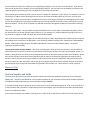
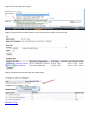
To access the EPAF system to approve EPAFs as the proxy of another user, select Act as a Proxy from the main menu
when you log into the EPAF system. The following screen will appear:
Note: Only certain users can
act as Superusers.
Select the name of the user you are acting as a proxy for (this person must have already designated you as a proxy), and
then enter the “from” and “to” date range that you will be acting as a proxy into the system and select the Go button.
Entering the “from” and “to” date range is particularly useful for times when the user you are acting as a proxy for is on
vacation or away from their job for a number of days, because all of the EPAFs that typically route to that user will route
to you during that time. You simply need to log into the EPAF system regularly during the selected time frame to view
the EPAFs that are waiting in your approval queue.
Return to Top
Approving EPAFs
If you are an Approver of EPAF transactions, you should get into the habit of checking your EPAF Approver Summary in
the EPAF system on a regular basis. When EPAFs are awaiting your approval you will not get an email to notify you that
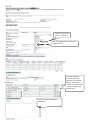
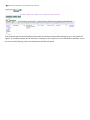
they are waiting in the system. To check to see if you have EPAFs awaiting your approval, select EPAF Approver
Summary in the main menu of the EPAF system when you log in. The following screen will appear: