1
Package Contents
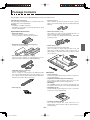
The package contents are as described below. Please check before use.
Captureboard, main unit [1]
See “Assembly and Setup Manual” for information about the
assembly parts of the Captureboard.
Stand [1]
* The printer is available separately.
* Depending on the product you have purchased, the stand
may be sold separately.
• Cushions [2 pcs.]
These cushions are used to absorb the shake of printer
table in case wall mounting. (See the Assembly and Setup
Manual.)
Captureboard Accessories
• Wall mount brackets [1 set]
These fittings are used to mount the Captureboard on a
wall (See the Assembly and Setup Manual.).
(The set includes four Captureboard brackets and 16 M4
mounting screws.)
• Dedicated markers
(One each of black, red, blue, and green)
Use these markers to draw on the sheet surface.
• Dedicated eraser (with 2 spare sponges) [1]
Use this to erase the drawing.
• Printer table [1 set]
The printer is placed on this printer table.
(The set includes one printer table, brackets for left and
right sides, 12 M3 assembly screws, 4 M4 screws, 3
printer guides, 5 cable clips and 2 20 cm cable ties and 2
10 cm cable ties)
• AC power adapter (with power cord) [1]
This is the power adapter for supplying power to the
Captureboard (See Page E-13). (HEC-AP065-24V)
• USB cable (type B ↔ type A) [1]
[PLUS code 715255400]
This is a cable for connecting the PC dedicated USB
port of the Captureboard with a personal computer. See
the separate volume Captureboard Software Operation
Manual for information about connections.
Documents
• User’s manual [1]
Includes information about safety precautions and the use
of the Captureboard.
• Captureboard Software Operation Manual [1]
The contents include information about how to use the
Captureboard Software and the setting method.
• CD-ROM [1]
The CD-ROM contains the instruction manual (PDF edition) and the utility software for use with the Captureboard.
• Quick Guide [1 set]
The Quick Guide can be hung from a hook in a convenient
location close to the Captureboard.
• Cable clips [5]
• Assembly and Setup Manual
The contents include the setup method for the
Captureboard, and connections with the printer (which is
sold separately).
E-7
C-11_man_E.indd E-7
07.7.30 6:04:49 PM