1
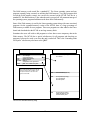
The RAM memory works much like a standard PC, The Linux operating system and any
programs currently being executed, are utilizing the RAM memory. Very large programs that
exceed the RAM memory storage size can not be executed on the M7140. Just like in a
standard PC, this RAM memory is lost when the unit is powered off. All permanent storage of
the operating system, programs and data must be done in the Flash memory.
Some of the Flash memory is used by the Linux operating system along with some associated
programs. On the expanded memory version of the M7140, there is a large percentage of
Flash memory available for user programs. These user programs are often added to the Linux
kernel and downloaded to the M7140 as one large memory block.
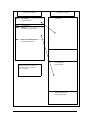
Sometimes the users will wish to add programs at a later date or store temporary data in the
Flash memory. The M7140 has a special sub-directory for all programs and data that are
temporary but must be saved even when the unit is turned off. This is the “Journaling Flash
File System” sub-directory also know as the “jffs2”.
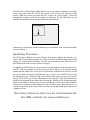
Flash Memory – 4 MB
64K
832K
64K
64K
2.4MB
640K
RAM Memory – 16 MB
Boot Loader
Linux ZImage
Compressed Kernel
Splash Screen Bitmap
Boot Parameters
rdisk.gz
Compressed Linux Applications
7MB
Uncompressed (running)
Linux Kernel
1MB
Free User Memory (volatile)
6MB
Uncompressed (running)
Linux Applications
Root File System
2MB
Scratch Pad File System
Volatile File Memory Area
Free File Memory Area
jffs2 – Non-volatile File System
Note: The jffs2 sub-directory is the only
memory location that user files can be
saved, that will not be lost when the
power is turned off.
The M7140 Standard Memory Map
48