1
■■
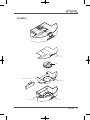
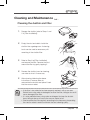
Filter installation
1.
As shown in the diagram to the right, press
the dustbin button to release the dustbin.
2.
Remove the dustbin and open the
transparent dustbin cover (simply pull it up
gently).
3.
Place the filter on the filter holder and gently
rotate it clockwise to lock it into a fixed
bolt inside. If it is necessary to remove the
filter, gently rotate it in the counterclockwise
direction to detach it from the fixed bolt,
and then put it up.
4.
Align the two corners of the transparent
dustbin cover with the two corners of the
dustbin itself, and press gently to close the
dustbin cover.
5.
Press the dustbin button and push the
dustbin back to the vacuum robot. Confirm
that it has returned to its original position.
a
b
b
a
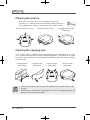
If it is necessary to replace any other consumables, be sure to halt charging
and turn off the power switch.
16
Tulip100