1
Under the negative-ion mode, if the battery level is down to 30%, the homing
mode will not be executed; the machine will continue to operate until only
10% of battery power remains, at which time it will enter the power-saving
mode.
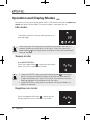
Homing mode:
2/Qpxfs!po0pgg
3/Txffq!Ujnf
4/Bvup
5/Ofhbujwf!Jpot
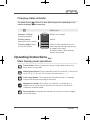
If only the6/Epdljoh
docking button
is shown on the
display panel, the unit is currently in this mode.
2/Vq
3/Epxo
4/Mfgu
5/Sjhiu
2/Qpxfs!po0pgg
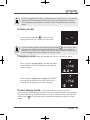
Under the
homing mode, pressing the power
button
on the display panel
6/Foufs
will cause
the machine to cease all activities3/Txffq!Ujnf
for three seconds in order to
facilitate7/Tqsjbm
user's input. At this point, the machine
4/Bvup will continue its journey back
to the charging
base in the absence of any user
input.
8/Dmpdl
5/Ofhbujwf!Jpot
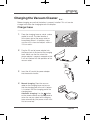
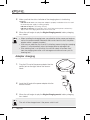
Charging mode: Refer to [Charging the Vacuum Cleaner] for details.
9/Tdifevmjoh
6/Epdljoh
:/Wbdvvn
2/Vq
21/Mbohvbhf
3/Epxo
4/Mfgu
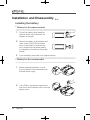
When using the charging base, the docking button
on the display panel will automatically dim and5/Sjhiu
be
non-functional.
6/Foufs
7/Tqsjbm
8/Dmpdl
9/Tdifevmjoh
:/Wbdvvn
When using the adapter for charging, the SWEEP
21/Mbohvbhf
and docking button on the display panel will be
automatically dimmed and be non-functional.
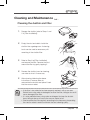
Power-saving mode: Under idle mode, the machine will enter
power-saving mode automatically if one minute has elapsed without any operations,
and the display panel will be completely dark. At this point, the user can press the
power
button
on the display panel to wake the machine and return it to idle
2/Qpxfs!po0pgg
mode.
3/Txffq!Ujnf
4/Bvup
5/Ofhbujwf!Jpot
6/Epdljoh
2/Vq
3/Epxo
4/Mfgu
5/Sjhiu
6/Foufs
Tulip100
13