1
Chapter 5
RUGGEDCOM ROX
Setup and Configuration
User Guide
1
w1ppp
192.168.16.2
3
4
192.168.17.3
eth1
2
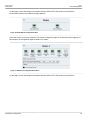
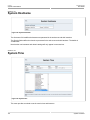
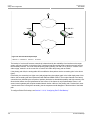
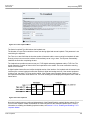
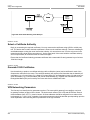
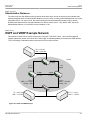
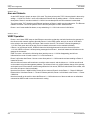
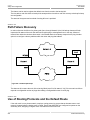
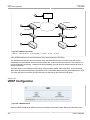
Figure 166: End to End Backup Example
1. Network A
2. Network B
3. Router 1
4. Router 2
The backup is "end to end" because connectivity is determined by the availability of an interface on the target
system, and not a local link. In the above figure, interface w1ppp acts as the primary interface and eth1 acts as
the secondary interface. The router tests the primary path by probing 192.168.16.2 on router 2. A failure of the
either w1ppp, network A or the remote link on router2 will render the primary path as "failed".
If the primary path fails, the routing table will be modified to direct packets out the secondary (eth1 in the above
figure).
Presumably, the secondary is a higher cost (and perhaps lower throughput) path. In the initial deployment of this
feature, the secondary path was implemented with Ethernet-CDMA modem. The modem featured a low latency
connection time (initiated by the reception of packets) but had a low bandwidth capability and high monetary cost.
Note that the feature must be implemented at both routers. If the feature is only implemented at router 1, the
second router's gateway will still point towards Network A after a failure of the primary path. Packets from router
1 would reach router 2 through the secondary, but the responses would disappear in the black hole of the failed
path.
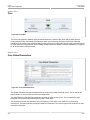
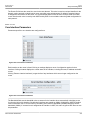
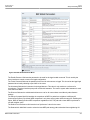
To configure End to End backup, see Section 5.1.2.10, “Configuring End To End Backup”
170
End to End Backup