1
IL ETH BK DI8 DO4 2TX-XC-PAC
11
Startup behavior of the bus coupler
11.2
Expert mode
The startup behavior of the bus coupler is specified via two
system parameters, plug and play mode (Var ID 2240hex)
and expert mode (Var ID 2275hex). By default upon delivery,
plug and play mode is activated and expert mode is
deactivated.
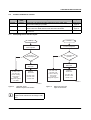
Expert mode inactive
11.1
If expert mode is active, the bus is not started automatically.
The user must set the station to the "RUN" state using the
appropriate firmware commands such as
CREATE_CONFIGURATION ,0710hex and
START_DATA_TRANSFER, 0701hex. The PP and CO
LEDs are not used.
Plug and play mode
Please note that the following description is valid
when expert mode is deactivated.
Plug and play mode active
If expert mode is deactivated (default upon delivery), the
bus coupler runs as described in 11.1.
Expert mode active
The IL ETH BK DI8 DO4 2TX-XC-PAC supports plug and
play mode (P&P). This mode enables Inline terminals
connected in the field to be started up using the bus coupler
without a higher-level computer. The P&P mode status
(active or inactive) is stored retentively on the bus coupler.
The current mode is displayed via the PP LED. In P&P
mode, the connected Inline terminals are detected and their
function checked. If this physical configuration is ready to
operate, it is started, however writing outputs is not enabled.
To enable writing outputs, P&P mode must be deactivated.
The deactivation of P&P mode is also the signal to save the
active configuration as the reference configuration.
Plug and play mode inactive
When P&P mode is deactivated, the reference configuration
is compared to the physical configuration. If they are the
same, the bus coupler is set to the "RUN" state.
If the reference configuration and the physical configuration
differ, the CO LED lights up and process data exchange is
not possible for safety reasons.
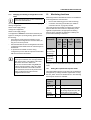
In order to operate the bus despite this, you have the
following two options:
1. Restore the original configuration so that the reference
configuration and the physical configuration are the
same again
2. Activate P&P mode and restart the bus coupler so that
the active physical configuration is accepted as the
reference configuration
8501_en_01
PHOENIX CONTACT
18