1
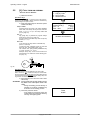
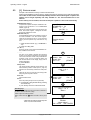
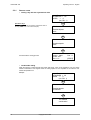
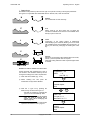
Operating manual
D425338XA
vers. 5.0
®
(c) 2002 SILCA S.p.A. - Vittorio Veneto
This manual is written by SILCA S.p.A.
All rights reserved. No part of this publication may be reproduced or used in any form or by any means
(photocopying, microfilm or other) without the written permission of SILCA S.p.A.
Edition: may 2004
Printed in Vittorio Veneto
by SILCA S.p.A.
via Podgora, 20 (Z.I.)
31029 VITTORIO VENETO (TV) - Italy
INDEX
REFERENCE GUIDE ............................................................................................ 1
GENERAL .............................................................................................................. 2
1
MACHINE DESCRIPTION ..................................................................................... 3
1.1
2
SAFETY ........................................................................................................ 4
1.3
MAIN WORKING PARTS .................................................................................. 5
1.4
TECHNICAL DATA .......................................................................................... 6
1.5
ACCESSORIES PROVIDED .............................................................................. 7
TRANSPORT ......................................................................................................... 8
2.1
3
4
5
MAIN CHARACTERISTICS ................................................................................ 3
1.2
PACKING ...................................................................................................... 8
2.2
UNPACKING .................................................................................................. 9
2.3
MACHINE HANDLING ...................................................................................... 9
MACHINE INSTALLATION AND PREPARATION ............................................. 10
3.1
CHECKING FOR DAMAGE ............................................................................. 10
3.2
ENVIRONMENTAL CONDITIONS ..................................................................... 10
3.3
POSITIONING AND INSTALLATION .................................................................. 10
3.4
DESCRIPTION OF WORK STATION ................................................................. 11
3.5
GRAPHICS .................................................................................................. 11
“SET UP” AND USE OF THE MACHINE ............................................................ 12
4.1
KEYBOARD AND FUNCTIONS ........................................................................ 12
4.2
USE OF THE CLAMP .................................................................................... 13
4.3
CUTTING BY ELECTRIC CONTACT ................................................................. 15
4.4
FITTING THE CLAMP TO THE MACHINE .......................................................... 16
4.5
CUTTER ..................................................................................................... 16
4.6
CHANGING THE CUTTER .............................................................................. 16
4.7
INVERTING THE PULLEYS ............................................................................. 17
OPERATING GUIDE ............................................................................................ 18
5.1
INITIAL OPERATIONS .................................................................................... 18
5.2
[0] COPY FROM AN ORIGINAL ...................................................................... 19
5.3
[1] COPY BY CODE .................................................................................... 21
5.3.1
5.3.2
SPECIAL CASES ......................................................................................22
LIMITED ACCESS TO DATA (PROTECTED SYSTEMS) ...................................26
5.4
[2] LIST OF CODES ..................................................................................... 26
5.5
USE OF THE MACHINE WITH A PERSONAL COMPUTER ................................... 27
5.5.1
5.5.2
5.6
[4] CALIBRATIONS ...................................................................................... 29
5.6.1
5.6.2
5.6.3
5.6.4
5.7
[3] QUEUE FROM PC .............................................................................27
KEY DECODING ......................................................................................28
CALIBRATING THE V100 CLAMP ..............................................................29
CALIBRATING THE R100 CLAMP ..............................................................32
CALIBRATING CUTTERS ...........................................................................34
MANUAL ADJUSTMENTS ..........................................................................35
[5] MAINTENANCE ..................................................................................... 36
5.7.1
5.7.2
TESTS ...................................................................................................36
MACHINE ZERO POINTS ..........................................................................39
5.8
OPTIONS [6] ............................................................................................... 45
5.9
ERROR MESSAGES ...................................................................................... 49
6
CLEANING ........................................................................................................... 52
7
MAINTENANCE ................................................................................................... 53
7.1
TROUBLE SHOOTING ................................................................................... 53
7.2
MAINTENANCE OPERATIONS ........................................................................ 55
7.3
CUTTER REPLACEMENT ............................................................................... 55
7.4
BELT REPLACEMENT AND TENSION ADJUSTMENT .......................................... 56
7.5
CHECKING AND/OR REPLACING FUSES ......................................................... 57
7.6
ELECTRONIC CIRCUIT BOARD REPLACEMENT ................................................ 58
7.7
KEYBOARD/DISPLAY REPLACEMENT ............................................................. 59
7.8
ACCESS TO BACK COMPARTMENT ................................................................ 60
7.9
ACCESS TO BOTTOM COMPARTMENT ........................................................... 60
7.10
SENSOR REPLACEMENT .............................................................................. 61
7.11
PHOTOCELL REPLACEMENT ......................................................................... 63
7.12
BRUSH REPLACEMENT ................................................................................ 66
7.13
WIN-TRANSFER PROGRAM . .................................................................... 67
7.11.1 MACHINE ZERO SETTING AFTER REPLACING THE PHOTOCELLS .................64
8
DISPOSING OF MACHINE .................................................................................. 68
9
ASSISTANCE ...................................................................................................... 69
9.0.1
HOW TO REQUEST SERVICE ....................................................................69
Appendix 1 - ELECTRICAL DIAGRAMS ........................................................I - VII
Operating manual - English
UNOCODE 399
REFERENCE GUIDE
This manual has been produced to serve as a guide for users of the UNOCODE 399 electronic key-cutting
machine. Read it carefully; it is essential if you wish to operate your machine safely and efficiently.
CONSULTATION
The contents of the manual are divided into sections relating to:
• Machine description ..................................................................................... Chapter
• Transport and installation ............................................................................ Chapters
• Regulation and use ...................................................................................... Chapters
• Maintenance ................................................................................................ Chapters
1
2-3
4-5-6
7-8-9
TECHNICAL TERMS
Common technical terms are used in this manual.
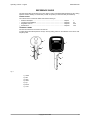
To assist those with little experience of keys and key-cutting, below is an illustration of the terms most
frequently used.
1
1
2
3
4
2
7
6
3
5
7
5
Fig. 1
1)
2)
3)
4)
5)
6)
7)
Head
Rim
Stop
Stem
Tip
Back
Cuts
Copyright Silca 2002
1
UNOCODE 399
Operating manual - English
GENERAL
UNOCODE 399 has been designed in compliance to the European Community normative (CE).
From the design stage, risks for the operator have been eliminated in all areas: transport, regulation, cutting
and maintenance.
Further risks have been eliminated by means of protective devices.
The materials used to manufacture this machine and all its components are not hazardous.
USE
UNOCODE 399 is designed for cutting keys of ferrous materials: brass, silver nickel, etc.
It must be installed and used according to the instructions indicated by the manufacturer.
If the key-cutting machine is used differently or for purposes different from those described in this manual,
the customer will forego any rights he may have over Silca S.p.A. Furthermore, unforeseen danger to the
operator or any third parties may arise from incorrect use of the machine.
INCORRECT USE
Operator negligence resulting in improper use of this machine or failure of the operator to observe the
instructions written in this manual. The manufacturer may decline all guarantees and responsibilities.
It is therefore essential to carefully read this operating manual.
IMPROPER USE OF ELECTRIC CONTACT
CAUTION:
• it is not permitted to cut ultralite anodized aluminium keys, plastic keys or any keys with materials
that do not have electrical conductivity by means of electric contact.
• cuts cannot be repeated on the same side of the key when electric contact cutting is used.
FURTHER RISKS
No further risks will arise when properly using the UNOCODE 399.
PROTECTION AND SAFETY PRECAUTIONS FOR THE OPERATOR
UNOCODE 399 is entirely built in compliance to the Machine Directives. The operations for which it has
been designed are easily carried out with no risk to the operator.
The adoption of general safety precautions and observation of the instructions provided by the
manufacturer in this manual eliminate all human error, unless deliberate.
UNOCODE 399 is designed with features which make it completely safe.
• Power supply
UNOCODE 399 is supplied with electricity by means of a grounded plug and differential switch.
• Pneumatic power
with compressed air.
• Start-up
The machine is turned on by means of a master switch that is located on the Unocode’s lower left back side.
• Maintenance
The operations to regulate, service, repair and clean the machine are structured in the simplest and safest
way possible. Parts that the operator can dismount cannot be incorrectly replaced therefore avoiding any
risks.
• Machine identification
The machine is provided with an identification label which includes the machine’s serial number (fig. 2).
SILCA S.p.A.
Via PODGORA 20 (Z.I.)
31029 VITTORIO V.TO (TV) ITALY
®
Manufacturer’s
identity
Tel. 0438 9136
Fax 0438 913800
e-mail [email protected]
Type of machine
TIPO
TYPE
Serial No.
MATRICOLA
SERIAL No
Working
voltage
V
CE mark
Year of
manufacture
HZ
W
A
MADE IN ITALY
Working
frequency
Fig. 2
2
Absorbed current
Copyright Silca 2002
Absorbed
power
Operating manual - English
1
UNOCODE 399
MACHINE DESCRIPTION
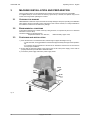
UNOCODE 399 is an electronic machine operating on two axes with controlled movement. Accurately
studied, it adds a high degree of cutting precision to operating speed and ease of use.
UNOCODE can be used in 3 different ways:
• entering the key code directly by means of the machine keyboard
• reading the key with a laser reader and reproducing it
• linking to a PC and Silca software
Fig. 3
1.1
MAIN CHARACTERISTICS
• Movements
Movement of the two axes (X-Y) operates on ball screws activated by step motors, on rectified roller
guides.
• Clamp
Standard four-sided clamp, specially designed to grip most flat keys.
• Working tool
Consists of a cutter in hard metal carbide (optional High Speed Steel), that is easily replaced.
Suitable to the type of work and speed rotation needed. Optional hard metal carbide cutter.
• Display
Rear-illuminated and placed on the front of the machine.
Display with 4 rows of 20 characters each.
Its technical features and positioning make it highly practical in use.
• Laser reader
Designed to read cuts on keys to be reproduced.
Copyright Silca 2002
3
UNOCODE 399
1.2
Operating manual - English
SAFETY
• Protective shield
The transparent protective shield is designed to cover the working parts as completely as possible,
ensuring operator safety.
The shield (U) (fig. 5, page 5) must be raised in order to fit keys for cutting or carry out other operations.
Raising of the shield is controlled by a microswitch and disactivates the operating and movement functions,
including the cutter. A special message appears on the display to warn that the shield is not closed.
To re-start the work cycle, place the shield in its original position and press START on the machine’s
keyboard.
• Emergency stops
The red emergency button (N) (fig. 5, page 5) placed on the right-hand side of the machine is used to stop
it immediately in the event of faulty operation or danger for the operator.
When the cause of the emergency has been eliminated, turn the button 45˚ clockwise to disactivate it.
NOTE: the operator is responsible for keeping the area around the button clear so that it can be reached
as quickly as possible.
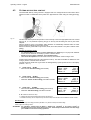
• Laser warning
Regulations require that warning labels in the language to be used be attached to the laser reader, as
shown in fig. 4.
Fig. 4 - laser warning
• Cutter motor protection
The cutter motor is protected against overheating by a cut-out switch (located inside the motor) that will
automatically stop the motor if it reaches a certain temperature. Should the switch activate:
1) turn the machine off and disconnect the power supply cable.
2) contact Silca’s Technical Assistance Dept.
4
Copyright Silca 2002
Operating manual - English
1.3
UNOCODE 399
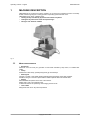
MAIN WORKING PARTS
U
L
E
E1
I
H
D
D1
F
F1
V
C
B
S
T
N
P
O
Q
R
Fig. 5
A - master switch
B - keyboard
C - display
D - clamp – cutter side
D1- clamp – optical reader
E - clamp knob
E1- optical reader clamp knob
F - key gauge – cutter side
F1- key gauge – optical reader side
H - cutter
I - cutter shield
L - optical reader
N - emergency button
O - 3rd axis
P - IN/OUT port
Q - serial port
R - Y axis connector
S - X axis carriage
T - Y axis carriage
U - protective shield
U2- vacuum systems connector
V - swarf tray
Copyright Silca 2002
A
5
UNOCODE 399
1.4
Operating manual - English
TECHNICAL DATA
Electricity supply:
230V-50Hz / 110V-60Hz / 100V-50Hz
Maximum absorbed power:
230V: 2 Amp. 250 Watt
-
110V: 3,6 Amp. 250 Watt
cutter motor:
single phase and speed
cutter:
hard metal carbide - optional high speed steel (HSS)
Tool speed:
•
50Hz: 1150 rpm (+/- 10%)
-
60Hz: 1100 rpm (+/- 10%)
with pulleys inverted:
•
50Hz: 1830 rpm (+/- 10%)
- 60Hz: 2700 rpm (+/- 10%)
Movement:
on 2 axes with ball screws activated by step motors, on rectified roller guides.
Possibility to add a 3rd axis to activate the optional tilting and rotating clamps.
Clamp:
universal 4 sided clamp to grip flat, car and cruciform keys
Runs:
X axis: 57 mm
Y axis: 32 mm
Dimensions:
width: 500 mm
depth: 500 mm
height: 420 mm (with raised shield 650 mm)
Mass:
37 kg
Noise level:
sound pressure Lp(A) = 85 dB(A) (cutting steel keys)
6
Copyright Silca 2002
Operating manual - English
1.5
UNOCODE 399
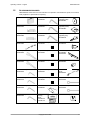
ACCESSORIES PROVIDED
UNOCODE 399 comes with a set of accessories for its operation and maintenance (tools, hex wrenches,
fuses) supplied in a special tool kit comprising:
tool kit
4 mm allen key
D300224ZZ
Z1 template
(regulating disk)
D416657BA
Tip stop with notch
D402301BA
5 mm allen key
D300225ZZ
Z2 template
(regulating block)
D416660BA
Tip stop
D402302BA
6 mm allen key
D300226ZZ
Z3 template
(regulating key)
D416658LR
Cutter release rod
D400754BA
2 Amp fuse – delayed
D312423ZZ
Z4 serial test connector
D416661ZZ
13 mm spanner
D302788ZZ
4 Amp fuse – rapid
D301185ZZ
Belt tension plate
D416552BA
D202443ZZ
10 mm spanner
D300308ZZ
10 Amp fuse - delayed
D316568ZZ
Anti-tilting device
D508699ZZ
1,5 mm allen key
D302434ZZ
4 Amp fuse - delayed
D308726ZZ
Slanted
brush
D306935ZZ
2 mm allen key
D300221ZZ
6,3 Amp fuse - delayed
D310652ZZ
ø 1,7 mm steel pin
D401225ZZ
2,5 mm allen key
D300222ZZ
19 mm socket wrench
D306963ZZ
ø 1,2 mm steel pin
D401224ZZ
3 mm allen key
D300223ZZ
laser
warning
labels
D416816XA
D416817XA
WIN-TRANSFER program disk
Copyright Silca 2002
7
UNOCODE 399
2
Operating manual - English
TRANSPORT
The key-cutting machine is easily transported and is not dangerous to handle.
The packed machine should be carried by at least two people.
2.1
PACKING
The packing for UNOCODE 399 is designed to ensure safe transportation and to protect the machine and
all its parts.
It comprises a pallet base (b) to which the machine is attached, and a cardboard box as a cover (a).
The machine is fixed to the base of the pallet with screwed down brackets that hold it firm into place. This
prevents the machine and its protective shield from any damage.
The closed packing is held in place by two straps which hold the cardboard box firmly on the pallet.
Symbols are printed on the outside of the cardboard box to give instructions and warnings for
transportation.
a
b
Fig. 6
Keep dry
Handle with care
This side up
Use no hooks
To prevent any damage to the machine it is advisable to save and use the brackets provided for future
transportation.
8
Copyright Silca 2002
Operating manual - English
2.2
UNOCODE 399
UNPACKING
To remove the machine from the packing box:
1)
2)
3)
4)
5)
6)
cut the straps with scissors and remove
raise the top part of the cardboard box
loosen the screws, both on the front and back brackets that hold the machine to the pallet.
use the special spanner (provided in the tool kit), to loosen the nuts on the machine’s feet.
remove the metal brackets and re-tighten the nuts on the feet.
check the contents in the box, that should comprise with the following:
1 UNOCODE 399 key-cutting machine
1 set of documents, including: an operating manual, a spare parts list and a guarantee
1 power supply cable
1 tool kit
NOTE: we strongly recommend you keep the packing intact for future transportation.
2.3
MACHINE HANDLING
When the UNOCODE 399 has been unpacked, place it directly on its workbench; this operation should be
carried out by at least two people.
Take care to lift the machine firmly holding the base, and no other part.
ATTENTION: never lift the machine by holding the keyboard stand (fig. 7).
CORRECT!
INCORRECT!
Fig. 7
Copyright Silca 2002
9
UNOCODE 399
3
Operating manual - English
MACHINE INSTALLATION AND PREPARATION
The key-cutting machine can be installed by the purchaser and does not require any special skills.
It is supplied ready for use and does not need any special set up. However, the operator may have to
control a few things before operating the machine.
3.1
CHECKING FOR DAMAGE
UNOCODE 399 is solid and compact and will not normally damage if transport, unpacking and installation
have all been carried out according to the instructions in this manual. However, it is always advisable to
check that the machine has not suffered any damage.
3.2
ENVIRONMENTAL CONDITIONS
To ensure that the best use is made of the key-cutting machine, it is important to place it in a well-aired
area which is not too damp.
The ideal conditions for the machine are:
temperature between 10˚C and 40˚C;
relative humidity: approx. 60%.
3.3
POSITIONING AND INSTALLATION
1) Place the machine on a horizontal surface, solid enough to support the weight of 37 Kg.
- to work with ease, we suggest that the workbench be approximately the height of the operator’s
hip.
- it is important to leave clearance of at least 30 cm behind the machine and on each side to
ensure proper ventilation.
2) Ensure that the machines voltage is the same as that of the mains power supply, which must be
properly earthed and provided with a differential switch.
3) Connect the power supply cable to the power supply socket.
30 cm
30 cm
30 cm
100 cm
Fig. 8
10
Copyright Silca 2002
Operating manual - English
3.4
UNOCODE 399
DESCRIPTION OF WORK STATION
The machine needs only one operator, who has the following controls at his/her disposal (fig. 5, page 5):
• master switch placed on the back of the machine
• key-positioning clamp
• keyboard
• display
• emergency button
3.5
GRAPHICS
•
•
The Plexiglass protective shield carries an adhesive warning label (fig. 9). This label must never be
removed.
Two laser warning labels must be attached to the optical reader (ch.1.2, page 4).
Do not use compressed air
for cleaning
laser warning labels
Fig. 9
Copyright Silca 2002
11
UNOCODE 399
4
Operating manual - English
“SET UP” AND USE OF THE MACHINE
4.1
KEYBOARD AND FUNCTIONS
The machine’s keyboard has 19 alphanumeric and 6 function keys.
The alphanumeric keys are used for entering the data card number and the cutting data (numbers and/or
letters) according to the code on the card in use.
Each of the 19 alphanumeric keys contains two characters: the main character (white) which is directly
active, and an alternate character (red), which can be activated by simultaneously pressing the SHIFT key.
E.g.:
pressed directly produces: 1
SHIFT
+
Pressed simultaneously produce: H
display
function keys
alphanumeric keys
Fig. 10
FUNCTION KEYS
STOP
Stop button, particularly when the machine is in motion.
Stops the function in progress at any time in the operation.
START
Starts the machines operations (only with the shield in its closed position).
ENTER
Activation of various functions in the menu.
CLEAR
COPY
CLEAR: deletes numerical characters.
SHIFT
SHIFT
+ CLEAR
COPY
Combination of SHIFT & CLEAR/COPY enables you to automatically switch to the (0)
“Copy from original” function from any menu in the Unocodes internal program (Ch. 5.2,
page 19).
Pressed in combination with all the keys of the same colour to enter the number or letter
available.
• regulating the display
it is possible to modify the angle of vision on the machine’s display by following the instructions below:
• to incline the angle of the display towards the bottom you must press the
key and then press the
key, simultaneously keeping them both pressed
up until you reach the desired
visualization.
• to incline the visualization of the display towards the top you must press the
key and then press
the
key, simultaneously keeping them both pressed
up until you reach the desired angle.
12
Copyright Silca 2002
Operating manual - English
4.2
UNOCODE 399
USE OF THE CLAMP
red
white
V100
Clamp - cutter side
R100
Clamp - OPTICAL READER side
Fig. 11
The four-sided clamp ensures excellent grip on the keys placed on their back or profile sides (fig. 12).
• Keys with 1 or 2 cuts to reproduce by code should be fitted mainly on the A and/or B side of the clamp.
• When copying with the optical reader the key can be fitted to any side (A, B, C or D) of the clamp.
ATTENTION: never invert the clamps.
4
3
2
4
1
3
B
A
2
1
3
2
4
3
2
Fig. 12
D
4
1
A side
C side
B side
4
3
2
1
1
2
A
3
1
3
2
4
2
3
1
4
C
2
1
3
4
0
4
-
D side
C
-
For keys to be cut by code the
side of the clamp on which to
place the key is shown on the
machines display.
For keys to be copied with the
optical reader the side of the
clamp to be used is at the discretion of the operator.
To fit keys with tip stops on the
optic reader clamp, fit the bar
provided into the special
grooves (fig. 13).
1
-
Fig. 13 - key stops
Copyright Silca 2002
13
UNOCODE 399
Operating manual - English
ATTENTION: when closing the clamp, do not apply excessive pressure
to the knob. Turning the knob approximately 70˚ (equal to
a force of 3NxM) is sufficient to secure the key (fig. 14).
4
2
A
3
4
3
1
1
2
2
4
3
C
Fig. 14
3
2
4
NOTE: before starting the cutting process the V100 clamps key gauge will automatically tilt itself to its
rest position.
USING THE PINS
Copying with the optical reader
For keys with narrow stems the pins must be placed between
the bottom of the clamp and the back of the key so that the
key protrudes sufficiently out of the clamp and therefore can
be properly read and cut.
If the key has a narrow stem and is also very thin, 2 pins must
be used (see fig. 15).
Fig. 15
If the original key is broken, place a suitable sized pin in the groove of the keys stem so that it is properly
held in place and therefore can be copied (fig. 16).
NOTE: the diameter of the pin used for the original key must be the same as that of the pin used for the
blank key; only in this way will the two keys be locked in the same position.
Attention: the pin
should be placed
vertically
Fig. 16
14
Copyright Silca 2002
Operating manual - English
4.3
UNOCODE 399
CUTTING BY ELECTRIC CONTACT
The UNOCODE 399 key-cutting machine is equipped with a low voltage electrical contact device which
permits the cutter to individualize the key blank as it approaches the cutter during the cutting phase (fig.
17).
Fig. 17
This technical solution permits the operator to secure the key to the more appropriate side of the 4 faced
clamp (A, B, C or D) therefore improving the grip on the key and eliminating the need of pins and/or
adaptors.
With the electrical contact card enabled, depth calibration is automatically calculated when the cutter
touches the keys profile during the cutting process.
Electrical contact is guaranteed for keys in steel, brass, silver nickel, Zamak or iron (with or without nickelplating).
Improper use of electric contact
•
it is not permitted to cut ultralite anodized aluminium keys, plastic keys or any keys with materials
that do not have electrical conductivity by means of electric contact.
•
cuts cannot be repeated on the same side of the key when electric contact cutting is used.
Attention: for these types of materials, insert standard cutting.
All data cards provided by Silca are in the machine’s memory. The cards are enabled or disabled for code
cutting by electric contact at Silca’s discretion.
The data cards are divided into 3 types which are distinguished by special symbols shown on the display
(asterisk “*” and “+”).
Side - 1
Clamp : 100/A
Cutter : U01
Pieces = 3
Pos.: 0
Adapt.: 0
[START]
2)
Clamp: 100/B
START+
• data card with standard cutting (press START)
• alternative: electric contact cutting press SHIFT+START
Side - 1
Clamp : 100/B
Cutter: U01
Pieces = 3
Pos.: 0
Adapt.: 0
[START] +
3)
Clamp: 100/*
START+
• data card with electric contact cutting (press START)
• alternative: standard cutting press SHIFT+START
Side - 1
Clamp : 100/*
Cutter: U01
Pieces = 3
Pos.: 0
Adapt.: 0
[START] +
1)
Clamp: 100/A
START
• data card with standard cutting (press START)
A - B: indicate the side of the clamp
+ : indicates the alternative activated with the SHIFT+START keys
* : indicates that the key can be clamped to any side of the clamp when the data card is enabled for electric contact.
Operating keys:
SHIFT+START: changes the cutting procedure (‘standard’ or ‘by electric contact’) and starts cutting.
START: begins the cutting process.
ATTENTION: the alternative selected with the SHIFT + START keys (‘standard’ or ‘by electric contact’) is
maintained as long as the chosen data card is in use. When the procedure has been selected, simply
press START for successive cutting operations.
Copyright Silca 2002
15
UNOCODE 399
4.4
Operating manual - English
FITTING THE CLAMP TO THE MACHINE
To remove the clamp unit:
-
loosen the grub screw (D2) (fig. 18) and slide the clamp out of the dovetail guide.
To install the clamp unit on the machine:
-
slide the clamp into the dovetail guide, pushing it all the way in, then secure it by tightening the grub
screw (D2).
These instructions refer exclusively to the standard clamp (V100). For the use of optional clamps please
refer to the instructions provided along with them.
D2
Fig. 18
4.5
CUTTER
The majority of keys utilize the standard cutter (U01) for code cutting. Only in certain cases some special
keys with particular type cuts require different cutters.
To change the cutter see chapter 4.6.
4.6
CHANGING THE CUTTER
1) raise the protective shield.
2) remove the cutter protective shield (i) by loosening the screw (i2).
3) slide the cutter release rod (X) into the hole located on the left side of the machines cutter shaft chassis
(fig. 19).
4) loosen the cutter locking nut (turning it clockwise) with the19 mm socket wrench (X1) provided with the
machine.
ATTENTION: the thread is left-handed.
5) replace the cutter, then tighten the nut (turning it counter-clockwise) and remove the rod from its hole.
6) place the cutters protective shield (i) back into position securing it with the screw (i2).
i2
X
i
X1
Fig. 19
WARNING: when replacing a worn cutter with a new one or with a re-sharpened cutter consult ch.5.6 "[4]
Calibrations", page 29.
16
Copyright Silca 2002
Operating manual - English
4.7
UNOCODE 399
INVERTING THE PULLEYS
This operation must be carried out when the operator intends to use a high speed steel (HSS) cutter
(optional), in order to adapt the cutter speed to the new characteristics of the cutter’s material.
W
Fig. 20
1)
2)
3)
4)
5)
6)
7)
8)
9)
turn the machine off and disconnect the power supply cable.
remove the back and bottom metal panel (ch.7.8 and ch.7.9, page 60).
loosen the 4 motor locking screws (W) (fig. 20) and remove the belt.
loosen the 2 grub screws securing the pulley and remove it from the motor shaft.
fit the cutter shaft locking rod and use the allen key provided to loosen the screw (A1) and grub screws
(A2) on the pulley (fig. 21).
invert the pulleys and secure them by tightening the grub screws, fit the screw and washer on the cutter
shaft.
remount the belt and adjust its tension (ch. 7.4, page 56).
remount the back and bottom metal panel.
enter the ‘cutter material’ function in ch.5.8 "Options [6]", page 45, and alter the speed.
cutter shaft
A2
A1
motor shaft
for HSS cutter
for carbide cutter
Fig. 21
Copyright Silca 2002
17
UNOCODE 399
5
Operating manual - English
OPERATING GUIDE
Introduction
The Operating Guide below explains how to use the UNOCODE 399 without a Personal Computer.
All operations to manually use the key-cutting machine are explained step by step.
The programs available for Personal Computers connected to the key-cutting machine are able to
transmit data for cutting, reading or decoding keys.
Programs for Personal Computer eliminate manual procedures of certain functions, once the data has
been transmitted to the machine it bypasses some of the operating guides screens.
When the UNOCODE 399 is used with a Personal Computer, the operating guide does not change
its displays logic, with the exception of all the screens that are rendered unnecessary.
5.1
INITIAL OPERATIONS
When the key-cutting machine has been placed on its workbench and connected to the mains (Ch.3.3,
page 10), proceed as follows:
1) make sure that the emergency button is not turned on.
2) turn the machine on by means of the main switch that is located on the back of the machine.
3) to check or alter the parameters for use of the machine, consult the "Options [6]" menu (ch.5.8,
page 45).
When the machine is turned on, for a few
seconds the display shows the internal
software version and the machine model:
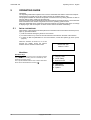
UNOCODE 399
version 1.0.023
MAIN MENU
Operational keys:
use the
keys to move the cursor to the option required
and press ENTER or directly press the numbered key corresponding to the option number.
The >> symbol indicates that the menu contains other items
which can be reached with the arrow key
.
0 - Copy from original
1 - Copy by code
2 - List of codes
3 - Queue from PC
4 - Calibrations
5 - Maintenance
6 - Options
18
Copyright Silca 2002
>>
Operating manual - English
5.2
UNOCODE 399
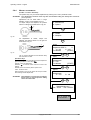
[0] COPY FROM AN ORIGINAL
- WITH THE OPTICAL READER 1) select the function.
Operational keys:
use the arrow keys
to move the cursor to the option required and press ENTER or directly press the numbered key
corresponding to the option number.
2) insert the original key into the R100 optical
reader side clamp.
Clamp = R100/?
According to the type of key to be copied, establish
which side of the clamp the key must be inserted.
Enter ‘?’ (A, B, C or D) in the clamp sides field
(Ch.4.2, page 13).
Pos. = 0
Key gauge stop; by default the program always
shows the ‘0’ stop (Ch.4.2, page 13).
For keys without a shoulder stop, enter the tip stop
position (1, 2, 3, 4).
0 - Copy from original
1 - Copy by code
2 - List of codes
3 - Queue from PC
ENTER
Original on right
Clamp=R100/_?
(ABCD)
Pos. = 0
(0-4)
Dist. = 000
[START]
START
READING IN PROGRESS
Dist.= 000
To be used only for keys without a shoulder stop
(from 0 to 9,99 mm).
To insert the “Dist.” (distance) quote you must first
enter the “Pos.” (stop position) from 1 to 4.
The entered “Pos.” (stop position) cannot be stop
“0” (“Pos.” must be 1, 2 , 3 or 4).
Example: with tip stop ‘2’ the cuts must start to be
read at least 2 mm before the normal starting position (stop “0”).
0
4
3
2
A
1
4
Fig. 22
Operational keys:
numerical keys to enter the distance in the “Dist.” field.
SHIFT+ arrow key
: chooses the clamp from those available for the reading unit (with ‘R’ prefix); the clamp sides and stop
are automatically set up. Important: the last reading clamp setting remains until another one is selected.
3) Place the key to be cut in the ‘V100’ cutter
side clamp.
ATTENTION: use the same side and stop position as the
key fitted to the R100 optical reader side
clamp.
- during the reading process the key is
partially cut; it will be completed only
at the end of the reading process.
4) Close the protective shield.
- if the shield is not lowered, when the
START button is pushed the following
warning message appears:
Copyright Silca 2002
Close
shield!
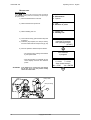
19
UNOCODE 399
Operating manual - English
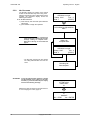
• Data alteration
The operator may alter the ‘depth’ and ‘space’
parameters.
Adjustments ?
Depth = +00
Spaces=+00
[START]
Operational keys:
to increase or decrease the parameters use a combination
of the SHIFT +
or SHIFT +
.
Example:
Depth: (from -99 to +99 hundredths of a mm)
Enter the figure (positive or negative) to raise or lower all the cuts.
-
Adjustments ?
Depth = -0,03
Spaces = -0,02
[START]
START
+
Key blank on left
Clamp= 100/A
(ABCD)
Pos.: = 0
Dist.: -000
Pcs = 1/3
[START]
Fig. 23: depth adjustments
Spaces: (from -99 to +99 hundredths of a mm)
Enter the figure (positive or negative) to move all the
cuts closer to or farther from the key stop.
-
START
+
CUTTING IN PROGRESS
Copy: 1 of: 3
Fig. 24: spaces adjustments
Pieces:
enter the number required (max. 255).
5) Carry out the same procedure to cut the
remaining keys.
20
Copyright Silca 2002
Copy : 3 of: 3
Finished.
More copies?
No = STOP
Yes = ENTER
Operating manual - English
5.3
UNOCODE 399
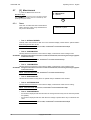
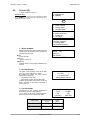
[1] COPY BY CODE
One part of the machine’s memory is used for the data cards.
A data card is a database of cutting ‘spaces’, ‘depths’ and angles for all the keys in the machines data base.
The number of data cards is increased periodically when the ‘Silca Code Program’ is updated. The
updates can be bought separately and easily installed to a P.C. then transmitted over to the
machine.
As the memory can be rewritten, the Personal Computer updates the data cards automatically.
STANDARD data card (S.):
comprises the ‘spaces and depths’ database as described in the introduction to ch.5 "OPERATING
GUIDE", page 18).
The source of this information can be the SILCA Car
Book, ‘Silca Code Program’, catalogues and other
documents available from Silca.
USER data card (U.):
personalized data cards can be created by means of
a function available in the ‘Silca Code Program’.
Cards can be stored from the P.C. to the machine’s
memory and the operator may recall them at any
time.
1) enter the data card No. (e.g.: STANDARD =
50).
2) enter the cutting data.
Enter card number:
STANDARD = 50
USER
=
0
(ver. DB : 1)
ENTER
Side 1 x 2
.......
Possible depths:
1234
S. 50
2213442
(ver. DB : 1)
gives the number of the Silca board database version installed on the machine.
.......:
ENTER
the dots on the display represent the maximum
number of cuts that are permitted. The same data
card can be used for a number of keys with different
numbers of cuts. If a key is used with fewer cuts
than the dots shown on the display, simply enter a
partial combination.
3) Press ENTER.
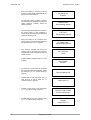
Side: 1
Clamp.: 100/*
Cutter: U01
Pcs = 1/2
Pos. : 0
[START]+
START
Clamp: V100/*
The special symbol (asterisk) means that the cuts
will be made by electric contact (Ch.4.3, page 15)
therefore it is unnecessary to select the clamp side.
Pos.: 0
CUTTING IN PROGRESS
Copy: 1 of: 2
Side 1
Place the key to be cut into the V100 clamp (cutter
side) using the stop that is shown.
Side: 2
Clamp: 100/*
Cutter: U01
Cutter: U01
Recommended cutter.
Pieces:
enter the quantity of keys to be cut (max.255).
4) proceed with cutting the first side by pressing
the START key.
5) turn the key over and cut the second side.
Operating keys:
SHIFT+START: changes the cutting procedure (‘standard’ or
‘by electric contact’) and starts cutting.
START: begins the cutting operation.
SHIFT+ down arrow key
selects the side of the key to be
cut.
- When the last side of the last key has
been cut, the screen shows:
Copyright Silca 2002
Pos. : 0
[START]+
START
CUTTING IN PROGRESS
Copy: 1 of: 2
Side 2
START
Copy: 2 of: 2
finished.
More copies?
No = STOP
Yes = ENTER
21
UNOCODE 399
5.3.1
Operating manual - English
SPECIAL CASES
•
Cutting a key with two asymmetrical sides
Enter card number
STANDARD = 115
USER
= 0
(ver. DB : 1)
Operational keys:
use the
arrow keys to be able to visualize both sides of
the keys possible cuts on the machines display.
ENTER
Side 1
..........
Possible depths:
4321
S. 115
1112213331
ENTER
Side 2
..........
Possible depths:
4321
S. 115
1121123313
ENTER
Proceed with the cutting process.
•
Side: 1
Clamp : 100/A
Cutter: U01
Pcs = 1/1
Pos. : 0
[START]
Inadmissible cutting
When the machine is used manually with certain data cards, it may not be possible to carry out certain
entered combinations. This happens when the cutting depths are not compatible in the order the user
entered the possible cuts.
Example:
Enter card number
STANDARD = 174
USER
= 0
(ver. DB : 1)
ENTER
Side 1
.....
Possible depths:
012345678
08213
ENTER
non-feasible
combination!
22
Copyright Silca 2002
S. 0174
Operating manual - English
UNOCODE 399
The reason for the conflict between certain
cuts is explained simply in the case shown.
With regard to the cut that originated the
message <inadmissible combination> it can be
seen that between the two deep cuts (8) and the
constant angle (100˚) the intermediate cut (0)
would be removed.
This happens when the cutting angle N (Normal)
is not made variable by means of the type of cut
L (Laser) (page 24).
8
?
0
α
8 4
α
α
6
α
Fig. 25
The new drawing of the key shows how for the
same cutting process (80846) the cutting angles
are automatically calculated by the conjunction
of the cutting base with a straight line.
This aspect, admissible with certain car keys, is
more commonly known as ‘the ideal cutting line’.
ATTENTION: in this example it can be seen that the ß
angle is less than 45˚. This could cause
serious problems with a lock, making it
difficult or impossible to place the key into
the cylinder or remove it.
Fig. 26
8
α β
0
8 4 6
β
γ δ
α
Control of the combinations in the Options menu can in any case be disabled (ch. 5.8).
Copyright Silca 2002
23
UNOCODE 399
•
Operating manual - English
Types of cut
All the data cards provided by Silca have the type of cut pre-set according to the original parameters.
The types of cut possible with UNOCODE 399 are: Normal, Flat, Laser and Vertical.
N
NORMAL
For conventional car and door keys.
P
FLAT
Mainly used for car keys where the cut edges are
rounded to facilitate the movement of the blades when
the key is put into the lock.
LASER
Conjunction of the cutting angles is determined
automatically by the machine, allowing cuts to be made
with variable angles; this facilitates the smooth entry of
the key into the lock, prolonging the working life of the
key.
L
V
VERTICAL
Necessary for special keys with small bits (Silca art. FO19P,
FO21P...) where a special cutter is required.
When this cutting method is used a special angled cutter
is needed.
V
EXAMPLE OF HOW TO CHANGE THE TYPE OF CUT:
All the technical data regarding the types of
cuts stored in the machine’s memory can be
changed according to the user’s requirements.
Enter card number
STANDARD = 50
USER
= 0
(ver. DB : 1)
1) enter data card number (e.g.: nr.50)
ENTER
2) before entering the cuts press
combination of keys SHIFT+ENTER.
the
3) enter the “L” type cut by pressing the
SHIFT+L keys to set the laser type cut.
- the letter in brackets (L) indicates the
type of cut recommended by Silca.
NOTE: for certain cutting methods the standard
cutter U01 must be replaced with a
specific cutter (ch.4.6 "Changing the
Side 1 x 2
.......
Possible depths:
1234
SHIFT
S. 50
+ ENTER
S. 50
Cutter: U01
Cut type (L) = L
Alternative: N P V
cutter", page 16).
4) enter the combination and proceed with the
operations described in ch.5.3, page 21.
24
Copyright Silca 2002
ENTER
Side 1 x 2
112233
Possible depths:
1234
S. 50
Operating manual - English
•
UNOCODE 399
Changing the cutter
Some of the data cards stored in the machine’s memory require a different cutter from the standard U01
cutter.
EXAMPLE WITH
FO21P key:
Enter card number
STANDARD = 0
USER
= 0
(ver. DB : 1)
220
ENTER
Side 1 x 4
......
Possible depths:
1234
S. 220
ENTER
Replace the cutter according to the instructions
in ch.4.6 "Changing the cutter", page 16.
ATTENTION !!
Install cutter:
05
ENTER
Is cutter:
05
installed?
No = STOP
Yes = ENTER
•
Adapters
Some of the data cards provided by Silca may
show a new parameter (Adapt.: 7) which indicates
the type of accessory that is needed to cut the key
in question.
See the ‘Unocode Adapters’ leaflet included with
the Unocode 399 machine.
Copyright Silca 2002
Side 1
Clamp: 100/A
Cutter: U01
Pcs : 1/1
Pos.: 0
Adapt.: 7
[START]
25
UNOCODE 399
5.3.2
Operating manual - English
LIMITED ACCESS TO DATA (PROTECTED SYSTEMS)
Silca has predisposed limited access to some of the data in the Database, in compliance with agreements
with some makers. Limitations apply to:
-
DATA CARD: If the key-cutting card is protected, access is denied.
Gain access to protected data in the following way:
- request the maker’s authorization.
- communicate to Silca:
- The key-cutting machine SERIAL NUMBER
- The ACTIVATION CODE
- Key-cutting Machine ID
Silca will issue a Password to enter in order to enable key-cutting of the protected system.
Example: Silca provides a protected data card No. 11.
When card 11 is selected from menu -1- the following
appears on the screen:
PROTECTED CARD
Mach.ID:
12345
Code:
SKPSC00011
Password:
0
When authorization has been received from the maker, apply to Silca for a password, providing the
following information:
- Key-cutting machine serial No. 1170145634567
Read the serial number on the ID plate fixed to the back of the machine.
- Machine ID 12345
visible in the password application box or by selecting menus 6-12-1 on the machine.
- ACTIVATION Code SKPSC00011
shown ONLY when access to protected data is attempted.
Once obtained, enter the password on the Password
line, as shown in the example given above.
If the correct password has been entered, the screen
shows:
CORRECT PASSWORD
Save the password ?
No=STOP
Yes=ENTER
The password can be saved so that it need not be entered whenever the protected data card is used, or
not saved so that access is limited only to the person in possession of the password.
5.4
[2] LIST OF CODES
ATTENTION: function currently not available! (for future use)
26
Copyright Silca 2002
Operating manual - English
5.5
UNOCODE 399
USE OF THE MACHINE WITH A PERSONAL COMPUTER
In the previous pages the UNOCODE 399 key-cutting machine has been analysed in all its parts from
the point of view of manual use, i.e. operating from the keyboard incorporated in the machine to cut
keys by code.
It is now necessary to examine the very important facility with which it is possible to connect up to a PC in
order to receive data directly from the computer.
Taken for granted that the user is in possession of some Silca software, the following are the
possibilities available.
The ‘Silca Code Program’ makes it possible to carry out searches by code for cutting data and to store the
information in a special work queue (or file).
This is a special function which has been created to help those users who wish to work with a number
of simultaneous searches. After having carried out a code search, the information is simply filed in the
special work queue then everything is transferred to the UNOCODE 399.
The information transmitted by the Personal Computer cannot be altered manually. Each line transmitted
corresponds to a stage in the cutting process for one or more keys.
As described above, for each cutting process transmitted the number of pieces to be cut is set¸ a ‘+’ sign
shows when the cycle is finished.
The ‘+’ sign warns the operator that the last cutting operation has been carried out.
Should a work queue be interrupted, turn off the UNOCODE 399. When the machine is turned on again
and the <PC queue> is called up, the list reappears, starting from the first line.
5.5.1
[3] QUEUE FROM PC
The data received from the PC are presented in one form only:
•
quantity of keys in queue transmitted
•
key code
•
card number
•
quantity of each code transmitted
•
the “+” mark indicates that all three keys (or
more) have been cut.
•
the “-” mark indicates that the total quantity
of keys referring to its code have not been
cut.
6 CODES RECEIVED
1 + AB100
[234] 3
2 - AB101
[234] 3
3 - AB102
[234] 3
4 - 2315
5 - 1251
6 - W109
....
Pressing the ENTER key takes us to the
‘Copying by code’ procedure. From this point
on the operational functions are the same as
those described in ch.5.3, page 21.
C.= data card from PC.
[122] 5
[122] 5
[567] 5
ENTER
Side 1
1234
Possible depths:
1234
When the SHIFT + ENTER keys are pressed
additional data referring to the choosen code
can be visualized, such as:
• Customer’s name
• Key blank
Operational keys:
To quickly go to the next key to be cut, strike the
arrow key
. Doing so the operator starts from
where she or he stopped the previous operation.
arrow keys
: to scroll the lines.
SHIFT + arrow keys
: to scroll 4 lines at a time.
SHIFT+ENTER keys to show customer data and
key item linked to the selected code.
When the START key is pressed the cursor will
automatically position itself on the first key code that
indicates the “-” mark.
Copyright Silca 2002
SHIFT
C. 234
+ ENTER
GIUSEPPE VERDI
ART. GT10P
27
UNOCODE 399
5.5.2
Operating manual - English
KEY DECODING
The decoding function by means of the optical
reader can be activated only when using a PC.
After the decoding function is launched from the
program, the machine’s display shows the
following information:
S. 50: the data card used.
1) insert the key into the R100 optical reader’s
side clamp.
2) press START to begin the operation.
Decode
S. 50
ORIGINAL on right.
Clamp: 100/?
Pos.: 0
Side: 1
[START]
START
DECODING IN PROGRESS
Side 1
NOTE: if the key has 2 or more asymmetrical
sides the machine’s display will show the
message “waiting for computer data”.
Each side of the key to be decoded will
appear:
Waiting for
computer data!
Decode
S. 50
ORIGINAL on right.
Clamp: 100/?
Pos.: 0
Side: 2
[START]
- the Silca Key Program will then display
the cutting data decoded from the machine.
Decoding OK.
See computer.
ATTENTION: if a key decoding/reading operation is started
and the diameter of the cutting tool exceeds
60.4 mm (e.g. cutter 06 Ø 64.6 mm), the display
will show the following message:
Replace the cutter according to the instructions in
ch.4.6 "Changing the cutter", page 16.
ATTENTION !!
Install cutter:
01
ENTER
Is cutter:
01
installed?
No = STOP
Yes = ENTER
28
Copyright Silca 2002
Operating manual - English
5.6
UNOCODE 399
[4] CALIBRATIONS
The following components on the machine have a specific ‘self-setting’ procedure with the use of regulating
templates (ch.1.5 "Accessories provided", page 7).
- CLAMPS
- CUTTERS
ADAPTERS provided as optionals do not require calibrating. However, if necessary adjustments can be
made to the cutting data, according to the procedures described in ch.5.6.4 "Manual adjustments", page
35.
In the circumstances listed below (see events) it may be necessary to re-set one or all of the clamps and/
or cutters that the user has in possession. This operation is semi-automatic and requires close attention to
the instructions listed below.
EVENT
ZERI MACCHINA
CALIBRATION (ch. 5.6, page 29)
CUTTING UNIT
READING UNIT
CLAMPS
YES
YES
NO
NO
YES
(ch. 7.6, page 58)
YES
(ch. 7.6, page 58)
YES
(ch. 7.6, page 58)
YES
(ch. 7.6, page 58)
Replacement of the Optical Reader unit
NO
YES
NO
NO
Replacement of sensors
NO
NO
NO
NO
Replacement of the cutter shaft
YES
YES
NO
NO
Replacement of the ball screws
YES
YES
NO
NO
V100 clamp replacement
(with a new one of the same type)
NO
NO
YES
NO
V100 clamp replacement
(with a new one of the same type)
NO
NO
YES
NO
Re-sharpening of existing cutter and/or
cutter replacement (with a new one of the same type)
NO
NO
NO
YES
Installation of optional clamps
NO
NO
YES
(if applicable)
NO
Replacement of photocells
Electronic board replacement
CUTTERS
1) Enter the ‘Calibrations’ menu #4.
Operational keys:
use the arrow keys
to move the cursor to the option required and press ENTER or directly press the numbered key
corresponding to the option number.
4 - Calibrations
5 - Maintenance
6 - Options
ENTER
1 - Clamps
2 - Cutters
3 - Adaptors
2) Select ‘Clamps’ #1.
ENTER
5.6.1
Clamps
CALIBRATING THE V100 CLAMP
V100
V101
V102
- CUTTER SIDE -
Before starting the clamp calibration, make
sure that there are no keys and/or adapters
fitted in the V100 and/or R100 clamp.
Operational keys:
SHIFT+ENTER: to select and visualize each side of the clamp
(where applicable).
STOP: to exit the menu.
ENTER
V100
SIDE A
Adjustment: SIDE A
X = +00
Y = +00
To calibrate
[START]
START
Copyright Silca 2002
29
UNOCODE 399
Operating manual - English
3) replace the cutter with the (Z1) template (fig.
27). To remove the cutter follow the
instructions on page 16, ch. 4.6 "Changing
the cutter".
4) insert the (Z3) template to the side of the
V100 clamp that is shown on the machine’s
display.
5) close the protective shield.
6) press START.
V100
SIDE A
Install Z1 & Z3 temp.
See operating manual
[START]
START
V100
SIDE A
Detection
in progress!
- this will automatically start the setting of
the V100 clamp by means of electric
contact between the two templates.
V100
SIDE A
X = +002
Y = +004
Save data?
No = STOP
Yes = ENTER
- the display shows the differences from
the theoretical values.
ENTER
7) to save the data press ENTER.
ATTENTION: if the STOP key is pressed, the new settings
will be lost. If so, only the previous setting
values will remain valid.
NOTE: the settings will be accepted only if the
tolerances remain within a range
between –40/+40 hundredths of a mm.
Exceeded setting
tolerance limit.
x = +50
y = +2
See operating manual.
- if the tolerances exceed the accepted
range the machine’s display will show
an error message:
- carefully follow the instructions and
repeat the procedure.
ENTER
Z1
Z1
Z3
Z3
Fig. 27
30
Copyright Silca 2002
Operating manual - English
•
•
UNOCODE 399
- the operational sequence will continue
and the display will show the settings
for sides B, C and D.
turn the V100 clamp to side B, insert the (Z3)
template into the clamp and proceed with the
settings, following the same procedure
described for side A.
V100
SIDE B
Adjustment SIDE B
X = +00
Y = +00
To calibrate
[START]
turn the V100 clamp to side C, insert the (Z3)
template into the clamp and proceed with the
settings, following the same procedure
described for side A.
V100
SIDE C
Adjustment SIDE C
X = +00
Y = +00
To calibrate
[START]
ATTENTION: make sure that the (Z3) template is properly
inserted into side C of the V100 clamp (see
fig. 28).
•
turn the V100 clamp to side D, insert the (Z3)
template into the clamp and proceed with the
settings, following the same procedure
described for side A.
ATTENTION: make sure that the (Z3) template is properly
inserted into side D of the V100 clamp (see
fig. 28).
V100
SIDE D
Adjustment SIDE D
X = +00
Y = +00
To calibrate
[START]
Operational keys:
SHIFT+ENTER: to select and visualize each side of the clamp.
START: to begin the setting procedure.
STOP: to interrupt the setting procedure.
ATTENTION: after calibrating all sides of the V100 clamp:
-
remove the (Z3) template from the V100
clamp.
remove the (Z1) template from the cutter
shaft replacing it with a cutter.
Z3
side C
Z3
side D
Fig. 28
Copyright Silca 2002
31
UNOCODE 399
5.6.2
Operating manual - English
CALIBRATING THE R100 CLAMP
- OPTICAL READER Before starting the clamp setting, make sure
that there is no key and/or adapter fitted in
the V100 cutter side clamp.
1) enter the ‘Options’ menu and select option 1
– ‘Clamps’.
1 - Clamps
2 - Cutters
3 - Adaptors
ENTER
5 - R100
ENTER
The >> symbol indicates that the selected clamp
has more than one side.
Operational keys:
SHIFT+ENTER: to select and visualize each side of the clamp
(where applicable).
STOP: to exit the menu.
R100
Adjustment SIDE A
>>
X = +00
Y = +00
To calibrate
[START]
START
2) fit the (Z3) template to side A of clamp R100
(fig. 29).
ATTENTION: lower the key gauge.
R100
Install the Z3 template.
See operating manual.
[START]
3) press START to proceed with automatic
setting of side A.
- during this operation the settings are
read by the optical reader.
START
R100
SIDE A
Detection
in progress!
R100
SIDE A
X = +023
Y = +009
Save data?
No = STOP
Yes = ENTER
4) press ENTER to save data.
ATTENTION: if the STOP key is pressed, the new settings
will be lost. If so, only the previous setting
values will remain valid.
ENTER
NOTE: the settings will be accepted only if the
tolerances remain within a range
between –40/+40 hundredths of a mm.
- if the tolerances exceed the accepted
range the machine’s display will show
an error message:
- carefully follow the instructions and
repeat the procedure.
Exceeded setting
tolerance limit.
x = +50
y = +1
See operating manual.
ENTER
32
Copyright Silca 2002
Operating manual - English
•
•
UNOCODE 399
- the operational sequence will continue
and the display will show the settings
for sides B, C, D.
turn the R100 clamp to side B, insert the (Z3)
template into the clamp and proceed with the
settings, following the same procedure
described for side A
turn the R100 clamp to side C, insert the (Z3)
template into the clamp and proceed with the
settings, following the same procedure
described for side A
ATTENTION: make sure that the (Z3) template is properly
inserted into side C of the R100 clamp (fig.
28).
•
turn the R100 clamp to side D, insert the (Z3)
template into the clamp and proceed with the
settings, following the same procedure
described for side A
R100
SIDE B
Adjustment SIDE B
X = +00
Y = +00
To calibrate
[START]
R100
SIDE C
Adjustment SIDE C
X = +00
Y = +00
To calibrate
[START]
R100
SIDE D
Adjustment SIDE D
X = +00
Y = +00
To calibrate
[START]
ATTENTION: make sure that the (Z3) template is properly
inserted into side D of the R100 clamp (fig.
28).
Z3
Fig. 29
Copyright Silca 2002
33
UNOCODE 399
5.6.3
Operating manual - English
CALIBRATING CUTTERS
For this procedure always use side A of the
V100 clamp.
According to the cutter speed (determined by
fitting the pulleys in the way described in ch.4.7,
page 17) and material (chosen from the ‘Options
– cutter material’ menu on page 45) the list will
show all the HSS or hard metal carbide cutters
(distinguished by the suffix ‘W’).
1 - Clamps
2 - Cutters
3 - Adaptors
ENTER
1) enter the “cutters” menu #2.
Operational keys:
use the arrow keys
to move the cursor to select the required cutter and press ENTER.
2) fit the selected cutter to the machine.
Cutters
00 - U01
01 - 01
02 - 02
ENTER
00 - U01
Adjustment:
Y = +00
To calibrate
[START]
START
3) fit a brand new (Z3) template on side A of the
V100 clamp.
4) close the shield and proceed with setting the
cutter by pressing START.
00 - U01
Install the Z3 template.
See operating manual.
[START]
START
00 - U01
Detection
in progress!
- the display shows the differences from
the theoretical values.
NOTE: the setting will be accepted only if the
tolerance of the cutter’s diameter
remains within a range between +10 /–
100 hundredths of a mm.
- if the tolerances exceed the accepted
range the machine’s display will show
an error message:
- carefully follow the instructions and repeat the procedure
ATTENTION: once this operation is completed the (Z3)
template must be discharged of; contact
with the cutter skims the surface of the
template therefore it would cause errors if
used for future settings.
34
Copyright Silca 2002
00 - U01
Adjustment: +002
Save data?
No = Stop
Yes = ENTER
ENTER
Exceeded setting
tolerance limit
y = +110
See operating manual
ENTER
Operating manual - English
5.6.4
UNOCODE 399
MANUAL ADJUSTMENTS
(CLAMPS – CUTTERS - ADAPTERS)
The operator may carry out manual adjustments by entering new X and Y parameter values.
ATTENTION: such adjustments should be made only when the automatic setting has already been carried out
(where applicable).
Adjustments can be made within a range
between +30 and –30 hundredths of a mm.
To adjust clamps and adapters, the positive
values of X will give the result shown in fig. 30.
-
4 - Calibrations
5 - Maintenance
6 - Options
+
ENTER
1 - Clamps
2 - Cutters
3 - Adaptors
Fig. 30
For adjustments to cutters, clamps and
adapters, the positive values of Y will give the
result shown in fig. 31.
+
-
ENTER
Clamps
R100
Adjustment SIDE A
>>
X = +00
Y = +00
To calibrate
[START]
Fig. 31
The >> symbol indicates that the selected clamp
has more than one side.
Operational keys:
place the cursor next to the parameter and enter the adjustment
figure using the SHIFT + arrow keys
.
CLEAR: to zero out adjustments
ENTER or
: to move the cursor from the X to the Y axis
settings.
ENTER: press in the final entry field to quit the menu.
STOP: to exit the menu.
SHIFT+ENTER: to go from one side of the clamp to another
when making manual adjustments.
ENTER
STOP
Cutters
00 - U01
Adjustments:
Y = +00
To calibrate
ENTER
[START]
STOP
Adaptors
B1
Adjustments:
X = +00
Y = +00
ATTENTION: if the STOP key is pressed, the new settings
will be lost. If so, only the previous setting
values will remain valid.
ENTER
STOP
Save adjustments ?
No = STOP
Yes = ENTER
Press START only if you
intend to proceed with
automatic calibration.
Copyright Silca 2002
35
UNOCODE 399
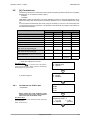
5.7
Operating manual - English
[5] MAINTENANCE
1) enter the ‘Maintenance’ menu #5.
Operational keys:
use the
keys to move the cursor to the option required
and press ENTER or directly press the numbered key corresponding to the option number.
5.7.1
4 - Calibrations
5 - Maintenance
6 - Options
ENTER
TESTS
There is an on board TEST menu that should be
used to verify the cause of any breakdown that
may occur to the machine.
•
1 - Test
2 - Machine ‘0’ point
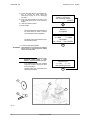
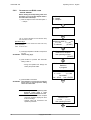
Test 1: OPTICAL READER
Carefully follow the instructions that are on the machine’s display. Check that the optical reader’s
status changes from OFF to ON.
NOTE: if the OFF/ON transition is not made, contact Silca’s Technical Assistance Dept.
•
Test 2: X AXIS MOTOR
Carefully follow the instructions on the machine’s display. Check that the X axis carriage moves.
ATTENTION: during this test function all end of run controls are disactivated; avoid moving the carriage up against
its mechanical stops.
NOTE: if the motor does not start, contact Silca’s Technical Assistance Dept.
•
Test 3: Y AXIS MOTOR
Carefully follow the instructions on the machine’s display. Check that the Y axis carriage moves.
ATTENTION: during this test function all end of run controls are disactivated; avoid moving the carriage up against
its mechanical stops.
NOTE: if the motor does not start, contact Silca’s Technical Assistance Dept.
•
Test 4: B AXIS MOTOR
This test can be carried out only when an optional clamp is installed on the machine.
•
Test 5: CUTTER MOTOR
Carefully follow the instructions on the machine’s display. Check that the cutter motor is working.
NOTE: if the cutter motor does not turn, contact Silca’s Technical Assistance Dept.
•
Test 6: X AXIS SENSOR
-
the machine’s display should show ON when the carriage is drawn away from the machine (towards
the operator).
the machine’s display should show OFF when the carriage is pushed all the way in towards the machine.
-
NOTE: if the ON/OFF transition is not made, contact Silca’s Technical Assistance Dept.
36
Copyright Silca 2002
Operating manual - English
UNOCODE 399
•
Test 7: Y AXIS SENSOR
-
the machine’s display should show OFF when the carriage is moved all the way to the right.
the machine’s display should show ON when the carriage is moved all the way to the left (towards
the cutter).
NOTE: if the ON/OFF transition is not made, contact Silca’s Technical Assistance Dept.
•
Test 8: B AXIS SENSOR
This test can be carried out only when an optional clamp is installed on the machine.
•
Test 9: X AXIS PHOTOCELL
Slowly push the X axis carriage manually towards the machine’s chassis checking that the machine’s
display indicates OFF to ON.
NOTE: if the ON/OFF transition is not made, contact Silca’s Technical Assistance Dept.
•
Test 10: Y AXIS PHOTOCELL
Slowly push the Y axis carriage manually from its right all the way to its left checking that the machine’s
display indicates OFF to ON.
NOTE: if the ON/OFF transition is not made, contact Silca’s Technical Assistance Dept.
•
Test 11: B AXIS PHOTOCELL
This test can be carried out only when an optional clamp is installed on the machine.
•
Test 12: PROTECTIVE SHIELD MICROSWITCH
Lift and lower the protective shield checking that the machine’s display indicates OFF to ON.
NOTE: if the ON/OFF transition is not made, contact Silca’s Technical Assistance Dept.
•
Test 13: ELECTRIC CONTACT
Use any metal conductor to contact clamp to cutter, checking that the machine’s display indicates OFF
to ON.
NOTE: if the ON/OFF transition is not made, check the brushes or contact Silca’s Technical Assistance
Dept.
•
Test 14: KEYBOARD
One at a time, press all the keys (except STOP) checking that an asterisk (*) appears for each key pressed.
Press the STOP key for last.
NOTE: if the asterisk does not appear, contact Silca’s Technical Assistance Dept.
•
Test 15: DISPLAY
All points on the display should be obscured.
NOTE: if this is not so, contact Silca’s Technical Assistance Dept.
•
Test 16: CLAMP CODE
This test can be carried out only when an optional clamp is installed on the machine.
Copyright Silca 2002
37
UNOCODE 399
•
Operating manual - English
Test 17: INLETS
This test can be carried out only when an automatic feeder (or other optional component) is installed
on the machine.
•
Test 18: OUTLET 1
This test can be carried out only when an automatic feeder (or other optional component) is installed on
the machine.
•
Test 19: OUTLET 2
This test can be carried out only when an automatic feeder (or other optional component) is installed on
the machine.
•
Test 20: OUTLET 3
This test can be carried out only when an automatic feeder (or other optional component) is installed on
the machine.
•
Test 21: OUTLET 4
This test can be carried out only when an automatic feeder (or other optional component) is installed on
the machine.
•
Test 22: VACUUM SYSTEM
This test can be carried out only when a vacuum system is installed on the machine.
•
Test 23: SERIAL PORT
Check that the machine’s display indicates OFF.
Fit the special (Z4) serial test connector (accessories provided) to the machine’s serial port, checking
that the machine’s display indicates OFF to ON.
NOTE: if the ON/OFF transition is not made, contact Silca’s Technical Assistance Dept.
38
Copyright Silca 2002
Operating manual - English
5.7.2
UNOCODE 399
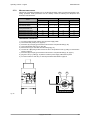
MACHINE ZERO POINTS
With the use of regulating templates (ch.1.5 "Accessories provided", page 7) the machine provides a ‘selfsetting’ procedure. These procedures must be carefully carried out following the descriptions and
illustrations indicated below.
MACHINE ZEROES
EVENT
CALIBRATING (Ch. 5.6, page 29)
CUTTING UNIT
READING UNIT
CLAMPS
CUTTERS
YES
YES
NO
NO
YES
(see ch.7.6, page 58)
YES
(see ch.7.6, page 58)
YES
(see ch.7.6, page 58)
YES
(see ch.7.6, page 58)
Replacement of
the Optical Reader unit
NO
YES
NO
NO
Replacement of sensors
NO
NO
NO
NO
Replacement of the cutter shaft
YES
YES
NO
NO
Replacement of the ball screws
YES
YES
NO
NO
Replacement of photocells
Replacement of
the electronic board
PRELIMINARY OPERATIONS
1)
2)
3)
4)
5)
6)
turn the machine off and unplug it from its power supply cable.
remove the back panel (ch.7.8, page 60).
loosen the (G1) and (G2) grub screws that secure the X axis photocell disk (fig. 32).
remove the bottom panel (ch.7.9, page 60).
disconnect the (J1) Y axis cable from the carriage (fig. 33).
unscrew the 3 (B5) fixing screws and remove the Y axis protective cover by pulling it in the direction
shown in figure 33.
7) loosen the (G3) and (G4) grub screws that secure the Y axis photocell disk (fig. 35, pag.41).
8) plug the Y axis (J1) cable (fig. 33) and the machine’s power supply cable back into place.
9) turn the machine on and carry on with the procedures described on page 40.
G1
G2
Fig. 32
Copyright Silca 2002
39
UNOCODE 399
Operating manual - English
Y axis photocell disk
B5
Y axis sensor
J1
Y axis photocell
Fig. 33
CUTTING UNIT
1) enter the “Maintenance” #5.
4 - Calibrations
5 - Maintenance
6 - Options
2) select “Machine zero points” #2.
1 - Test
2 - Machine ‘0’ point
Operational keys:
use the
keys to move the cursor to the option required
and press ENTER or directly press the numbered key corresponding to the option number.
1 - Cutting unit
2 - Reading unit
3) select ‘Cutting unit’ #1.
4) remove the V100 clamp (cutter side) from
its support.
5) insert the (Z2) template, the clamp’s
bushing and secure them with the clamp’s
knob (fig. 34).
6) remove the cutter (ch.4.6, page 16) and
insert the (Z1) template into place (fig. 34).
7)
8) manually move the X and Y axis up until
the (Z1) and (Z2) templates make contact
(see fig. 34 - top view).
9) lower the protective shield and press
START.
ATTENTION: check that both the (Z2) and (Z1) templates
make perfect contact (fig. 34). If this does
not occur the display will show an error
message.
40
Copyright Silca 2002
Install Z1 & Z2
templates.
See operating manual.
ENTER
Move X and Y axis
up until contact is made
See operating manual.
START
TEMPLATE E R R O R
No contact made.
See operating manual.
Operating manual - English
UNOCODE 399
- the machine will take the X and Y axes
to a predefined position.
- the operator must manually rotate the
X and Y photocell disks up until the
cut in the disks face the photocells
card.
START
Pos. Photocell.
TZX = OFF
TZY = OFF
See operating manual.
[START]
Y axis photocell:
• manually turn the Y axis disk (fig. 35) up
until the display’s description changes
from OFF to ON.
• use the provided allen key to tighten the (G3)
grub screw (fig. 35).
Pos. Photocell.
TZX = OFF
TZY = ON
See operating manual.
[START]
X axis photocell:
• manually turn the X axis disk (fig. 32,
pag.39) up until the display’s description
changes from OFF to ON.
• use the provided allen key to tighten the (G1)
grub screw (fig. 32, pag.39).
Pos. Photocell.
TZX = OFF
TZY = OFF
See operating manual.
[START]
Pos. Photocell.
TZX = ON
TZY = ON
See operating manual.
[START]
10) lower the protective shield.
11) press START.
- the machine goes on to a new position and is ready for regulating the
sensors.
clamp’s knob
START
clamp’s bushing
X
Z1
Z2
Z2
Z2
Y
Z1
top view
Fig. 34
G3
G4
Y axis sensor
Y axis photocell
Fig. 35
Copyright Silca 2002
41
UNOCODE 399
Operating manual - English
Regulating the Y axis sensor:
• raise the protective shield.
• use the provided allen key to loosen the (C1)
grub screw; manually rotate the (C2) rod (fig.
36) in both directions up until the changeover
point from OFF to ON is found.
• tighten the (C1) grub screw (fig. 36) to
secure the rod.
START
Pos. sensors.
ICX = OFF
ICY = OFF
See operating manual.
[START]
Pos. sensors.
ICX = OFF
ICY = ON
See operating manual.
[START]
Regulating the X axis sensor:
• carefully tip the machine over.
• remove the bottom panel by unscrewing all 8
securing screws.
• loosen the (C3) screw (fig. 37, pag.43) that
secures the sensor support plate. Manually
move the sensor support plate up until the
display’s description goes from OFF to ON.
• tighten the (C3) screw (fig. 37, pag.43) to
secure the plate back into place.
• re-position the machine back on its
workbench and lower the protective shield.
• press START.
- the ‘machine’s zero’ settings are detected by electric contact.
12) when the operation has been completed, the
display will show the measured quotes.
13) manually turn the Y axis disk to get access to
the (G4) grub screw (fig. 35, pag.41).
14) manually turn the X axis disk to get access to
the (G2) grub screw (fig. 32, pag.39).
15) use the provided allen key to tighten and lock
the grub screws
ATTENTION: if the STOP key is pressed, the new settings
will be lost. If so, only the previous setting
values will remain valid.
42
Copyright Silca 2002
Pos. sensors.
ICX = OFF
ICY = OFF
See operating manual.
[START]
Pos. sensors.
ICX = ON
ICY = ON
See operating manual.
[START]
START
Zero detection
in progress!
Measured quotes:
X = 4444
Y = 3333
Save measurements?
No = STOP
Yes = ENTER
ENTER
Operating manual - English
UNOCODE 399
Y axis sensor
C2
C1
C2
Fig. 36
C3
bottom view
ATTENTION: if it is necessary
to work close to this area with
the machine turned on (e.g. to
regulate the X axis sensor)
take great care not to touch
any components on the
machine’s electronic boards
as it is connected to 230 /110
Volts.
Fig. 37
X axis sensor
C3
Fig. 38
Copyright Silca 2002
43
UNOCODE 399
Operating manual - English
READING UNIT
Operational keys:
use the
keys to move the cursor to the option required and
press ENTER or directly press the numbered key corresponding to
the option number.
1) enter the ‘Maintenance’ menu #5.
2) select ‘Machine zero points” #2.
1 - Test
2 - Machine ‘0’ point
3) select ‘Reading unit’ #2.
1 - Cutting unit
2 - Reading unit
4) remove R100 clamp (optical reader side) from
its support.
5) install the (Z2) template, the clamp’s bushing
and secure them with the clamp’s knob (fig. 39).
6) lower the protective shield and press START.
Install the Z2 template
See operating manual.
[START]
START
- the ‘machine’s zero’ settings are detected
by the optical reader.
Zero detection
in progress!
- when this operation is completed, the machine’s display will show the measured
quotes
Measured quotes:
X = 4444
Y = 3333
Save measurements?
No = STOP
Yes = ENTER
ATTENTION: if the STOP key is pressed, the new settings
will be lost. If so, only the previous setting
values will remain valid.
clamp’s knob
clamp’s bushing
Z2
Fig. 39
44
4 - Calibrations
5 - Maintenance
6 - Options
Copyright Silca 2002
ENTER
Operating manual - English
5.8
UNOCODE 399
OPTIONS [6]
1) Enter ‘Options’ menu # 6.
Operational keys:
use the
keys to move the cursor to the option required
and press ENTER or directly press the numbered key corresponding to the option number.
4 - Calibrations
5 - Maintenance
6 - Options
ENTER
1 - Serial No.
2 - Cutter material
3 - Cutting speed
4 - Carriage speed
>>
5 - Min. distance
6 - Modify keys stop
7 - Preference
8 - Language
>>
9 - Optical reader
10-Invers. keyboard
11-Cutting check
12-Protected Systems
1 - SERIAL NUMBER:
displays the machine’s serial number that should
correspond to the serial No that is stamped on
the back of the machine.
Model :
Ser. n: 153214523123
Model : 399
Keys cut : _ _ _
SW Version : _._._
type of Unocode.
Keys cut:
numbers of keys cut.
SW Version:
Software version of the program installed on the
machine.
2 - CUTTER MATERIAL:
The option ‘cutter material’ shows all the HSS
(enter 0) or hard metal (enter 1) cutters.
By inverting the pulleys two cutter rotation
speeds can be obtained:
• low speed for HSS tools
• high speed for hard metal carbide tools
Inversion of the pulleys gives the first or second
speed according to the method described in
Ch.4.7, page 17.
3 - CUTTING SPEED:
Corresponds to the carriage advancement
speed during the key cutting operation:
On the basis of the cutter material selected,
speed can be altered as shown in the table.
Cutter Material = 0
(0 = HSS
)
(1 = Hard metal )
See operating manual
Cutting speed
HSS
Hd. Met.
300
400
(100-400)
(200-700)
cutter metal
Recommended
speed
Speed
Range
HSS
300
100-400
Hard metal (carbide)
400
200-700
Copyright Silca 2002
45
UNOCODE 399
Operating manual - English
4 - CARRIAGE APPROACH SPEED:
This is the speed at which the carriages move
towards the cutting area, before starting the
cutting cycle.
We recommend to operate the machine with the
speed that is set (4000). If required, the operator
can adjust the carriage approach speed from a
minimum of 1000 to a maximum of 5000.
5 - MINIMUM DISTANCE:
The number shown on the machine’s display
represents the X axis distance between the key
blank shoulder and the beginning of the first cut
(fig. 40).
This function is extremely important with keys
that require cuts on both sides as it ensures
precise positioning on the key 2nd side.
Carriage approach
speed = 4000
(1000 - 5000)
Min. distance
of cut from key stop = 50
(0 - 90)
Fig. 40
The set figure is 50 hundredths of a mm, which
can be varied between min.0 - max. 99
hundredths of a mm.
ATTENTION: settings that are too high may render
precise cuts impossible, with the following
message on the display:
6 - MODIFY KEYS STOP:
Normally the machine does not require key
shoulder stop adjustment.
If required, it is possible to modify the key’s
shoulder according to the modification made to
the key shoulder (fig. 41).
If the operation is confirmed (with SHIFT+ ), 4
items are required:
thickness X:
measurement of the shoulder stop to be cut is
expressed in hundredths of a mm (min.0 max.99).
Min. Parameter of
DISTANCE FROM STOP
is incompatible with
selected card!
Modify key stop
Enabled =
YES
Thickness X =
0
Height Y =
300
Depth =
Length =
H = 100
L = 50
height Y:
height of the shoulder read on the key using a
calliper, expressed in hundredths of a mm. E.g.:
• Y = 3 mm = 300 hundredths
depth H:
depth of the part to be removed, expressed in
hundredths, referred to the measurement of the
key blank.
length L:
movement of the cutter axis referred to X.
Fig. 41
46
Copyright Silca 2002
Operating manual - English
UNOCODE 399
7 - PREFERENCES:
work parameters are chosen from this menu.
Inches or millimetres:
choose the measurements you intend to work with
(mm = millimetres, inch. = inches).
Start-up menu:
choose the function in the Main menu that you
would like to appear first when the machine is
turned on:
*
0
1
2
3
= Main menu
= Copy from original
= Copy by code
= List of codes
= Queue from PC
mm [0]
inch. [1] = 0
Start Menu = * (0-3)
Quick Menu = 0 (0-1)
Attention: press the “CLEAR/COPY” key to void
any selection made and to select the (*) main
menu function.
Quick menu:
when enabled (=1) some operational functions will
be skipped (if admissible).
- e.g. when ‘0’ is selected in the Start
Menu, the display will show the following
when the machine is turned on:
ORIGINAL on right.
Clamp = R100/_?
(ABCD)
Pos. = 0
(0-4)
Dist.= 000
[START]
8 - LANGUAGE:
enter the number that corresponds to the
language you intend to work with.
Select language = 2
1 : Italiano
2 : English
3 : Deutsch
4 : Français
5 : Español
9 - OPTICAL READER:
the recommended reading speed is 350; if required
the operator can adjust the setting:
• min. 100 - max. 350
10 - KEYBOARD INVERSION
This function inverts the alphanumerical keyboard
(numbers to letters (fig. 10, pag.12).
With “Inversion keyboard” disactivated (0):
• to digit number 1: press 1
Reading
speed = 350
(100 - 350)
Inversion keyboard
function = 0
(1 - enabled)
see Operating manual
H
•
to digit the letter H: press SHIFT +
1
H
With “Inversion keyboard” enabled (1) :
• to digit number 1: press SHIFT + 1 H
•
to digit the letter H: press
1
H
NOTE: this function can be carried out from the main menu“ Copy by code” and/or “List of codes” .
Copyright Silca 2002
47
UNOCODE 399
Operating manual - English
11 - CUTTING CTRL.:
This option is used to enable and disable control of
the combinations included in the data card, by
pressing the SHIFT +
keys.
Default is YES, i.e. permanent control of the
combinations entered to check compatibility with
the cutting path.
The control function follows given rules that prevent
the operator from creating keys whose operation is
not guaranteed.
Enable check on
excluded
combinations: YES
See operating manual
12 - LIST OF ENABLED SYSTEMS ACTIVATED AND REMOVAL OF AN ACTIVATION (PROTECTED
SYSTEMS)
To read the list of data cards enabled, select menus 6-12.
Select the item in menu 1 to see the Machine
Identification Number.
Select the item in menu 2 to see the list of Enabled
Systems:
To delete an enabled system, place the cursor on
the line to be eliminated and press the CLEAR key.
48
Copyright Silca 2002
PROTECTED SYSTEMS
1 - Machine ID
2 - Enabled Systems
ENABLED SYSTEMS
1: CARD 121
2: CARD 234
3: CARD 20
Operating manual - English
5.9
UNOCODE 399
ERROR MESSAGES
•
The selected data card is for a different
clamp from the one installed on the machine.
Install proper clamp.
•
The entered data card number is not
available in the machine’s data base.
•
The entered cuts cannot be carried out (see
Ch.5.3.1, page 22)
•
This message appears when the cutter
must be changed with one that is
compatible to the type of cuts required for
the entered data card number.
•
•
•
•
This clamp is not available in the
machine’s data base.
This cutter is not available in the machine’s
data base.
This adapter is not available in the
machine’s data base.
The entered data card number requires a
type of cut that is not available in the
machine’s data base.
•
The minimum distance from the key stop
position overlaps the first cut on the key
(Ch.5.8, page 45).
•
This message appears when the cutter is
unable to identify the keys measurements
when cutting by means of electric contact.
•
During the cutting cycle one or more depth
exceeded the maximum limit. These depths
are automatically aligned to the maximum
permitted depth.
Copyright Silca 2002
Data card not
compatible with
clamp installed!
Data card
not available!
Non-feasible
combination!
ATTENTION!!
Install cutter:
U01
Clamp not
available!
Cutter not
available!
Adaptor not
available!
Type of cut
not available!
MIN. Parameter of
DISTANCE FROM STOP
is incompatible with
selected card!
POSITION E R R O R
Key not
properly installed!
ATTENTION
Depth limit
exceeded!
49
UNOCODE 399
•
During the reading or decoding cycle the
machine’s optical reader verified that the key
gauge had not been lowered.
KEY GAUGE E R R O R
key gauge out
of place!
•
The automatic setting revealed a variation
that exceeded the permitted nominal figure
setting reference. Carefully repeat the
setting procedure.
Exceeded setting
tolerance limit
See operating manual
•
This message indicates that there is a fault in
the optical reader or that something is
obstructing its laser beam before starting the
reading or decoding cycle.
OPTICAL READER
ERROR
See operating manual
•
During the setting of the “machine’s zero
points” there is a contact failure between the
two templates (see ch.5.7.2, page 39).
TEMPLATE ERROR
no contact made.
See operating manual
•
This message indicates that during the
reading cycle an anomalous form has been
revealed that cannot be reproduced with the
cutters provided.
READING E R R O R
Key cannot be
copied
•
Indicates that the entered function is not yet
available.
•
50
Operating manual - English
The electronic control board has exceeded
the maximum permitted temperature. Check
the cooling fan (ch. 7.1 "Trouble shooting",
page 53).
Non-feasible
function !
TEMPERATURE ALARM
Turn the machine off!
•
Indicates that the fuse has blown due to a
short circuit in an inlet or outlet (ch. 7.1
"Trouble shooting", page 53).
•
Indicates a short circuit in port P (IN/OUT)
(ch. 7.1 "Trouble shooting", page 53).
DIGITAL OUTLET
PROTECTION ALARM
Turn the machine off !
•
Indicates that the fuse has probably blown
(ch. 7.1 "Trouble shooting", page 53).
CUTTER MOTOR
ALARM
Check fuse F1 !
Copyright Silca 2002
I/O POWER ALARM
Check fuse F4 !
Operating manual - English
•
UNOCODE 399
Indicates a fault on the electronic control
board.
The Machine ID has not been set. In such cases
access cannot be gained to Protected Systems
until the Machine ID is set. Select menu 6-12-1
and check that the Machine ID is different from
0. To set Machine ID ask for a Software update
valid for your machine (machine internal
program version higher than or the same as
2.0.078) and install with the SILCA WinTransfer
Program or SILCA Code Program.
Copyright Silca 2002
CUTTER MOTOR
ALARM
Fault on motor circuit !
ERROR
Machine ID
not defined
See operating manual
51
UNOCODE 399
6
CLEANING
•
•
•
52
Operating manual - English
keep the operational parts of the machine as clean as possible by brushing away the chippings
in areas where they accumulate during cutting operations.
under no circumstances must compressed air be used to clear the work zone of chippings as
this will blow them onto the moving parts.
Never use oily products or thinners for cleaning painted surfaces, clamps, electrical or
electronic connections.
Copyright Silca 2002
Operating manual - English
7
UNOCODE 399
MAINTENANCE
ATTENTION: for repairs or replacement of parts for maintenance, the ‘CE’ mark is guaranteed only if original spare
parts provided by the manufacturer are used.
Although the UNOCODE 399 key-cutting machine does not require special maintenance, it is advisable to
check and, if necessary, replace the parts subject to wear and electric/electronic parts (fuses, circuit
boards, etc.) in the event of faulty operation.
ATTENTION: for normal servicing of the burnished mechanical parts, we recommend using lubricants or
protective oil, e.g. WD40 or similar. Do not apply to the parts used for electrical contact (clamps,
decoders, cutters, gauging templates, etc.). Do not contaminate the electronic parts with the oil.
Replacement is simple and can be carried out by the operator consulting the instructions.
Before starting any type of maintenance (controls or replacements), read the instructions below:
• never carry out maintenance with the machine switched on
• always remove the main power supply cable
• strictly follow all the instructions in the manual
• use original spare parts (see Spare Parts sheet provided).
7.1
TROUBLE SHOOTING
FAULT
PROBABLE CAUSE
Machine is on, with no
message
on
its
display::
check to see if the back fan is working
Not working
a) emergency button activated
b) general fuses in the power socket are faulty
Working
a) fuse F3 on electronic control board is faulty
b) connection wire between display and electronic circuit board loose
c) defective display
cutter
motor
working:
not
a) the closed protective shield is not making proper contact with the safety microswitch (fig. 43).
b) the F1 fuse on the electronic control board is faulty
c) motor wire not properly attached to the connector
d) defective electronic control board
e) motor cut-off
WARNING: this may derive from inappropriate or heavy use of the key-cutting machine or a fault
with the motor itself. DO NOT USE THE MACHINE and call Technical Silca Dept. to determing the
cause of activation of the cut-off.
X, Y and B axes motors
are not working
None of the
motors working:
a) fuse F2 on the electronic control board faulty
b) the wiring between the transformer and electronic control board is loose or
the connector is not seeded properly.
c) defective electronic control board
Only one motor
is not working:
a) the connection wires between the motor and the electronic control board are
loose or the connector is not seeded properly
b) defective electronic control board
Protective shield is
closed but the display
reads “‘close shield”
a) the closed protective shield is not making proper contact with the microswitch (D3) (fig. 43)
Keyboard not working
(partially or completely)
a) the keyboard connector is not properly connected to the interface board (fig. 42)
b) the F4 fuse on the electronic control board is faulty
b) the wiring between the keyboard/display unit and electronic control board is not properly
attached to the relative connectors
c) defective keyboard
d) defective electronic control board
Electric contact not
working
(during
calibrating or cutting)
a) wiring between the J14 connector on the electronic control board and cutter shaft is loose or disconnected
b) wiring inside the Y axis carriage is not seeded properly or disconnected
c) defective electronic control board
d) wear on the brushes (ch. 7.12, page 66)
Copyright Silca 2002
53
UNOCODE 399
Operating manual - English
FAULT
Optical
working
reader
PROBABLE CAUSE
not
a) glass lent on the optical reader is dirty
b) wiring between optical reader and the electronic control board is not seeded properly
c) defective optical reader
d) defective electronic control board
Key-cutting machine
fails to communicate
with computer
a) wiring between 9-pin serial port and electronic circuit board not seeded properly or disconnected
b) serial cable between key-cutting machine and computer is faulty
c) computer serial port is not functional
d) defective electronic control board
The display shows the
message:
‘TEMPERATURE
ALARM - turn the
machine off’.
check that the fan on the back of the key-cutting machine is working:
The display shows the
message: ‘I/O POWER
ALARM – check fuse
F4”.
a) fuse F4 on the electronic control board faulty.
The display shows the
message:
‘DIGITAL
OUTLET
PROTECTION ALARM
- turn the machine off’.
a) short circuit on the outlets. To find which outlet is causing the error message, disconnect the J4-5
connectors one at a time and check each time whether the alarm disappears.
The display shows the
message:
‘CUTTER
MOTOR ALARM check fuse F1’.
a) fuse F1 on the electronic control board faulty.
Not working:
a) fan faulty
b) electronic control board faulty
Working:
electronic control board faulty
b) short circuit on inlets or outlets. To find which inlet or outlet is causing the error message, disconnect the J4-5-7-8-12-14-15-20 connectors one at a time and check each time whether the alarm
disappears.
b) internal fault on the electronic control board.
b) cutter microswitch on protective cover triggered or disconnected (D4) (fig. 43).
c) cutter motor wiring disconnected.
d) internal fault on the electronic control board.
Fig. 42
D3
D4
Fig. 43
54
Copyright Silca 2002
Operating manual - English
7.2
UNOCODE 399
MAINTENANCE OPERATIONS
•
•
•
•
•
•
•
•
•
•
•
7.3
Cutter replacement
Belt replacement and tension adjustment
Fuse check and replacement
Electronic circuit board replacement
Keyboard/display replacement
Access to back compartment
Access to bottom compartment
Sensor replacement
Photocell replacement
Brush replacement
WIN-TRANSFER program for loading/updating the machine program
CUTTER REPLACEMENT
1) turn the machine off and unplug it.
2) remove the cutter protective shield (i) by loosening the screw (i2).
3) slide the cutter release rod (X) into the hole located on the left side of the machines cutter shaft chassis
(fig. 44).
4) loosen the cutter locking nut (turning it clockwise) with the19 mm socket wrench (X1) provided with the
machine.
ATTENTION: the thread is left-handed (reversed).
5) replace the cutter, then tighten the nut (turning it counter-clockwise) and remove the rod from its hole.
6) place the cutters protective shield (i) back into position securing it with the screw (i2).
i2
X
i
X1
Fig. 44
WARNING: when replacing a worn cutter with a new one or with a re-sharpened cutter consult ch.5.6 "[4]
Calibrations", page 29.
Copyright Silca 2002
55
UNOCODE 399
7.4
Operating manual - English
BELT REPLACEMENT AND TENSION ADJUSTMENT
To replace the belt, proceed as follows:
1)
2)
3)
4)
5)
6)
7)
turn the machine off and unplug it.
remove the back panel (Ch.7.8, page 60).
remove the bottom panel (Ch.7.9, page 60).
loosen the 4 screws (W) securing the motor (fig. 45).
remove the worn belt from the pulleys.
fit the new belt onto the pulleys, making sure that the direction of rotation is correct.
using the provided belt tension plate and the (W2) screw (fig. 45) adjust the belt’s tension by turning
the (W2) screw.
8) tighten the 4 (W) (fig. 45) screws back into place, securing the motor.
9) remount the back and bottom panel.
W
W2
Fig. 45
W2
Fig. 46
To adjust belt tension proceed as follows:
1)
2)
3)
4)
turn the machine off and unplug it.
remove the bottom panel (Ch.7.9, page 60).
loosen the 4 screws (W) securing the motor (fig. 45).
using the provided belt tension plate and the (W2) screw (fig. 45) adjust the belt’s tension by turning
the (W2) screw.
5) tighten the 4 (W) (fig. 45) screws back into place, securing the motor.
6) remount the bottom panel.
56
Copyright Silca 2002
Operating manual - English
7.5
UNOCODE 399
CHECKING AND/OR REPLACING FUSES
Fuses should be checked with a tester (ohmmeter, multimeter, etc.) as they may appear to be in good
condition even when they are electrically faulty. Fuses must always be replaced with the same amperage
and type (rapid or delayed), as indicated in this manual.
There are 6 fuses in the UNOCODE 399.
• 2 fuses: 4 Amps rapid
located next to the power socket on the back of the
machine, next to the main switch (fig. 47). These
fuses protect the machine from power surges and/or
spikes in the electricity supply.
To check and/or replace the fuses proceed as
follows:
1) turn the machine off and unplug it from its power
supply cable.
2) use a flat screwdriver to open the flap covering
the socket, remove and check the fuses,
replacing them if necessary.
Fig. 47
• 4 fuses: F1, F2, F3, F4
F1: 10 Amps delayed
- protects the cutter motor and its electronic controls
F2: 6,3 Amps delayed
- protects the step motors and their electronic controls (+32V d.c.)
F3: 4 Amps delayed
- protects the logic control circuits on the microprocessor board (+5V d.c.)
F4: 2 Amps delayed
- protects the digital output circuits for the low voltage controls and the sensor inlets (+24V d.c.)
Situated on the electronic circuit board inside the base of the machine (fig. 48) protecting the board from
short circuits.
To check and/or replace the fuses proceed as follows:
1) turn the machine off and unplug it from its power supply cable.
2) remove the bottom panel (Ch.7.9, page 60).
3) check and, if necessary, replace the fuses in the way described below:
to remove the fuse:
-
press the fuse cap with your fingers and turn it counter clockwise.
To fit the new fuse:
-
carefully position the fuse back into place, then gently press the fuse cap downwards turning it clockwise.
F1
to open fuse cap
F2
F3
F4
to close fuse cap
electronic circuit board
Fig. 48
Copyright Silca 2002
57
UNOCODE 399
7.6
Operating manual - English
ELECTRONIC CIRCUIT BOARD REPLACEMENT
Proceed as follows:
1) turn the machine off and unplug it from its power supply cable.
2) remove the bottom panel (ch.7.9, page 60).
3) disconnect all cable connectors from the electronic circuit board (fig. 49).
electronic circuit board
Fig. 49
4) take the electronic circuit board off by unscrewing the (Y1)
nuts off (fig. 50).
5) mount the new electronic circuit board and re-connect all
cables (all cable connections are polarised therefore
cannot be connected incorrectly).
6) re-fit the bottom panel and re-position the machine on its
workbench.
7) turn the machine on and launch the WIN-TRANSFER
program.
Fig. 50
58
Copyright Silca 2002
Y1
Operating manual - English
7.7
UNOCODE 399
KEYBOARD/DISPLAY REPLACEMENT
1)
2)
3)
4)
5)
turn the machine off and unplug it from its power supply cable.
remove the display’s support, by unscrewing the 2 (B1) fixing screws (fig. 51).
detach the flat cable and ground wire from the keyboard (fig. 52).
unscrew the keyboard’s fixing nuts and remove the keyboard from its support.
fit the new keyboard/display, repeating the operations described above, backwards.
B1
Fig. 51
Fig. 52
Copyright Silca 2002
59
UNOCODE 399
7.8
Operating manual - English
ACCESS TO BACK COMPARTMENT
To gain access to the back compartment, proceed as follows:
1) turn the machine off and unplug it from its power supply cable.
2) remove the vacuum system’s connector (U2) (fig. 53).
3) unscrew the 6 (M1) screws that secure the back panel (fig. 53) thus removing it.
M1
U2
Fig. 53
7.9
ACCESS TO BOTTOM COMPARTMENT
To gain access to the bottom compartment, proceed as follows:
1)
2)
3)
4)
turn the machine off and unplug it from its power supply cable.
remove the vacuum system’s connector (U2) (fig. 53).
turn the machine on its back side.
remove the machine’s bottom panel by unscrewing the 8 (L1) screws.
L1
Fig. 54
60
Copyright Silca 2002
Operating manual - English
7.10
UNOCODE 399
SENSOR REPLACEMENT
X AXIS SENSOR REPLACEMENT
1)
2)
3)
4)
5)
6)
turn the machine off and unplug it from its power supply cable.
remove the bottom panel (chap.7.9 "Access to bottom compartment").
disconnect the X axis sensor’s connector from the electronic circuit board (fig. 55).
loosen the (L3) nut. Unscrew the sensor from the plate and remove it (fig. 56).
remove the front cover on the (X axis) lower carriage (fig. 57) by unscrewing the 3 (B4) screws.
fit the new sensor in position, tightening it until it almost touches the (L2) screw (fig. 56) thus securing
it with the (L3) nut.
7) connect the sensor’s connector to the electronic circuit board.
8) remount the bottom panel and front cover.
Fig. 55
X axis sensor
L2
0,1 - 0,4 mm
L3
Fig. 56
B4
Fig. 57
Copyright Silca 2002
61
UNOCODE 399
Operating manual - English
Y AXIS SENSOR REPLACEMENT
1) turn the machine off and unplug it from its power
supply cable.
2) raise the protective shield.
3) disconnect the (J1) Y axis cable from the carriage
(fig. 58).
4) remove the Y axis carriage cover by unscrewing
the 3 (B5) locking screws and pull the cover in the
direction shown in fig. 58.
5) disconnect the (M3) sensor’s connector (fig. 59).
6) slightly loosen the (M2) grub screw with the
provided allen key.
7) remove the faulty sensor and replace it with a
new one. Screw it in until it almost touches the
underlying rod (fig. 60). Tighten the (M2) grub
screw to lock the sensor into place.
8) connect the (M3) sensor’s connector.
9) replace the Y axis carriage cover.
10) connect the (J1) Y axis connecting wire to the
carriage.
B5
J1
Fig. 58
M3
M2
Y axis sensor
Fig. 59
Y axis sensor
0,1 - 0,4 mm
Fig. 60
62
Copyright Silca 2002
Operating manual - English
7.11
UNOCODE 399
PHOTOCELL REPLACEMENT
REPLACING THE X AXIS PHOTOCELL
1)
2)
3)
4)
5)
6)
7)
8)
9)
turn the machine off and unplug it from its power supply cable.
remove the back panel (Ch. 7.8 "Access to back compartment").
unscrew the 2 (G) screws that secure the photocell card and remove.
disconnect the (G5) photocell cable (fig. 61).
connect the photocell cable to the new photocell card.
replace the photocell in position securing it with the (G) screws (fig. 61).
remount the back panel.
plug the machine back in and turn it on.
proceed with machine settings (Ch.7.11.1, page 64).
X axis photocell
G
G5
Fig. 61
REPLACING THE Y AXIS PHOTOCELL
1) turn the machine off and unplug it from its power supply cable.
2) disconnect the (J1) Y axis cable from the carriage (fig. 62).
3) remove the Y axis carriage cover by unscrewing the 3 (B5) locking screws and pull the cover in the
direction shown in fig. 62.
4) disconnect the (J2) photocell cable and (J) sensor cable (fig. 62).
5) unscrew the 2 (K) screws that hold the photocell card and remove it from the carriage.
6) place the new photocell card in the carriage and tighten the 2 (K) supporting screws.
7) reconnect both the photocell and sensor cables.
8) remount the Y axis protective cover.
9) connect the (J1) Y axis cable back on the carriage (fig. 62).
10) plug the machine back in and turn it on.
11) proceed with machine settings (Ch.7.11.1, page 64).
B5
Y axis photocell
J
J1
M2
J2
K
Fig. 62
Copyright Silca 2002
63
UNOCODE 399
7.11.1
Operating manual - English
MACHINE ZERO SETTING AFTER REPLACING THE PHOTOCELLS
CUTTING UNIT
1) enter ‘Maintenance’ menu #5.
4 - Calibrations
5 - Maintenance
6 - Options
2) select ‘Machine zero points’ #2.
1 - Test
2 - Machine ‘0’ points
1 - Cutting unit
2 - Reading unit
3) select ‘Cutting unit’ #1.
4) remove the V100 clamp (cutter side) from the
machine.
5) install the (Z2) template, clamp’s bushing
and secure them with the clamp’s knob (fig.
63).
6) remove the cutter from the machine (Ch.4.6,
page 16) and install the (Z1) template (fig.
63).
7) manually move the X and Y axes up until the
templates make contact (fig. 63 - top view).
Install Z1 & Z2
templates.
See operating manual.
[ENTER]
ENTER
Move X and Y axis
up until contact is made
See operating manual.
[START]
8) lower the protective shield and press
START.
START
TEMPLATE ERROR
no contact made.
See operating manual
ATTENTION: check that both the (Z2) and (Z1) templates
make perfect contact. If this does not occur
the display will show an error message.
9) press START
START
Pos. Photocells.
TZX = ON
TZY = ON
See operating manual.
[START]
ATTENTION: do not touch the X and Y axes carriages and
press START.
10) press START
clamp’s knob
START
clamp’s bushing
X
Z1
Z2
Z2
Z2
Z1
top view
Fig. 63
64
Copyright Silca 2002
Y
Operating manual - English
UNOCODE 399
ATTENTION: do not touch the X and Y axes carriages and
press START.
11) press START
Pos. sensors.
ICX = ON
ICY = ON
See operating manual.
[START]
START
- the ‘machine’s zero’ settings are detected by electric contact
- when this operation is completed, the
machine’s display will show the measured quotes
ATTENTION: if the STOP key is pressed, the new settings
will be lost. If so, only the previous setting
values will remain valid.
12) press ENTER to save the settings.
13) remove the (Z1) and (Z2) templates.
14) proceed with setting the reading unit.
READING UNIT
Zero detection
in progress !
Measurements read:
X = 4444
Y = 3333
Save data ?
No = STOP
Yes = ENTER
ENTER
1 - Cutting unit
2 - Reading unit
1) Select ‘Reading unit’ #2.
2) press ENTER.
3) remove the R100 clamp (optical reader
side) from its support.
4) fit the (Z2) template and the clamp’s
bushing securing it with the clamp’s knob
(fig. 64).
5) lower the protective shield and press
START.
ENTER
Install the Z2 template.
See operating manual.
[START]
START
- the ‘machine’s zero’ settings are detected by the optical reader.
- when this operation is completed, the
machine’s display will show the measured quotes.
ATTENTION: if the STOP key is pressed, the new settings
will be lost. If so, only the previous setting
values will remain valid.
Zero detection
in progress !
Measurements read:
X = 4444
Y = 3333
Save data ?
No = STOP
Yes = ENTER
ENTER
6) press ENTER
7) remove the (Z2) template.
- the new setting has been made.
clamp’s knob
clamp’s bushing
Z2
Fig. 64
Copyright Silca 2002
65
UNOCODE 399
7.12
Operating manual - English
BRUSH REPLACEMENT
1)
2)
3)
4)
5)
open the rear compartment (ch. 7.8, page 60).
unscrew the two brush caps (M4) (fig. 65), remove and fit two new brushes.
replace the two caps (M4).
close the rear compartment.
carry out Test 7 to check proper operation (ch. 5.7.1, page 36).
M4
Fig. 65
66
Copyright Silca 2002
Operating manual - English
7.13
UNOCODE 399
WIN-TRANSFER PROGRAM FOR LOADING/UPDATING THE INTERNAL MACHINE
PROGRAM
The machine is supplied with an internal program already loaded and tested in our workshops. The user
therefore does not need to carry out any operations.
Only in the situations described below can the WIN-TRANSFER program be used to re-start the machine.
The following is a list of situations where the use of the WIN-TRANSFER program is required.
For further details on installation and use of the program, follow the instructions given on the
instruction sheet provided with the disks or CD ROM.
•
Replacement of the electronic board (see ch. 7.6, page 58) or loss of the internal
machine program.
1) replace the board with a new one, if necessary.
2) install on your personal computer the latest version received of the WinTransfer program and follow the
instructions given on the instruction sheet provided with the program.
3) read the serial number on the data plate on the back of the machine (ch.5.8, page 45) and enter on the
machine.
4) gauge the machine according to the instructions in the manual, as follows:
- gauge as explained in chapter 5.7.2 "Machine zero points" - “Cutting Unit’ and ‘Reading Unit”
in the user’s manual.
- first gauge the V100 clamp (ch. 5.6.1, page 29) then the R100 clamp (ch. 5.6.2, page 32).
At this point the machine is set up and ready for operation.
•
SILCA update for the program or machine data
1) install on your personal computer the latest version received of the WinTransfer program and follow the
instructions given on the instruction sheet provided with the program.
•
Loading of customized key data cards provided by SILCA on Customer’s request
1) install on your personal computer the latest version received of the WinTransfer program and follow the
instructions given on the instruction sheet provided with the program.
Copyright Silca 2002
67
UNOCODE 399
8
Operating manual - English
DISPOSING OF MACHINE
To dispose the machine, it must be rendered unusable by carrying out the operations listed below:
• deactivation of the electricity supply;
• separation of the plastic and metal parts;
When these operations have been carried out, the machine can be disposed of according to the current
regulations in the country of use.
WASTE DISPOSAL
CEE standards state special regulations for waste disposal (*).
Machine
The 399 UNOCODE is made up of recyclable parts.
Recycling is ecologically recommended.
Packing
The packing in which the machine is transported is made of cardboard and wood therefore can be re-used
if intact or if dismantled used as combustible materials.
Warning! Take great care when dismantling the packing as it contains nails, which could cause injuries.
We recommend to bend the nails downwards into the wood with a hammer or to completely remove the
nails disposing them in authorized metal recycling centres.
The packing is considered solid urban waste and must not be thrown into the environment but placed in
special cardboard collection bins.
Waste deriving from key cutting
The waste deriving from key cutting is classified special waste, but is still classified as solid urban waste,
as metal wool. Such waste must be disposed of in special collection centres according to the classification
assigned to them by the current EEC law. The circumstances which transform metal residue from solid
urban waste into contaminated or toxic noxious waste are listed in the appendices to the current European
Union regulations regarding disposal of such waste.
To facilitate disposal of the waste generated by the machine during its operation and of the
machine itself at the end of its useful life, refer to identification of the main types of waste by the
relative European CER code:
CER code
- Electronic circuit boards
16 02 16
- Iron filings and swarf
12 01 01
- Paper and cardboard packaging
15 01 01
- Wooden packaging
15 01 03
- Plastic packaging
15 01 02
(*) Waste is any substance or object deriving from human activity or natural cycles, disposed off or to be disposed off.
68
Copyright Silca 2002
Operating manual - English
9
UNOCODE 399
ASSISTANCE
Silca provides full service to purchasers of the UNOCODE 399 key-cutting machine. To ensure complete
safety to the operator and machine, any job not specified in this manual should only be carried out by the
manufacturer or recommended Silca Service Centres.
On the back cover of this manual is a list of the manufacturer’s addresses; listed below are the addresses
of specialized service centres.
9.1
HOW TO REQUEST SERVICE
The guarantee attached to the 399 UNOCODE ensures free repairs or replacements of faulty parts within
12 months of the date of purchase. All other service calls must be arranged by the customer with Silca or
specialized Silca service centres.
Copyright Silca 2002
69
Operating manual - English
UNOCODE 399
Appendix 1 - ELECTRICAL DIAGRAMS
The following pages contain the electrical diagrams for the UNOCODE 399 key-cutting machine
described in this manual.
Copyright Silca 2002
Appendix - I
Operating manual - English
UNOCODE 399
UNOCODE 399
ELECTRICAL DIAGRAMS Ver.1.0
Copyright Silca 2002
Appendix - III
Operating manual - English
UNOCODE 399
Copyright Silca 2002
Appendix - IV
Operating manual - English
UNOCODE 399
Copyright Silca 2002
Appendix - V
12
VCC
11
GND
10
F
E
G
D
9
8
CLEAR
COPY
SER DIN-
7
SER / RES+
6
SER / RES-
5
SER DOUT+
4
SER DOUT-
3
2
SER CLK-
1
STOP
START
SER CLK+
ENTER
V LED
SER DIN+
J3
SHIFT
13
GND
C
B
A
14
9
8
7
6
4
3
2
1
GND
VCC
0
UNOCODE 399
5
Operating manual - English
VI - Appendix
Copyright Silca 2002
Operating manual - English
UNOCODE 399
Copyright Silca 2002
Appendix - VII
Operating manual - English
VIII - Appendix
UNOCODE 399
Copyright Silca 2002
SILCA S.p.A.
Via Podgora, 20 (Z.I.) 31029 VITTORIO VENETO (TV)
Tel. 0438 9136 Fax 0438 913800
www.silca.it
Member of the Kaba Group