1
TP414 User Manual
Sample Planner for Variables
SamplingPlans.com
About TP414 -- Sample Planner for Variables
What does TP414 do?
TP414 calculates the sample size (n) and acceptance/rejection limits for sampling plans for variables
data. The sampling requirement can be expressed in terms of either a mean or a fraction nonconforming to ISLs. The user specifies the sampling requirement by entering a Consumer's Point and a
Producer's Point of the desired oc curve. TP414 also will analyze an existing fixed-n decision rule and
can convert it to a matched sequential plan.
Decision Rules:
TP414 performs the calculations for fixed-n and sequential decision rules.
Performance Curves:
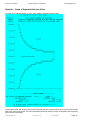
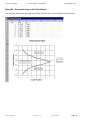
TP414 evaluates the performance of Fixed-n and Sequential sampling plans with performance curves:
OC, ASN, ARL, AOQ, and AFI curves.
Example of Input:
Names that specify the project, process, and lot definition and disposition.
OC curve points like Alpha= 0.05, Beta= 0.05, AQL= 0.01, RQL= 0.91.
OC curve points like Alpha= 0.05, Beta= 0.05, AQLML= 2.0, RQLML= 5.0.
(OC curve points can be input or output.)
Fixed-n decision rule like: n=98, AL=3, AU=4
(The decision rule can be input or output.)
Sample results to evaluate with confidence limits, like: n=98, Xbar=4.
Examples of types of output reports:
Performance curve tables containing OC, ASN, ARL, AOQ, and AFI curves.
Performance graphs of OC, ARL, ASN, AOQ, and AFI curves.
Fixed-n decision rule report.
Sequential decision rule table.
Sequential decision rule graph.
Confidence limit report (one-sided and two-sided limits).
Quick Start
For the latest information about the most recent version, see the ReadMe.txt file that was distributed with TP414
V3
How to Install TP414 v3:
Save the Zip file. Extract the .EXE file from the Zip file. Double click the .EXE in Windows Explorer to start the
install wizard. Follow the instructions.
How to manage your license:
Your license's current status is shown in the [Help] [About] menu. The license might be pre-activated, depending
on how you purchased the product. If the [Design] menu does not open then you may need to activate a license
that you can obtain from H & H Servicco Corp.
How to Uninstall TP414 v3:
Click [Start][Settings][Control Panel][Add/Remove Programs] Uninstall TP414 3.0
How to Use TP414 v3 -- 8 usage tips:
Design a sampling plan
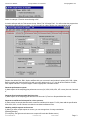
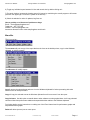
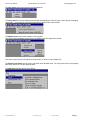
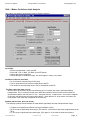
1) Start TP414. To start designing a sampling plan, select [Design] from the main menu, followed by either
[Fraction nonconforming to ISL] or [Mean with Lower or Upper or Both RQLs].
File: TP414Manual01.doc
H & H Servicco Corp.
Printed: 01/29/08
Page: 2