1
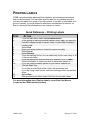
CREATING A RECORD There are 7 mandatory fields that must be filled in for each record: Confidentiality Code o Assigned Access—the new record will only be able to be viewed by individuals within the organizational unit who have assigned access privileges Unit Only— IS THE DEFAULT -- the new record will be available only to the selected organizational unit All Units—the new record will be available to all organizational units Schedule Number o Primary Number o Secondary Number o OPR Code o Indicates whether or not you are the Office of Primary Responsibility File Location o Only required if different from the default for the Org Unit Opened Date o Entered in the form yyyy-mm-dd Quick Reference – Creating a Record STEP 1. 2. 3. 4. 5. 6. 7. 8. 9. 10. 11. 12. 13. ACTION From the main menu, select Record Maintenance At the prompt to have the records ordered, select Yes if you want the records to display sorted in numeric order, or select No to display in random order Select New Select Confidentiality Code Enter or Select the Schedule number Enter Primary number Enter Secondary number Enter Series Code and Series Sub Code (if needed) Select OPR or NOPR Enter Location (if other than default) Enter the Opened Date (or TAB to enter today’s date) Enter the Closed Date (if applicable – only necessary for SO files) Select Save For more information about Creating Records, consult the User Manual located on the CRMS website CRMS Level I -2- February 10. 2010