1
PRINTING REPORTS
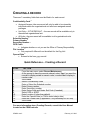
File lists are the most commonly printed report. To print a file list, you must first
determine which files you would like to include on your list. Then you will perform
a search for these records. Once you have the list of records you wish to print,
you can print either a standard numeric file list, a condensed numeric file list, a
standard alpha file list, or a condensed alpha file list
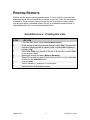
Quick Reference – Printing File Lists
STEP
1.
2.
3.
4.
5.
6.
7.
8.
ACTION
From the Main Menu, select Record Maintenance
At the prompt to have the records ordered, select Yes if you want the
records to display sorted in numeric order, or select No to display in
random order
Select List Files to go directly to the list of all records, or select Find
to set search criteria
Select type of sort you want (Alpha or Numeric)
Select the records you wish to include on your list, or if you want them
all click on the Select All button
Click on Print
Select Standard, Condensed, or Descriptive
Select Print from the preview screen
CRMS Level I
-7-
February 10. 2010