1
CLASSIFYING RECORDS WITH THE MANUAL
FUNCTION
The Manual Function can be used to find the correct classification for your
records.
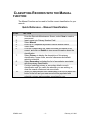
Quick Reference – Manual Classification
STEP
1.
2.
3.
4.
5.
6.
7.
8.
9.
10.
CRMS Level I
ACTION
From the Records Maintenance Screen, select New to create a
new record.
Insert curser into Primary Number Field
Select Manual
Enter up to 3 separate keywords to define search criteria
Select Find
From the Classification list, select the code you believe to be
correct, and click on Details to view more information about the
classification
Select Primary to display the description of this primary
classification, scope notes, see also references and default
retention schedule
Select Secondary to display the list of secondaries associated
with this primary classification
Continue selecting primary or secondary details on each
classification until you reach the selection you are seeking, or,
clear the search criteria and set new criteria
When you have decided on a classification from the list select the
button to the left and your new record will be populated with
schedule, primary and secondary completed for you.
-3-
February 10. 2010