1
9.2.2
Logging Features of Windows Automotive 5.0
The System Logging Tool is a module intended to improve upon the problems discussed
in Section 9.2.1, "Logging Features of Windows CE 5.0."
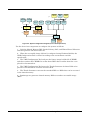
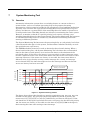
The use of the System Logging Tool offers a unified log output destination, thus
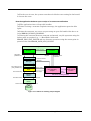
enabling all logs to be saved using the same mechanism. Figure 9-2 provides an
overview of the logging features of Windows Automotive 5.0.
WA Feature
Host PC
Target Device
Middleware
OS Log
CeLog
Exception
Log
Log file
System
Logging
Tool
Kernel
AUI Log
Memory Card, Ethernet,
USB, Serial port, etc
Applications
Log file
CeLog
Log Convert Tool
KernelTracker
AerReport.pl
App Log
(Dbg Msg)
Notepad
Figure 9-2: Windows Automotive 5.0 logging features
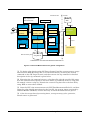
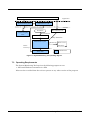
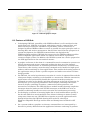
The System Logging Tool accumulates log data, received from the application, in a log
buffer. If the size of log data accumulated in the log buffer exceeds a specified threshold,
the log filter requests the log saver driver to write the data to a file. The log saver
driver saves the log data accumulated in the log buffer to a file.
Application
Interface Library
KernelIoControl
Kernel
Log Filter
Log Router
Device Manager
Log Saver
Driver
OAL
Figure 9-3: Configuration of the System Logging Tool
Using Windows Automotive 5.0 SP2 9-3