1
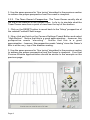
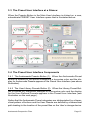
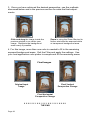
happens automatically when the mouse cursor is passed over a Preset
Thumbnail Button in the gallery.
Conversion of the color of the descriptive text below the Preset Thumbnail
and the perimeter line enclosing the Preset Thumbnail from blue to red
indicates that the Preset Thumbnail button has been selected. The selected Preset Thumbnail will instantly appear in the Preset Selection Preview Window (see item #6).
This process occurs after the User has clicked on a specific Preset Thumbnail Button in the gallery.
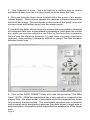
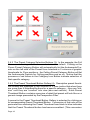
3.4.5 The Preset Thumbnail Gallery Scroll Buttons (5): When there are
more than 6 presets in a category, numbers 7 and up are hidden from view
when that category of Preset Thumbnail Buttons are first displayed. In
order to bring the remaining preset thumbnails into view, the User must
click on the downward pointing arrow. This process will hide the top two
presets and bring the next two thumbnail presets back into the gallery view
in the bottom row.
Clicking on the upward pointing arrow will bring the last two presets, hidden by the previous downward arrow click, back into view in the top row of
the Thumbnail Preset Gallery.
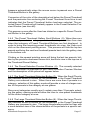
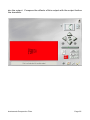
3.4.6 The Preset Selection Preview Window (6): The currently selected
Preset Thumbnail is displayed in the Preset Selection Preview Window
and the description of the preset will appear below.
3.4.7 The Small Thumbnail Selection Button (7): When the Small Thumbnail Selection Button is clicked on, the thumbnails in the Preset Thumbnail
Gallery are reduced in size. When there are more than 6 presets in a
category, selection of this gallery mode will provide a view of a larger number of the presets in the category at one glance.
Since most categories usually won’t contain more than 15 presets, selecting this gallery viewing mode will allow the User to view preset thumbnails
for the entire category at once.
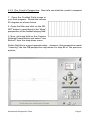
3.4.8 The Large Thumbnail Selection Button (8): When the Large Thumbnail Selection Button is clicked on, the thumbnails in the Preset Thumbnail
Gallery are increased in size. The larger thumbnails provide the User with
a more detailed view of the characteristics of the presets in a specific category.
Andromeda Perspective Filter
Page 17